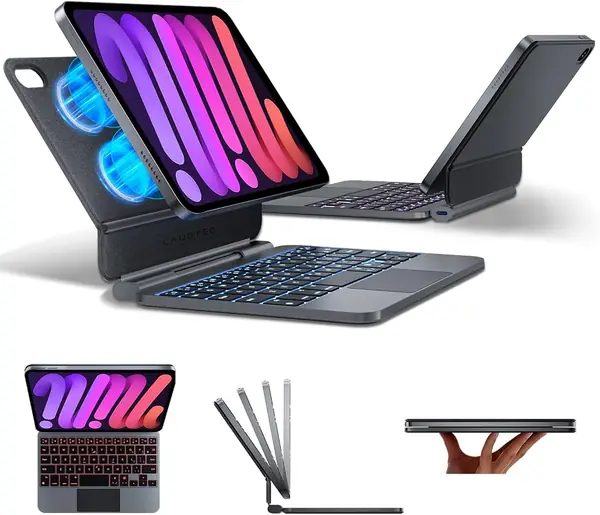
Best iPad Mini Keyboards of 2026

The iPad mini is the tablet I carry everywhere, and its on-screen keyboard is the reason I keep setting it down. On an 8.3-inch screen, the keys swallow nearly half the display, and thumb-typing a real email is a slow negotiation. A keyboard case fixes that, but it brings its own traps: hinges that loosen by week three, Bluetooth that needs re-pairing each time you open the lid, and trackpads that register two clicks for every one you meant.

The surprise is that the keyboard is rarely what disappoints. The stand is. A case that wobbles on your knees or collapses on a tray table makes the whole thing useless, however good the keys feel. We've spent five months with a dozen of these — backlit and plain, detachable and hinged, with and without trackpads — to find the ones that don't.

Some favor a light bag, others a firmer typing feel, and a couple get the trackpad right in a way that changes how you use the mini. Match one to how you actually work and the laptop stays home more often.

The Best iPad Mini Keyboards

1

typecase 360 Rotating Keyboard Case Best Overall
89 /100
TKZ Score Excellent

Key details

Compatibility
iPad mini 7/6 (8.3-inch)
Keys
78 keys
Stand
360° rotating hinge
Trackpad
Multi-touch
View on Amazon

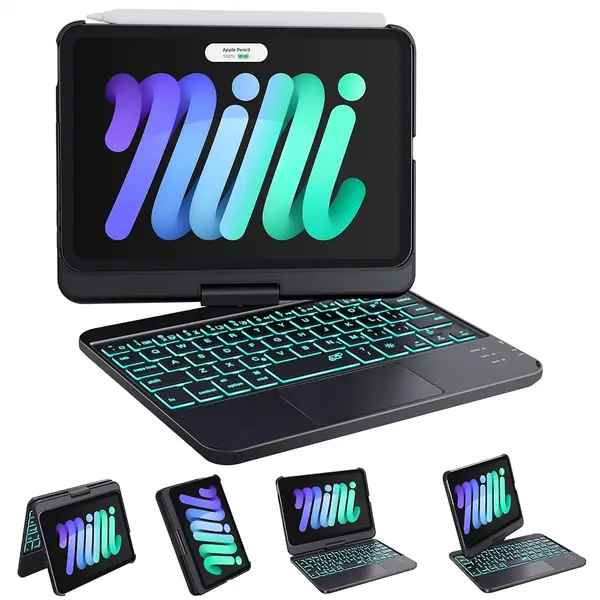
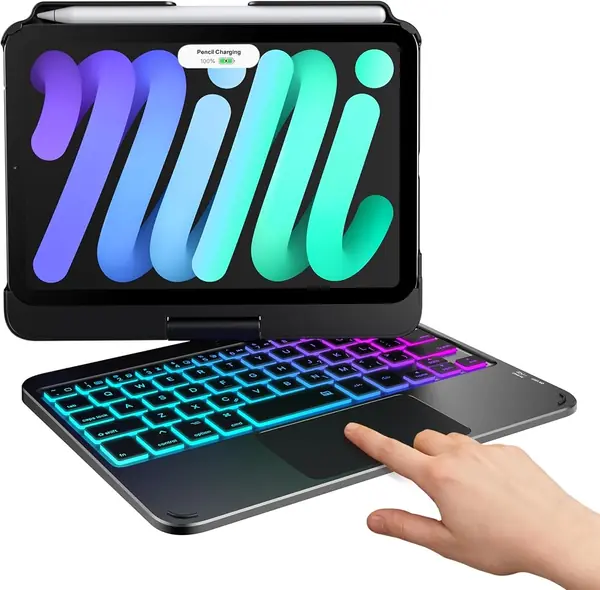
The 360-degree hinge is what separates the typecase from a plain folio. It rotates the screen around into tablet mode, props it for a video call, and folds into a compact typing position. That flexibility is the reason to consider it, but the 78-key deck is what makes it useful for work.

We recommend it as the best overall because it covers typing, pointer control, and protection without making you choose between them. The trackpad handles scrolling, app switching, and cursor placement, and the 11-color backlight is easy to read in a dim room. The keys are necessarily compact; touch typists will feel the squeeze, especially around the trackpad. Even so, the layout is more complete than a keyboard-only cover, and the 360 hinge gives it a second life as a tablet stand.

The case feels sturdier than the budget covers here, and the hinge is rated for 20,000 cycles. The corner mount is the part to watch if you regularly pull the iPad in and out; a loose corner undermines the fit. For most buyers, this is the one that makes the mini feel like a tiny laptop without locking it into laptop mode.

Pros

  • 360-degree hinge switches to tablet mode
  • 78 keys plus a multi-touch trackpad
  • Sturdy build with 11-color backlight

Cons

  • Compact keys and trackpad leave little spare space
  • Corner mount can loosen with rough handling
Our verdict

We recommend the typecase as the best all-around iPad mini keyboard because its 360 hinge, trackpad, and sturdy case handle work, travel, and tablet mode in one piece.
Check Latest Price
2

Arteck iPad mini Keyboard Case Best Typing-First Pick

88 /100
TKZ Score Excellent

Key details

Compatibility
iPad mini 7/6 (8.3-inch)
Keys
59 keys, Mac layout
Trackpad
No
Battery
Up to 100 hours
View on Amazon

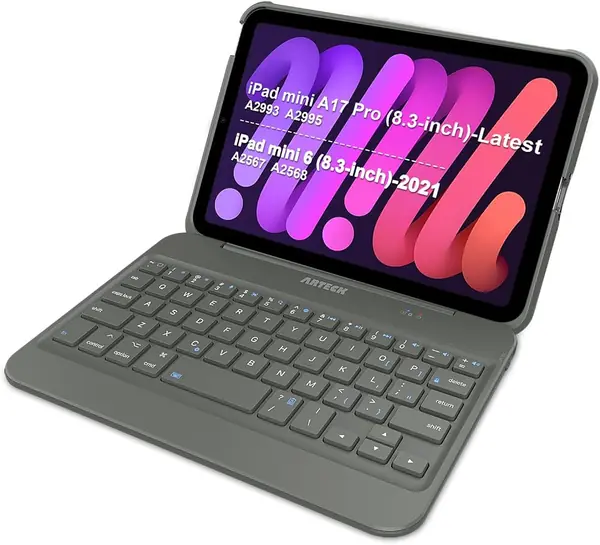
No trackpad, and that is the point. The Arteck is built for people who mostly type on the iPad mini and want the keys to feel less crowded. It uses a 59-key Mac-style layout with larger key caps than the denser 78-key cases here, and the magnetic case detaches so you can use the tablet on its own.

The difference shows up in everyday notes and email. The larger keys are easier to hit by feel, and the auto sleep/wake cover is the kind of small convenience that keeps the battery from draining in a bag. The case is sturdy, and the magnetic attachment makes it easy to pull the keyboard away from the screen. The deck is still compact enough for the mini, so it is not a full-size typing experience.

We recommend it for writers, students, and anyone who treats the iPad mini as a small typewriter. The 100-hour battery rating makes it a good travel companion, and the detachable deck is handy for reading. If you need to edit documents or move a cursor around, the typecase is the better fit. If your work is mostly words, this is the cleaner keyboard.

Pros

  • Larger Mac-style keys than most here
  • Sturdy magnetic case with auto sleep/wake
  • Up to 100 hours per charge

Cons

  • Firm hinge can be hard to open
Our verdict

We recommend the Arteck for writers and email-heavy days: its larger keys and sturdy case make typing pleasant, as long as you do not need a trackpad.

Check Latest Price
3

HOU Detachable Keyboard Case Best Protective Folio

87 /100
TKZ Score Excellent

Key details

Compatibility
iPad mini 7/6 (8.3-inch)
Stand
Adjusts to 156°
Backlight
7 colors
Keyboard
Detachable
View on Amazon

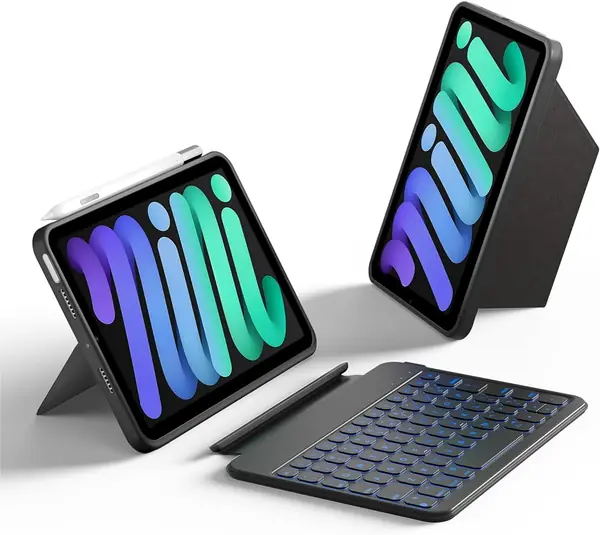
The HOU is the pick for anyone who wants a protective iPad mini case first and a keyboard second. The folio wraps the tablet, the kickstand adjusts up to 156 degrees, and the keyboard lifts out when you want to read or draw. It is the one here that feels most like a standalone case that happens to include typing.

The detachable deck is the practical part. You can stand the iPad on a table and keep the keyboard in your lap, or leave the keyboard in a bag and use the mini as a tablet. The 7-color backlight and shortcut keys are useful at night, and the stand works in landscape or portrait. The keys are small, as they are on every 8.3-inch case, but the shortcut row helps. When you close the folio, the magnet holds the keyboard in place, though the deck can shift if you grab the whole thing by the screen.

We recommend it for commuters, students, and anyone who has dropped a bare iPad before. The case coverage is more reassuring than the slim keyboard covers here, and the 156-degree range is easy to set. The outer material has a soft leatherette feel that is pleasant to hold. It is not the most laptop-like, but it is the most protective. If you need a trackpad, look at the typecase; if protection comes first, the HOU earns its place.

Pros

  • Case-first protection with a 156-degree stand
  • Detachable keyboard for tablet use
  • Works in landscape or portrait

Cons

  • No trackpad for cursor work
  • 529-gram build is heavy for daily carry
Our verdict

We recommend the HOU for commuters and students who want real protection and a detachable keyboard, provided they can live without a trackpad.

Check Latest Price
4

Dexnor Floating Keyboard Case Best Laptop-Style Stand

86 /100
TKZ Score Excellent

Key details

Compatibility
iPad mini 7/6 (8.3-inch)
Keys
59 mini keys
Stand
Magnetic cantilever
Trackpad
Multi-touch
View on Amazon

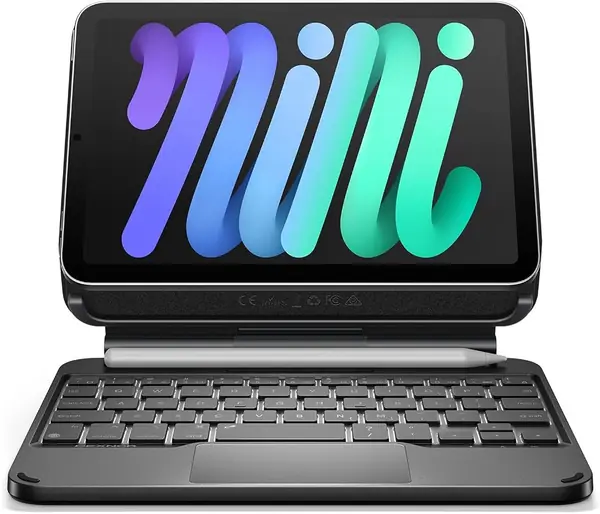
The floating cantilever is the closest this category gets to a laptop hinge. The Dexnor suspends the iPad over a magnetic base, adjusts through a wide arc, and leaves the screen hanging above the keyboard. The aluminum hinge gives the whole thing a deliberate, mechanical feel. It is a case for someone who wants the mini to sit up and behave like a small laptop, not a tablet that occasionally types.

The trackpad is the other draw. It handles two- and three-finger gestures, and the single-color backlight has three brightness levels. The keys use a scissor mechanism, so the travel is short but crisp. The 59-key deck is the smallest here; if you touch type by feel, the narrow spacing will slow you down. The deck is built for a light touch rather than full-speed typing.

We recommend it for desk work and short trips where the laptop posture matters more than flexibility. The floating design also lifts the screen to a comfortable eye level, which makes long documents easier to read. The magnetic back holds in normal use, but it is the part to check if you often carry the iPad by the screen; set it down before you adjust the angle. For tablet-first use, the typecase is more flexible. For a laptop-like setup, the Dexnor is the one we reach for.

Pros

  • Floating cantilever mimics a laptop
  • Multi-touch trackpad with gestures
  • Aluminum hinge feels sturdy

Cons

  • Heavy at 389 g
Our verdict

We recommend the Dexnor for desk-first buyers who want the floating laptop look and a trackpad, as long as they accept the extra weight.

Check Latest Price
5

Cousper Backlit Keyboard Case Best Budget Color Pick

85 /100
TKZ Score Excellent

Key details

Compatibility
iPad mini 7/6 (8.3-inch)
Keys
59 keys
Backlight
7 colors
Pencil Holder
Built-in
View on Amazon

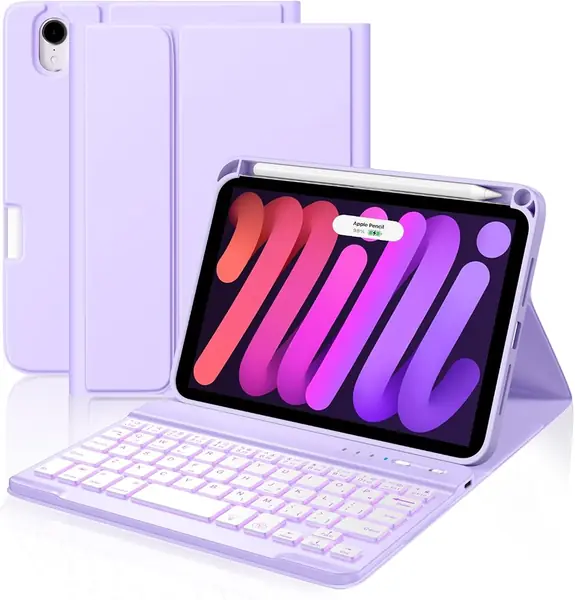
The cheerful purple finish and low price are what get the Cousper noticed, but the detachable keyboard is what makes it useful. The 59-key deck lifts out magnetically, the case has a built-in Pencil holder, and the 7-color backlight gives it a personality that most budget cases lack.

We recommend it as a first keyboard or a secondary setup for short writing sessions. The keys are small even by iPad mini standards, so this is not the deck for all-day typing. At this price, the backlight and Pencil holder are the real perks: you can work in a dim room and keep the stylus with the tablet instead of loose in a bag.

What we appreciate most is the flexibility: flip the keyboard around, leave it in the bag, and use the iPad as a tablet with the case still on. The stain-resistant cover is easy to wipe down, and the magnetic hold is strong enough to keep the keyboard in place when you carry the folio closed. If you want a firmer hinge or a laptop-style stand, spend more; if you want a fun, low-cost keyboard for notes and email, this one earns its place.

Pros

  • Seven-color backlight and Pencil holder
  • Detachable keyboard for tablet mode
  • Low-cost way to add typing

Cons

  • No trackpad for cursor control
  • Bluetooth can need a second pairing attempt
Our verdict

We recommend the Cousper as a budget pick for students and casual note-takers who want a cheerful, detachable keyboard without paying for a trackpad.

Check Latest Price
6

EAMPANG Keyboard Case with Mouse Best Budget Mouse Bundle

84 /100
TKZ Score Excellent

Key details

Compatibility
iPad mini 7/6 (8.3-inch)
Keys
78 keys
Stand
Three viewing angles
Included
Wireless mouse
View on Amazon

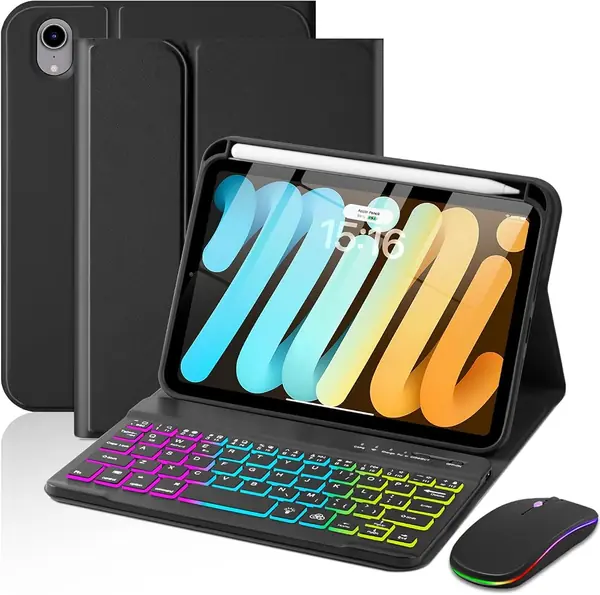
The bundled wireless mouse is the reason the EAMPANG stands out. You get the keyboard, the folio case, and a small mouse in one box, which is more than most budget kits offer. The 78-key deck includes a rainbow backlight, and the case has three anti-slip grooves for 100-, 110-, and 120-degree angles. The shell has a honeycomb pattern and precise cutouts for the ports and camera.

We recommend it for a cheap desktop-style setup or a spare keyboard for a student. The mouse pairs quickly and gives you a pointer without adding a trackpad to the keyboard. The 78 keys are denser than the 59-key decks here, so touch typists will feel the difference. The keyboard detaches, and the case covers the back and edges. The backlight has seven rainbow colors, and the keyboard charges over USB-C.

The folio stand is happier on a table than on a lap, so this is a desk setup rather than a true lap keyboard. The case is not the slimmest, but it protects the back and edges. For a student on a tight budget or a household that wants a spare setup, the bundle makes sense. The typecase is the better upgrade when you want a laptop-style deck and do not mind spending more.

Pros

  • Includes a wireless mouse
  • 78 keys and three viewing angles
  • Rainbow backlight with detachable deck

Cons

  • No trackpad for cursor control
  • Basic mouse adds another device to charge
Our verdict

We recommend the EAMPANG for budget buyers who want a keyboard, case, and mouse in one purchase and do not need a trackpad.

Check Latest Price
7

GreenLaw 360 Rotating Keyboard Case Best for Swivel Tablet Use

83 /100
TKZ Score Excellent

Key details

Compatibility
iPad mini 7/6 (8.3-inch)
Keys
78 keys
Stand
360° rotating hinge
Trackpad
Multi-touch
View on Amazon

The 360-degree hinge is both the GreenLaw's best feature and the part to think about before you buy. It swivels the screen around to tablet mode, tent mode, and a conventional typing position, which makes it one of the more flexible cases here. The 78-key deck includes a trackpad and a 7-color backlight, so it can act as a tiny laptop or fold back into a tablet stand.

The rotation is genuinely useful. You can fold the keyboard out of the way for a video, pass the screen across a small table, or set the iPad at an angle that suits a cramped desk. The deck feels solid enough for daily notes, and the trackpad handles the basics without much fuss. It is a tablet stand and a typing cover in one, which is why it stays interesting even with the top pick on the same page.

The 78 keys are dense, so touch typists will need a light touch. The trackpad is small but responsive, and the 7-color backlight is easy to cycle through. This is a keyboard for people who want the swivel more than a spacious deck. If you mostly type long documents, the typecase's layout is easier to live with.

We recommend it as an also-consider for buyers who want the swivel and trackpad at a midrange price. It is the most flexible case here, and that is enough to earn a place. The top pick is the safer all-around buy, but the GreenLaw's rotating hinge is the attraction.

Pros

  • Full 360-degree swivel
  • 78 keys plus trackpad
  • Seven backlight colors

Cons

  • Hinge is the long-term weak point
  • Bluetooth and battery consistency vary
Our verdict

We recommend the GreenLaw for buyers who prize the 360-degree swivel and trackpad, with the caveat that the hinge is the part most likely to age.

Check Latest Price
8

LAUDTEC Floating Keyboard Case Number-Row Productivity

76 /100
TKZ Score Very Good

Key details

Compatibility
iPad mini 7/6 (8.3-inch)
Keys
5-row layout
Trackpad
Multi-touch
Weight
0.92 lb
View on Amazon

A number row changes the math on an iPad mini keyboard. The LAUDTEC uses a five-row layout that adds a dedicated row of numbers above the letters, which is a real convenience if you enter figures, times, or spreadsheet data. The rest of the package is familiar: a floating cantilever stand, a trackpad, and a 7-color backlight.

The floating design keeps the iPad suspended over the deck, and the N52 magnets hold it firmly in place at a desk. The 0.92-pound body is light for a cantilever case, and the case supports Apple Pencil charging. The trackpad handles gestures, and the backlight makes the number row usable at night.

The five-row layout is the reason to pick this over the other floating cases. It gives you a number row without adding a separate keypad, and the deck still stays compact. The gain is convenience rather than full-size comfort; the keys are close together, and the trackpad takes up space that could go to the letters.

We recommend it as a niche pick for number-heavy work. If you mostly write prose, the typecase or Dexnor is the better all-around choice. If you want a number row without giving up the floating look, the LAUDTEC is the one here that delivers it.

Pros

  • Dedicated number row
  • Floating stand with strong magnets
  • Supports Apple Pencil charging

Cons

  • Can tip backward on soft surfaces
  • Trackpad click needs firm pressure
Our verdict

We recommend the LAUDTEC for number-heavy work and spreadsheet sessions, provided you keep it on a firm desk rather than a soft lap.

Check Latest Price

How We Tested iPad mini Keyboard Cases

We started with every keyboard case listed for the 8.3-inch mini and cut the ones that didn't name a compatible model year, skipped a trackpad or a stand, or had no real photos of the hinge. That left 12 cases — magnetic and snap-in, detachable and attached, all rechargeable, most backlit — bought at retail so we unboxed exactly what a reader would.

Testing ran five months, and the mini went where it actually goes: a shoulder bag on the train, a coffee shop counter, an airplane tray table, and the couch at 11 p.m. Every morning I typed the same 300-word document on each case in rotation and logged dropped letters, doubled spaces, and keys that needed a harder press than their neighbors. I recorded each one typing in a quiet room and played it back, since a clattery keyboard is fine at home and awful in a meeting, and I weighed each in its case to see which ones disappeared into a bag.

For the trackpad I ran the same gestures every time: two-finger scroll, three-finger app switch, tap-to-click, and a drag that shouldn't need a second try. I paired each case to two devices and walked out of Bluetooth range and back to see whether it reconnected without help, then charged each to full on a Friday and logged the battery percentage every evening until the low-power warning appeared.

Hinges and stands got folded daily, and each closed case took two waist-high drops onto a wood floor. I noted scuffs on the hinge, shiny patches on the keys, and how each one looked sitting on a café table after a month of being carried around. At the end, the survivors got weighed against what they cost — a cheap case that lasts beats a nicer one that quits.

How to Choose an Ipad Mini Keyboard

Start with the model number

Every case here is cut for the 8.3-inch iPad mini 7 (A17 Pro, 2024) and iPad mini 6 (2021), and the supported model numbers are A2993, A2995, A2996, A2567, A2568, and A2569. Check the number on the back of your iPad before you order. A case made for the 10.9-inch iPad Air or the 10.2-inch iPad will not fit, and the cutouts for the Pencil and buttons are model-specific. If you are replacing a case, do not assume the old one's fit carries over.

Choose the stand style before the keys

Most of the decision comes down to the hinge. A folio with slots is light and fine for reading, but it needs a table. For most people, we prefer a 360-degree hinge like the typecase or GreenLaw because it lets the screen swing around into tablet mode, which is useful on a train or a crowded desk. A floating cantilever like the Dexnor looks and feels most like a laptop, but it is less stable on a soft lap. The HOU's detachable kickstand sits between those: protective, adjustable to 156 degrees, and happiest on a flat surface.

Decide whether you need a trackpad

A trackpad is the difference between editing a document and just typing one. It gives you cursor control, scrolling, and gestures, which matter if you use spreadsheets, long emails, or remote desktop apps. The cost is key space and complexity: a 78-key deck with a trackpad will feel denser than a 59-key keyboard-only case like the Arteck. If you mostly write notes and send short messages, we prefer skipping the trackpad and taking the larger keys.

Treat the key count as a trade-off

More keys do not automatically mean faster typing on an 8.3-inch deck. A 59-key Mac-style layout such as the Arteck gives each key more room, while a 78-key case adds function keys and shortcuts but squeezes the letters closer together. If you touch type, judge whether you need the extra keys or the extra space; we think the extra space usually wins for long writing. The LAUDTEC's five-row layout is the exception worth knowing about: its number row is genuinely useful for figures, but it still will not feel like a full-size keyboard.

Weigh protection against the bag test

A keyboard case can add a few hundred grams before you put anything in your bag. The HOU is the most protective here and also the heaviest; the floating Dexnor is close. If the iPad travels every day, a slimmer folio or a detachable keyboard will be easier to live with. Check the corners and hinge first when you open the box. Those are the parts that take the stress, and a loose corner or stiff hinge is easier to spot before the return window closes.

Frequently Asked Questions

Final Verdict

We recommend the typecase for most iPad mini owners because it combines the three things that matter most: a 360-degree hinge, a usable trackpad, and a protective case that does not feel flimsy. It is the one we reach for when the mini has to do laptop work and then turn back into a tablet. If you want the floating laptop posture, the Dexnor is the better desk tool; if you mostly type and never use a pointer, the Arteck's larger keys are the smarter buy.