Best E-Readers for Libby of 2026

A library card is the best deal in reading, and Libby is why so many of us rediscover it: free ebooks and audiobooks, borrowed from the couch, returned on their own. The catch is the hardware. E-readers handle your library in two very different ways — some put your holds right on the device, others make you borrow in the phone app and send the title over — and that one difference shapes how the whole thing feels. My team has spent the past seven months living with 12 e-readers to sort out which approach actually holds up.

Two things surprise first-time buyers. A bigger screen isn't automatically better — 7 inches is wonderful for long chapters and awkward for one-handed reading in bed, and weight matters more than any spec sheet admits. Color is the other: a color E Ink panel makes covers and highlights look great, but the page behind the text is dimmer and grayer, and you pay a premium for it. The picks below are the ones that got out of the way.

The Best E-Readers for Libby

1

Kobo Clara BW Best Overall
92 /100
TKZ Score Outstanding

Key details

Screen
6-inch E Ink Carta 1300
Storage
16 GB
Libby Access
Built-in OverDrive sync
Waterproofing
IPX8
View on Amazon

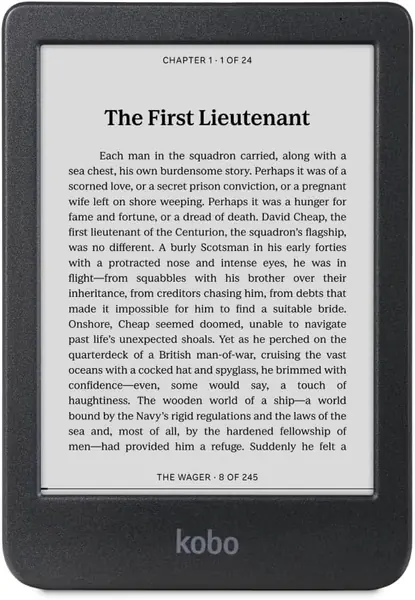
The Kobo Clara BW is the reader we hand to someone who wants Libby to feel like a library card, not a file-transfer project. Borrow a title in the Libby app, sync the Kobo, and it appears on the device; the built-in OverDrive connection keeps the loan, due date, and return in one place. We think that direct path is the most practical Libby setup in this group, and the 6-inch body makes it easy to read one-handed on a commute.

The screen is a crisp Carta 1300 panel with ComfortLight PRO, so we could shift from cool daylight to warm amber at night without the text going muddy. Dark mode is there for late reading, and the IPX8 rating means a splash by the pool or a steamy bath isn't a panic moment. At 6.14 ounces, it disappears in a coat pocket, and the 16GB storage is plenty for a long stack of novels and audiobooks.

The trade-off is the size: 6 inches is wonderfully portable, but large-font readers will turn pages more often than on a 7-inch model. The bigger caveat is library compatibility. Kobo's sync depends on your library offering OverDrive, and Wi-Fi or sign-in hiccups can happen; check your library's digital collection before you order. If it works with your card, the Clara BW is the cleanest Libby experience here.

Pros

  • Direct OverDrive/Libby borrowing and sync
  • Crisp 6-inch screen with warm light
  • IPX8 waterproof and light one-hand body

Cons

  • No physical page-turn buttons
Our verdict

The Clara BW is our default Libby reader: direct library syncing, a comfortable one-hand shape, and waterproofing without a color-screen premium.
Check Latest Price
2

Kobo Libra Colour Best for Color Comics

91 /100
TKZ Score Outstanding

Key details

Screen
7-inch color E Ink Kaleido 3
Storage
32 GB
Libby Access
Built-in OverDrive sync
Page Controls
Physical buttons
View on Amazon

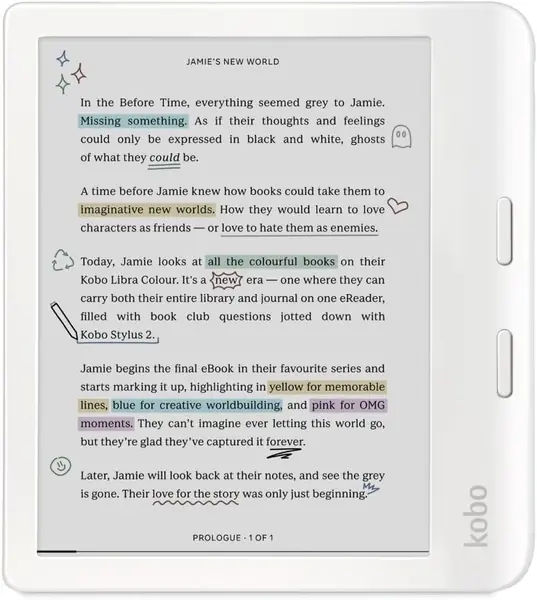
The Libra Colour is the Kobo for the reader who wants a bigger page and a button under the thumb. Its 7-inch color E Ink screen handles Libby book covers, comics, and highlighted passages in color, and the physical page-turn buttons make one-handed reading feel more deliberate than tapping a touchscreen.

We liked it most for graphic novels and PDFs borrowed through Libby: the 32GB storage gives those files room, the same OverDrive sync as the Clara BW brings the loan over, the IPX8 body is safe by the pool, and the battery is rated for up to four weeks. The stylus support is a genuine bonus for margin notes and crossword puzzles.

The color layer is the trade-off. Text looks slightly softer and more textured than on the Clara BW, especially at small sizes, and that is the cost of seeing covers and highlights in color. The buttons are clicky and sit right where your thumb rests, which is the detail we came back to when reading in bed.

Pros

  • 7-inch color E Ink for comics and covers
  • Physical page buttons and stylus support
  • 32GB storage and IPX8 waterproofing

Cons

  • Stylus sold separately
  • Heavier than the 6-inch Clara BW
Our verdict

Choose the Libra Colour if a bigger color page and physical buttons matter more than the crispest black-and-white text and a lower price.

Check Latest Price
3

Kindle Paperwhite (2024) Best Kindle for Libby

90 /100
TKZ Score Outstanding

Key details

Screen
7-inch glare-free display
Storage
16 GB
Libby Access
Libby app + Send to Kindle
Battery Life
Up to 12 weeks
View on Amazon

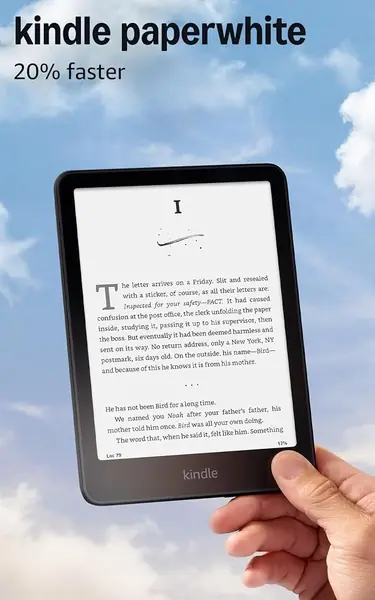
The Kindle Paperwhite is the best Kindle for Libby, but it makes you borrow somewhere else first. You check out the title in the Libby app, tap Read with Kindle, and Amazon sends the loan to the device; we found that handoff reliable and quick, and the 7-inch screen is the best pure reading surface in this roundup.

The 7-inch display is crisp, the page turns are fast, and the amber light makes late-night reading easy without a lamp. Battery life is rated at up to 12 weeks, and the 16GB storage is enough for a long library queue. We also appreciate that the Kindle stays out of the way: no social apps, no notifications, just the book.

The catch is that the Paperwhite never sees the Libby catalog. If you want to browse, place holds, and borrow on the device itself, this isn't the reader for that; a Kobo is. The larger 7-inch page and faster screen are what separate it from the entry Kindle, especially when you're reading for hours.

Pros

  • Best 7-inch reading screen in this set
  • Up to 12 weeks of battery life
  • Libby loans delivered through Amazon

Cons

  • No physical page-turn buttons
Our verdict

For Kindle loyalists, the Paperwhite is the one to pair with Libby: borrow in the app, send it over, and read on the best screen here.

Check Latest Price
4

Kindle (2024) Best Budget

89 /100
TKZ Score Excellent

Key details

Screen
6-inch glare-free display
Storage
16 GB
Libby Access
Libby app + Send to Kindle
Battery Life
Up to 6 weeks
View on Amazon

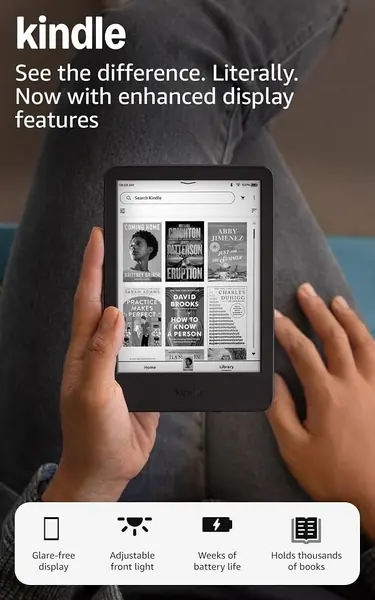
The entry-level Kindle is the least expensive way to join the Libby-to-Kindle workflow, and its 6-inch body is the most pocketable Kindle here. It has a glare-free front light, dark mode, and a rated six weeks of battery life, so it covers the basics without asking you to pay for extras you may not use.

We think it's the right first e-reader for a lot of people: light enough to hold for hours, small enough for a bag, and fast enough that page turns don't pull you out of the book. The 16GB storage holds thousands of titles, and the Libby handoff works the same as on the Paperwhite—borrow in the app, send to Kindle, read on the device.

The 6-inch screen is the main adjustment. Large-font readers will turn pages more often, and dense PDFs are not its strength; this is a novel-first reader. For a library queue of fiction and memoir, that trade-off has been easy for us to live with, especially at this size.

Pros

  • Lowest-priced Kindle here
  • Pocketable 6-inch, lightweight body
  • Simple Libby Send to Kindle workflow and 16GB

Cons

  • Battery life is shorter than the Paperwhite's
Our verdict

Budget-minded readers should start with the entry Kindle: it is small, light, and the least expensive way into Libby on a Kindle.

Check Latest Price

How We Tested E-Readers for Library Borrowing

We began with every current e-reader we could buy or borrow, then cut anything that can't tap into a public library at all, anything outside the 6- to 7-inch range, and anything we couldn't defend on price. That left 12 devices, from pocketable 6-inch models to 7-inch color screens, and we spent seven months reading on them.

They went everywhere a book goes: an hour in bed with the lights off, the morning commute, a lawn chair in August sun, a bathtub (we splashed them, because a waterproofing claim deserves skepticism), and a weekend camping trip with no outlet in sight. We weighed each one bare and again in a case, and read a full chapter one-handed to see whether the extra ounce or inch actually registered. One tester paired Bluetooth headphones and listened to a week of audiobooks.

Then the less visible stuff. We linked every device to a library card, placed a hold, and timed the steps from the hold notification to a readable page, including what happens when a loan expires mid-chapter. In a dark room we dropped the brightness to its lowest setting and looked for blotchy patches in the light, and we watched for the black flash between pages on a fast turn. We typed Wi-Fi passwords on each on-screen keyboard and walked out of range mid-download to see how fast it recovered. Every device was charged to full and read down with Wi-Fi off, which is how we found the ones that quit inside a week.

Value got the same treatment: we tallied what each step up in price bought us day to day, and wrote down what disappointed us — a stubborn keyboard, ghosting on a color panel, a screen that went gray behind the text.

How to Choose an E-Reader for Libby

Decide How You Want to Borrow

There are two practical routes. Kobo's built-in OverDrive integration lets you borrow in the Libby app and sync the loan to the reader, so the library stays part of the device. Kindle models use Libby's Read with Kindle handoff: you borrow in the Libby app, send the title to Amazon, and it downloads to the Kindle. We prefer the Kobo route for a library-first reader because it keeps everything in one place. Choose Kindle if you already buy Kindle books and don't mind using your phone to start the loan.

Pick a Screen Size and a Display Type

A 6-inch screen is the one-hand sweet spot: light, pocketable, and fine for novels, though large-font readers will turn pages more often. A 7-inch screen gives you more words per page and is noticeably better for PDFs and comics, at the cost of some portability. Color E Ink is worth it only if covers, graphic novels, or color highlights matter to you; the color layer can soften text contrast compared with a black-and-white panel. For most Libby readers, a 6- or 7-inch black-and-white screen is the better value.

Weigh Buttons, Waterproofing, and Battery

Physical page buttons are a small luxury that becomes a real preference if you read in bed or hold the reader one-handed; touchscreens work fine, but buttons let you turn pages without moving your thumb. IPX8 waterproofing is the feature to pay for if you read in the bath or by a pool. Battery ratings are given in weeks, not hours, and they assume modest front-light use; a larger color screen or heavy wireless use will shorten that. Our advice: pay for buttons and waterproofing only if you'll actually use them.

Check Library Compatibility Before You Commit

The library side matters more than the spec sheet. Kobo's OverDrive sync works with participating libraries, not every library system, and the setup can hiccup with Wi-Fi or sign-in. Kindle's Read with Kindle handoff depends on the title offering that option, so a book that reads fine in the Libby app may not be available for your Kindle. Before you buy, open your library's Libby collection, search for a few titles you actually want, and confirm the device route is offered. Storage is secondary: 16GB holds thousands of text novels, while 32GB is more useful for comics and PDFs.

Frequently Asked Questions

Final Verdict

With a Libby-first routine, the Kobo Clara BW is the reader we recommend: it borrows and syncs directly through OverDrive, fits one hand, and shrugs off a splash. The Kindle Paperwhite is the better pick if you already buy Kindle books and don't mind starting the loan in the Libby app; its 7-inch screen and faster page turns are worth the extra step. Choose the Kobo Libra Colour only if comics, color highlights, and page buttons matter more than contrast, and the entry Kindle if budget and pocketability are the priority.