Best iPad Keyboard and Mouse Combos of 2026

The on-screen keyboard is fine for a text message and maddening for a two-page email. That's the moment people start shopping for a keyboard and mouse for their iPad, and the wrong set makes things worse: mushy keys, a cursor that jumps, a connection that drops when you pick up your phone. The right one puts real keys under your fingers and holds the screen at eye level, which is basically the laptop you wanted in the first place.

Pairing is where these sets live or die. The cheaper ones forget your iPad the moment you switch to a phone; the good ones hop between devices with a button press. Backlighting sounds like a gimmick until you're answering email in a dim hotel room, and key travel on a slim board is the difference between typing and hunting for typos.

My team and I have spent the past six months typing on 12 sets, from folio cases with detachable keyboards to slim deck-and-mouse pairs, on iPads from a mini to a Pro. Some earned a permanent spot in my bag; those are the ones below.

The Best iPad Keyboard and Mouse Combos

1

TECURS iPad Keyboard and Mouse Combo Best Overall
91 /100
TKZ Score Outstanding

Key details

Compatibility
iPadOS 13 and later
Battery
400 mAh rechargeable
Weight
13.1 oz
Backlight
7 colors
View on Amazon

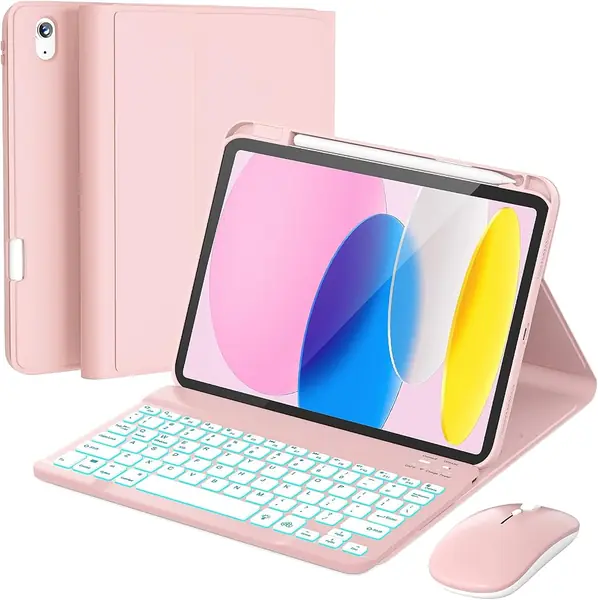
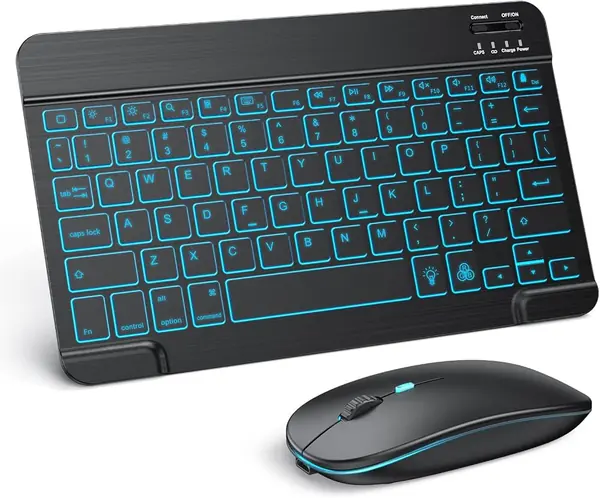
The TECURS combo is the one we reach for when an iPad has to become a laptop for an afternoon without turning the bag into an office-supply store. The keyboard is a compact 78-key deck weighing 370 g, and the mouse is a silent model with three DPI settings. We paired both over Bluetooth and liked that neither needs a dongle or a spare USB port on the iPad.

What sold us is the combination of a rechargeable battery and a seven-color backlight. TECURS rates the keyboard at 40 hours without the backlight, so the light is the feature that will send you back to the cable sooner. The backlight makes the keys legible in a dim room without needing a lamp. The mouse's 800/1200/1600 DPI steps are also useful: we slowed it down for tapping small interface controls and sped it up for moving across a long document.

The compact layout is the other trade-off. It packs easily, but if you spend all day in spreadsheets, a full-size keyboard with a number pad is the better tool. For email, notes, and schoolwork, the TECURS is the set that makes the iPad feel less like a tablet and more like a small laptop.

Pros

  • Rechargeable keyboard and mouse
  • Seven-color backlight for dim rooms
  • Silent mouse with three DPI levels

Cons

  • Long-term durability can be uneven
Our verdict

Our top pick for most iPad owners is the TECURS combo: a backlit, rechargeable keyboard and quiet mouse that pack small, though the compact layout favors travel over spreadsheet work.
Check Latest Price
2

SPARIN iPad Keyboard and Mouse Set Best for Older iPads

90 /100
TKZ Score Outstanding

Key details

Compatibility
iPadOS 13 and later
Battery
2 AAA batteries
Keys
78
Wireless Range
Up to 10 m
View on Amazon

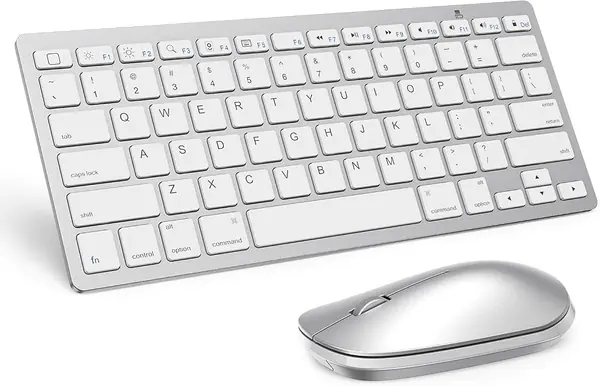
The SPARIN set earns its place by fitting an unusually broad spread of iPads: iPadOS 13 and later, from the 11th- and 10th-gen iPad down to older 9th- and 8th-gen models, plus Air, Pro, and mini. That is the first thing we check for a family tablet, because a keyboard that only fits the newest chassis is a short-lived purchase. We paired it with an older iPad and had cursor control working without a dongle.

The typing feel is the pleasant surprise. The 78 scissor keys are quiet and have a short, crisp travel that suits email and notes; the mouse moves smoothly and has a 10 m wireless range. Two AAA batteries power the keyboard, which makes a flat battery a quick swap rather than a charging session. We also like that the set is light enough to leave in a bag.

The mouse is the part to think through. It has no on/off switch, so the battery can drain between sessions if you leave it paired and moving in a bag. The keyboard is the better half of the package, and its quiet scissor keys are the reason we keep this set in the conversation for older iPads.

Pros

  • Fits a wide range of iPads
  • Quiet scissor-key typing
  • Easy AAA battery swaps

Cons

  • Plastic build feels less solid than pricier sets
Our verdict

The SPARIN set is the one we keep for older iPads and travel bags, where broad compatibility and easy AAA swaps matter more than a premium feel.

Check Latest Price
3

seenda CTU-301 Keyboard and Mouse Combo Best for Desk Setup

89 /100
TKZ Score Excellent

Key details

Layout
Full-size with number pad
Connection
Bluetooth 5.0 and 2.4G
Power
2 AAA batteries
Stand
Built-in tablet holder
View on Amazon

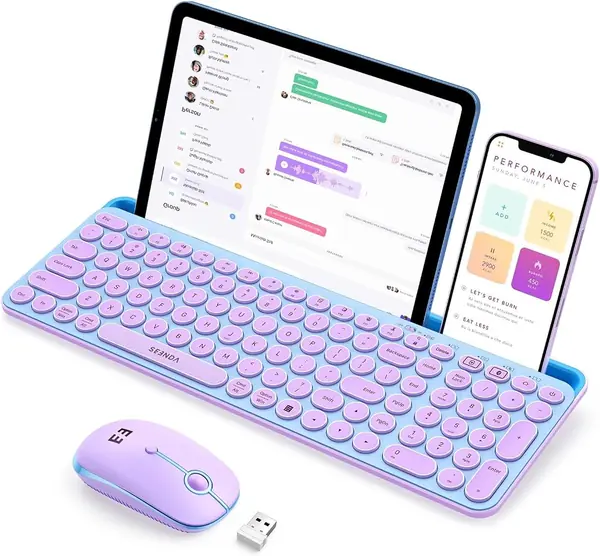
The built-in tablet slot is what separates the seenda CTU-301 from a plain keyboard-and-mouse set. It turns an iPad into a small desktop: the keyboard is full-size, with a number pad and 15 hotkeys, and the slot holds the tablet at a comfortable angle. We set it up on a desk and liked that the iPad, keyboard, and mouse could stay in one place instead of migrating around the table.

The dual connection is more useful than it sounds. Bluetooth 5.0 handles the iPad, while the 2.4G receiver gives you a fallback for a desktop or a laptop with a USB port; the range is 33 ft. We found the quiet keys and low-noise mouse clicks welcome in a shared room, and the full-size layout made long typing sessions feel less cramped than the compact sets here.

This is the one we point to when the iPad has a permanent spot on a desk. The catch is the tablet slot: it is best with a bare iPad, and a thick case can keep the tablet from seating fully. If your iPad lives in a case and moves around the house, a compact Bluetooth set is the easier fit.

Pros

  • Built-in tablet stand for desk use
  • Full-size keys with number pad
  • Bluetooth 5.0 plus 2.4G option

Cons

  • Runs on AAA batteries, not rechargeable
Our verdict

Put the seenda CTU-301 on a fixed desk and it earns its keep with full-size keys, a number pad, and a tablet slot; we like it less for a bag.

Check Latest Price
4

Logitech Pebble 2 Combo Best for Apple Device Switching

88 /100
TKZ Score Excellent

Key details

Compatibility
macOS, iPadOS, iOS
Key Type
Scissor-switch
Customization
10 Fn keys
Device Switching
Up to 3 devices
View on Amazon

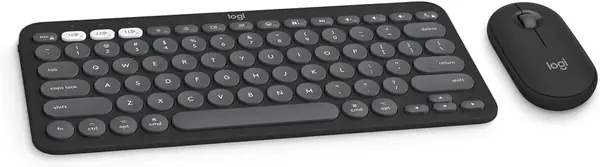
The Pebble 2 is the set we hand to someone who moves between an iPad, a Mac, and an iPhone in the same afternoon. The Easy-Switch buttons store three Apple devices, and a press moves the keyboard and mouse between them; we used that more than any other feature. It is the closest thing here to a single desk setup for the whole Apple ecosystem.

The typing experience is quiet and laptop-like, with scissor switches and low-travel keys. The mouse is a slim six-button model, and the middle button plus 10 Fn keys can be customized in Logi Options+. We liked the compact footprint for a small desk and a bag, and the build feels denser than the budget plastic sets.

The Pebble 2 keeps one keyboard and mouse ready for three devices without a dongle or a charging cable. We came back to the switching buttons every time, which is more than we can say for the single-device sets here. That is the feature that makes the set feel like a system rather than two accessories.

Pros

  • Easy-Switch across three Apple devices
  • Quiet, laptop-like typing feel
  • Customizable Fn keys and mouse button

Cons

  • Premium price compared with the budget picks
  • Compact keys may cramp larger hands
Our verdict

For iPad, Mac, and iPhone juggling, the Pebble 2 is our pick: quiet compact keys and three-device switching without re-pairing.

Check Latest Price
5

seenda SKM64-2 Keyboard and Mouse Combo Best Apple-Style Layout

87 /100
TKZ Score Excellent

Key details

Battery
Type-C rechargeable
Layout
104 keys, number pad
Connection
3 Bluetooth channels
Standby
Up to 200 hours
View on Amazon

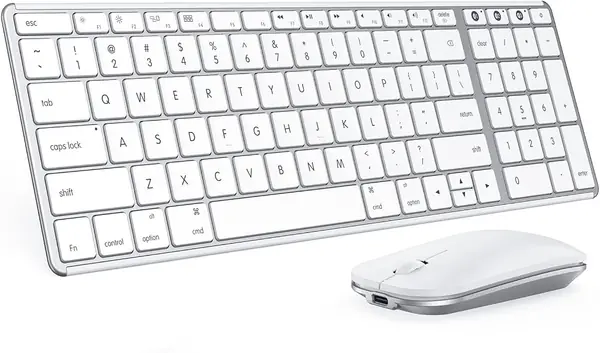
The metal finish is the first thing that separates the seenda SKM64-2 from the plastic combos here. It is a full-size Apple-style keyboard with a number pad, 104 keys, and a slim stainless-steel and ABS body; the mouse is similarly low-profile. We liked the look immediately, and it is the set that makes an iPad desk feel less like a compromise.

We liked the three Bluetooth channels more than the styling. You can assign the iPad, a Mac, and an iPhone to separate channels and jump between them without re-pairing. The Type-C rechargeable battery and auto-sleep are the right choices for a desk keyboard, and the 200-hour standby figure means it can sit for a while without drama. The full-size layout with number pad is the reason to choose it over the compact Pebble 2 if you want a fixed desk setup.

The caveat is connection consistency. The keyboard can drop a pairing or lag for a moment, and a few keys can stop responding; that is the risk to weigh against the metal finish and the Apple layout. For a desk where you can reconnect quickly, it is a handsome, comfortable alternative. For a travel bag, the smaller Pebble 2 is the safer bet.

Pros

  • Three Bluetooth channels for device switching
  • Type-C rechargeable with auto-sleep
  • Full-size Apple-style layout with number pad

Cons

  • Bluetooth only; no USB receiver option
Our verdict

We like the seenda SKM64-2 for a fixed Apple-style desk, where the metal body, number pad, and three Bluetooth channels make it feel like a serious keyboard.

Check Latest Price
6

EAMPANG iPad Case with Keyboard and Mouse iPad 10/11 Protection

86 /100
TKZ Score Excellent

Key details

Compatibility
iPad 10th/11th gen
Battery
400 mAh
Backlight
7 colors
Rotation
360 degrees
View on Amazon

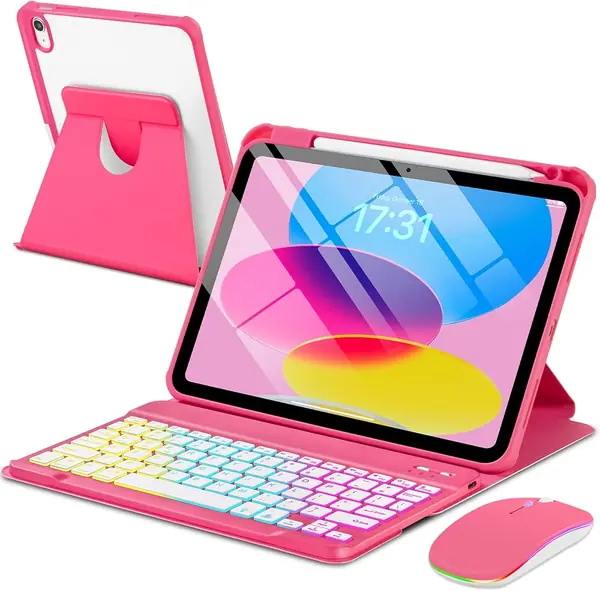
The 360-degree rotating case is what makes the EAMPANG bundle more than a keyboard with a mouse tossed in. The iPad snaps into a protective case, the keyboard detaches magnetically, and the stand rotates between portrait and landscape; we liked being able to swing the screen around without pulling the tablet out.

The keyboard is compact, with 78 keys and a seven-color rainbow backlight, and the mouse is a basic wireless model. We found the bundle best for schoolwork, email, and note-taking rather than long document sessions; the 400 mAh keyboard battery is sized for days of intermittent use, not a week of all-day writing. The pencil holder is a small thing that keeps the Apple Pencil from rolling off the desk.

The limit is fit. This case is made for the iPad 10th and 11th generation only, so Air, Pro, and mini owners need a different solution. If you have one of those two iPads and want protection, a stand, and a mouse in one purchase, the EAMPANG is the case combo we point to; if you have any other iPad, stop here.

Pros

  • Case, keyboard, and mouse in one
  • 360-degree rotating stand for portrait or landscape
  • Seven-color backlight and pencil holder

Cons

  • Adds noticeable bulk to the iPad
Our verdict

Our call for iPad 10th or 11th gen owners who want a case, stand, keyboard, and mouse in one purchase is the EAMPANG bundle.

Check Latest Price
7

RAYMCRAFT iPad Keyboard Case and Mouse Detachable iPad Case

85 /100
TKZ Score Excellent

Key details

Compatibility
iPad 10th/11th gen
Weight
1.8 lb
Keyboard
Detachable magnetic
Viewing Angles
3 grooves
View on Amazon

The RAYMCRAFT's magnetic keyboard pulls off the case, which is the feature that makes it more flexible than a fixed keyboard case. You can leave the back cover on for reading or sketching and snap the keyboard back when you need to type. We liked that for casual use, where an attached keyboard just gets in the way.

The case has three grooves for viewing angles, a pencil holder, and a seven-color backlight with three brightness levels. We found the compact keys usable for email and notes, and the mouse pairs separately over Bluetooth. The case feels protective, and the keyboard detaches when you want to shed it.

The backlight is the part we used most in a dim room; three brightness levels let you tone it down without losing the keys. The mouse is a basic wireless model, and the power setup is the thing to watch: the keyboard is rechargeable, but the mouse has its own battery needs. We kept the charging cable nearby.

The fit is narrow: this case is made for the iPad 10th and 11th generation only, so Air, Pro, and mini owners are out. If you have one of those two iPads and want a detachable keyboard with a few viewing angles, the RAYMCRAFT is a sensible alternative to the rotating EAMPANG. The EAMPANG has the rotating stand; the RAYMCRAFT is the one to pick if you prefer to remove the keyboard entirely.

Pros

  • Detachable magnetic keyboard for standalone tablet use
  • Three grooves for stable viewing angles
  • Backlight and pencil holder

Cons

  • Case adds noticeable weight
Our verdict

Choose the RAYMCRAFT case if you have an iPad 10th or 11th gen and want a detachable keyboard with stable viewing angles; we prefer it to a fixed deck for reading.

Check Latest Price

How We Chose and Tested iPad Keyboards and Mice

I built the shortlist from what iPadOS actually supports rather than what looks good on a spec sheet. Every set had to pair over Bluetooth to an iPad, handle the scroll and right-click gestures the cursor depends on, and come with either a case or a stand that holds the screen at a usable angle. From there I compared key spacing, backlighting, multi-device switching, and how flat each one packed, then narrowed to 12 sets across a few price tiers.

Testing ran six months, with every set in the same rotation: a kitchen table for expense reports and long documents, the couch for email after dinner, a commuter train where the iPad sat on my knees, and a tote bag already holding a laptop and a water bottle. I paired each set to a mini, an Air, and an 11-inch iPad, then to a phone, then back, noting whether it reconnected on its own or needed repairing. I also ran the backlights at full brightness and logged when the low-battery warning hit.

For keyboard feel, I typed the same 300-word passage on every set, timed it, and counted the typos, flagging undersized shift keys and keys that wobbled under a finger. I listened for how loud the clicks were in a quiet room, watched for cursor lag while scrolling long PDFs, and checked whether the mouse tracked across a glass table and a fabric armrest. For fit, I noted which cases actually lined up with the camera cutout and held the tablet steady on my lap; for appearance and reliability, I watched how the finish handled fingerprints, a spilled coffee, one knock off the coffee table, and a few weeks rattling around in a bag.

How to Choose an Ipad Keyboard and Mouse Combo

Start With Your iPad, Not the Keyboard

iPadOS 13 or later is the baseline for Bluetooth mouse support, and it is the first thing we confirm before recommending a set. We check the model line as well, because case-style combos are built for specific generations and will not stretch to an Air or Pro. If you have an older iPad, the SPARIN's broad compatibility is the safer starting point; if you want a case, match the A-number on the back of your tablet before ordering.

Choose Compact Travel or Full-Size Desk

A 78-key keyboard is the travel shape: it covers the essentials and leaves out the number pad, which keeps the footprint small. A full-size 104- or 105-key deck is the desk shape, and the seenda CTU-301 goes further with a built-in tablet slot. The trap is thinking compact means only smaller; it also changes how your hands sit. If you type long documents, prioritize key size and a number pad. If the iPad goes in a bag, compact wins.

Weigh Rechargeable Against Replaceable Power

Rechargeable keyboards cut cable clutter, but the runtime figure needs reading carefully: TECURS quotes 40 hours with the backlight off, and backlighting is the feature that shortens it fastest. AAA-powered sets such as the SPARIN and seenda CTU-301 trade charging for a quick battery swap, which is easier on a trip but means packing spares. We lean toward rechargeable for a desk and AAA for a travel bag.

The Mouse Deserves Its Own Check

A keyboard can feel right and the mouse still spoil the setup. Look for an on/off switch, because a mouse that stays awake in a bag drains its battery, and not every set here includes one. Adjustable DPI matters if you move between detailed tapping and broad cursor sweeps, and silent clicks are worth having in a shared room. Pair the mouse separately in iPadOS and confirm the pointer appears before you settle in.

Case Combos Are a Different Purchase

A keyboard case with a mouse can be the tidiest answer for an iPad that travels with a screen protector and a pencil, but it is not a universal keyboard. The EAMPANG, for example, fits only the iPad 10th and 11th generation, and its keyboard is compact by design. Check that the bundle actually includes a mouse, since many keyboard cases do not. If you have an Air, Pro, or mini, buy a separate keyboard-and-mouse set and a case you like instead.

Frequently Asked Questions

Final Verdict

The TECURS combo is our pick for most iPad owners because it pairs a backlit, rechargeable keyboard with a quiet mouse that has adjustable speed, and it does all of that in a package that slips into a bag. If your iPad stays on a desk, the seenda CTU-301's full-size keys and tablet slot are the better fit. If you move between an iPad, a Mac, and an iPhone, the Pebble 2's three-device switching is worth the premium.