Best iPad A16 Keyboard Cases of 2026

The pitch is simple: snap a keyboard onto your iPad and you're carrying a laptop. What the pitch skips is what you actually live with — a case that doubles the weight in your bag, a hinge that loses its grip until the screen flops down mid-sentence, a trackpad that ignores every other two-finger scroll. The good ones aren't the ones with the longest feature list. My team and I spent six months with 12 keyboard cases for the A16 and 10th-generation iPads, and the keepers behaved on day 90 the way they did on day one.

Worth knowing before you shop: the A16 11-inch and the 10th-generation 10.9-inch are the same footprint, so fit comes down to how the case attaches, not which iPad you own. Magnetic folios pop off for tablet mode, rotating hinges flip to portrait, and detachable keyboards change how the whole thing balances on your lap. Backlighting earns its keep if you type at night.

The picks below are the ones I'd hand to a friend — different strengths, same job of turning the iPad into something you can actually work on.

The Best iPad A16 Keyboard Cases

1

typecase Touch 360° Best Overall
92 /100
TKZ Score Outstanding

Key details

Compatibility
iPad A16 11th/10th gen
Stand
360° hinge, 7 modes
Keyboard
78 keys, trackpad, 11-color backlight
Weight
1.43 lb
View on Amazon

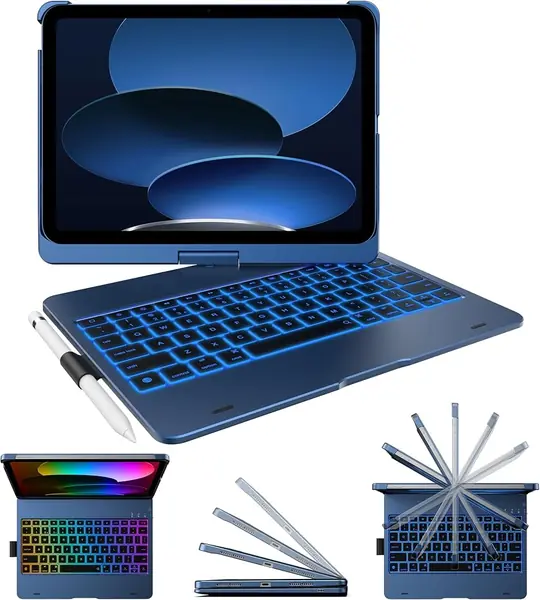
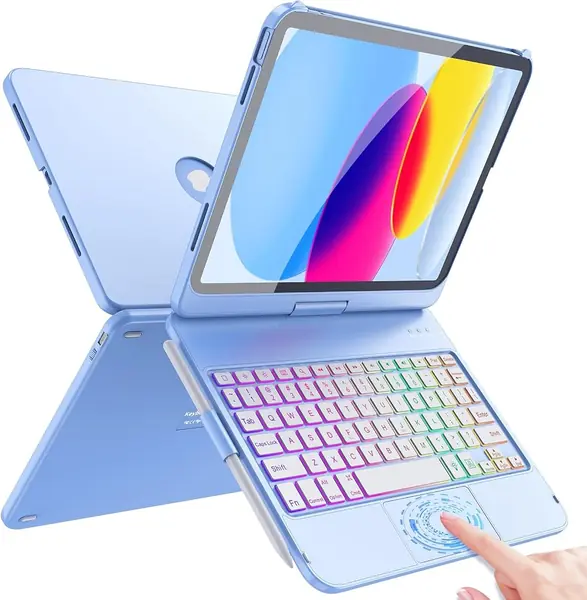
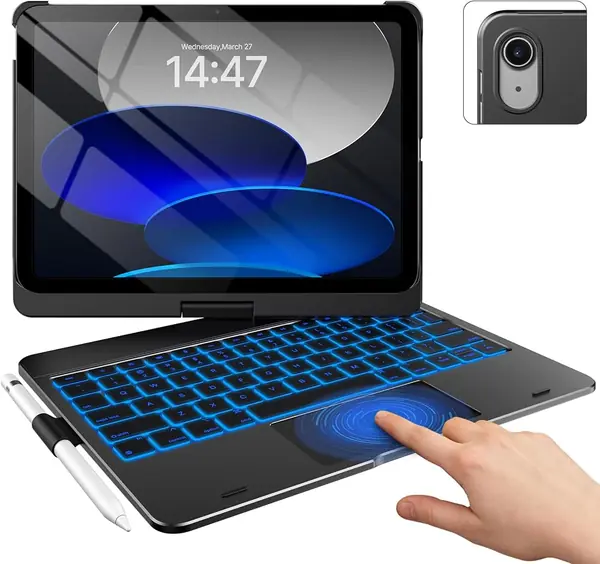
What sold us on the typecase Touch is the hinge. It rotates a full 360 degrees and locks into seven use modes, so the same case works as a laptop stand for email, a tent for video, and a tablet cover when you want the keyboard out of the way. That flexibility is what makes it the most versatile case here.

The typing setup is equally complete: 78 keys, an 11-color backlight, and a multi-touch trackpad that handles iPadOS gestures. The hard-shell case protects the back and sides, and the built-in pencil holder keeps the Apple Pencil with the iPad. We like that the keyboard is backlit without turning the case into a light show; you can pick a color or leave it off.

The trade-off is weight. At 650 grams, the typecase is noticeably heavier than the ESR Flex, and it turns the iPad into a small laptop rather than a tablet you forget is in your bag. We think the 360-degree hinge earns its weight for school and desk work, but daily commuters should handle the case before committing.

Pros

  • 360-degree hinge with seven use modes
  • Multi-touch trackpad and 11-color backlight
  • Hard-shell protection with pencil holder

Cons

  • At 650 g, it is heavy for daily carry
Our verdict

The typecase Touch is our top pick for most people: its 360-degree hinge, trackpad, and backlit keys cover work, school, and tablet use.
Check Latest Price
2

ESR Flex Best Lightweight

91 /100
TKZ Score Outstanding

Key details

Stand
65° and 20° angles
Weight
1.17 lb
Trackpad
65% larger
Thickness
6.9 mm
View on Amazon

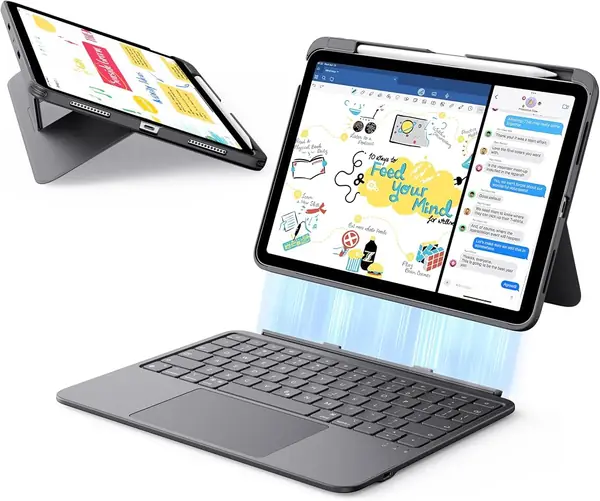
The ESR Flex is the case we reach for when the iPad has to disappear into a tote. The keyboard section is 6.9 mm thick and the whole thing weighs 530 grams, so it adds less bulk than the typecase Touch and far less than the Apple Magic Keyboard Folio. The case has a PU finish that should wipe clean, and the keyboard pairs over Bluetooth like the rest.

We think the Flex is the better travel pick because it does not make you choose between a usable trackpad and a light case. The trackpad is 65% larger than a standard keyboard case trackpad, and the magnetic keyboard detaches when you want tablet mode. The stand sets at 65 degrees for typing or 20 degrees for sketching, and the triangular support is designed to keep the screen steady. At 530 grams, it is light enough to leave on the iPad between meetings, which is the real test for a travel case.

The limits are simple: two viewing angles instead of a 360-degree hinge, and a single-color backlight rather than RGB. Neither matters much if you mostly type and watch video. If you need to flip the screen around for tablet games or presentations, the typecase Touch is the more flexible case.

Pros

  • Light 530 g, 6.9 mm profile
  • Large 65% bigger trackpad
  • Stable two-angle stand with detachable keyboard

Cons

  • Only two viewing angles
Our verdict

We think the ESR Flex is the best lightweight pick, with a 530 g body and 6.9 mm keyboard that still leave room for a large trackpad.

Check Latest Price
3

runelk Magic-Style Best Magic Keyboard Alternative

90 /100
TKZ Score Outstanding

Key details

Compatibility
iPad A16 11th/10th gen
Stand
Floating cantilever
Keyboard
64 keys, trackpad
Battery
750 mAh
View on Amazon

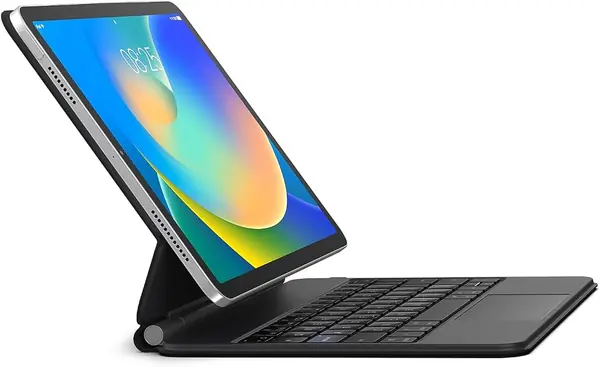
The runelk is the case we compare with Apple's Magic Keyboard Folio, because it takes the same floating cantilever idea and asks for a lot less money. The iPad attaches magnetically to a back case, and the keyboard base holds the screen up in a laptop-style float.

The 64-key keyboard has a multi-touch trackpad and a 750 mAh battery. runelk claims three months of daily use or two weeks of nightly use per charge, which is the kind of number that depends on backlight use and how often you type. There is no backlight at all here, and no dedicated Apple Pencil storage. The synthetic leather and hard plastic base protect the iPad well enough for a bag, but this is not a rugged case.

We like the runelk for a desk or a kitchen table, where the cantilever stand puts the screen at a comfortable angle and the keys feel closer to a laptop than a folio. It is not the case for a dark airplane seat or for someone who needs a pencil slot. But if you want the cantilever shape and do not need a backlight or pencil slot, the runelk is the one we point to first.

Pros

  • Floating cantilever stand
  • Long 750 mAh battery
  • Strong magnet and laptop-style keys

Cons

  • No backlight
  • No Apple Pencil storage
Our verdict

Our favorite lower-cost alternative to Apple's folio, the runelk pairs a floating cantilever stand with a long battery and strong magnetic hold.

Check Latest Price
4

Apple Magic Keyboard Folio Best Premium

89 /100
TKZ Score Excellent

Key details

Compatibility
iPad A16 and 10th gen
Keyboard
Trackpad, 14-key function row
Weight
1.96 lb
Power
No separate charge
View on Amazon

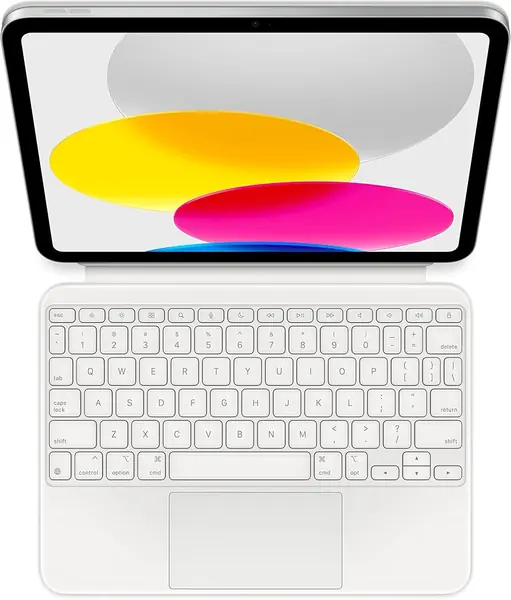
The Magic Keyboard Folio is the most expensive case here, and we think the price is easier to understand than to justify. The keys have the crisp, quiet feel of a laptop keyboard, the trackpad is the best in this group, and the 14-key function row puts brightness, volume, and media controls within reach.

The two-piece design is the catch. The keyboard attaches magnetically and can be removed, while the back panel protects the iPad and provides a continuous kickstand. The kickstand adjusts continuously, so you can tune the angle for a desk or a kitchen counter. That makes it flexible for typing and watching, but the pieces can separate in a bag, and the back panel leaves the edges more exposed than a hard-shell case.

Apple also skips a separate keyboard charge: the folio powers from the iPad, so there is no Bluetooth pairing or charging cable to manage. For a student or office worker who types all day, that convenience is real. The folio is also the heaviest case here at 1.96 pounds, so it is a desk companion more than a backpack case.

Pros

  • Best typing and trackpad feel
  • No separate keyboard charge
  • 14-key function row

Cons

  • Premium price
  • Limited edge protection
Our verdict

Choose the Apple Magic Keyboard Folio if typing feel matters most; we think its keys and trackpad justify the premium, though protection is limited.

Check Latest Price
5

ZAGG Rugged Book Best Rugged

88 /100
TKZ Score Excellent

Key details

Compatibility
iPad A16 11th/10th gen
Keyboard
Detachable, backlit
Weight
1.8 lb
Protection
6.6 ft drop
View on Amazon

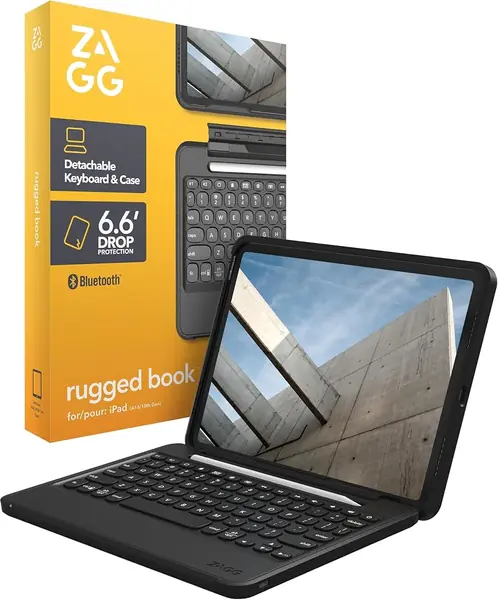
The ZAGG Rugged Book is built around one number: 6.6 feet of drop protection. The case uses tough polycarbonate and soft silicone, and it wraps the iPad more heavily than the folio-style cases here. If the iPad rides in a backpack with a water bottle and a laptop, that extra armor is the point. The case also has a built-in Apple Pencil holder, which keeps the pencil from rolling loose in a bag.

We think it earns a place for rough handling, but not as an all-purpose keyboard case. The detachable keyboard is backlit, pairs with two devices, and ZAGG claims up to two years between charges depending on backlight use. The keys are comfortable for long typing sessions, and the backlight helps in a car or a dim office. There is no trackpad, so you are reaching for the screen to move the cursor.

The hinge is the part we watch. It can be stiff to open and close, and the iPad can work loose from the holder over time; that is a condition to check before you rely on it for daily commuting. The 1.8-pound weight is the other tax. The protection is real, but the hinge and weight are the reasons to try it before you commit.

Pros

  • 6.6-foot drop protection
  • Detachable backlit keyboard
  • Multi-device Bluetooth pairing

Cons

  • No trackpad
  • Hinge can stiffen and loosen over time
Our verdict

We recommend the ZAGG Rugged Book when drop protection comes first, with 6.6-foot armor and a detachable backlit keyboard, but no trackpad.

Check Latest Price
6

Hamile Keyboard Case Best Budget

87 /100
TKZ Score Excellent

Key details

Compatibility
iPad A16 11th/10th gen
Stand
3 viewing angles
Battery
420 mAh
Backlight
7 colors
View on Amazon

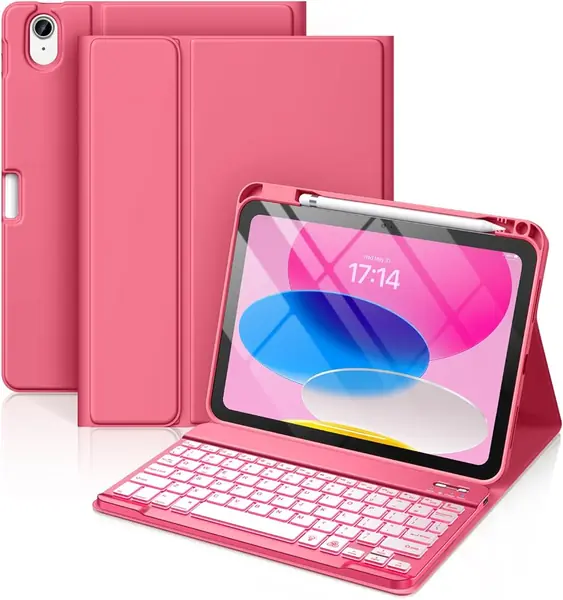
The Hamile is the case we suggest when the budget is the first filter. It is a folio-style keyboard cover with a detachable magnetic keyboard, seven backlight colors, three viewing grooves, and a pencil holder. The 420 mAh battery is smaller than the runelk's 750 mAh, so expect to charge more often, especially with the backlight on.

The color selection is a real draw; the pink version is the one we picture for a student who wants the iPad to feel personal. The keyboard and PU-and-TPU case feel more budget than the typecase or ESR, and that is the difference you notice when you pick up the case every day. It is not a deal-breaker at this price, but it is worth knowing before you order.

The Hamile makes sense for a kid, a spare iPad, or a first keyboard case where the iPad is mostly used for schoolwork and streaming. The keyboard and Bluetooth connection are the compromise: key and pairing problems come up, and the case is not the one to choose if you need years of heavy daily typing. For that, spend more on the ESR Flex or typecase Touch.

Pros

  • Budget-friendly price
  • Seven backlight colors and pencil holder
  • Three viewing angles

Cons

  • Keyboard and Bluetooth reliability can be inconsistent
  • Case material feels budget
Our verdict

For the tightest budget, we suggest the Hamile: a backlit keyboard, pencil holder, and three angles matter more here than long-term keyboard durability.

Check Latest Price
7

typecase Flexbook Best for Trackpad-Free Typing

86 /100
TKZ Score Excellent

Key details

Compatibility
iPad A16 11th/10th gen
Stand
360° hinge, 7 modes
Keyboard
78 keys, no trackpad
Backlight
11 colors
View on Amazon

A trackpad-free keyboard case sounds like a downgrade until you have spent a lecture fighting a cursor that jumps every time your palm grazes the pad. The typecase Flexbook removes the trackpad on purpose, and that is the reason to consider it.

Everything else is familiar from the typecase Touch: a 360-degree hinge with seven modes, 78 keys, 11-color backlighting, a hard-shell case, and a built-in pencil holder. The keys are quiet, and typecase rates the hinge at 20,000 cycles. The case is also a little cheaper than the Touch, which matters if you want a second case for school.

The catch is obvious. Without a trackpad, you are using the touchscreen or an external mouse for anything that needs a cursor. For writing, notes, and streaming, that is fine; for spreadsheets or text selection, it is a step back. The Flexbook is a sensible second iPad case or a school-only pick.

We like it for the person who types far more than they point. If you want one case for both, the typecase Touch is the better all-rounder; if you have had enough accidental clicks, the Flexbook is the cleaner typing tool.

Pros

  • No trackpad means fewer accidental clicks
  • 360-degree hinge with seven modes
  • Backlit keys and pencil holder

Cons

  • No trackpad for cursor-heavy work
Our verdict

The typecase Flexbook is our pick for a 360-degree keyboard case without trackpad distractions, and it suits anyone who rarely needs a cursor.

Check Latest Price
8

FUWANG 360° Best for Budget 360° Use

85 /100
TKZ Score Excellent

Key details

Compatibility
iPad A16 11th/10th gen
Stand
360° hinge
Keyboard
78 keys, trackpad
Weight
1.4 lb
View on Amazon

The FUWANG is the cheapest way here to get the 360-degree hinge and a trackpad in the same case. The screen flips around for tablet mode, the keyboard is backlit in seven colors, and the hard shell covers the back and sides. We like that it brings the 360-degree shape to a budget price.

The 360-degree alloy hinge is rated for more than 20,000 open-and-close cycles, and the keyboard has a multi-touch trackpad and a full row of iPadOS shortcut keys. The case weighs 1.4 pounds, so it is not a featherweight; the metal hinge and hard shell are most of the reason.

The FUWANG is also the pick where durability is the question mark. Some units develop key or hinge problems within a few months, and the value is mixed. That is not a reason to baby it, but it is a reason to buy from a seller with a clear return window and to check the hinge and keys as soon as it arrives.

It works best as a budget second case or a first 360-degree case for a careful user. If the case will be opened and closed all day, the typecase Touch is the more proven spend; if the budget is fixed, the FUWANG gets you the same shape for less.

Pros

  • 360-degree hinge with trackpad
  • Seven-color backlight
  • Hard-shell protection

Cons

  • Durability is the long-term question
Our verdict

We see the FUWANG as a budget route to a 360-degree hinge and trackpad, provided you buy with a return window and check the hinge early.

Check Latest Price

How We Tested These iPad Keyboard Cases

We started with every keyboard case that explicitly listed both the A16 11th generation (2025) and the 10th generation 10.9-inch (2022), since a case that fits only one is a return waiting to happen. From there we cut anything without a real hinge, a trackpad, or a detachable keyboard option, and made sure the shortlist ran from budget folios to the premium end. Twelve made the cut.

Each one spent six months in rotation, which meant real days rather than a bench. A case had to get through a full workday on the kitchen table, an hour on my lap on the couch, a commute stuffed into a backpack next to keys and a water bottle, and a couple of flights on a tray table. I weighed each one with the iPad inside and carried it for a week before writing anything down.

The specific checks: I held each case upside down and shook it gently to see whether the hinge held the screen or let it swing. I typed a few hundred words on every keyboard and noted which ones flexed or dropped keystrokes at speed. On the trackpad I ran two-finger scrolls, three-finger swipes, and tap-to-click, watching for cursor jump. I paired each to a tablet and walked into another room to see how far the connection held, then timed how long it took to reconnect after sleep. Cases went into a tote with keys and off the edge of a counter onto hardwood, and I compared color and finish to the listing photos after a week of fingerprints.

We revisited every case at the one-month and six-month marks to see what had loosened, frayed, or stopped pairing, and that second look decided more of the rankings than the first day did.

How to Choose an Ipad A16 Keyboard Case

Start With Fit and Model Number

The iPad A16 11th generation uses model numbers A3354, A3355, or A3356; the 10th generation uses A2696, A2757, or A2777. A case listed for one family may not fit the other, and a case for an iPad Air or Pro is a different shape. Check the model number in Settings > General > About before you order, and make sure the listing names your exact model. We prefer a listing that names every supported model over one that says compatible with iPad 10.9/11 inch and leaves it there.

Decide Whether You Need a Trackpad

A trackpad is the difference between a keyboard case and a small laptop. It is worth the extra cost if you edit documents, build slides, or move a cursor all day; the Apple Magic Keyboard Folio has the best trackpad feel here, and the runelk is the closest lower-cost alternative. If you mostly type notes and watch video, a trackpad-free case like the typecase Flexbook avoids accidental palm clicks. The middle ground is a detachable folio with a trackpad, such as the ESR Flex.

Weigh the Stand Against the Carry

A 360-degree hinge is the most flexible stand: it lets you flip the screen around for tablet mode, tent mode, or a low typing angle. That flexibility adds weight. The typecase Touch is 650 grams; the ESR Flex is 530 grams and 6.9 mm thick, with two fixed angles. We prioritize the lighter case for daily commuting and the 360-degree hinge for school, presentations, and shared use. If you mostly work at a desk, the extra modes are worth the bulk; if the iPad lives in a backpack, start with weight.

Check Protection, Backlight, and Battery

Drop protection matters most if the iPad travels with kids or in a crowded bag. The ZAGG Rugged Book is the only case here rated for 6.6 feet of drop protection, but it is heavier and has no trackpad. Backlighting is useful in dim rooms, though it drains the keyboard battery faster. Most Bluetooth keyboards last days to weeks between charges; the runelk lists a 750 mAh battery, and ZAGG claims up to two years depending on backlight use. We care more about a comfortable key feel and a stand that does not wobble than about the longest battery claim.

Frequently Asked Questions

Final Verdict

For most people, the typecase Touch is the keyboard case we recommend. Its 360-degree hinge, trackpad, backlit keys, and hard-shell protection cover work, school, and tablet use, and the 650-gram weight is the price of that flexibility. It is the safest default here.

If you carry the iPad every day, the ESR Flex is the lighter choice at 530 grams and 6.9 mm. For the best typing feel and no separate keyboard charge, the Apple Magic Keyboard Folio is the premium alternative.