Best iPad Air 13-Inch Keyboard Cases of 2026

An iPad Air 13-inch with a keyboard snapped onto it is the lightest laptop most of us will ever carry — right up until you lift it by the screen and the whole thing comes apart in your hands. That's the trade this category makes. A good case gives you a stable deck, real key travel, and a cursor that lands where you point it; a bad one adds a pound, flexes under your thumbs, and slides off the tray table the moment the drink cart rolls by.

I've been swapping cases on and off my Air since early spring, and my team has run 11 of them through six months of commutes, couch evenings, and a handful of flights. The thing that decides whether you'll keep using one isn't the key count or the finish — it's magnet strength and hinge tension. A case can look exactly like a laptop and still let the screen flop flat the second you tilt it back.

Below are the ones that survived daily use, the ones we reached for without thinking about it. Some stay thin, some rotate, some let you pull the keyboard off entirely and read like a tablet again — all of them hold the iPad securely and type like something you chose on purpose.

The Best iPad Air 13-Inch Keyboard Cases

1

Apple Magic Keyboard Best Overall
89 /100
TKZ Score Excellent

Key details

Compatibility
iPad Air 13-inch (M2, M3, M4)
Weight
2.79 lb
Trackpad
Built-in
Connection
Smart Connector
View on Amazon

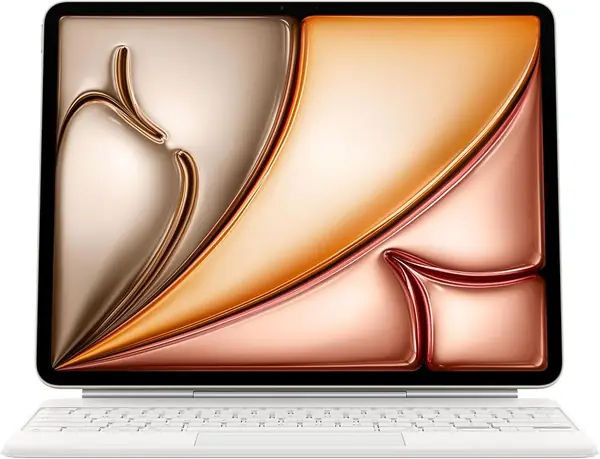
The Magic Keyboard gets the fundamentals right in a way the Bluetooth cases here do not. It attaches through the iPad's Smart Connector, so there is no pairing routine and no separate keyboard battery to remember. The two-cantilever hinge holds the screen at a useful angle and folds into a rigid slab for travel. We recommend it first for anyone who types for hours and wants the iPad to feel like a laptop rather than a tablet with an accessory.

The 14-key function row and built-in trackpad are the parts we keep coming back to. The trackpad handles the gestures that make iPadOS feel less like a stretched phone, and the keys have a crisp, stable feel. Protection covers the front and back, and the USB-C pass-through means you can charge the iPad without unplugging the keyboard.

The trade-off is heft: at 2.79 pounds, this is the heaviest case in our group, and it turns the Air into something closer to a MacBook Air in your bag. That weight buys a very rigid typing deck, and the premium is easier to justify if the iPad lives on a desk more than in a backpack. It is also the least flexible design here, since the keyboard stays attached and the screen only works in landscape. For travel and portrait reading, the ESR Shift is the more adaptable choice.

Pros

  • Seamless Smart Connector connection
  • Excellent typing and trackpad feel
  • Rigid hinge and full protection

Cons

  • No keyboard backlight
Our verdict

We recommend the Magic Keyboard for anyone who wants the most reliable typing and trackpad experience on the iPad Air 13-inch.
Check Latest Price
2

ESR Shift Best Value

88 /100
TKZ Score Excellent

Key details

Compatibility
iPad Air 13-inch (M2, M3, M4)
Weight
2.1 lb
Trackpad
112 × 70 mm
Viewing Modes
Portrait and landscape
View on Amazon

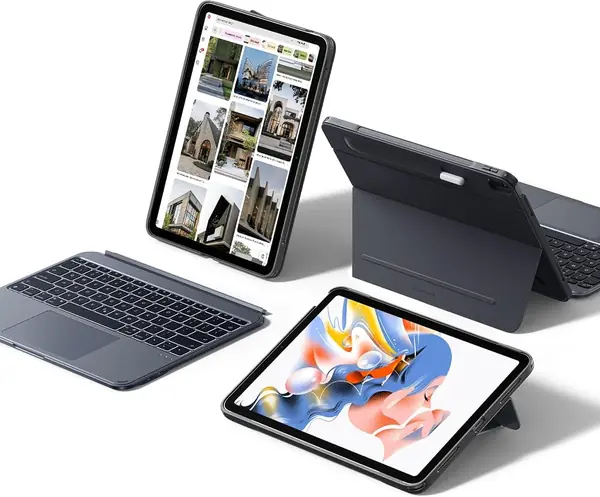
The ESR Shift is built around a simple idea: the keyboard should come off when you want the iPad to be a tablet again. The magnetic keyboard detaches, the case switches between portrait and landscape, and the stand adjusts from 20 to 75 degrees. That makes it the most flexible case in this group for someone who reads, sketches, and types on the same device.

We recommend it as the best value for most people because it covers the features that matter without the Apple tax. The 112 × 70 mm trackpad is noticeably larger than most, the keys are backlit, and the case adds reinforced corners and a pencil holder. At about 2.1 pounds, it is still a bag-friendly step down from the Magic Keyboard, though you feel the extra layer when you hold it one-handed.

The detachable design means two pieces when the keyboard is off. That is the price of the flexibility. If you mostly work at a desk and want the stiffest typing deck, the Apple Magic Keyboard is the better tool; the Shift earns its keep when the iPad has to be a tablet again by the end of the meeting.

Pros

  • Detachable keyboard and portrait mode
  • Large 112 × 70 mm trackpad
  • Backlit keys and reinforced protection

Cons

  • Keyboard magnets can release when carried
  • Backlight is single-color only
Our verdict

We think the ESR Shift is the best-value step up for most iPad Air 13 owners, with a detachable keyboard, a big trackpad, and portrait mode.

Check Latest Price
3

typecase Edge Best Laptop-Style Stand

87 /100
TKZ Score Excellent

Key details

Compatibility
iPad Air 13-inch (M2, M3, M4)
Weight
1.65 lb
Backlight
11 colors
Stand
Floating cantilever
View on Amazon

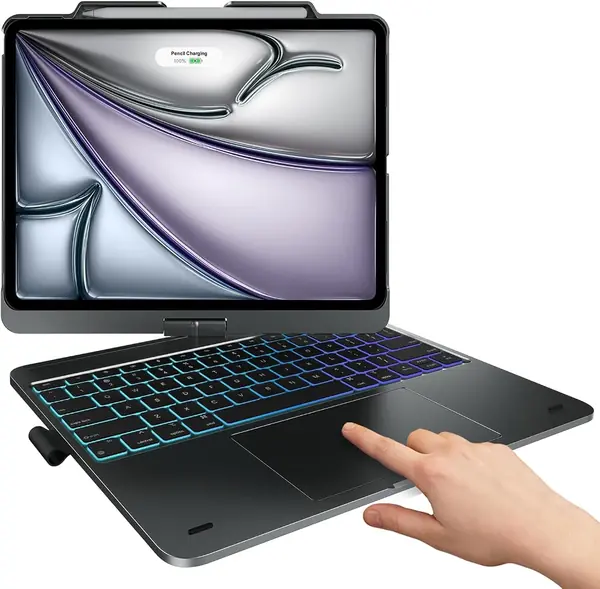
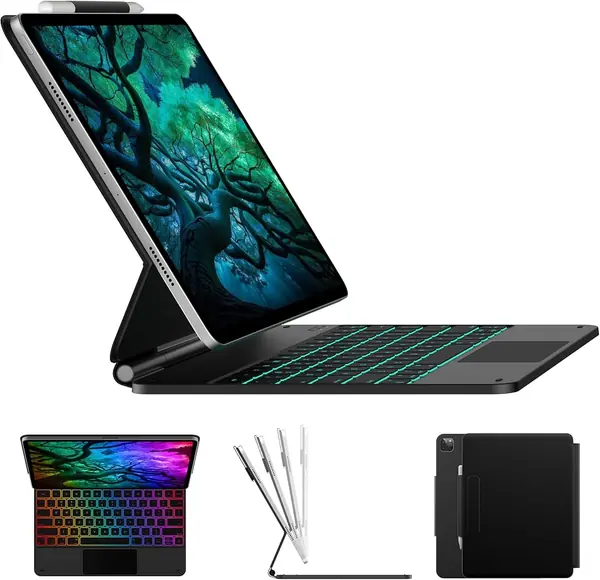
The typecase Edge is the closest thing here to a floating laptop display. The cantilever stand lifts the iPad off the keyboard, so the screen sits higher and closer to eye level than a folio propped in a groove. We recommend it for desk-bound typers who want that laptop posture and do not need to flip the screen into portrait.

The 11-color backlight is the detail that makes it feel more expensive than it is, and the click-anywhere trackpad is responsive across its surface. The magnetic clasp holds the iPad and gives the Pencil a place to sit. At 750 grams, it is lighter than the Apple Magic Keyboard on paper, but the stand and keyboard still add noticeable bulk to a 13-inch tablet.

The Edge is happiest on a desk. The cantilever makes it easy to pull the screen close for typing, and the backlight is useful on a night flight. It is not the case for someone who wants to sketch in portrait; that is a different design. If you mostly type at a desk and want a clean laptop posture, this one earns its place.

Pros

  • Floating cantilever improves screen height
  • 11-color backlight with three brightness levels
  • Click-anywhere trackpad

Cons

  • Magnet can let the iPad shift when carried
Our verdict

We recommend the typecase Edge to desk-bound typers who want a floating laptop-style screen and colorful backlighting.

Check Latest Price
4

typecase 360 Best for Drawing and Portrait

86 /100
TKZ Score Excellent

Key details

Compatibility
iPad Air 13-inch (M2, M3, M4)
Weight
2 lb
Backlight
11 colors
Rotation
360 degrees
View on Amazon

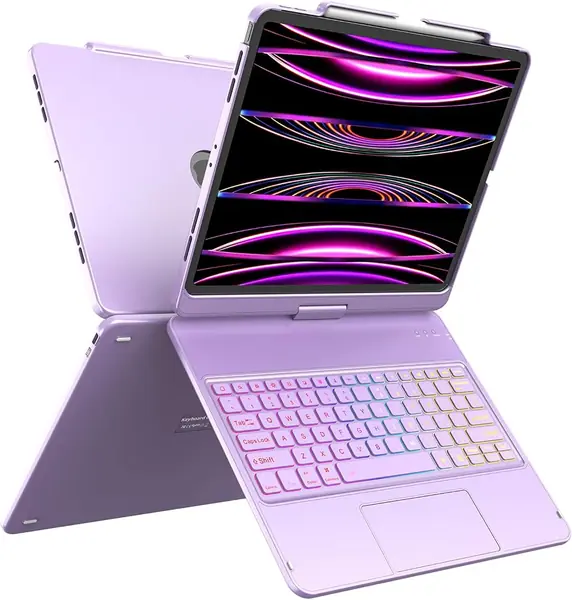
A 360-degree hinge changes how you use a keyboard case. The typecase 360 flips the screen around for portrait reading, sketching, and presentations, then folds back into a laptop shape for typing. That flexibility is the reason it stands out from the folio-style cases here.

The 11-color backlight and full trackpad make it feel like a complete workstation, and the pencil holder keeps the Apple Pencil with the iPad instead of loose in a bag. The case also has auto sleep/wake and a stable hinge, so it does not flop when you tap the screen. The transition between the two modes is the point: you can set it up for typing, then rotate it for a closer look at a page.

We recommend it for students and artists who want one case that handles portrait sketching and landscape typing, because the hinge does the job the folio cases cannot. Seven modes sounds like marketing, but the useful ones are portrait reading, landscape typing, and a shallow angle for drawing. If you mostly type at a desk and never rotate the screen, the typecase Edge is the cleaner choice.

Pros

  • 360-degree hinge for portrait and landscape
  • 11-color backlight and trackpad
  • Pencil holder and auto sleep/wake

Cons

  • Two-pound weight is noticeable
  • Rotating shell adds bulk when closed
Our verdict

We recommend the typecase 360 for students and artists who want to rotate between portrait sketching and landscape typing.

Check Latest Price
5

Harvopu Keyboard Case Best Budget

85 /100
TKZ Score Excellent

Key details

Compatibility
iPad Air 13-inch (M2, M3, M4)
Weight
2.1 lb
Backlight
7 colors
Viewing Angles
3 modes
View on Amazon

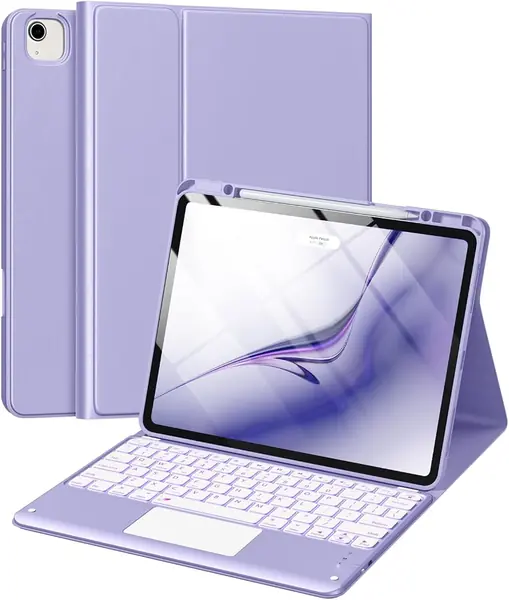
The Harvopu is the budget case we point to when the first question is what you can get for very little. It includes the features that usually cost more: a detachable magnetic keyboard, a multi-touch trackpad, seven backlight colors, and three viewing angles. The case is cut for the 13-inch Air across M2, M3, and M4, and it also lists support for the 12.9-inch Pro. The purple finish is a nice change from the sea of black cases.

We recommend it as the best budget pick because it covers the basics without feeling stripped down. The 500 mAh battery is enough for normal commutes, and the detachable keyboard lets you use the iPad as a tablet without carrying the whole folio. At 2.1 pounds, it adds weight, but it is in line with the other full-featured cases here.

The Harvopu makes the most sense as a second setup or a student case that stays mostly on a desk. The three angles are easy to adjust, and the keyboard lifts off when you want to read or draw. For the money, it is the easiest way into a backlit keyboard case without giving up the trackpad.

Pros

  • Backlit keyboard at a budget price
  • Detachable keyboard and trackpad
  • Three viewing angles

Cons

  • Keyboard can slide out of position
  • Stand feels less planted than pricier cases
Our verdict

We point budget shoppers to the Harvopu for its backlit keys, detachable keyboard, and three viewing angles.

Check Latest Price
6

HOTLIFE Keyboard Case Best Budget 360

84 /100
TKZ Score Excellent

Key details

Compatibility
iPad Air 13-inch (M2, M3, M4)
Backlight
7 colors
Rotation
360 degrees
Bluetooth
5.2
View on Amazon

The HOTLIFE case takes the budget 360 formula and adds Bluetooth 5.2, a seven-color backlight, and a pencil holder. The hinge rotates the screen into portrait for reading or sketching, then back to landscape for typing. The case is cut for the iPad Air 13-inch across M2, M3, and M4, plus the 12.9-inch iPad Pro, and its reinforced corners add protection.

The trackpad handles the basics, and the backlight has three brightness levels. Bluetooth 5.2 is the newer radio standard, which helps with connection stability, and the keyboard runs on its own battery and charges separately from the iPad. Budget for another cable on longer trips. At this price, it is a lot of hardware for a casual setup.

We recommend it for occasional use, a spare setup, or a student who needs rotation on a budget. It is not the case we choose for a job that depends on the keyboard every day; for that, the ESR Shift or Apple Magic Keyboard is the safer buy. The 360 hinge is the reason to consider it, not the keyboard.

Pros

  • 360-degree rotation
  • Seven-color backlight and trackpad
  • Reinforced corners and pencil holder

Cons

  • Keyboard can stop pairing or charging over time
Our verdict

We see the HOTLIFE as a budget 360 case for casual use, with a backlight and pencil holder that make it easy to recommend for a spare setup.

Check Latest Price
7

Hamile Keyboard Case Budget Color

83 /100
TKZ Score Excellent

Key details

Compatibility
iPad Air 13-inch (M2, M3, M4)
Backlight
7 colors
Viewing Angles
3 grooves
Battery
500 mAh
View on Amazon

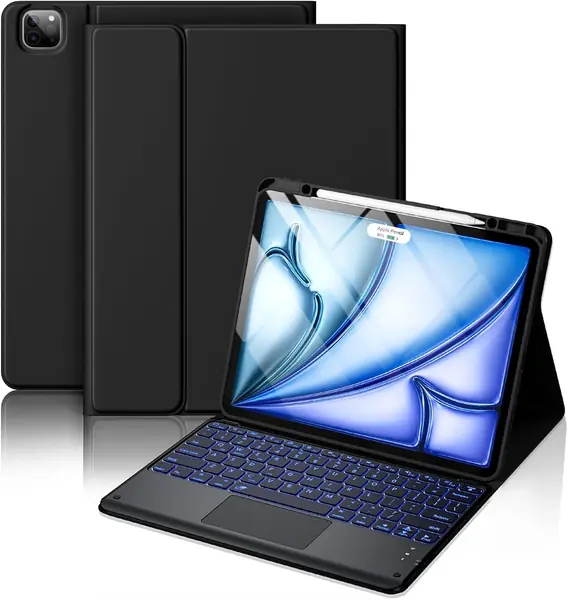
The Hamile leans on feel and color. The folio has a soft-touch cover, the keys light up in seven colors, and the magnetic keyboard lifts out when you want a plain tablet. It is one of the least expensive ways to get a backlit keyboard case with a trackpad.

The 500 mAh battery and three grooves cover the basics for email, notes, and streaming. The keyboard pairs over Bluetooth and charges by USB-C, so you are not tied to the iPad's battery. The folio also protects the screen and back, which is more than some budget shells manage.

The Hamile is best suited to a desk, a kitchen counter, or a dorm room where the iPad is not constantly moving. The three grooves give you a few angles for typing and watching, and the magnetic keyboard comes off for reading. It is not the case for someone who needs the keyboard to stay rigidly attached in a bag.

We see the Hamile as a budget pick for color and backlight, not the one we choose for daily typing. The Harvopu has the stronger mix of stand and keyboard for the same kind of money, while the Hamile is easier to recommend if the soft finish and seven colors are what you want. Keep it on a desk and it does the job.

Pros

  • Soft-touch folio with seven-color backlight
  • Detachable magnetic keyboard
  • Three viewing angles and 500 mAh battery

Cons

  • Build feels less solid than better budget cases
  • Keyboard magnets can be weak for stand use
Our verdict

We recommend the Hamile for shoppers who want a soft-touch folio and seven-color backlight at the lowest price.

Check Latest Price

How We Tested iPad Air 13-Inch Keyboard Cases

We started with more than 30 listings for the 13-inch Air and the 12.9-inch Pro models that share its footprint, then cut anything that fit only one generation, skipped a real trackpad, or locked the screen to a single angle. That left 11 cases spanning folio styles, rotating stands, and floating cantilever designs. Each one went onto the same iPad and stayed in rotation for six months.

Testing happened where these actually get used: a kitchen counter in the morning, the couch at night, a coffee shop table, an airport tray table, and one very cramped train seat. On every case I typed the same 600-word document, noting dropped keystrokes, keycaps that wobbled at the edges, and whether backlight bled around the lettering in a dark room. I also wrote and sketched with the Pencil attached to see how much the stand shook while my hand moved.

For the trackpad, I dragged a text selection across a long PDF, two-finger scrolled through a spreadsheet, and watched whether the cursor jumped when my palm rested on the deck. Magnets got a blunt test: I lifted each case by the keyboard half and shook it gently over a cushion, then carried it around by the screen one-handed. I detached and reattached every magnetic keyboard a dozen times to see whether it reconnected instantly or needed a nudge, and I propped each hinge at its steepest angle and tapped the top corner to check for dip.

Every case went on a kitchen scale and then into a tote for a full commute, because weight only registers after the third block. I ran the backlights at full brightness and logged how often I had to charge, and after six months of bag tosses and one deliberate knock off the arm of a couch, I checked corners, hinge play, and whether the keycaps had gone shiny. Color and finish were judged in daylight, and value came down to what a given case could do that the rest of the field couldn't.

How to Choose an Ipad Air 13-Inch Keyboard Case

Start with the fit, not the feature list

Several cases here fit the 13-inch iPad Air across M2, M3, and M4, and some also fit the 12.9-inch iPad Pro. That overlap is useful, but it is not a guarantee. The check that matters is your model number, which you can find in Settings > General > About, not the product photo or the word Air in the title. A case cut for the 12.9-inch Pro can leave the wrong camera or port openings, and an iPad Pro 13-inch is a different shell altogether.

Choose the stand for where you work

A floating cantilever is the best choice for desk work: it lifts the screen higher and makes the angle easy to adjust. A 360-degree hinge earns its keep if you sketch or read in portrait, while a detachable keyboard is the one to choose if you want the iPad to become a tablet again. The trap with a folio keyboard cover is the stand: three grooves are fine on a table but less planted on a lap, and a magnetic keyboard can shift when you carry the case by the screen.

Weigh the case, not just the tablet

A 13-inch iPad Air is already a large tablet, and a keyboard case can add anywhere from about 1.6 to 2.8 pounds. That difference is the one you feel on a commute. If the iPad mostly stays on a desk, a heavier case can be worth it for a stiffer hinge and a bigger stand. If it travels daily, start with the lighter options and accept a smaller trackpad or fewer viewing angles.

Backlight and battery are convenience features

Backlit keys are worth paying for if you type in dim rooms, on night flights, or in a dorm after lights-out. A Bluetooth keyboard also carries its own battery, so check that it charges by USB-C and that the case has a sleep mode. The Apple Magic Keyboard is the exception: it draws power through the Smart Connector, so there is no separate keyboard battery to manage. That convenience is part of what the premium buys.

Prioritize the trackpad and key feel

The keyboard and trackpad are what you touch every day, so they deserve more attention than the color of the case. A larger trackpad, like the 112 × 70 mm surface on the ESR Shift, makes text selection and app switching less fussy. Keys should feel stable at the edges, not mushy. If you mostly type, key feel matters most; if you edit documents or spreadsheets, spend more on the trackpad and less on backlight colors.

Frequently Asked Questions

Final Verdict

We recommend the Apple Magic Keyboard as our top pick for the iPad Air 13-inch because it removes the friction that makes tablet typing feel like a compromise: no pairing, a rigid hinge, and a trackpad that behaves like a laptop.

If you need a detachable keyboard, portrait mode, or a lower entry point, the ESR Shift is the better buy. It gives up some typing polish but adds the flexibility the Apple case lacks.