Best Lavalier Microphones for iPhone of 2026

The microphone on your iPhone is fine until you step two feet away from it. Then you get room echo, a humming fridge, and a voice that sounds like it is coming from the bottom of a coffee mug. A lavalier clips a tiny mic to a collar and sends clean audio to a receiver plugged into your phone. The hard part is whether that receiver fits your iPhone, whether pairing works on the first try, and whether the clip and cable survive being tugged, packed, and reused.

I have recorded windy walk-and-talks and noisy kitchen interviews, and over the past six months our team tested 11 lavalier mics in those same situations. The best values paired quickly, stayed connected when the phone went into a pocket, and sounded natural without much fiddling. Battery life mattered on longer shoot days, and noise cancellation helped only when it cleaned up the room without thinning out the voice. Check your iPhone's port first—USB-C and Lightning are not interchangeable—then use the list below to find the kit that fits your setup.

The Best Lavalier Microphones for iPhone

1

Hollyland Lark M2 Best Overall
95 /100
TKZ Score Outstanding

Key details

Battery Life
10 hours
Range
1000 ft
Audio Format
48kHz/24bit
Transmitter Weight
0.32 oz
View on Amazon

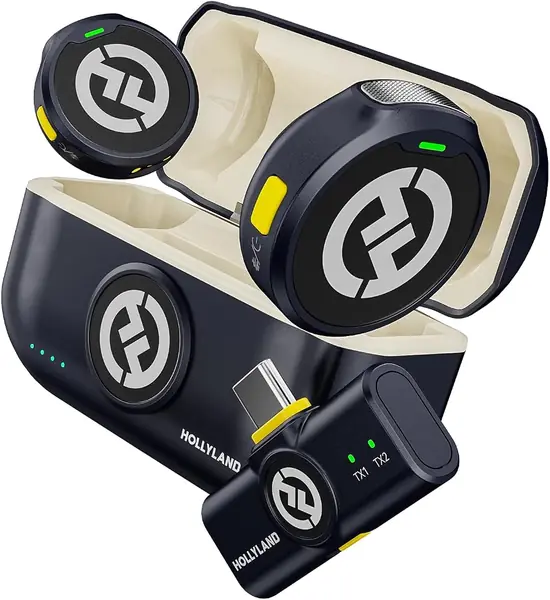
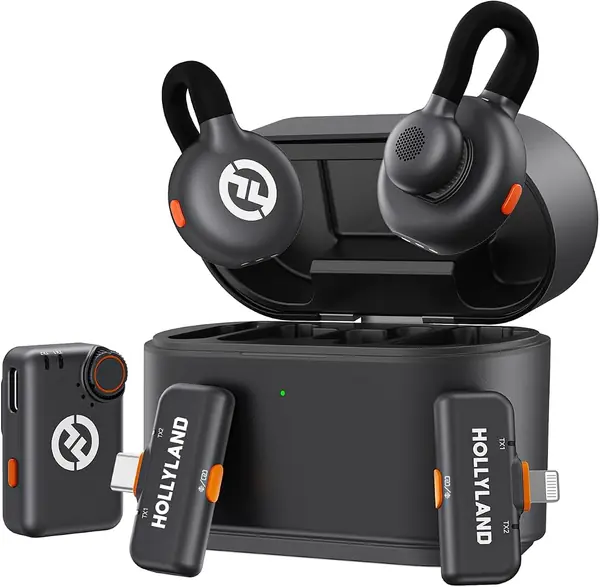
The Lark M2 transmitter is a 9-gram disc, small enough that a collar clip disappears under a button-down. That discretion is a big part of why it's our top pick for iPhone 15, 16, and 17 shooters: two transmitters, a USB-C receiver, and a charging case; the receiver plugs straight into the phone. The 48kHz/24-bit recording and 70dB signal-to-noise ratio give you clean voice capture, and the direct USB-C plug means no adapter chain.

We appreciate the battery math: each transmitter is rated for 10 hours with noise cancellation off, and the case adds two full charges for about 30 hours total. That's enough for a full day of interviews without hunting for a cable. The magnetic clip is the other detail we like; it holds through a shirt or attaches to a hat, which makes the kit more flexible than a plain alligator clip. The noise cancellation is a one-click affair on the transmitter, and the HollyAudio app gives you finer control if you want it.

For a solo creator, one transmitter stays in the case while the other clips on; for a two-person interview, both are ready. We prefer that simplicity to a kit with a screen and a dozen menus. It leaves room in the bag for a spare windscreen, and that's the trade we make every time.

Pros

  • Tiny 9-gram transmitters clip discreetly
  • Clear 48kHz/24-bit voice capture
  • About 30 hours total with the charging case

Cons

  • USB-C only; no Lightning receiver for older iPhones
Our verdict

For an iPhone 15 or newer, we recommend the Lark M2 as the easiest dual-mic kit to live with: tiny, clear, and backed by a charging case that keeps both transmitters ready.
Check Latest Price
2

Hollyland Lark M2S Ultimate Best for Older iPhones

94 /100
TKZ Score Outstanding

Key details

Battery Life
9 hours per unit
Audio Format
24-bit/48kHz
Receivers
Lightning, USB-C, camera
Charging Case
2.5 full charges
View on Amazon

The Ultimate Combo is the kit you buy when your iPhone drawer is a mix of old and new. Hollyland puts three receivers in the box—Lightning, USB-C, and a camera receiver—so the same pair of transmitters can move from an older Lightning iPhone to a current USB-C iPhone to a mirrorless camera without an adapter hunt. The transmitters are pearl-sized and logo-free, with a titanium clip that is sturdier than the plastic clips on most budget kits.

That flexibility is why we rank it as the best choice here for older iPhones and hybrid shoots. Audio is 24-bit/48kHz with a 70dB signal-to-noise ratio, and the charging case adds 2.5 full charges, for about 30 hours total. We like the discreet look for on-camera interviews; the mics disappear against a shirt instead of announcing themselves. The two noise-cancellation levels are adjusted in the HollyAudio app, and the titanium clip holds through thicker fabric.

The setup detail that matters: peel the protective film off the charging contacts before the first shoot. If a transmitter won't charge in the case, check the contact points before assuming it's dead. We check both lights before packing the case, and that small habit is worth more than another receiver.

Pros

  • Three receivers cover Lightning, USB-C, and cameras
  • Pearl-sized, logo-free transmitters hide easily
  • Titanium clip holds through thicker fabric

Cons

  • Costs more than the USB-C-only Lark M2
Our verdict

If your iPhone still uses Lightning, or you shoot with both a phone and a camera, we recommend the M2S Ultimate for its three receivers and discreet titanium-clipped mics.

Check Latest Price
3

DJI Mic 2 Best for Hybrid Shoots

93 /100
TKZ Score Outstanding

Key details

Range
250 m
Transmitters
2
Phone Adapters
Lightning and USB-C
Internal Recording
32-bit float
View on Amazon

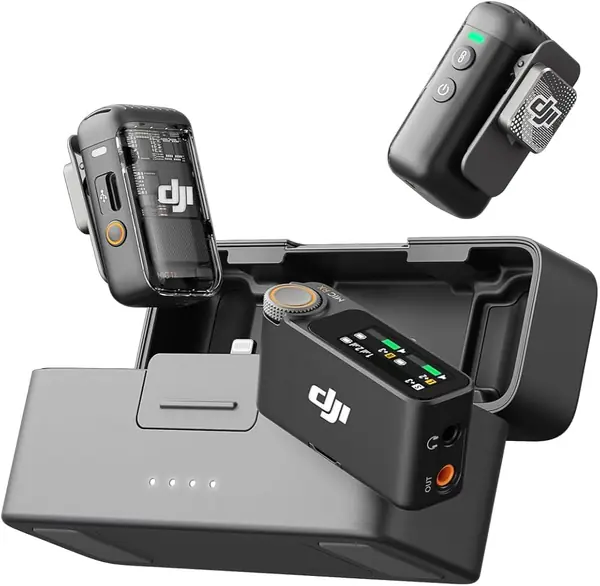
One feature stands out on the DJI Mic 2: each transmitter can record 32-bit float audio internally, up to 14 hours. That's a backup track if the wireless link drops or your phone's gain is set badly, and it's the kind of insurance that matters when a reshoot is not an option.

We recommend it for hybrid shooters who need one kit for a camera and an iPhone. DJI includes both Lightning and USB-C adapters, so it covers older and newer iPhones, and the receiver has a headphone out and an OLED display for checking levels. The 250-meter range is more than most phone shoots need, and the charging case makes the kit easy to carry.

The caveats are real. Bluetooth pairing with iPhones is the part that can stumble, so we treat the included adapter as the primary connection and keep the receiver's display visible. A transmitter that won't power on is the other failure to test for before a shoot. For a phone-only creator, the Lark M2 is easier to recommend; the DJI earns its keep when the same shoot also uses a camera.

Pros

  • 32-bit float internal recording backs up the wireless feed
  • Lightning and USB-C adapters cover both iPhone generations
  • Headphone out and OLED display help check levels

Cons

  • Heavier and pricier than the phone-first picks
Our verdict

For creators who shoot with a camera as well as an iPhone, we recommend the DJI Mic 2 for its 32-bit float backup recording and both phone adapters.

Check Latest Price
4

DJI Mic 3 Best for Multi-Mic Shoots

92 /100
TKZ Score Outstanding

Key details

Battery Life
28 hours
Transmitters
2
Anti-interference
Dual-band
Receiver Channels
4
View on Amazon

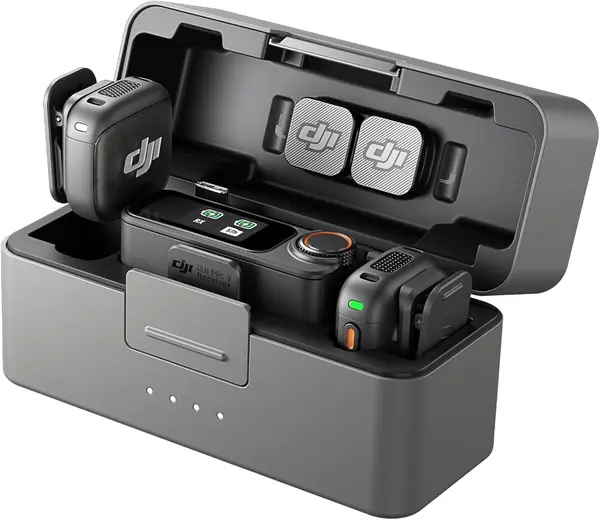
The DJI Mic 3 takes the two-transmitter idea of the Mic 2 and stretches it: the receiver can handle four transmitters and output four channels, and it can sync to seven more receivers. For a panel interview or a growing channel, that's a different class of kit.

The upgrades are aimed at unpredictable locations. Adaptive gain control keeps a whisper and a shout in the same range, dual-band anti-interference is designed for crowded events, and there are three voice tones and two noise-cancellation levels. We like that the receiver still fits in a pocket and the charging case covers 28 hours of use.

For a simple iPhone shoot, the Mic 2 is the easier recommendation. If you regularly record two or more people, the extra channels and anti-interference are worth the step up. The Mic 3 is the kit that grows with a channel, not the one to buy for a solo vlog.

Pros

  • Four-channel receiver handles multi-person shoots
  • Adaptive gain control balances whispers and shouts
  • Dual-band link targets crowded venues

Cons

  • USB-C receiver only; no Lightning adapter
  • Costs more than the Mic 2
Our verdict

For multi-person shoots on a USB-C iPhone, we recommend the DJI Mic 3 for its four-channel receiver and dual-band link.

Check Latest Price
5

NEEWER KM19 USB-C iPhone

91 /100
TKZ Score Outstanding

Key details

Battery Life
30 hours
Range
100 m
Audio Format
48kHz/24bit
Transmitter Weight
0.21 oz
View on Amazon

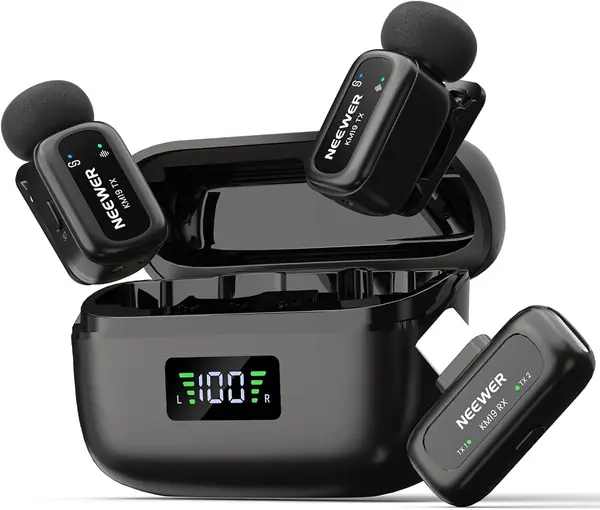
NEEWER's KM19 is built around a 3-gram receiver and two 6-gram transmitters, small enough to disappear in a pocket and light enough to clip to a collar without tugging. The kit includes a charging case, two OTG adapters, windscreens, and a pouch, so it travels like a set rather than a pile of parts.

The specs are strong for a budget kit: 48kHz/24-bit capture, 81dB signal-to-noise ratio, a 30-hour battery rating, and a 100-meter range. We like the three-level noise cancellation and the double-press mute, which are the controls you actually use when you're filming alone. The receiver has a USB-C plug, so it is a straightforward match for an iPhone 15 or newer.

The build is the part to watch: the plastic case and thin cables feel closer to a budget kit than the Hollylands, and the receiver is a small box that hangs off the phone's port. None of that affects the audio specs, but it is the difference between a kit you baby and one you toss in a bag.

Pros

  • 3-gram receiver and 6-gram transmitters travel light
  • 48kHz/24-bit audio with 81dB SNR
  • 30-hour battery rating and 100-meter range

Cons

  • USB-C receiver only; no Lightning option
  • App control is Android-only
Our verdict

For a USB-C iPhone and a tight budget, we recommend the KM19 for its light parts, clear specs, and long battery rating.

Check Latest Price
6

PQRQP 3 in 1 Best for Mixed Phone Kits

90 /100
TKZ Score Outstanding

Key details

Battery Life
10 hours per mic
Range
328 ft
Audio Format
48kHz/24-bit
Connector Type
USB -C/3.5 mm Jack/Lightning
View on Amazon

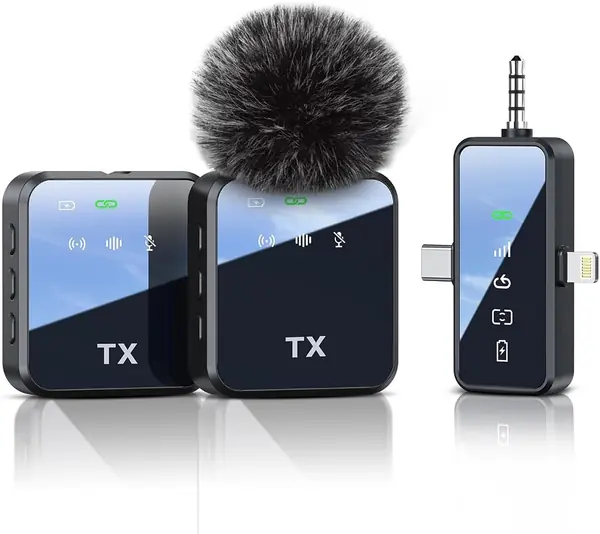
The PQRQP kit is the least expensive way here to get a receiver with Lightning, USB-C, and 3.5mm connections in one box. That makes it the one to look at if your household has an older iPhone, a USB-C phone, and a camera, and you don't want three separate receivers. We recommend it as a budget travel kit or a backup, not as the main mic for a paid shoot.

The rest of the package is aimed at casual creators: 48kHz/24-bit audio, a 328-foot range, two clip-on transmitters, and 10 hours of use per mic. The one-touch mute and reverb are more fun than useful for interviews, but they make the kit feel less bare than the rest of the package. We like the 3-in-1 receiver for travel because it covers a friend's Lightning iPhone and your USB-C phone without a dongle. For a solo creator who wants a cheap second angle, it does the job.

Pros

  • 3-in-1 receiver covers Lightning, USB-C, and 3.5mm
  • 48kHz/24-bit audio and 328-foot range
  • 10 hours per mic with two transmitters

Cons

  • Both mics share one output channel
  • No charging case in the box
Our verdict

For a budget kit that covers Lightning, USB-C, and a camera, we recommend the PQRQP 3 in 1 for casual creators and backup use.

Check Latest Price

How We Tested These iPhone Lavalier Mics

I started by pulling together wireless lavalier systems that explicitly support iPhone recording, then filtered by receiver type—USB-C or Lightning—whether the kit included a charging case or a separate camera receiver, and price. I looked for complete kits rather than transmitters that need extra adapters. That left 11 units, which we used for six months.

We clipped each mic to a T-shirt collar and a jacket lapel, plugged the receiver into an iPhone, and recorded the same spoken test line in a quiet room, in a kitchen with the vent fan running, and outdoors on a breezy sidewalk. I noted whether pairing happened on the first try, whether the phone recognized the receiver without an adapter, and whether the audio stayed in sync after I walked 30 feet away with the phone in my pocket. For noise cancellation, I compared the same sentence with the mode on and off, listening for whether the room noise dropped without making my voice sound hollow.

Battery testing was simple: I ran each transmitter until it shut off during continuous recording, then repeated the run after a full charge to see if the estimate held. I dropped each mic from waist height onto a wood floor, tugged the clip, and packed and unpacked the kit in a bag between shoots. Reliability meant no dropouts during a 20-minute walk-and-talk and no unplugging when the phone moved in my pocket. At the end, I compared what each kit included against what it cost to judge value.

How to Choose a Lavalier Microphone for an Iphone

Start With the iPhone's Port

The port is the first decision, because a Lightning receiver will not fit a USB-C iPhone and a USB-C receiver will not fit an older Lightning iPhone. If everyone in your house is on iPhone 15 or newer, a USB-C kit like the Lark M2 is the simplest match. If you still shoot with a Lightning phone, or with both generations, the Lark M2S Ultimate is the safer buy because it includes both receivers. Do not assume an adapter in the box; check the connector list before ordering.

Decide How Many Tracks You Need

A two-transmitter kit is not automatically a two-track kit. Some receivers mix both mics into one output channel, which is fine for a quick clip but leaves you unable to fix one speaker's level later. If you edit interviews, look for a receiver that keeps the transmitters separate. For solo work, one transmitter and a simple receiver are easier to manage, and the second mic mostly adds bulk. The DJI Mic 3 goes the other way with four channels for panel-style shoots.

Treat Battery Ratings as a Best Case

Battery figures usually assume noise cancellation is off, so a 10-hour transmitter may run shorter in a noisy room. A charging case that adds full charges is more useful than a slightly larger single-charge battery, because you can top up between takes without a cable. For long shoots, start with everything full and check that both transmitters light up in the case; a mic that is not seated will not charge. The Lark M2's case adds two full charges, while the DJI Mic 2 adds internal recording as a separate safety net.

Choose a Clip You Can Hide and Trust

Weight and clip design matter more on camera than another menu of features. A 9-gram lapel mic disappears under a button-down; a heavier or logo-heavy mic draws attention. Magnetic clips are more flexible than alligator clips because they hold through fabric or attach to a hat, but they need a strong magnet and a clean placement. The Lark M2S Ultimate's titanium clip is the sturdiest design here, and its logo-free body is the easiest to conceal. Test the clip on the shirt you plan to wear before the shoot.

Do Not Expect Noise Cancellation to Fix a Bad Room

Noise cancellation is tuned for steady low-frequency noise, not for an echoey room or a nearby conversation. Strong settings can make a voice sound processed, so use a low setting indoors and save the aggressive mode for wind or traffic. A furry windscreen is still the best defense outdoors. The DJI Mic 3 gives you two noise-cancellation levels and three voice tones, which is useful when you can monitor the result; without headphones, start with the mildest setting and check a test clip.

Frequently Asked Questions

Final Verdict

For most people shooting on an iPhone 15, 16, or 17, the Hollyland Lark M2 is the kit we recommend first. It is small enough to disappear, clear enough for interviews, and simple enough that you do not need a rig to get good sound.

If your iPhone still uses Lightning, or you shoot with a camera too, the Lark M2S Ultimate is the better buy because it includes the receivers you need. For a camera-first workflow with backup recording, choose the DJI Mic 2; for multi-person shoots on a USB-C iPhone, the DJI Mic 3 is the step up.