Best Lavalier Microphones for YouTube of 2026

I still cringe thinking about the first video I was genuinely proud of: good light, tight framing, a script I'd rehearsed six times — and audio that sounded like I was recording from inside a paper bag. That hollow, far-away voice is what a camera's built-in mic gives you, because it's sitting three feet from your face instead of three inches. A clip-on lavalier fixes that one problem, and it fixes it completely: the mic rides on your collar, your voice arrives clean, and the room stops competing with you.

I've been clipping these little mics to my shirts for a couple of years now, and my team has spent the past six months living with 12 of them — cheap ones, spendy ones, kits with charging cases, kits that ship with a drawer full of adapters. Here's what I've learned that first-time buyers don't: the spec sheet is nearly useless. Almost everything in this category claims high-resolution audio and some form of noise cancellation, and the numbers rarely tell you which one will actually survive a noisy kitchen or a phone in a thick case.

What separates them is duller and more practical — whether the receiver seats firmly in your phone, whether the clip survives fifty shirt-collar clampings, and whether the battery outlasts a real shooting day rather than a lab timer. I've ranked these on exactly that basis, favoring mics that stay out of your way while you're talking to a camera. The picks below cover solo talking heads, two-person interviews, and the messy hybrid setups where you're switching between a phone and a laptop mid-shoot.

The Best Lavalier Microphones for YouTube

1

Hollyland Lark M2 Best Overall
96 /100
TKZ Score Outstanding

Key details

Battery Life
Up to 40 hours with case
Wireless Range
300 m
Transmitter Weight
0.32 oz
Receivers
Camera, USB-C, and Lightning
View on Amazon

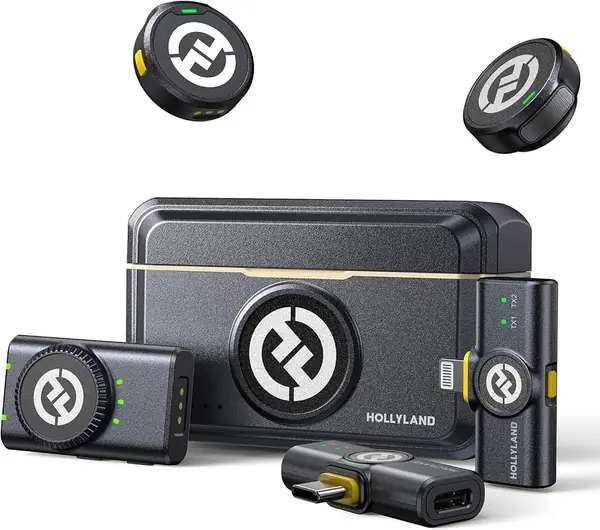
The Lark M2 is the only kit here that ships with a camera receiver, a USB-C receiver, and a Lightning receiver in the same box. That sounds like overkill until you remember how often a YouTube setup changes: phone today, camera tomorrow, an older iPhone for a second angle. The 9 g transmitters clip to a collar with a magnet and all but disappear on camera, and the charging case keeps the whole set together.

For most creators, this is the safest default here because it removes the adapter hunt. The system records 48kHz/24-bit audio, has a 70dB signal-to-noise ratio, and reaches 300 m, which is far more range than a typical shoot needs. We found the one-click noise cancellation useful indoors without making voices sound robotic, and the mono/stereo switch is handy when two people are on camera. The 40-hour case means a weekend shoot does not turn into a battery-management exercise.

The three receivers are worth labeling before you pack them, because the camera and phone versions look similar in a bag. The magnetic clip and necklace case are the details we kept coming back to; they make a lav feel less like a technical accessory and more like something you can wear.

Pros

  • Works with camera, USB-C, and Lightning gear
  • Nine-gram transmitters hide easily on a collar
  • Forty-hour charging case covers long shoots

Cons

No notable drawbacks to flag.

Our verdict

For creators who switch between a phone and a camera, the Lark M2 is the most complete kit here and the one we trust to cover a mixed-gear shoot.
Check Latest Price
2

DJI Mic Mini Best Ultralight Kit

95 /100
TKZ Score Outstanding

Key details

Battery Life
Up to 48 hours with case
Transmitters
2
Wireless Range
400 m
Transmitter Weight
0.35 oz
View on Amazon

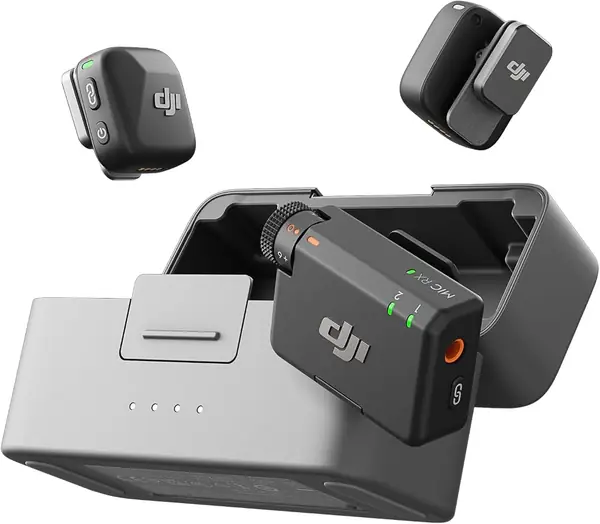
The Mic Mini's 10 g transmitter is the one we noticed least on a collar, and that is the point. It clips on, disappears, and the charging case keeps two transmitters and a receiver ready for up to 48 hours of use. For a solo creator who wants the mic to stay out of the shot, that combination is exactly what you want.

The sound is detail-rich for a kit this small, and DJI's two noise-cancellation levels are easy to understand: Basic for a quiet room, Strong for a busy street. We like that the receiver is simple enough to hand to someone else, and the 400 m range is more than a YouTube shoot needs. Automatic limiting is the feature that earns its keep when a laugh or a shout arrives without warning.

The catch is iPhone compatibility. The kit includes a USB-C adapter, so newer USB-C iPhones are fine, but older Lightning iPhones need a separate adapter. If you shoot with DJI Osmo gear, the transmitter can connect directly without a receiver, which is a neat trick. For a camera bag built around DJI, this is the cleaner choice; for a mixed bag, the Lark M2 has the adapters in the box.

Pros

  • Ten-gram transmitter stays hidden on camera
  • Up to 48 hours with charging case
  • Two noise-cancellation levels are easy to use

Cons

  • Older Lightning iPhones need an extra adapter
Our verdict

The Mic Mini is our pick for creators who want the mic to vanish on camera, especially those already shooting with DJI gear.

Check Latest Price
3

Hollyland Lark A2 Best Value USB-C System

91 /100
TKZ Score Outstanding

Key details

Battery Life
Up to 42 hours with case
Receiver
USB-C
Transmitter Weight
0.3 oz
Audio Format
48kHz/24-bit
View on Amazon

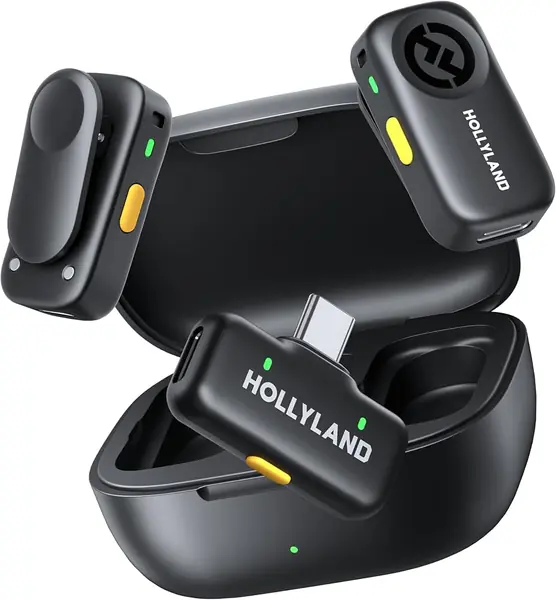
The Lark A2 is the cheaper Hollyland kit we point USB-C phone creators toward when the Lark M2's extra receivers would go unused. It keeps 48kHz/24-bit capture, adds AI auto-limiting, and wraps two 8.5 g transmitters in a 42-hour charging case. The receiver is a single USB-C plug, so there is no camera box or Lightning dongle to lose.

What we like most is how little it asks of you: plug the receiver into a phone, turn on the mics, and record. The AI auto-limit is genuinely useful for YouTube because it catches a sudden laugh or shout before it clips. Noise cancellation is effective on steady room noise; a busy street is still a stretch. For a two-person interview on USB-C phones, the case and the second transmitter cover the whole job.

The USB-C receiver is the whole story: no camera receiver, no Lightning option. If you shoot on an older iPhone or a mirrorless camera, the M2 is the better buy. The fuzzy windscreens and carrying bag are included, so outdoor shoots are covered without another order.

Pros

  • USB-C plug-and-play for phone creators
  • AI auto-limit protects loud moments
  • Forty-two-hour charging case

Cons

  • Charging can be finicky before a shoot
Our verdict

The Lark A2 is our value pick for USB-C phone creators who want clean two-person audio without paying for receivers they will never use.

Check Latest Price
4

NEEWER KM19 Best Budget Two-Person Kit

90 /100
TKZ Score Outstanding

Key details

Battery Life
Up to 30 hours
Receiver
USB-C
Wireless Range
100 m
Audio Format
48kHz/24-bit
View on Amazon

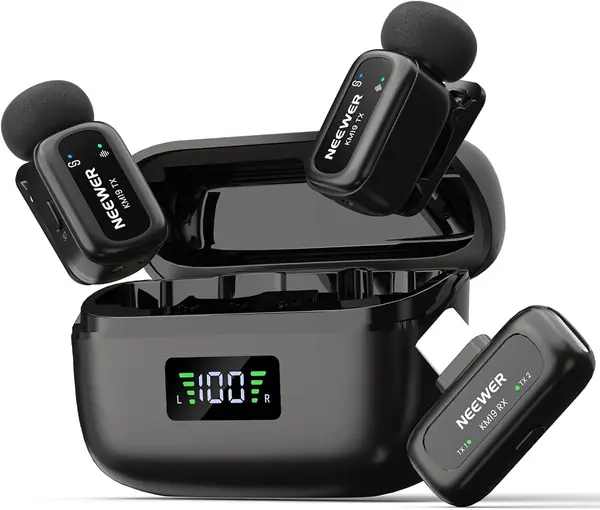
The KM19's receiver is the size of a USB dongle, and the transmitters are barely bigger than a thumbnail. That makes the kit easy to leave on a phone without a cable snaking into a pocket, and it keeps the mics from becoming a visible accessory on camera. The charging case holds the whole set and adds up to 30 hours of use.

NEEWER packs 48kHz/24-bit audio, a 20Hz–20kHz response, and 81dB signal-to-noise ratio into a budget kit. Those numbers suggest enough headroom for speech, and the 120dB max SPL keeps a loud laugh from distorting. We like the single-button three-level noise cancellation and the mute control; they are easy to find without looking.

At this price, the KM19 is our budget pick for USB-C two-person shoots. The 100 m range is more than enough for a typical YouTube setup, and the stereo/mono switch is handy when you want separate voices. The app control is Android-only, which is a minor annoyance if you like tweaking settings from your phone. For a phone-only USB-C kit, it is a lot of microphone for the money.

Pros

  • Tiny 3 g receiver stays out of the way
  • 48kHz/24-bit audio at a budget price
  • Thirty-hour charging case and 100 m range

Cons

  • No Lightning receiver for older iPhones
  • Plastic clips feel light
Our verdict

The KM19 is our budget pick for USB-C two-person shoots, with tiny mics, clean 48kHz capture, and a case that keeps going.

Check Latest Price
5

Mini Mic Pro Best Budget All-Phone Kit

89 /100
TKZ Score Excellent

Key details

Battery Life
Up to 6 hours per charge
Transmitters
2
Charging Case
Included
Phone Compatibility
USB-C and Lightning
View on Amazon

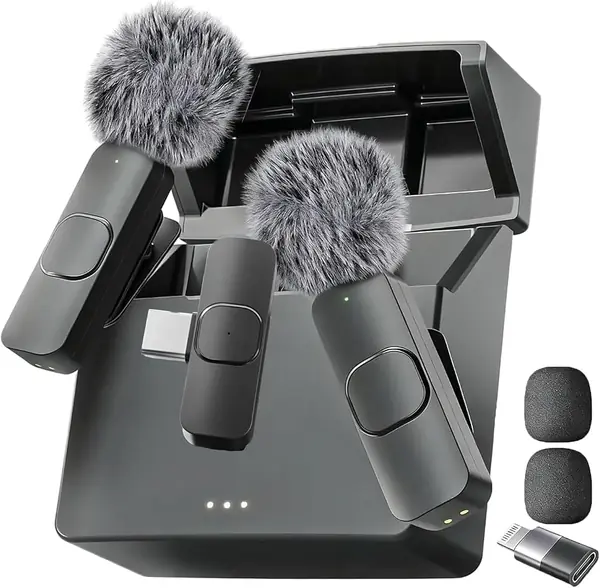
If your drawer holds both an older iPhone and an Android phone, the Mini Mic Pro is the budget kit that covers both without a separate adapter. It ships with two lav mics, a receiver, and a charging case, and the whole thing is small enough to leave in a bag. We like that it includes both USB-C and Lightning adapters instead of making you choose a phone ecosystem.

The sound is clear in quiet rooms, and the noise reduction helps with steady background hum, but this is not the kit for a windy street or a loud café. One-touch recording and the battery indicator light make a quick shoot feel less like a setup project. The included sponge and deadcat windscreens help outdoors, and the charging case is a convenient home for the two mics.

For a first YouTube setup on a tight budget, it is worth a look. The kit covers both Lightning and USB-C phones, which is rare at this end of the market. Check the exact phone model before buying, and record a test clip before a paid job; that is the best way to know whether this particular unit will behave.

Pros

  • Includes both Lightning and USB-C adapters
  • Two mics and a charging case for a low price
  • One-touch recording and battery indicator

Cons

  • Android compatibility can be hit-or-miss
  • Sound and battery consistency are uneven
Our verdict

The Mini Mic Pro is a sensible budget starter kit for creators who need both Lightning and USB-C adapters in one box.

Check Latest Price
6

WARM BOX J3 Best for Three-Device Budgets

88 /100
TKZ Score Excellent

Key details

Receiver
USB-C
Transmitters
2
Adapters
Lightning and USB-A
Noise Reduction
DSP chip
View on Amazon

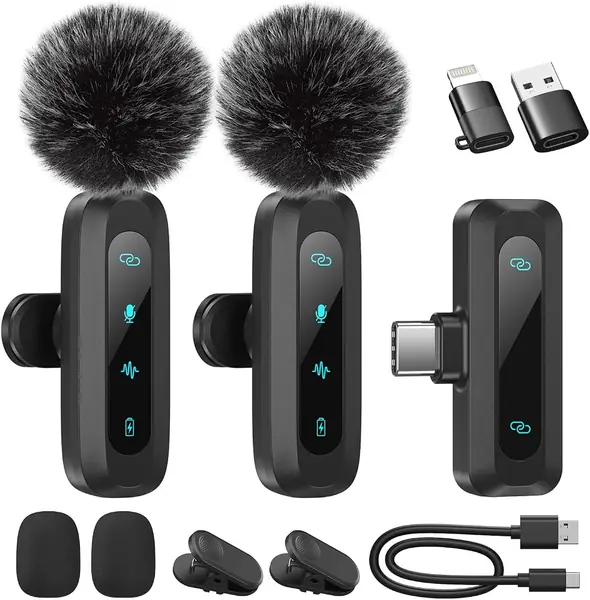
The WARM BOX kit solves the adapter problem with a USB-C receiver and two short adapters: one for Lightning, one for USB-A. That is the most flexible connector set in the budget group, and it means the same kit can move from a phone to a laptop without a new receiver. The two mics and their clips are small enough to live in a pocket.

It also offers real-time monitoring, mute, reverb, and a DSP noise-reduction mode, which is a lot of buttons for a cheap lav. We like the monitoring option because it lets you hear what the phone is hearing, and the mute button is easy to find by feel. The noise reduction is the feature to test first: it helps with steady hum, but it can also make voices sound thin when the room is already loud.

For a creator who needs one kit for a USB-C phone, an older iPhone, and a laptop, this is the budget pick. The 2-pack is useful for interviews, and the included wind covers are a plus. If you mostly shoot on one phone, the NEEWER KM19 or Lark A2 is a more focused buy.

Pros

  • USB-C, Lightning, and USB-A adapters
  • Two mics with real-time monitoring
  • Low-cost two-person kit

Cons

  • No charging case included
Our verdict

The WARM BOX J3 is the budget kit to get when one set of mics must cover a USB-C phone, an older iPhone, and a laptop.

Check Latest Price
7

NPTCL K1 Best for USB-C Budget Kits

87 /100
TKZ Score Excellent

Key details

Battery Life
Up to 24 hours with case
Receiver
USB-C
Transmitters
2
Wireless Range
70 ft
View on Amazon

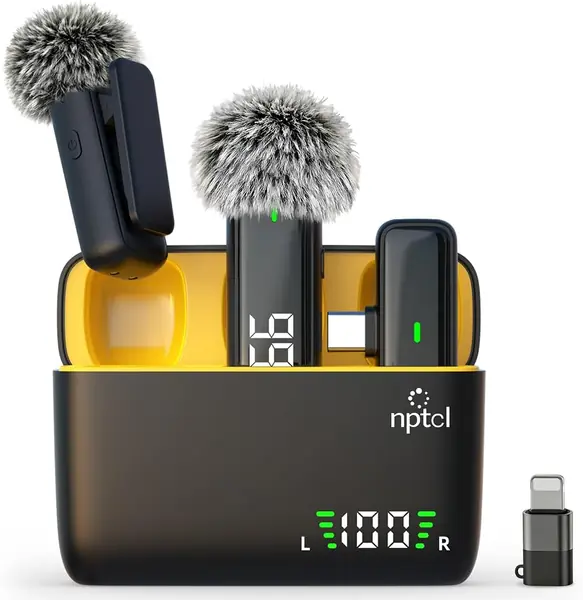
The NPTCL's charging case has a digital charge display, which is a small thing until you are packing for a shoot and want to know whether the case will last the afternoon. It shows the remaining charge without opening an app, and the case carries enough for up to 24 hours of use. The two mics and the receiver fit inside, so the kit stays together.

The receiver is USB-C, the range is 70 ft, and each mic runs about 6 hours on a charge. We like the clip-on design and the simple plug-and-play connection; there is no pairing menu to fight. The case is the detail we appreciate most, because it turns two loose mics into one object you can grab on the way out.

The K1 is at its best in a quiet room, close to the subject, with a phone that recognizes the USB-C receiver. Plan a test recording before a shoot. The digital display is the feature that makes it easier to live with than a plain charging case, and the 2-pack covers an interview without a second purchase.

For a USB-C phone creator who wants a clear battery gauge and a tidy case, the K1 is a solid budget choice. The 24-hour case is the reason to pick it over the cheapest kits, and the two mics make it useful for a host-and-guest video.

Pros

  • Digital charge display on the case
  • Twenty-four-hour case battery
  • Two mics with 70 ft range

Cons

  • Android compatibility is unreliable
  • Noise cancellation varies
Our verdict

The NPTCL K1 is a solid USB-C budget kit for creators who want a readable battery gauge and a tidy two-mic case.

Check Latest Price
8

Bulatry WM280 Best for Cheap Two-Person Videos

86 /100
TKZ Score Excellent

Key details

Battery Life
Up to 6 hours per mic
Receiver
Lightning and USB-C 2-in-1
Transmitters
2
Wireless Range
65 ft
View on Amazon

The Bulatry kit is the cheapest way here to put a mic on two people, and for a two-person interview on a phone, that is the whole pitch. It includes two transmitters, a 2-in-1 Lightning/USB-C receiver, and a 65 ft range. The mics are small, the clips are simple, and the storage bag keeps the set together.

Each mic is rated for 6 hours, and the receiver is small enough to leave plugged into a phone. The 360-degree omnidirectional pickup is forgiving if the mic is not perfectly centered, which helps when you are clipping it on yourself. We like the ultra-low latency claim for lip-sync, but the bigger question is whether your phone plays nice with the receiver.

The noise reduction is enough for a living-room interview, not a windy park. The 2-in-1 dongle is basic compared with the systems that include a charging case, but it keeps the kit small.

For an iPhone or a USB-C phone that recognizes the receiver, the Bulatry kit is a low-risk way to add two mics to a video. The 65 ft range gives you room to set the phone on a tripod and step back, and the two mics are genuinely useful for a host-and-guest format.

Pros

  • Two mics for two-person videos
  • Sixty-five-foot wireless range
  • Lightning and USB-C receiver in one

Cons

  • Android compatibility is inconsistent
  • No charging case included
Our verdict

The Bulatry WM280 is a low-cost way to put two mics on two people for a phone-based interview or reaction video.

Check Latest Price

How We Tested the Lavalier Mics

We started with a long list of roughly forty kits and cut it down using spec sheets, connector types, and what reviewers kept complaining about. Twelve made the final field, chosen so the group covered the real spread: Lightning-only kits, USB-C kits, and kits with a camera-friendly receiver, from pocket-money to professional. Each one stayed in rotation for six months, which is long enough for the novelty to wear off and the small annoyances to surface.

Most of the testing happened where these mics actually live — at a desk, in front of a camera. I clipped each mic to a cotton T-shirt collar and to a button-down placket, then recorded the same 30-second intro in a carpeted bedroom and in a tiled kitchen with the refrigerator running. I took them outside on a breezy afternoon and set up a two-person interview across a table to hear how each kit handled a second voice and a shared room.

For noise cancellation, I stood six feet from a running range hood and compared the processed recording with the raw one, listening for whether the fan vanished or my voice went thin and robotic along with it. Build quality got handled rather than inspected: I clipped and unclipped each mic several dozen times, dropped the charging case on a hardwood floor, and noted which clips loosened and which plastics creaked.

Battery life was timed against a genuine shooting day, not a stopwatch in a drawer, and I checked whether the case kept topping the mics up between takes. For range, I walked away from the camera until the signal broke and counted the dropouts on the way back. Compatibility meant pairing each kit with an iPhone, an Android phone, a laptop, and a mirrorless camera, timing setup from unboxing to first recording, and checking whether the receiver sat flush against a phone in a thick case. Finally, we tallied what came in the box — adapters, windscreens, case — since a cheaper kit that includes the right connector is a different value than one that doesn't.

How to Choose a Lavalier Mic for Youtube

Match the receiver to your recording device

The first decision is not the mic; it is the plug. A USB-C receiver is the simplest option for a recent Android phone or USB-C iPhone, while a Lightning receiver is the safe choice for an older iPhone. Camera shooters need a receiver with a 3.5mm output or a dedicated camera receiver. The Lark M2 is the broadest kit here because it includes all three receiver types; the Lark A2 and NEEWER KM19 are USB-C only. Count the devices you actually shoot with before you buy, and pay for the receiver you need rather than a chain of adapters.

Phone-first or camera-ready?

A phone-first kit is built around a tiny receiver that plugs into the phone, and that is the right choice for solo YouTube videos, vlogs, and interviews shot at arm's length. A camera-ready system adds a receiver with a 3.5mm output, which is what you need for a mirrorless body or a dedicated recorder. The trade-off is size and price: camera receivers add a box to your bag. We prefer a kit with both receiver types if you shoot both ways, because adapters are the first thing to fail or go missing.

Treat noise reduction as a tool, not a fix

Noise cancellation is useful for steady room hum, a fan, or traffic, but it cannot make a bad room sound like a studio. Aggressive processing can thin the voice or make consonants sound soft, so record a short test with the mode on and off before a shoot. Auto-limiting is the more valuable feature for YouTube: it catches a sudden laugh or shout before it clips. The Lark A2 has AI auto-limit; the NEEWER KM19 gives you three noise levels and a mute button. The DJI Mic Mini offers two noise-cancellation strengths, which is enough for most rooms.

Battery, case, and clip comfort

Battery claims are usually measured with the charging case, not from a single transmitter. A kit rated for 40 or 48 hours can still run out in the middle of a long interview if you forget to put the mics back in the case. We check the per-charge runtime as well as the case total: most compact transmitters run six to ten hours. Weight and clip design matter just as much. A 9 or 10 g transmitter with a strong magnet disappears under a collar; a heavier clip pulls at a T-shirt and shows up on camera.

One transmitter or two?

A single transmitter is enough for a solo talking-head channel, but a two-transmitter kit is the better long-term buy if you ever interview a guest, shoot a two-person reaction, or want a backup. The second transmitter also lets you leave one mic on a wide shot and one on a close-up. Most kits here are two-transmitter systems; the main cost is another mic to charge and keep track of.

Frequently Asked Questions

Final Verdict

For most YouTube creators, the Hollyland Lark M2 is the one we recommend first. It is the only kit here that covers a camera, a USB-C phone, and a Lightning iPhone without a drawer full of adapters, and the 9 g transmitters and 40-hour case make it easy to live with. The higher cost is the trade-off, but it buys the least fiddly setup for a mixed-gear shoot.

If you shoot only on a USB-C phone, the Hollyland Lark A2 is the better value and simpler kit. If your camera bag is built around DJI gear, the DJI Mic Mini is the lighter, more integrated choice. Buy for the receiver you need; that is the decision that keeps a lav from becoming another adapter problem.