Best iPad Cases for Note Taking of 2026

A note-taking session lives or dies on one hinge. Press a Pencil into the screen and a weak folio starts folding itself flat, taking your writing angle with it. What you need is a case that locks into a steep, stable angle, keeps the Pencil attached and charging, and doesn't collapse the moment it goes into a bag.

We've lived with 14 cases over the past five months, taking notes in meetings, at the kitchen counter, and in a coffee shop booth that wobbled about as much as some of the stands did. Fit mattered more than any spec sheet: the keepers snapped over the corners without creaking or leaving a lip. Protection, looks, and the unglamorous question of whether the magnets are strong enough to wake the screen on the first try all counted.

One trade-off worth knowing: the slimmest cases are the nicest to write on and the least forgiving when the tablet slides off the couch. Pick your side of that line, then read on.

The Best iPad Cases for Note Taking

1

DTTO Premium Leather Folio Best Overall
97 /100
TKZ Score Outstanding

Key details

Compatible iPad
iPad (A16) 11-inch 2025; iPad 10th gen 10.9-inch 2022
Pencil Storage
Built-in holder for Apple Pencil (USB-C) or Pencil 1st Gen
Stand Positions
Multiple angles; two anti-slip grooves
Hand Strap
Built-in hand strap
View on Amazon

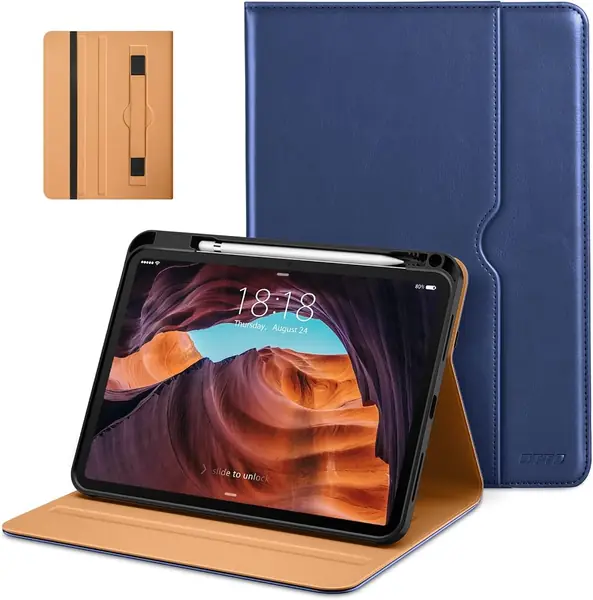
The hand strap is the feature that makes the DTTO Premium Leather Folio our top pick for note-taking. It runs across the inside of the front cover, so you can slide a hand in and hold the iPad steady while you write with the other. That sounds small, but it changes how the case works on a couch, in a lecture hall, or anywhere without a desk. The built-in pencil holder keeps the Apple Pencil with the iPad, and a cutout at the back lets you push the Pencil out instead of digging for it.

The rest of the case is just as practical. A front pocket holds a few index cards, receipts, or a folded sheet of notes, and the two anti-slip grooves give you a typing angle and a steeper viewing angle. The synthetic leather wipes clean, and the corner coverage feels more substantial than the thin trifolds here. We also appreciate that the cover closes over the screen and wakes the iPad when you open it.

If you like to read or annotate in portrait, the Fintie Rotating Case is the better choice. For handwritten notes, though, the hand strap is more useful than another angle. The protection is worth it if the iPad travels in a backpack, and the front pocket is the small extra that makes it feel like a work folio rather than a sleeve.

Pros

  • Hand strap steadies one-handed note-taking
  • Pencil holder with rear push-out hole
  • Front pocket and multiple stand grooves

Cons

  • Heavier than slim trifold cases
Our verdict

The DTTO Premium Leather Folio is our top pick for current 11-inch and 10.9-inch iPads because its hand strap makes handwritten notes genuinely easier.
Check Latest Price
2

Supveco Composition Book Folio Best Notebook-Style

96 /100
TKZ Score Outstanding

Key details

Compatible iPad
iPad (A16) 11-inch 2025; iPad 10th gen 10.9-inch 2022
Pencil Storage
Built-in pencil holder
Stand Positions
Multi-angle anti-slip front stand
Cover Style
Composition book
View on Amazon

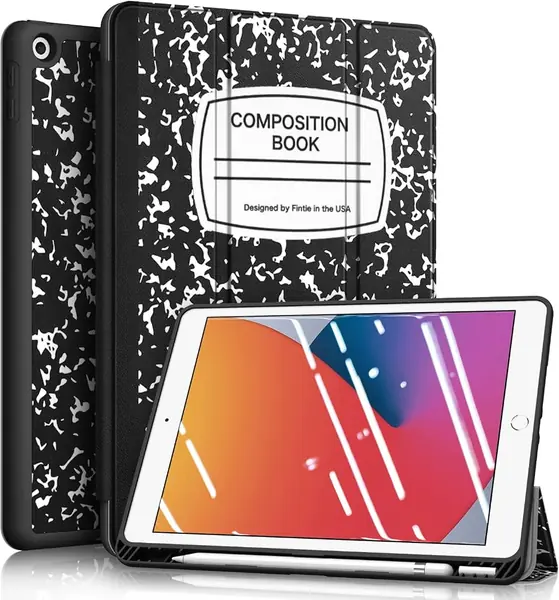
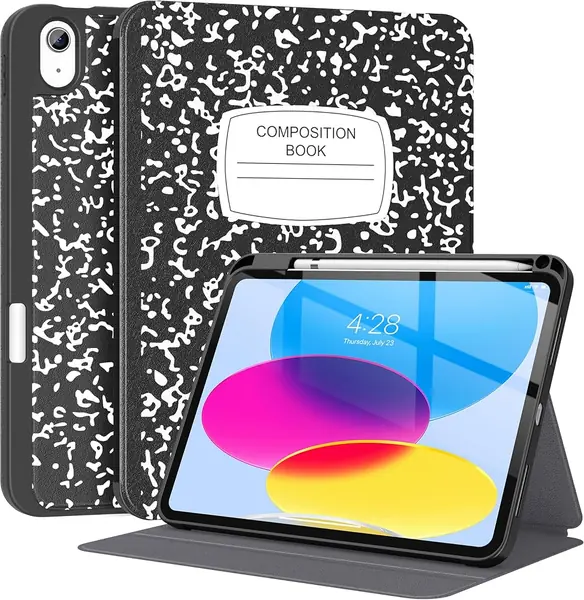
The Supveco Composition Book Folio does not look like an iPad case. The cover is printed like a black-and-white composition notebook, down to the speckled texture, so it disappears on a desk in a way a glossy case does not. The spine and rounded corners continue the school-supply look, and the whole thing reads as a notebook until you open it.

That disguise is why we recommend it as the notebook-style pick. The front cover folds into a multi-angle stand with an anti-slip lip, and the built-in pencil holder keeps the Apple Pencil with the iPad. The TPU back and silicone cover give it more structure than a basic trifold, and the cover wakes and sleeps the tablet automatically. We also like that the pencil slot is inside the cover, so the Pencil is not exposed when the case is closed.

The stand is the part to watch. On a polished table, the front lip can creep when you tap near the top of the screen, so this is better for reading and typing than for heavy poking. That is the main reason it is not our top pick. If you want portrait viewing, the Fintie Rotating Case is the one to choose. For the classroom look and the pencil storage, this is the most fun case here.

Pros

  • Composition-book cover looks like a real notebook
  • Multi-angle front stand with anti-slip lip
  • Built-in pencil holder and structured TPU back

Cons

  • Landscape-only stand
Our verdict

For notebook style and a multi-angle stand, we choose the Supveco Composition Book Folio; its pencil slot stays inside the cover.

Check Latest Price
3

TiMOVO Clear Back Slim Case Best Budget

95 /100
TKZ Score Outstanding

Key details

Compatible iPad
iPad (A16) 11-inch 2025; iPad 10th gen 10.9-inch 2022
Pencil Storage
Built-in pencil holder
Stand Positions
Two trifold positions
Back
Clear PC back
View on Amazon

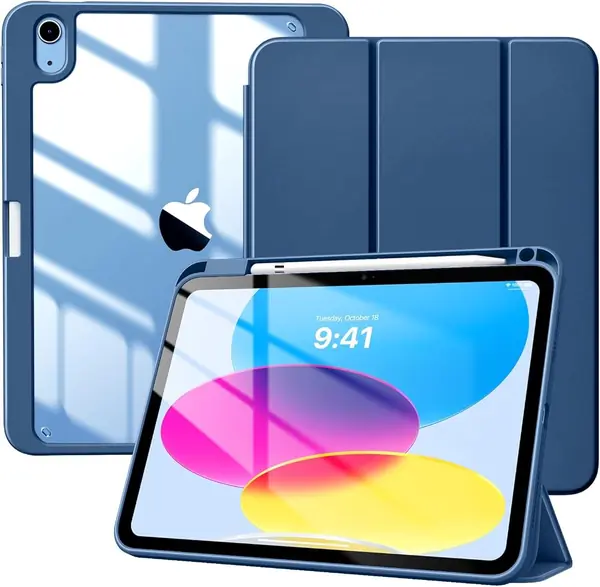
The TiMOVO Clear Back Slim Case is the budget pick we recommend when you want the iPad to look like the iPad. It is cut for the 11-inch iPad (A16) and 10.9-inch 10th-generation iPad, so match your model before ordering. The back is crystal clear, so the color and any engraving show through, and the pencil holder is built into the side rather than added as a loop. At the budget end of this group, that combination is hard to beat.

The trifold front gives you two positions, one for typing and one for viewing. We prefer the lower typing angle for notes and email, while the steeper angle is better for video. The hard PC back and shockproof TPU bumper cover the corners, and the cover wakes and sleeps the iPad automatically. The clear back can show smudges, so wipe it down if that bothers you.

The clear back is the reason to choose it over the leather cases; everything else is standard trifold. If you want a hand strap or a more planted stand, the DTTO case is the better buy. For a slim case that shows off the iPad and holds the Pencil, this is the value pick.

Pros

  • Clear back shows the iPad's color
  • Built-in pencil holder
  • Hard PC back with shockproof TPU bumper

Cons

  • Stand can fold flat under hard taps
Our verdict

We keep the TiMOVO Clear Back Slim Case as the budget choice for its clear back, pencil holder, and dependable everyday protection.

Check Latest Price
4

Fintie Rotating Case Best for Portrait Mode

94 /100
TKZ Score Outstanding

Key details

Compatible iPad
iPad (A16) 11-inch 2025; iPad 10th gen 10.9-inch 2022
Pencil Storage
Built-in Apple Pencil slot
Stand
360° rotation; portrait and landscape
Protection
Dual-layer hard interior
View on Amazon

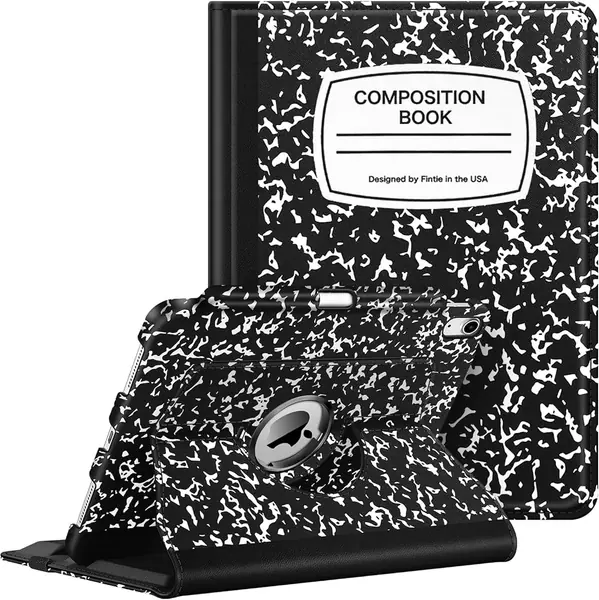
Most cases stand the iPad in landscape and stop there. The Fintie Rotating Case adds a 360-degree swivel, so you can turn the tablet upright for a PDF, a recipe, or a page of notes without taking it out of the case.

We recommend it for anyone who reads or reviews notes in portrait more than they type. The swivel moves smoothly, and the synthetic leather cover has a composition-book print that hides everyday scuffs. The pencil slot keeps the Apple Pencil secure, and the dual-layer hard interior gives the back more protection than a soft TPU shell. The cover also wakes and sleeps the iPad when you open and close it.

The stand is built for viewing, not for handwriting. This is a case for propping the iPad up to read, not for drawing at a desk. If you want a stable writing setup, the DTTO hand strap is more useful. The swivel is the reason to choose it; the stand is the reason to keep it on a table.

Pros

  • 360-degree swivel for portrait or landscape
  • Composition-book cover hides everyday scuffs
  • Pencil slot and dual-layer hard interior

Cons

  • iPad can slide in the stand grooves
Our verdict

We choose the Fintie Rotating Case if portrait viewing matters; the 360-degree swivel is the feature that sets it apart.

Check Latest Price
5

JETECH Magnetic Detachable Case Best Detachable

93 /100
TKZ Score Outstanding

Key details

Compatible iPad
iPad (A16) 11-inch 2025; iPad 10th gen 10.9-inch 2022
Pencil Storage
Built-in pencil holder
Stand
360° rotation; portrait and landscape
Cover
Detachable magnetic cover
View on Amazon

The JETECH Magnetic Detachable Case is two pieces: a clear back shell that stays on the iPad and a magnetic front cover that can come off completely. That sounds like a small modular trick, but it changes how you use the case.

For handwritten notes, the back shell alone is the lightest way to hold the iPad, and the pencil holder stays with the device. The front cover adds a 360-degree rotating stand for portrait or landscape viewing when you want to set it down. The magnet is strong enough to hold the cover in place in a bag, and the clear back shows the iPad's finish. The buttons and cutouts are covered by the shell rather than left open.

The trade-off is the two-piece design. When the cover is off, you have to keep track of it, and the back shell alone leaves the screen exposed. The stand works, but it is not as planted as the DTTO case. The detachable cover is the reason to choose it; the loose cover is the reason to think twice.

Pros

  • Detachable magnetic cover for handheld use
  • 360-degree rotation for portrait or landscape
  • Clear back with pencil holder

Cons

  • Heaviest case in this group
Our verdict

The JETECH Magnetic Detachable Case is our pick for handheld note-taking, thanks to a cover that comes off when you want less bulk.

Check Latest Price
6

Fintie 10.2-Inch Composition Book Case Best for Older iPads

92 /100
TKZ Score Outstanding

Key details

Compatible iPad
iPad 9th, 8th, and 7th gen 10.2-inch
Pencil Storage
Pencil holder and adapter slot
Stand
Viewing and typing angles
Material
Soft TPU back; microfiber lining
View on Amazon

The Fintie 10.2-Inch Composition Book Case is the pick for an older iPad, and the compatibility is the first thing to check. It fits the 9th, 8th, and 7th generation 10.2-inch models, not the 11-inch A16 or 10.9-inch 10th generation. If you are still using one of those older tablets, this is a familiar, budget-friendly way to add pencil storage.

The case has a built-in Apple Pencil holder plus an adapter slot, which is the detail that matters for the 1st Generation Pencil. The trifold cover gives you viewing and typing angles, and the soft TPU back protects the corners without adding much bulk. The composition-book print is the same idea as the Supveco, but this one is cut for the older tablet. The cover also wakes and sleeps the iPad automatically.

The adapter slot is the detail we appreciate most, because it keeps the Pencil's charging adapter from living loose in a bag. The composition-book cover is a matter of taste, but it hides scratches better than a plain black case. That combination makes it more than a basic case, and the notebook print keeps it from looking like a hand-me-down.

Pros

  • Fits 9th, 8th, and 7th gen 10.2-inch iPads
  • Pencil holder plus adapter slot
  • Composition-book cover with soft TPU back

Cons

  • Standard trifold stand is not a rigid writing easel
  • Cover can show wear over time
Our verdict

We recommend the Fintie 10.2-Inch Composition Book Case only for 9th, 8th, and 7th generation iPads, where its pencil and adapter storage fit.

Check Latest Price
7

Harvopu Keyboard Case Best for Occasional Typing

89 /100
TKZ Score Excellent

Key details

Compatible iPad
iPad (A16) 11-inch 2025; iPad 10th gen 10.9-inch 2022
Stand
Three anti-slip grooves
Keyboard
Detachable backlit keyboard
Trackpad
Multi-touch trackpad
View on Amazon

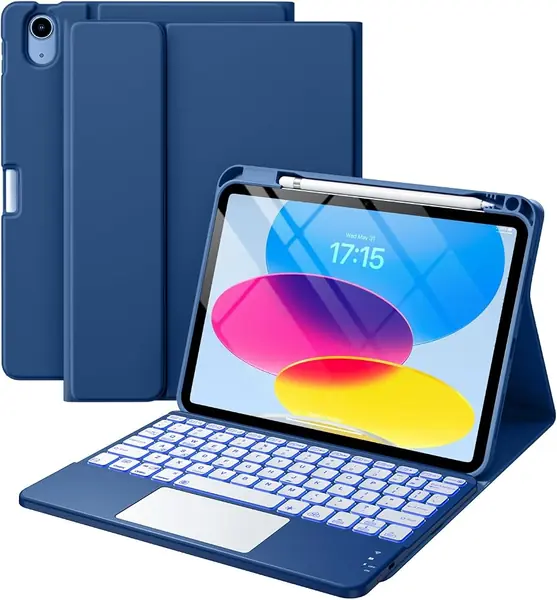
The Harvopu Keyboard Case is the only pick here with a keyboard, and that is the reason to consider it. The keyboard is magnetically detachable, backlit in seven colors, and paired with a trackpad, so you can type notes in landscape and pull the keyboard off when you want to use the iPad as a tablet.

The case itself has a pencil holder and three anti-slip grooves for standing the screen at different angles. The keyboard shortcuts are laid out for iPadOS, and the trackpad supports multi-finger gestures. For a student who types lecture notes and wants one case for everything, the idea is right.

The typing experience is decent for a compact keyboard: the keys have a short travel, and the backlight helps in a dim room. The case also adds bulk and another battery to charge, which is the price of the keyboard.

The keyboard is the reason it earns a look, and the trackpad is the reason to keep expectations modest. It is a useful second mode for the iPad, not a replacement for a laptop.

Pros

  • Detachable backlit keyboard
  • Multi-touch trackpad
  • Pencil holder and three stand grooves

Cons

  • Fussy Bluetooth pairing
  • Trackpad can move the cursor unpredictably
Our verdict

We see the Harvopu Keyboard Case as an occasional typing tool; its trackpad and pairing keep it out of laptop territory.

Check Latest Price

How We Tested iPad Cases for Note Taking

We started by pulling every case listed for the current 11-inch iPad and for the older 10.2-inch models, then cut anything without a Pencil holder, a stand that could hold a writing angle, or a price that made sense. That left 14, which went onto our tablets for five months of daily use.

The cases went where notes actually get taken: staff meetings, a long Saturday at the kitchen counter, the couch, and the bottom of a tote next to keys and a water bottle. We wrote full pages of notes in each one, pressing harder than usual near the top edge to see whether the stand crept down a degree at a time or held its position.

Each case came on and off a dozen times, so we could check for creaks, loose corners, and cutouts that missed the buttons or the charging port. We held the tablet upside down and shook it gently to see if it shifted inside the shell, closed the cover twenty times to confirm the screen woke every time, and left the Pencil on the magnetic edge overnight to see if it still charged through the case. Cases that pair with a keyboard got a few hundred words typed on them and a trackpad session in a notes app.

Protection got a less gentle test: a waist-high drop onto hardwood, then onto tile, with a hard look at the corners afterward. Over the five months we watched edges for peeling, stitching for fraying, and lighter colors for smudging, and weighed what each case included against what it cost.

How to Choose an Ipad Case for Note Taking

Match the model number first

iPad cases look interchangeable until you check the model. The 11-inch iPad (A16) and 10.9-inch 10th-generation iPad use one family of cases, while the 9th, 8th, and 7th generation 10.2-inch iPads use another. Open Settings, General, About, and match the model number to the listing. A case cut for the wrong generation can block the camera, cover a speaker, or leave the Pencil charging side exposed. If you own an older 10.2-inch iPad, the Fintie Composition Book Case is the pick here; for the current 11-inch and 10.9-inch models, start with the DTTO case.

Choose a stand for how you actually write

A steep trifold stand is for watching video or typing, not for handwriting. If you write with the iPad on a desk, look for a case that folds low, a detachable cover, or a hand strap that lets you hold the tablet in one hand. The DTTO case's hand strap is the most direct solution here; the JETECH's removable cover is the most flexible. More stand angles do not automatically mean more stability, so check whether the front lip is rigid and whether the iPad can slide when you tap the screen.

Pencil storage is a daily-use decision

A built-in slot protects the Apple Pencil in a bag, but it can make the Pencil slower to remove and may cover the charging side. A magnetic side attachment is quicker, though the Pencil can be knocked off in transit. For note-taking, decide whether you want the Pencil fully enclosed or always ready to snap on. The DTTO and Supveco cases use enclosed holders; the Fintie Rotating Case keeps a slot inside the cover. Check that the holder matches your Pencil generation and leaves room for charging if you rely on it.

Treat a keyboard case as a separate purchase

If typed notes are the main job, a keyboard case adds a keyboard, trackpad, battery, and another thing to charge. Detachable keyboards are the most flexible because you can leave them behind, but pairing and trackpad precision vary. The Harvopu Keyboard Case is the budget keyboard option here, and it works best for occasional typing; do not expect laptop-level reliability. If you only type now and then, a case plus a separate Bluetooth keyboard is often the more dependable setup.

Protection and weight trade-offs

Protection is not just the back material. A raised front lip, reinforced corners, and a cover that closes over the screen matter more than a thick shell. Weight follows: the JETECH case is the heaviest here, while the TiMOVO and Fintie 10.2 cases are easier to carry. If the iPad lives in a backpack, favor corner coverage; if you carry it by hand, favor a slim back and a cover that stays closed.

Frequently Asked Questions

Final Verdict

For most people, the DTTO Premium Leather Folio is the case to buy. The hand strap keeps the iPad steady while you write, the pencil holder keeps the Apple Pencil close, and the front pocket handles a few loose notes. It is the most complete note-taking design here, and the protection is serious enough for a backpack.

If you write with the iPad in your hand, choose the JETECH Magnetic Detachable Case; if you own an older 10.2-inch iPad, the Fintie Composition Book Case is the right fit. For portrait reading and note review, the Fintie Rotating Case earns its place.