Best Headphones for Calls of 2026

The fastest way to lose a room on a video call is to sound like you're dialing in from inside a soup can. I've been that person — mid-sentence dropouts, keyboard clatter louder than my actual update — and it took a client politely asking me to "maybe just type it" for me to care about what was on my head. A headset built for calls fixes that at the source: a microphone tuned to pick up your voice and reject the room, plus a fit you forget about by hour three.

We've spent the past six months working through 12 headsets — wired, dongle-based, on-ear, and open-ear — across standups, client calls, and one memorably loud coffee shop. The biggest thing I learned is that great headphones and great call gear are two different jobs. Speaker tuning tells you nothing about how you'll sound to everyone else, and details like a flip-to-mute boom, a USB dongle, and multipoint pairing matter more on a workday than any spec sheet.

After the novelty wears off, these headsets separate on battery life, comfort, and build — the ear pads that flatten by month two, the charging case that stops holding a charge, the cable that frays where it meets the plug. Value is its own test: a modest headset that survives two years of daily use beats a pricier one that doesn't. The picks below are grouped by how you'll actually use them, from all-day desk duty to calls on the move.

The Best Headphones for Calls

1

Angteela M112 Best Overall
93 /100
TKZ Score Outstanding

Key details

Talk Time
35 hours
Connection
USB dongle + Bluetooth 5.4
Fit
Over ear
Mute
Flip-up boom arm
View on Amazon

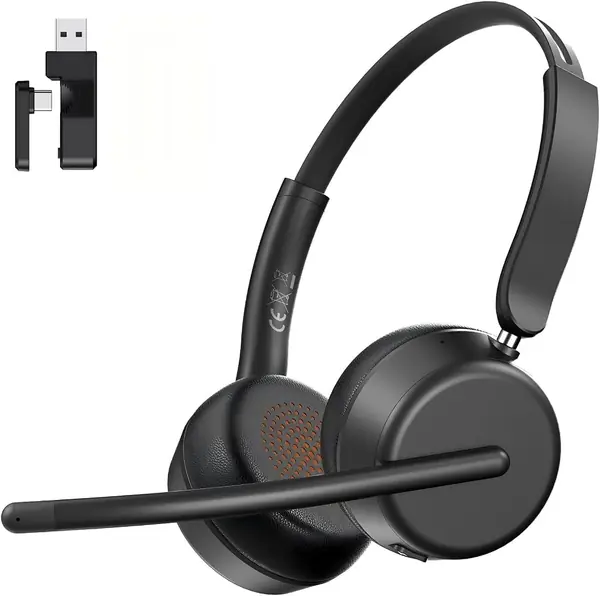
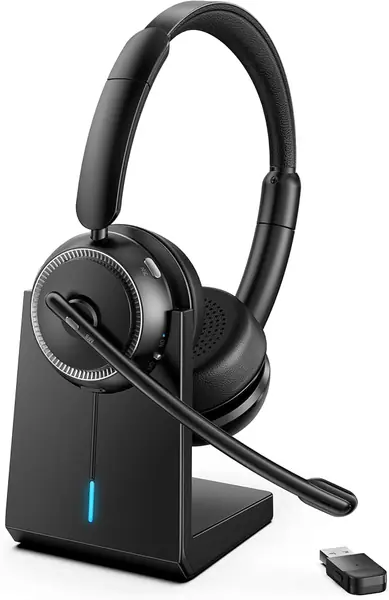
The Angteela M112's boom arm flips up and stays up, and that hinge is the whole argument for it. Mute becomes a gesture you can see from across the room, and it is the same gesture whether you are on a meeting through the dongle or a phone call over Bluetooth. We have not handled another pick here whose mute state is that visible.

We rate it the best all-rounder because it covers both halves of a working day. The over-ear cups hold active noise canceling for your side, and the microphone carries environmental noise canceling for everyone else's — two features sold under the same label that do opposite jobs. Set it up once: dongle into the laptop, phone paired over Bluetooth, both connected at the same time.

Thirty-five hours of talk time and a charging station mean the end of the day is a drop, not a hunt for a cable. The over-ear build is the trade: this is a bag item rather than something you leave in a jacket pocket, and the cups are big enough to warm your ears on a long afternoon.

The feature we came to use most is the smaller one: the noise-canceling button cycles into a transparency mode, so when someone walks up mid-call you tap once and the room comes back without taking anything off. That, more than the blocking itself, is what keeps it on our heads.

Pros

  • Flip-up boom makes mute visible and one-handed
  • Dongle and Bluetooth run a laptop and phone together
  • ANC for you plus a noise-canceling mic for callers
  • 35 hours of talk time with a charging station

Cons

  • Over-ear cups take up bag space
Our verdict

We point anyone who takes calls at a desk and on a phone in the same day here: the flip boom makes mute obvious and the dongle keeps the laptop link solid.
Check Latest Price
2

Jabra Evolve 10 Best Wired for a Desk

92 /100
TKZ Score Outstanding

Key details

Connection
USB-A wired
Weight
4.99 oz
Microphone
Noise-canceling boom, either side
Warranty
2 years
View on Amazon

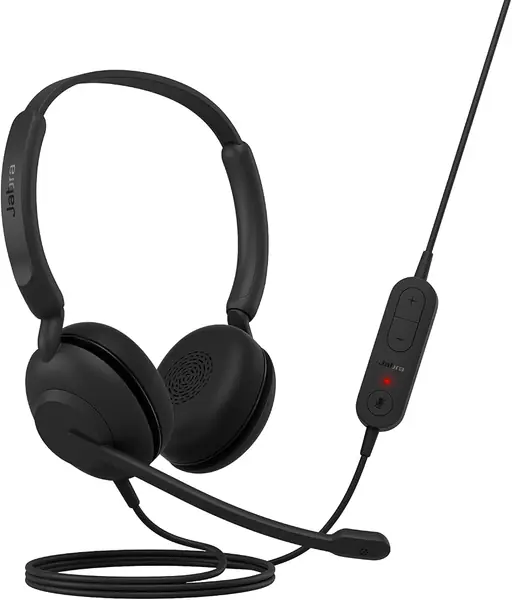
The part of the Evolve 10 that earns its place is the microphone arm. It swings to whichever side of your head suits your USB port, so the cable does not cross your chest and the mic still sits by your mouth. The name promises noise canceling; what you get is a noise-canceling microphone rather than ANC for your ears — and for a call, the mic is the half that matters.

At 141.5 grams with soft on-ear cushions, it is the kind of thing you forget you are wearing by the second meeting, and the inline control puts volume and mute on the cable where your hand already rests. TCO certification and more than half recycled plastic will not change how it sounds, but they make a cheap pair easier to justify to a procurement team, and two years of manufacturer warranty is generous at this end of the range. What it will not do is follow you to the kitchen: no Bluetooth, no battery, so it lives where the cable reaches.

Pros

  • Mic arm swings to the left or the right
  • 141.5 grams with soft on-ear cushions
  • Two-year manufacturer warranty

Cons

  • Wired only, with no Bluetooth or battery
Our verdict

We reach for the Evolve 10 whenever calls happen at a PC: light on-ear comfort, a mic arm that swings to either side, and a two-year warranty.

Check Latest Price
3

Soothielec KH53 Best Battery Life

91 /100
TKZ Score Outstanding

Key details

Talk Time
40 hours
Connection
USB-A dongle + Bluetooth 5.3
Charging
Charging stand, 2 hours
Battery
600 mAh
View on Amazon

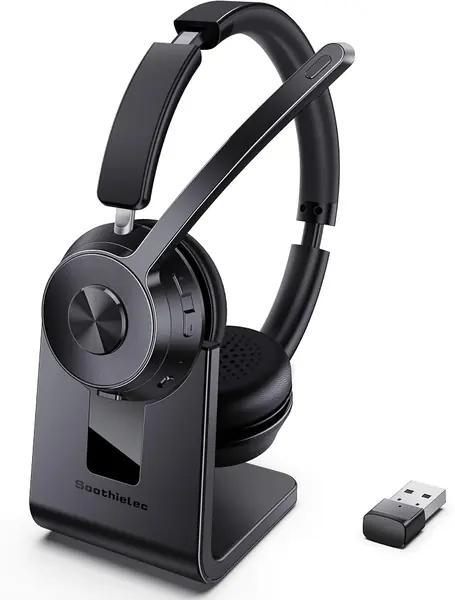
Same money as our top pick, different bet. The KH53 skips the flip boom and gives you a charging stand instead: set it down between calls and it tops up, pick it up and you are back to 40 hours of talk time. If your last wireless pair died mid-afternoon because you never plug anything in, the stand is the fix.

The microphone carries environmental noise canceling, which works on what the far end hears rather than on what reaches your ears. There is a USB-A dongle for a work PC that will not cooperate and Bluetooth 5.3 for everything else, and it holds two devices at once, so a call can start on the laptop and finish on your phone. The memory foam cushions and adjustable headband are the sort of padding you notice at hour four, not hour one.

Where it lands for us: this is the wireless pick for people who never want to think about charging, and the stand is the reason. The mute is a button rather than a boom you can flip, so if you mute a dozen times an hour, the visible hinge on the Angteela M112 is easier to trust.

Pros

  • 40 hours of talk time on a 600 mAh battery
  • Charging stand removes the nightly cable hunt
  • Dongle and Bluetooth hold two devices at once

Cons

  • No ANC for your ears, only mic-side canceling
Our verdict

For desk jobs that run on back-to-back calls, we pick the KH53: 40 hours of talk time and a stand that tops it up between meetings.

Check Latest Price
4

AOC SPK07 Best for USB-C Laptops

90 /100
TKZ Score Outstanding

Key details

Talk Time
40 hours
Microphone
AI noise canceling
Dongle
USB-A and USB-C
Bluetooth
5.4
View on Amazon

Most wireless headsets here ship a USB-A dongle and leave you hunting for an adapter the first time you plug into a newer laptop. The AOC SPK07's dongle fits a USB-C port and an older USB-A one, which is the smallest feature in this guide and the one that decides the purchase for a lot of people. Add 40 hours of talk time and a light build with a headband that retracts into the cups, and it becomes our pick for anyone issued a machine they had no say in.

The microphone runs an AI noise-canceling chip on the call side, and the earcup buttons cover volume, answering, and mute without reaching for a cable. It is an on-ear design rather than an over-ear one, so it seals less than the M112 or the KH53, which is fine in a quiet room and less fine beside a kitchen. Bluetooth 5.4 covers the phone; the dongle is the more reliable link for a work laptop with Bluetooth switched off.

Pros

  • One dongle fits USB-C and USB-A ports
  • 40 hours of talk time between charges
  • On-earcup buttons for volume, answer, and mute

Cons

  • On-ear cups seal less than over-ear designs
Our verdict

We hand this one to anyone working on a USB-C laptop they did not choose: the dongle fits either port and 40 hours of talk time is generous.

Check Latest Price
5

Shokz OpenComm2 Best Open-Ear

89 /100
TKZ Score Excellent

Key details

Talk Time
16 hours
Weight
1.23 oz
Microphone
Noise-canceling boom with mute
Design
Open-ear bone conduction
View on Amazon

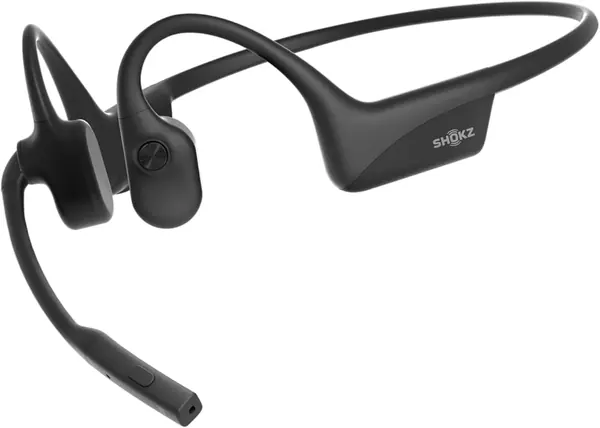
Some calls happen where covering both ears is a bad idea. The OpenComm2 rests on your cheekbones and leaves both ears clear, so you hear the loading dock, the engine, or a kid in the next room while the boom mic handles your end of the conversation. Nothing else here does that.

The numbers say what Shokz built it for: 16 hours of talk time against 8 hours of listening. Most pairs quote one figure and hope you do not notice; this one is honest that the microphone is the point. There is a physical mute button on the frame that you can find by feel, a flexible 35-gram band, and an IP55 rating for sweat and weather.

Fit is the variable to think about. Bone conduction only works when the transducers sit against the right spot, and on a smaller head the frame can sit loose enough to weaken that contact. Charge retention is the other thing to watch: these run a long day when they hold a charge, and some units stop holding one.

At the top of the price range here, it is the most expensive way on this list to take a call, and we think it earns that only when ear awareness is the requirement. At a desk the Angteela M112 does more for less; on a moving vehicle, nothing else here comes close.

Pros

  • Open-ear design keeps you audible to the room
  • 16 hours of talk time, 8 hours of listening
  • Physical mute button and a 35-gram frame

Cons

  • Costs more than every other pick here
  • Charge retention can fail after months of use
Our verdict

We recommend the OpenComm2 to anyone whose ears need to stay open — drivers, warehouse staff, parents — and who can live with the premium.

Check Latest Price
6

HEIBAS G7 Best Single-Ear

88 /100
TKZ Score Excellent

Key details

Talk Time
18 hours
Fit
Single in-ear
Mute
On-call button
Charging Case
500 mAh, up to 72 hours
View on Amazon

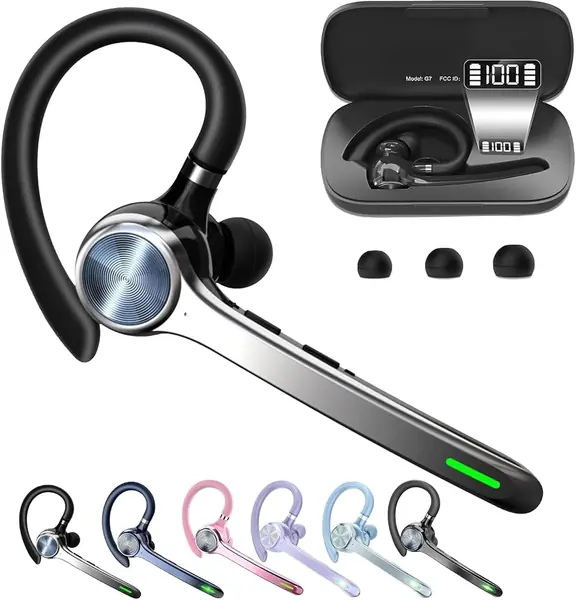
Not every call happens in front of a screen. The HEIBAS G7 is one earbud and a case, with no headband to muss your hair and nothing to take off when someone walks into the room. If calls arrive while you are driving, stocking shelves, or walking between buildings, the form factor is the recommendation.

The numbers are built for that life: around 18 hours from the earbud and up to 72 with the 500 mAh case, plus a display on the case that shows what is left so you are never guessing. The mute button sits on the earpiece, within reach of the same hand that answers, and it works only during a phone call — the one detail that trips people up if they expect a mic switch inside a desktop meeting app.

We like it best as a second pair, the one for the car and the shop floor, rather than the only one you own. Sound is a single ear with nothing in the box to compete with the boom mics above for a client call, but as a way to answer on the first ring with both hands busy, it is the least fussy thing here.

Pros

  • Single earbud and case fit a pocket
  • Up to 72 hours of talk time with the case
  • Mute button on the earpiece itself

Cons

  • Mute works only during phone calls
  • One earbud, so music is mono
Our verdict

The one we keep in the car: a single earbud, a pocketable charging case, and a mute button that sits on the earpiece itself.

Check Latest Price
7

Sony WH-CH520 Best for Music-First Listening

87 /100
TKZ Score Excellent

Key details

Fit
On ear
Charging
USB-C with quick charge
Multipoint
Two devices
Battery Life
Up to 50 hours
View on Amazon

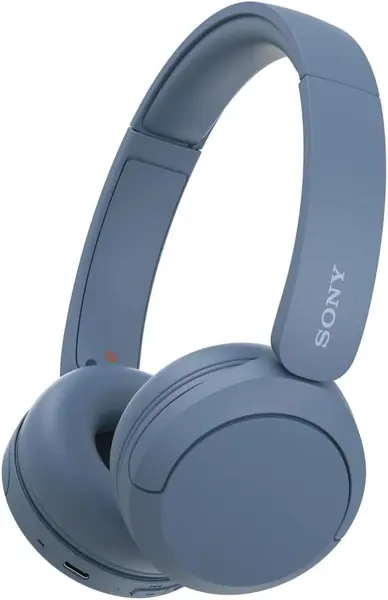
Sony built the WH-CH520 for playback. There is an EQ app, up to 50 hours of battery, multipoint for two devices, and swivel earcups that lie flat on your shoulders when you take them off. The microphone is built into the earcup because calls had to go somewhere; there is no boom to put near your mouth.

We rate it as the pair for a day that is mostly music and a little talk — a podcast, a playlist, a fifteen-minute check-in. Fifty hours means you charge it roughly once a month instead of every night, which sounds like a small thing until you have owned a headphone you never think about.

For work, the compromise shows. The earcup mic picks up whatever the room is doing, so a coffee shop or a shared office puts all of it on the call, and there is no noise canceling at all — this is an unsealed on-ear with soft pads, not a commuter's sealed can. Sony's handling of two paired devices is genuinely tidy, though, which is more than some far pricier headphones manage.

What keeps it on our desk is the mundane stuff: the battery, the app, the multipoint handoff, all of it tuned for listening. If music leads and calls follow, this is the one; for the reverse order, look at the boom mics above.

Pros

  • Up to 50 hours per charge
  • Multipoint keeps two devices paired
  • Sound you can shape in the Sony app

Cons

  • On-ear pads press on the ears after a few hours
Our verdict

We like it for music that occasionally takes a call, and we do not recommend it as the headset you buy for work.

Check Latest Price
8

Apple EarPods (USB-C) Best for USB-C Phones

86 /100
TKZ Score Excellent

Key details

Connection
USB-C wired
Weight
0.63 oz
Controls
In-line remote and mic
Compatibility
Devices with USB-C
View on Amazon

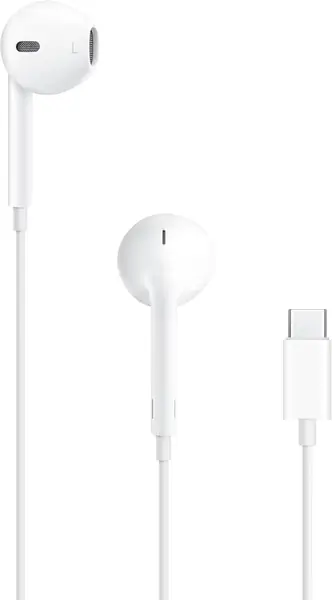
There is no battery in these and nothing to pair. The USB-C EarPods are the pair that still works at nine in the morning after you forgot to charge anything overnight — plug into a phone, tablet, or laptop with a USB-C port and you are on the call.

The microphone lives in the remote on the wire, at roughly chest height, which puts it closer to your mouth than a mic buried in a wireless earcup and further away than a boom. That same remote handles volume, play and pause, and answering or ending a call, so you are not diving for the phone mid-sentence.

Fit is the usual hard-plastic question: they sit in the bowl of your ear rather than sealing it, which is comfortable for some people and loose for others, and there is no seal to speak of. Durability is the weak spot — an earbud going silent after a few months is the failure that turns up, so treat them as a consumable rather than an investment.

We treat these as the backup that never needs charging, the one worth keeping in a laptop bag for the call you take while your wireless pair sits on its stand. For eight hours of meetings, the missing boom and the open fit show up by the second hour.

Pros

  • No battery and no pairing to manage
  • In-line remote handles volume and calls
  • Works with any device that has USB-C

Cons

  • Nothing seals the room out
Our verdict

The pair that lives in our bag: no battery, no pairing, a mic on the wire, and a call that works when everything else is dead.

Check Latest Price

How We Tested Headphones for Calls

We started by sorting every candidate by how it connects — wired USB, Bluetooth with a USB dongle, and straight Bluetooth — then filtered for a dedicated mute control, a boom or beamforming mic, and a price that made sense for what you get. We deliberately kept a wired option and an open-ear option in the mix for people who don't want another device to charge.

Twelve headsets came in, and each one became the only headset I used for at least a week over six months. They went through morning standups, eight-hour meeting days, a dog walk in light wind, calls from a parked car, and a kitchen session with the dishwasher running two feet away.

Microphone quality got its own pass: I recorded the same 60-second script into each headset with background noise playing, then played the clips back through speakers and had a colleague rate them blind. I tested every mute control mid-sentence to confirm the person on the other end actually stopped hearing me, and I measured cord length from plug to earpiece to see whether it reached across a desk without tugging.

For the rest, we ran each battery from full to shutdown on a loop of calls and music, noting how quickly a short charge got us back on a call. I wore them in four-hour stretches and logged clamp pressure and ear heat, and I paired each one to a laptop, a phone, and a tablet, walked two rooms away, and counted the dropouts.

How to Choose Headphones for Calls

Work Out What the Noise Canceling Is Actually Canceling

Two different technologies get sold under one name. ANC blocks sound before it reaches your ears, which is nice for your focus and does nothing for the person listening to you. ENC works on the microphone, filtering the room out of what the far end hears, and that is the one that decides whether you sound like you are in a call center or a coffee shop.

A headset can have either, both, or neither. If callers complain about background noise, read the microphone spec rather than the headphone spec. The Angteela M112 carries both; the Soothielec KH53 puts its cancellation on the mic only.

Match the Connection to the Laptop You Actually Have

Wired USB-A is the least interesting and most reliable answer: no charging, no pairing, no app to install, and it shows up as a sound card the moment you plug it in. A USB dongle does the same job without the cable and gets around a work laptop that will not pair with anything. Plain Bluetooth is right for a phone and for walking around.

If the machine is managed by IT and Bluetooth is locked down, buy wired or dongle — the connection is the feature. Anyone on a newer laptop should check the dongle's plug, since USB-C ports outnumber USB-A now.

Treat Weight and Clamp as Call Features

The pair you wear for four hours is a different product from the one you wear for forty minutes. Over-ear cups spread pressure and seal better across a long day; on-ear designs are lighter and easier to grab and go, but they press on the ears sooner. A 35-gram open-ear frame disappears entirely, at the cost of isolation.

If you wear glasses, the temples are what the clamp pushes against. Soft wide pads and a light clamp help more than a padded headband does.

Put Mute Where Your Hand Goes

Mute is the control you use most and the one most likely to be misunderstood. A flip boom shows its state to you and to the room. An inline button or an earcup button works if it sits on the side your hand already rests.

What you want is a hardware mute that works whichever app is open, ideally one that shows whether it is on. A mute that only functions inside a phone call will strand you in a desktop meeting.

Decide Whether Your Ears Need to Stay Open

Sealed cups are the wrong tool if you are driving, operating machinery, or listening for a kid. Bone conduction and open-ear frames leave the ear canal clear and put a boom mic where your voice is, which is why they turn up in trucks and on warehouse floors.

The trade runs the other way in an open office: an open frame leaks your call to the desks around you. Keep it for the road and put a sealed pair on at your desk.

Frequently Asked Questions

Final Verdict

The Angteela M112 is the one we point most people to, because it covers a laptop and a phone without re-pairing and puts mute on a hinge you can see from across the room. If your calls never leave a desk, the Jabra Evolve 10 does the essential job for a fraction of the money and adds a two-year warranty.

And if the room has to stay audible — driving, a shop floor, a toddler in the next room — the Shokz OpenComm2 is the only pick here built for it.