Best Wireless Microphones of 2026

Karaoke night is only fun until the microphone cuts out mid-chorus. Going wireless trades a tangle of cables for three new risks: a dead battery, a dropped signal, and a receiver that won't talk to your phone. A good system gives you the freedom without the tradeoff — hand the mic to a guest, cross the stage, film a vlog with both hands, and the room still hears every word.

My team and I have spent six months with 14 wireless systems — clip-on kits built for phones and cameras, handheld sets for singers — and the differences show up fast. A charging case carrying two or three extra charges matters more day to day than a big claimed range, and auto-limiting, which pulls the level down when someone shouts, is the feature first-time buyers overlook.

Clean sound, honest battery life, and a receiver that fits the gear you already own decided almost every pick. Whether you record alone or pass a mic around a room, the right one is below.

The Best Wireless Microphones

1

DJI Mic Mini Best Overall
96 /100
TKZ Score Outstanding

Key details

Microphone Type
Clip-on lavalier, two transmitters
Wireless Range
Up to 400 m
Battery With Case
Up to 48 hours
Included Adapters
USB-C phone, 3.5 mm camera
View on Amazon

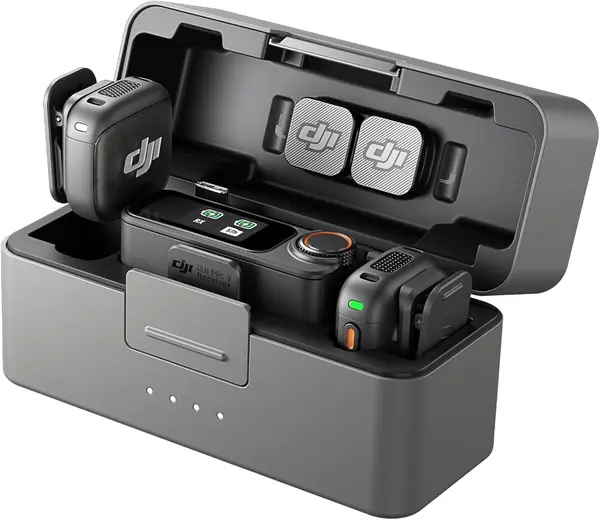
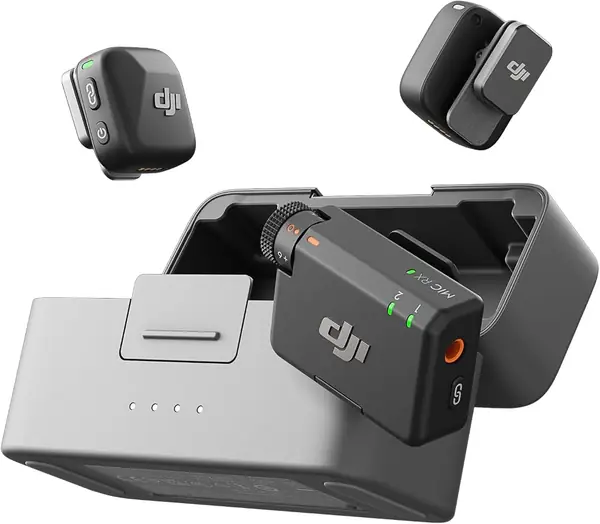
Ten grams is about the weight of two sheets of paper, and it explains most of what the DJI Mic Mini gets right. The transmitter clips to a collar and stays there without pulling a T-shirt out of shape, so an on-camera interview doesn't look like hardware is hanging off the subject. Two transmitters, the receiver, and a charging case fit in one hand.

The case is the part that changes how you pack. DJI rates the set for up to 48 hours of use with the case topping the transmitters up between sessions, and the transmission range is listed at 400 meters, both far beyond what a clip-on needs. Two noise-cancellation levels do the practical work: Basic for a quiet room, Strong when there's an air handler or a crowd behind the subject. Automatic limiting keeps a sudden laugh from tearing the audio.

What earns it the top spot is the combination rather than any single figure. It is the lightest and the least expensive of our full-featured picks, and its case outlasts the one on DJI's own premium model. If you already shoot on DJI's Osmo cameras or a gimbal, the transmitter connects to them directly without the receiver at all, which is one less box to keep track of.

The box includes a USB-C phone adapter and a 3.5 mm camera cable. Use the windscreens outdoors, since they are the difference between a usable take and a wash of wind noise on a breezy day.

Pros

  • Ten-gram transmitters stay put on a collar
  • Up to 48 hours of use with the case
  • Two noise-cancellation levels plus automatic limiting

Cons

  • No Lightning adapter in the kit
Our verdict

For most people recording voice to a phone or a camera, this is the kit we point to: the lightest transmitters here, the longest case battery, and the lowest price of our full-featured picks.
Check Latest Price
2

Hollyland Lark M2 Best for iPhone and Mixed Devices

95 /100
TKZ Score Outstanding

Key details

Microphone Type
Clip-on lavalier, two transmitters
Wireless Range
Up to 300 m
Battery With Case
Up to 40 hours
Included Receivers
Camera, USB-C, Lightning
View on Amazon

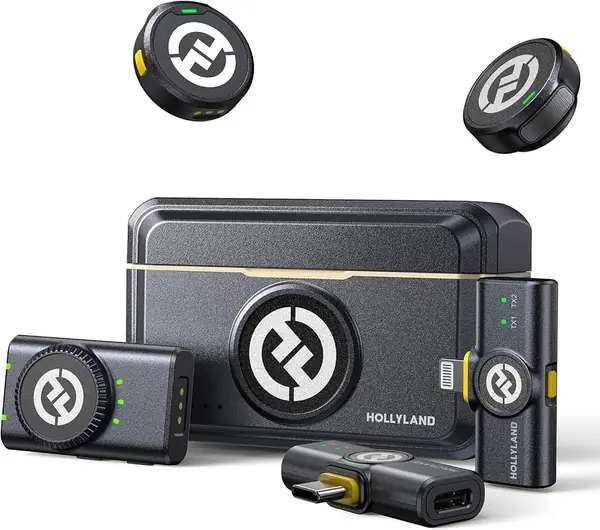
Three receivers ride in the Lark M2's case, one for a camera's 3.5 mm input, one USB-C, one Lightning, and that is the reason we hand this kit to anyone whose week includes both a phone and a camera. You don't hunt for an adapter or a dongle; you take out the receiver that matches the device in front of you and plug it in.

The transmitters weigh 9 grams and record at 48 kHz/24-bit with a 70 dB signal-to-noise ratio. The magnet is the detail we appreciate most: instead of clipping a mic to a neckline, you can pin the transmitter under a shirt or onto a cap and keep it out of frame entirely. Noise cancellation is one button on the transmitter, and the camera receiver switches between mono and stereo.

Battery life runs to 10 hours per transmitter with noise cancellation off, and up to 40 hours with the case, which covers a shoot day with plenty left. The thing to check is the case itself: it's the only way to recharge the transmitters on location, so confirm it's taking a charge before you pack it rather than discovering otherwise on set.

Pros

  • Three receivers cover Lightning, USB-C, and cameras
  • Nine-gram transmitters with strong magnets
  • One-button noise cancellation on the transmitter

Cons

No notable drawbacks to flag.

Our verdict

This is the one we hand to anyone whose kit mixes an iPhone, an Android phone, and a camera: three receivers cover them all, and the magnets make the transmitters easy to hide.

Check Latest Price
3

Hollyland LARK A2 Best Budget Clip-On Kit

94 /100
TKZ Score Outstanding

Key details

Microphone Type
Clip-on lavalier, two transmitters
Battery With Case
Up to 42 hours
Audio Format
48 kHz / 24-bit
Transmitter Weight
0.3 oz
View on Amazon

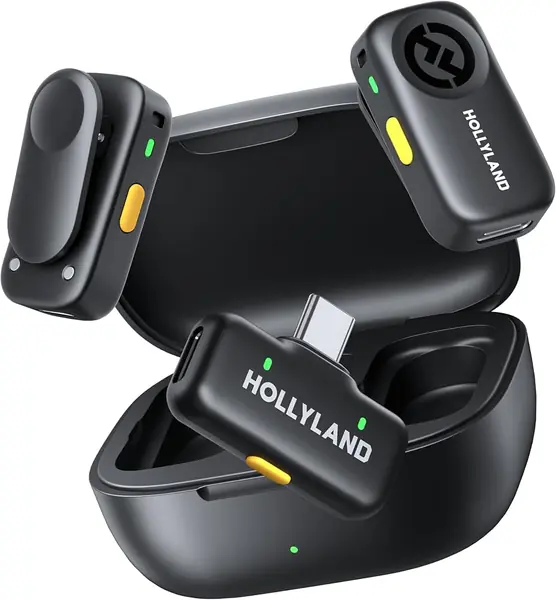
The LARK A2 is the least expensive kit on this list, and it doesn't read as a stripped-down one: two 8.5-gram transmitters, a USB-C receiver, and a charging case that carries the set to 42 hours of use. Audio is captured at 48 kHz/24-bit, the same format the premium kits use, each transmitter runs about seven hours before it needs the case, and furry windscreens come in the box.

What we like most is the auto-limit. Point this at a child, an interviewee who suddenly laughs, or anyone who leans into the mic, and it pulls the level down before the take clips, protection that usually shows up further up this list.

Two things to know before you buy. Pairing is the weak spot: some phones connect instantly, others fight interference from other Bluetooth gear nearby, so pair it at home and use it once before a real shoot. And the noise cancellation takes the edge off a room rather than erasing it, which is useful in a café and no substitute for a quiet corner.

Pros

  • Auto-limit stops sudden shouts from clipping
  • 42 hours of use with the charging case
  • 8.5-gram transmitters clip on discreetly

Cons

  • USB-C receiver only, with no Lightning option
Our verdict

Our budget pick, and the one we suggest when the recordings include sudden laughs and shouts, because the auto-limit protects those takes for far less than the rest.

Check Latest Price
4

DJI Mic 3 Best for Multi-Person Shoots

93 /100
TKZ Score Outstanding

Key details

Microphone Type
Clip-on lavalier, two transmitters
Battery With Case
Up to 28 hours
Audio Control
Adaptive gain, three voice tones
Transmitter Support
Up to four
View on Amazon

The Mic 3 is what you buy when a shoot has more than one person in it, or when the person talking won't hold a steady volume. It's the premium option here, and the extra money goes into control rather than size: the transmitters are still small enough to vanish on a collar, and the receiver still slips into a pocket.

Adaptive gain is the headline. It rides the level as someone whispers and then shouts, so one take stays usable without a hand on a dial. Three voice tones and two noise-cancellation levels let you match a room, and the receiver pairs with up to four transmitters and outputs four channels, enough for a panel rather than just an interview pair.

Dual-band anti-interference is the other upgrade, and it's the one that matters in a hotel ballroom or on a tradeshow floor where every other crew is crowding the same wireless space. DJI rates the set for 28 hours of use with the case.

That 28 hours is the trade. The Mic Mini's case runs to 48, and the premium kit asks you to charge more often in exchange for four channels and adaptive gain. Solo creators recording to a phone get none of that benefit and should stay with the cheaper kit.

Pros

  • Adaptive gain handles whispers and shouts in one take
  • Receiver pairs with up to four transmitters
  • Dual-band anti-interference for crowded venues

Cons

  • Case battery is shorter than the cheaper Mic Mini's
Our verdict

We think it's worth the upgrade for two- and four-person shoots and unpredictable audio; a solo creator recording to a phone gets everything needed from the Mic Mini.

Check Latest Price
5

Phenyx Pro PTU-71-2H Best Handheld System for Events

92 /100
TKZ Score Outstanding

Key details

Microphone Type
Handheld, two mics
Wireless Range
Up to 328 ft
Outputs
XLR and 1/4 inch
Selectable Frequencies
100 per channel
View on Amazon

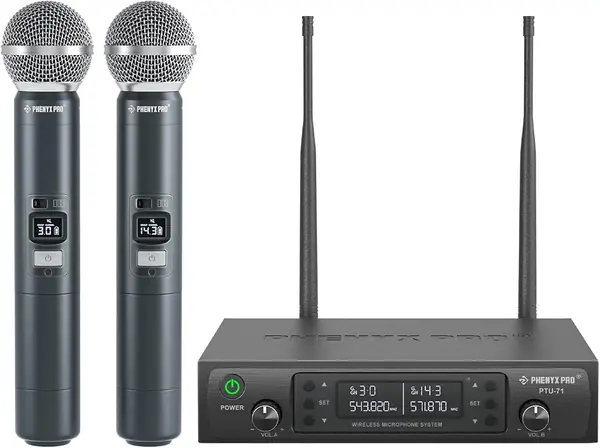
Auto scan is the button that earns this system its place. Press it and the receiver looks for the cleanest frequency in its band, which is the difference between a clean toast and a channel that drops out the moment another radio cuts through. Each channel offers a hundred selectable frequencies, so there is somewhere to move when the first choice goes bad.

We like the output flexibility as much as the scan. Each mic can run to its own XLR channel, or both can be combined into a single 1/4-inch feed, so a small club can mix two voices separately and a house party can run one cable. The mics and receiver are metal, and the tuning gives voices a fuller low end than the TONOR pair below.

Battery life is the moving part. The receiver shows an indicator per channel and runtime varies from a full evening to a couple of hours depending on the cells you feed it, so watch the indicator and keep spares in the case. Range is rated at 328 feet, more than most rooms ask for.

Pros

  • One-touch auto scan finds a clear frequency
  • Per-mic XLR outs or a combined 1/4-inch feed
  • All-metal mics and receiver

Cons

  • Runs on AA batteries, with no rechargeable pack
Our verdict

Our pick for events with two handhelds: scan once, hand out two metal mics, and run each to its own XLR channel or a single cable.

Check Latest Price
6

Phenyx Pro PTU-5000-4H Best for Groups and Panels

91 /100
TKZ Score Outstanding

Key details

Microphone Type
Handheld, four mics
Wireless Range
Up to 260 ft
Outputs
Four XLR plus 1/4 inch
Channels
Four fixed UHF frequencies
View on Amazon

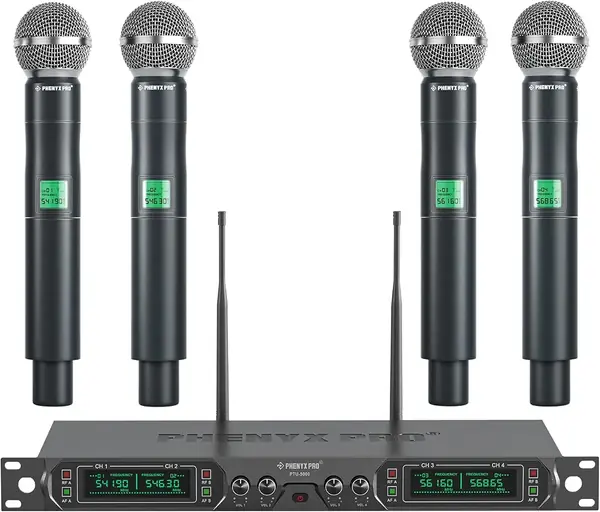
Four handhelds, one receiver, four XLR outputs. If your event has ever involved passing a single mic down a row of speakers, the appeal doesn't need explaining.

Each channel has its own volume dial and its own XLR out, so a worship team or a panel can be mixed separately instead of being summed into one feed. The frequencies are fixed, four specific channels between 541.9 and 568.65 MHz, and a memory switch holds your last settings so the next setup is quick. The set is all metal, rated to 260 feet, and arrives with eight AA batteries.

We included it for the nights when headcount is the problem, and it's the only four-mic system in this guide. It suits a church, a panel, or a small stage, and it's more than a two-person interview needs, since the PTU-71-2H handles that with frequency agility for less money.

Fixed frequencies are the trade. If one of the four clashes with a local broadcaster or another wireless rig, you can't scan your way out of it, so test all four channels at the venue before the doors open. Test the audio path too, not just the power light: there are sets that still connect but stop passing sound after a couple of years.

Pros

  • Four mics with individual XLR outputs
  • Memory switch keeps the last settings
  • All-metal build with batteries included

Cons

  • Fixed frequencies can't be re-scanned
Our verdict

We keep this one for the nights when four people need a mic at once, because every handheld gets its own output and its own volume dial.

Check Latest Price
7

TONOR TW-820 Best for Home Karaoke and School Events

90 /100
TKZ Score Outstanding

Key details

Microphone Type
Handheld, two mics
Wireless Range
Up to 200 ft
Selectable Frequencies
15 per mic
Body
All metal
View on Amazon

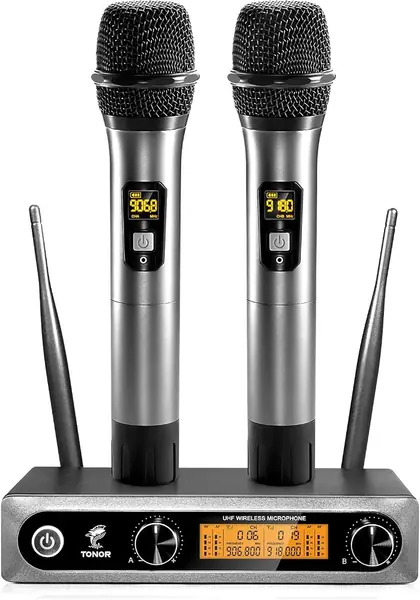
Two metal handhelds on a budget is the pitch, and the TW-820 mostly delivers it. The bodies have a steel mesh grille and enough heft to feel like real microphones rather than props, which is not what the price prepares you for.

Fifteen selectable frequencies per mic mean several sets can share a room without stepping on each other, and the receiver matches automatically when you switch on. Each mic gets its own volume dial, and the receiver runs to an amp or a powered speaker over 6.35 mm or XLR.

There's no speaker inside and no effects, so this is a microphone system and not a karaoke machine. You'll need a powered speaker, an amp, or a mixer with a mic input, which is the piece people forget when they order a wireless mic for a party.

Where it gives ground is in the hand. The metal body carries handling noise into the PA, so a singer who taps the grille or passes the mic mid-note will hear it, and battery life swings from all evening to a mid-party cell change. For karaoke at home or announcements at a school fair, both are easy to work around; for a paid gig every weekend, the Phenyx Pro pair is the sturdier bet.

Pros

  • All-metal bodies at a budget price
  • Fifteen selectable frequencies per mic
  • Separate volume dial for each mic

Cons

  • Handling noise can reach the PA
Our verdict

We recommend it as a first handheld system for karaoke and school events, as long as you keep spare AA cells and hold the mic steady.

Check Latest Price
8

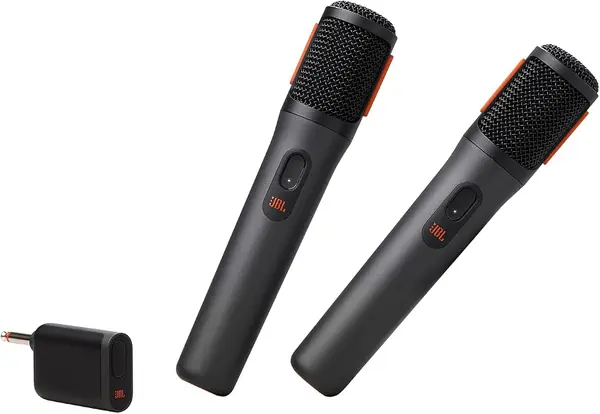
JBL PartyBox Wireless Mic Best for JBL PartyBox Owners

89 /100
TKZ Score Excellent

Key details

Microphone Type
Handheld, two mics
Battery
Up to 20 hours
Connection
2.4 GHz USB dongle
Pickup Pattern
Cardioid
View on Amazon

This one only works with a JBL PartyBox speaker. If that isn't your setup, skip it and pick a kit that brings its own receiver; if it is, these are the least fiddly way we've found to add vocals to a speaker you already own.

The dongle goes into the PartyBox, the mics switch on, and they connect. There's no receiver to place, no app, and no pairing screen. JBL rates the mics for up to 20 hours per charge, or about 12 when they're running through the dongle.

The details are where it earns its rating. A shock mount inside each mic cuts the thump of passing it hand to hand, and a built-in pop filter keeps plosives from punching the speaker. The cardioid pattern favors the voice in front of it over the room behind.

What it doesn't give you is control: volume and echo can't be adjusted from the mic, so a singer can't fine-tune mid-song. For a backyard party or a family gathering that's fine. For anything where someone is mixing live, choose a system with a dial on the receiver.

Pros

  • Plugs straight into a PartyBox with no receiver
  • Shock mount and pop filter reduce noise
  • Up to 20 hours of play time per charge

Cons

  • No volume or echo control on the mics
Our verdict

If you already own a JBL PartyBox, this is the simplest way we've found to add two wireless voices; without one, it isn't a general-purpose mic.

Check Latest Price

How We Tested Wireless Mics in Real Rooms

We started with research rather than shopping: reading spec sheets and owner reviews, then sorting each system by what it plugs into — USB-C for a phone, a cable for a camera, XLR into a mixer or PA. Price narrowed it further, and so did the box contents, because a missing adapter or windscreen can cost as much as stepping up to the next kit. That left 14 systems, which we've been using for six months.

Testing happened wherever people actually talk into a microphone. I recorded voiceovers at the kitchen table, ran transmitters through a backyard birthday party's karaoke hour, set up a multi-mic handheld system on a borrowed stage with a PA, and wore a clip-on around a loud coffee shop and along a windy sidewalk. At each setup I timed pairing from case-open to first recording, then walked away from the receiver until the audio stuttered, noting how far I got and whether it recovered. I clipped transmitters to collars and shirt plackets for hour-long sessions to see which ones dragged fabric or pulled a neckline crooked.

Noise cancelling got a box fan and a running faucet held a couple of feet from the mic; I listened for whether the hiss dropped or the voice went thin and metallic. To judge the limiter I laughed and shouted straight into each transmitter. Battery life came from full drain cycles over weeks, plus a check of whether each unit keeps working while charging. Finally, I dropped transmitters from waist height onto pavement and tossed them in a tote bag with keys, then noted which ones felt loose at the connector afterward.

How to Choose a Wireless Microphone

Match the Receiver to the Devices You Record With

Every kit ends in a plug, and the plug is where most disappointments start. A camera wants a 3.5 mm output, a USB-C phone wants a USB-C receiver, and a Lightning iPhone needs either a Lightning receiver or an adapter. Kits sold as universal often include one adapter and leave the rest to you. The Hollyland Lark M2 ships three receivers and covers all three without an adapter; the DJI Mic Mini includes USB-C and a camera cable. Write down your devices, then check the box against that list before you order.

Choose Clip-On or Handheld by the Job

A clip-on lavalier frees both hands and keeps the mic close to the mouth, which is what vlogs, interviews, tutorials, and phone-first shooting need. Handheld systems suit voices that move between people, like karaoke, toasts, worship, and announcements, and they behave differently: a handheld is a microphone, not a speaker, so it needs an amp, a powered speaker, or a mixer with a mic input before anyone hears it.

Buy for the room rather than the spec sheet. A party needs a speaker as well as mics, and a two-person interview needs two transmitters, not a handheld pair.

Understand the Band and What a Range Figure Means

Clip-on kits run on 2.4 GHz, a band shared with Wi-Fi, Bluetooth, and every other creator in the building. Handhelds usually run on UHF, where selectable frequencies and a scan button let you step around a clash; the Phenyx Pro PTU-71-2H does it with one press. Range figures are open-space numbers, and a 400-meter rating is not what you get through walls, bodies, and a crowd. Buy for the room you'll actually stand in, and keep the receiver in line of sight where you can.

Plan for Power and for the Take You Can't Repeat

Rechargeable kits live and die by their case, and case ratings across this list run from 28 to 48 hours of top-ups. Charge it the night before and confirm it's taking a charge before a trip, because it's the only way to refill a transmitter on location. Handheld sets run on AA cells, so carry spares and watch the per-channel indicator. For audio you can't redo, favor a limiter or auto-limit: the Hollyland LARK A2 has one at the budget end, and a clipped shout is not something you can fix afterward.

Frequently Asked Questions

Final Verdict

For most people recording voice, the DJI Mic Mini is the one to buy. Two ten-gram transmitters, a case that keeps them running for days, two levels of noise cancellation, and the lowest price among our full-featured picks add up to a kit that disappears into a shoot.

Change the requirement and the answer changes. If your bag holds a Lightning iPhone and a camera, the Hollyland Lark M2's three receivers remove the adapter question entirely. If four people need mics at once, the Phenyx Pro PTU-5000-4H is the only system here built for it.