Best Tablets for Autistic Kids of 2026

A tablet can be the most predictable thing in an autistic child's day — the same show, the same game, the same order, every time — right up until it stutters, dies mid-episode, or lands on the kitchen floor. I've watched a favorite video freeze at exactly the wrong moment, and the meltdown that follows is rarely about the video. What you need is boring: a screen big enough that an imprecise tap still lands, a battery that lasts a day out of the house, and a case that survives the throw you know is coming.

We've spent six months living with 12 kids' tablets, and the split came down to parental controls. Some let you build a locked kids' space and add three apps in about two minutes; others bury the settings three menus deep and interrupt play with a PIN prompt every time a child taps something new.

None of these are fast machines, and none is a disguised flagship. What they are is inexpensive, replaceable, and — set up right — calm. Below are the ones I'd hand to a child without a second thought, grouped by who they suit.

The Best Tablets for Autistic Kids

1

Evermyth 10-Inch Kids Tablet Best Overall
89 /100
TKZ Score Excellent

Key details

Battery
6000mAh
Display
10-inch IPS, 1280 x 800
Storage
64GB, microSD expandable
App Access
Google Play
View on Amazon

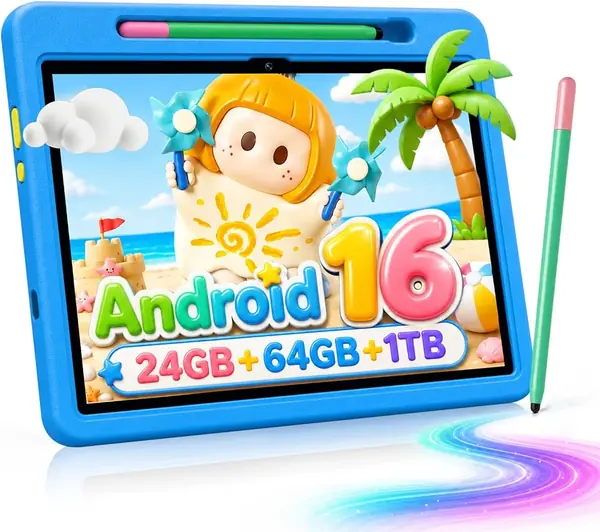
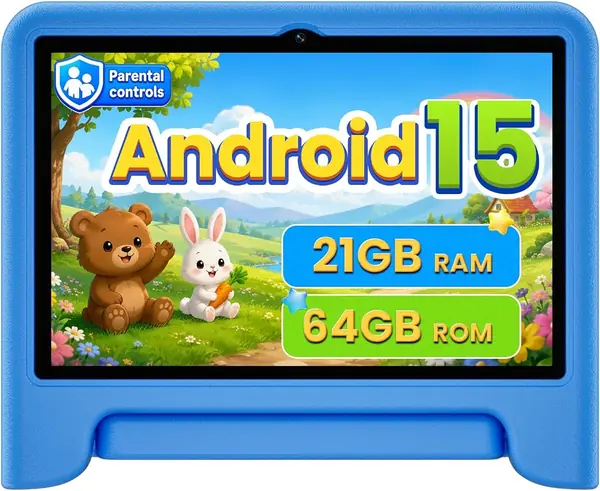
The Evermyth is built for the family that wants one tablet to do several jobs: a 10-inch screen for AAC boards and video, Android 16 with Google Play access, 64GB of storage, and a protective case with a 180-degree stand. The stylus and case arrive in the box, so it's ready for tabletop use without a second shopping trip.

That combination is why it's our top pick. You can install the communication, learning, and entertainment apps your child actually uses, then hand over the UKIDOZ Kids Space profile with its own limits. The 1280 x 800 IPS panel is bright enough for close work, and the 6000mAh battery is sized for a day of mixed use. We also appreciate the 1.1-pound body, which is light enough to move between the kitchen table and a therapist's office.

The first setup update is worth running before you hand it over; the tablet can feel sluggish until it finishes. Beyond that, the experience is pleasantly ordinary in the way a good kids tablet should be: apps open, the case stands up, and the screen wipes clean after snack time.

Pros

  • Google Play access for AAC apps
  • 64GB storage plus microSD slot
  • Protective case and stylus included
  • Bright 10-inch IPS display

Cons

  • Large 10-inch body for small hands
Our verdict

We recommend the Evermyth for most families: it runs Android 16 with Google Play, has 64GB of storage, and ships with a protective case and stylus.
Check Latest Price
2

Gleeso 10-Inch Kids Tablet Best for App Compatibility

88 /100
TKZ Score Excellent

Key details

Battery
6000mAh
Display
10-inch HD, 1280 x 800
Storage
64GB, microSD expandable
App Access
GMS certified
View on Amazon

GMS certification is the reason this Gleeso earns a runner-up spot. On a kids tablet, that is not jargon: it means the Google Play side of the device is properly supported, which is the least risky route to the AAC and learning apps you may already have chosen. You also get Android 16, a 10-inch HD screen, 24GB of RAM, 64GB of storage, and a 6000mAh battery.

The 10-inch screen is a good size for communication grids, and the included case gives it a better chance against drops. In use, the performance is fine for apps and video but not eager; the speed is adequate rather than impressive, and it is not the pick for a child who wants demanding games.

The bigger question is price. This is the most expensive tablet in our group, and the premium buys Google support rather than a faster chip or a nicer screen. If app compatibility is the worry that keeps you up at night, that trade is easy to defend; if your child mostly watches videos and plays simple games, the top pick covers the same ground for less.

Pros

  • GMS certified for Google Play
  • 64GB storage and 24GB RAM
  • 10-inch HD screen with case

Cons

  • Highest price in this group
Our verdict

If Google Play compatibility is your main worry, the Gleeso is the one we point to, as long as the premium price is acceptable.

Check Latest Price
3

WXUNJA 10.1-Inch Kids Tablet Best for Simple Setup

87 /100
TKZ Score Excellent

Key details

Battery
6000mAh
Display
10.1-inch IPS, 1280 x 800
Storage
64GB
Parental Controls
Google Kids Space
View on Amazon

The WXUNJA comes with Google Kids Space and parental controls that are straightforward to configure, plus a 10.1-inch 1280 x 800 IPS screen, Android 15, 64GB of storage, a 6000mAh battery, and an included silicone case.

That easy setup is the reason it lands as our pick for families who don't want to fight the tablet before their child can use it. We also like the 18W fast charging, which is a practical detail on a device that gets passed around and plugged in at odd hours. The screen is big enough for AAC boards and videos, and the case has a stand for tabletop use.

The caveat is charging reliability. Battery life and charging are the mixed part of this tablet's story, so check the charging port and run a full charge cycle during the return window. If the tablet stays home and gets plugged in nightly, that risk is easier to live with than if it travels to school every day.

Pros

  • Easy Google Kids Space setup
  • 18W fast charging for quicker top-ups
  • 10.1-inch screen and stand case

Cons

  • Charging reliability is the weak spot
Our verdict

We like this one for families who want parental controls set up without a fight, though the charging system is the part to watch.

Check Latest Price
4

EDUAITABLET 10-Inch Kids Tablet Best Budget Pick

86 /100
TKZ Score Excellent

Key details

Battery
6000mAh
Display
10.1-inch IPS, 1280 x 800
Storage
32GB
Audio
3.5mm headphone jack
View on Amazon

At the lower end of our group, the EDUAITABLET keeps the 10.1-inch screen, Android 16, and 6000mAh battery, and adds a feature the others don't all have: a 3.5mm headphone jack. That matters for a child who uses wired headphones in a classroom, therapy session, or noisy car, and it's the reason this is our budget pick.

The trade-off is storage. You get 32GB onboard, which fills quickly once you add a few AAC, learning, and video apps, so plan on a microSD card from the start. The EVA case is chunky in the way a good kids case should be, and the 10.1-inch IPS screen is clear for the price.

The 6000mAh battery is rated for up to 12 hours, though that figure assumes lighter use than a child running apps and video all day. We treat this as a solid second tablet or a first one for a family that wants wired headphones and doesn't mind adding storage.

Pros

  • 3.5mm headphone jack for wired audio
  • Android 16 on a 10.1-inch screen
  • Protective EVA case included

Cons

  • Heavier than other 10-inch picks
Our verdict

This is our budget pick for a child who needs a headphone jack, provided you add a microSD card for the 32GB storage.

Check Latest Price
5

COLORROOM 10.1-Inch Kids Tablet Best for Large-Screen Light Use

85 /100
TKZ Score Excellent

Key details

Battery
6000mAh
Display
10.1-inch IPS, 1280 x 800
Storage
64GB
System
Android 15
View on Amazon

The 10.1-inch screen and 64GB of storage are the draw here. That's a lot of canvas for AAC grids and video, and the Android 15 software with Google Kids Space gives you the usual parental controls. The pink color is a nice change from the blue-and-green parade, and the included EVA case adds drop protection.

We also appreciate that the 6000mAh battery is paired with a 10.1-inch IPS panel rather than a smaller, cheaper screen; for a child who needs a large touch target, that combination makes sense. The tablet is light enough to move around the house, and the 64GB storage means you aren't immediately hunting for a microSD card.

That makes it a home-first tablet in our view. If it stays on a kitchen counter and gets plugged in every night, the screen and storage still make it worth a look; for a device that needs to run all day away from an outlet, one of our runner-ups is the better fit.

Pros

  • Large 10.1-inch screen for AAC grids
  • 64GB storage for apps and media
  • Google Kids Space parental controls

Cons

  • Battery and charging are the weak spot
  • Durability is uneven after drops
Our verdict

We see the COLORROOM as a home-first tablet: the big screen and 64GB storage are useful, but the battery is not the one to trust for school days.

Check Latest Price
6

Jeazans 10-Inch Kids Tablet Best for Short-Session Use

84 /100
TKZ Score Excellent

Key details

Battery
6000mAh
Display
10.1-inch HD
Storage
64GB
Estimated Runtime
3.5 to 4 hours
View on Amazon

On paper this looks like our top pick: Android 16, 24GB of RAM, 64GB of storage, a 10.1-inch HD screen, and a 6000mAh battery. The difference shows up in the runtime estimate. The maker puts battery life at roughly 3.5 to 4 hours of nonstop use, which is short for a device that might run an AAC app through a school day.

For short sessions, the package is sensible. The five-core processor is specified for everyday apps rather than heavy games, and the parental-control mode lets you create profiles and manage content. The 64GB storage gives you room for communication and learning apps, and the USB-C port handles charging and wired headphones.

We see this as a second tablet rather than the main one. If your child uses a tablet for short breaks and car rides, the rest of the package is competitive; for school-day communication, one of our runner-ups is the better fit.

Pros

  • Android 16 with 24GB RAM
  • 64GB storage for app libraries
  • Parental control profiles for content limits

Cons

  • Wired headphones require USB-C
Our verdict

It works as a short-session tablet, but it is not the one to rely on for all-day AAC use.

Check Latest Price

How We Tested Tablets for Autistic Kids

We started with every kids' tablet we could find that shipped with a case and some form of built-in parental control, then filtered out anything with a screen much smaller than 10 inches, a battery under 6,000mAh, or a processor that couldn't stream video without stuttering. That left 12 tablets, all bought at retail, each one in near-daily use for six months.

Every tablet went into the same routine: after-school wind-down, car rides, waiting rooms, and the twenty minutes before bed. I timed how long it took to create a kids' profile and add three apps, then watched how often the device interrupted play with a PIN prompt or dropped a child out of an app entirely. I also logged load times for two popular kids' games and how long a video took to start, since a five-second delay lands very differently on a 5-year-old than it does on me.

Battery was measured the same way on every unit — a looped video at half brightness, from full charge to shutdown — and then checked again on a real day out, in a bag, with Wi-Fi on. Durability got the least gentle treatment: drops from couch height onto hardwood, the handle carried around by a 4-year-old, a wipe-down with a damp cloth after snack time, and the kickstand on each bundled case opened and closed until it stopped holding.

Over the weeks, we tracked which apps crashed, how warm the back got during a long video, and how much of the advertised storage was actually free before we installed anything. Screen size got judged by one simple question: could a child with imprecise aim hit a small icon without help?

How to Choose a Tablet for an Autistic Child

Start With App Access, Not the Kids Label

A kids tablet is only useful if it can run the communication app your child uses. That usually means a full Android tablet with Google Play, not a closed learning system with its own app store. GMS certification is the clearest sign that the Google Play side is properly supported; the Gleeso carries it, and the Evermyth lets you add apps from the Play Store. Before buying, search the app's listing for Android compatibility and check the minimum OS version. If the app isn't there, the tablet is the wrong purchase no matter how good the case looks.

Size and Weight: The AAC Trade-off

Communication grids benefit from space. A 10-inch screen gives you larger touch targets and room for more symbols, and it is easier for two people to look at together during modeling. The cost is portability: a 10-inch tablet is a two-hand device for a preschooler, while a 7-inch model fits small hands and a backpack but can make dense AAC layouts feel cramped. The Evermyth is 1.1 pounds, which is light for its size; the EDUAITABLET is 2 pounds, noticeably heavier. Pick the larger screen if the tablet mostly lives on a table, and the smaller one if it travels constantly.

Parental Controls That Don't Block Communication

Parental controls are there to keep the child out of purchases, browsers, and settings, not to lock them out of the app they need to speak. Set up a child profile, keep the AAC app available, then test it in kid mode before handing the tablet over. Google Kids Space is a common starting point; the WXUNJA makes that setup especially straightforward. Check whether the tablet lets you approve app installs remotely and whether the child can leave the kids profile with a PIN. If the communication app is buried behind a parent gate, the setup is wrong.

Battery, Charging, and the School Day

Capacity alone doesn't tell you whether a tablet will last a school day. A 6000mAh battery is common here, but runtime depends on the screen, apps, and age of the device. The Jeazans is rated for only 3.5 to 4 hours, which is a short leash for all-day communication; the Evermyth and Gleeso are better bets for mixed use. Charging ports are a recurring weak point on budget kids' tablets, so run a full charge cycle during the return window and check that the cable seats firmly. If the tablet travels, a battery pack and a spare cable are cheap insurance.

Protection, Stands, and Port Layout

A case is not optional for a child's tablet, but not all included cases are equal. Look for raised edges around the screen, a stand that holds the tablet upright for tabletop communication, and cutouts that don't block the charging port. The Evermyth's 180-degree stand and the EDUAITABLET's EVA shell are both practical. Port placement matters more than it sounds: a charging cable that sticks straight out of the top edge is easier to snag when the tablet is propped on a lap. Check that the case leaves the charging port and any audio connection reachable.

Frequently Asked Questions

Final Verdict

For most families, the Evermyth is the tablet we recommend. It has the three things that matter most for a child on the autism spectrum: Google Play access for the communication app you choose, 64GB of storage for learning and entertainment, and a protective case that makes daily handling less of a gamble.

If Google app support is the deciding factor and the premium is acceptable, the Gleeso is the alternative that earns it. For a tighter budget with wired headphones, the EDUAITABLET is the practical fallback.