Best Microphones for Vlogging

Bad audio is the one flaw viewers won't forgive. They'll sit through a shaky shot and a dim room, but the second your voice sounds like it's coming from down a hallway, they scroll. The fix is almost never a better camera — it's a microphone that sits close to your mouth and shuts the room out.

I've recorded voiceovers in a parked car with the windows up, and I've abandoned a take because a fridge was humming two rooms away. Over the past six months, my team and I put 12 mics through that same ordinary chaos, clip-on kits and desktop models alike, and the gap between the good ones and the rest shows up fast.

Here's what a spec sheet won't tell you: a long range number is worthless if the transmitter rattles loose on your collar, and 40 hours of battery is cold comfort if pairing takes three tries every time you open the case. What matters is how it sounds in a real room, how fast you're recording, and whether it works with the phone you actually own. Each pick below earned its spot that way.

The Best Microphones for Vlogging

1

Hollyland Lark M2 Best Overall
96 /100
TKZ Score Outstanding

Key details

Battery Life
40h with charging case
Transmitter Weight
0.32 oz
Audio Format
48kHz/24-bit
Receivers Included
Camera, USB-C, Lightning
View on Amazon

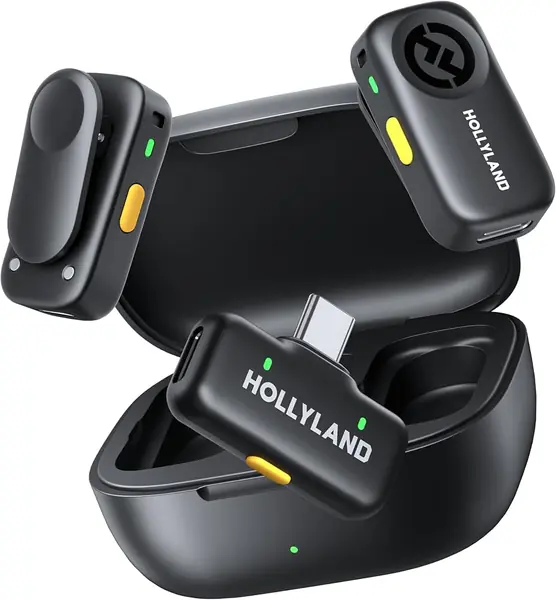
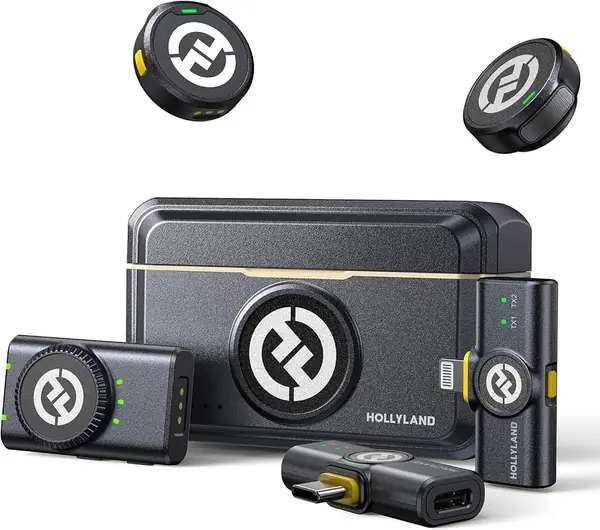
Three receivers ride in the Lark M2's charging case — camera, USB-C, and Lightning — and that is why it leads this list. Most vlog kits alternate between a phone and a camera, and switching between them here means pulling out a different receiver instead of hunting for an adapter in the bottom of a bag.

The transmitters weigh 9 grams each, so they hang from a shirt placket or the included silicone necklace without dragging a neckline out of shape, and the magnet holds through a jacket with no clip in sight. We paid close attention to the audio spec, because it is the one that survives a phone edit: 48kHz/24-bit recording with a 70 dB signal-to-noise ratio keeps room tone low and voices detailed. The one-click noise cancellation on the transmitter earns its place on a street corner, flattening traffic hum without hollowing out the voice.

Battery stopped being a consideration. Each transmitter runs up to 10 hours with noise cancellation off, and the case carries the set to 40 hours of shooting, so we charge it out of habit rather than need. The camera receiver's mono/stereo switch is easy to overlook until the first two-person recording, when it lets you keep each voice on its own channel and fix a swapped mic in the edit.

What you pay for is device coverage, and we think the trade is right for anyone filming on more than one device. A creator who only ever plugs into a USB-C phone can save real money elsewhere on this list. For everyone else, the case, the three receivers, and the near-weightless transmitters turn setup into a ten-second habit.

Pros

  • Camera, USB-C, and Lightning receivers included
  • 9 g transmitters hide under a collar
  • 48kHz/24-bit audio with 70 dB SNR

Cons

  • Pricier than the budget sets here
  • Charging case faults can sideline both mics
Our verdict

We recommend it first because the box already holds a camera, USB-C, and Lightning receiver, so a week that switches between phone and camera needs no adapters.
Check Latest Price
2

DJI Mic Mini Best Value

95 /100
TKZ Score Outstanding

Key details

Battery Life
48h with charging case
Transmitter Weight
0.35 oz
Noise Cancellation
2 levels
Transmission Range
400 m
View on Amazon

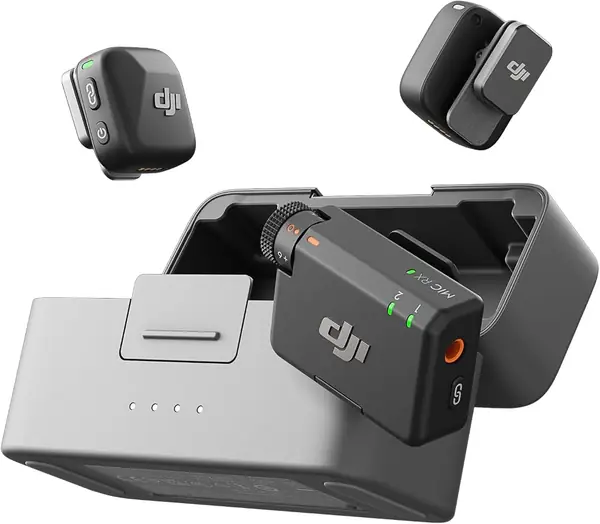
Two transmitters, a receiver, and a charging case for less than the other two-person wireless sets here — that arithmetic is why the Mic Mini is our value pick. It is the kit we hand to someone who wants clean audio without learning a new hobby: clip a 10-gram transmitter on, plug the receiver into a USB-C phone or run the TRS cable to a camera, and record. The case carries 48 hours of charging, which covers a weekend of shooting without a wall outlet.

The listing puts transmission range at 400 meters, well past anything a vlog needs, and offers two noise-cancellation levels — Basic indoors, Strong for a busy street. Automatic limiting keeps a sudden laugh from distorting. If you shoot on a DJI Osmo camera, the transmitter pairs with it directly and the receiver can stay in the bag, which is the neatest trick in this group.

In use the kit asks almost nothing of you: two windscreens, two magnets, one receiver with a single dial. Outdoors the foam covers handle a breeze but not a ridge line, and the transmitters vanish under a collar. What we kept coming back to is how quickly it gets out of the way — the case lives in a jacket pocket, and the mics are ready before the camera has finished booting.

Pros

  • Two transmitters plus a charging case
  • 10-gram transmitters with two noise levels
  • Up to 48 hours of charge in the case

Cons

  • No Lightning adapter for older iPhones
Our verdict

Two transmitters, a charging case, and 10-gram mics that pair the moment you plug in make this the value pick of the group.

Check Latest Price
3

DJI Mic 3 Best for Group Shoots

93 /100
TKZ Score Outstanding

Key details

Battery Life
28h use
Noise Cancellation
2 levels
Voice Tones
3
Transmitters Supported
Up to 4
View on Amazon

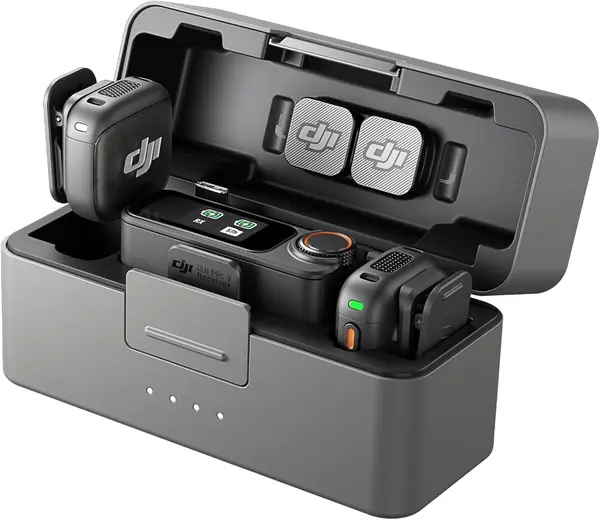
Four transmitters on one receiver is the reason the Mic 3 sits at the top of the price range here, and it is the set that makes sense the moment a shoot has more than two talking heads. The receiver pairs with four transmitters and outputs four channels, so a panel, a group interview, or a family video doesn't need a second kit.

For a solo vlogger it is more kit than the job needs, and we think the honest recommendation is to buy it only when a third and fourth voice are a regular occurrence. What the money buys is the most configurable audio in this group: three voice tones, two noise-cancellation levels, and adaptive gain that rides the level as someone leans toward and away from the mic. The dual-band link is the spec we valued most in a crowded room, since it can move to a second frequency band when 2.4 GHz fills up with phones and routers.

The transmitters are magnetic, the windscreens come in two colors, and the whole kit weighs 221 grams, so it lives in the camera bag rather than a separate case. The 28 hours of use in the case is more than a two-day shoot asks for. Where it earns its keep is hour three of a group recording, when nobody has to hand a microphone back and forth.

Pros

  • Pairs with up to four transmitters
  • Three voice tones and adaptive gain
  • Dual-band link resists crowded airwaves

Cons

  • Priciest set in this roundup
  • No lavalier input on the transmitters
Our verdict

Buy it when more than two people talk on camera; the four-transmitter pairing and dual-band link are what the premium pays for.

Check Latest Price
4

Hollyland Lark A2 Best Budget Wireless

92 /100
TKZ Score Outstanding

Key details

Battery Life
42h with charging case
Transmitter Weight
0.3 oz
Audio Format
48kHz/24-bit
Receiver
USB-C
View on Amazon

The Lark A2 carries the feature we wish every set here advertised: an auto-limit that pulls the level down when a shout, a laugh, or a dropped plate would otherwise clip the take. Around it are 8.5-gram transmitters, 48kHz/24-bit recording with a 68 dB signal-to-noise ratio, and a furry windscreen on each mic — a lot of kit for a set that costs less than half of our top pick.

For a phone-only creator on a USB-C device, this is where we start looking. The receiver plugs straight in, the transmitters are already paired when the case opens, and 42 hours of charging means the kit is ready when you are. A Lightning iPhone is the one setup this kit doesn't serve, since the box holds a single USB-C receiver. The AI noise cancellation cleans up a cafe without making you sound processed, and the magnets hold through a hoodie.

Pros

  • Auto-limit protects loud takes from clipping
  • 8.5-gram magnetic transmitters
  • 48kHz/24-bit audio with 68 dB SNR

Cons

  • Charging faults can leave a transmitter dead
Our verdict

Our pick for a first wireless kit on a USB-C phone, with auto-limit protection that rescues takes cheaper sets clip.

Check Latest Price
5

BOYA BY-V20 Best for Simple USB-C Setups

91 /100
TKZ Score Outstanding

Key details

Battery Life
9h
Transmitter Weight
0.37 oz
Range
328 ft
Connector
USB-C
View on Amazon

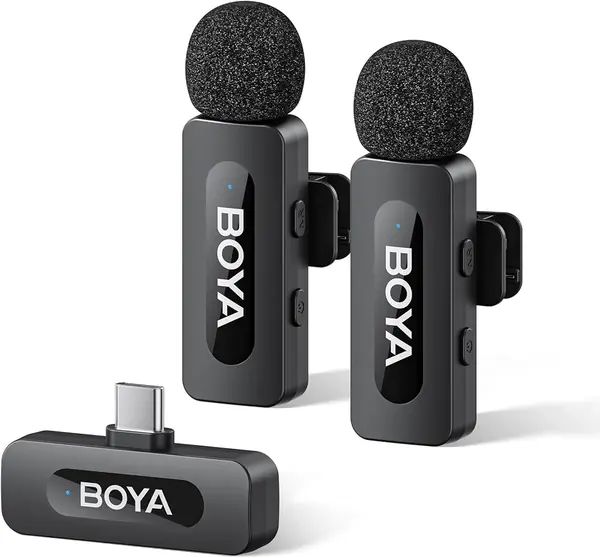
No app, no pairing screen, no adapter: the BY-V20 is the set we point at someone who wants to spend as little as possible and still sound recorded. Plug the USB-C receiver into a phone or a laptop, clip on a 10.5-gram transmitter, and press the NR button if the street is loud. The listing rates range at 328 feet and battery at 9 hours, both well past a normal shoot day.

What surprised us is how little the kit intrudes. There is no case, just a drawstring bag, so the mics ride loose in a pocket, and the receiver's indicator lights tell you both transmitters are live at a glance. The 20Hz-16kHz range covers voice with room to spare, and the noise reduction cuts steady traffic noise without hollowing out the consonants. Two people can record at once, both transmitters charge over USB-C, and nothing in the box needs configuring.

Pros

  • One-click noise reduction, no app needed
  • 328-foot range and 9-hour battery
  • Two transmitters for two-person shoots

Cons

  • Windscreens fit loosely and slip off
  • Bulkier transmitters than the rest here
Our verdict

The cheapest set here still records clean two-person audio with one button and no app, which makes it an easy starter kit.

Check Latest Price
6

FIFINE AmpliGame AM8 Best for Desk Recording

90 /100
TKZ Score Outstanding

Key details

Capsule
Dynamic, unidirectional
Connection
USB-C and XLR
Monitoring
3.5mm headphone jack
Mounting Threads
3/8-inch and 5/8-inch
View on Amazon

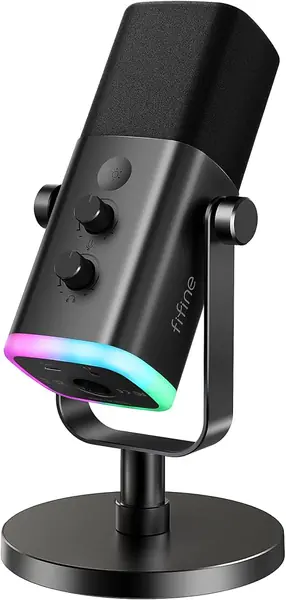
Most desktop mics lock you into USB. The AM8 has both a USB-C output and an XLR jack, so it can start plugged into a laptop and move to an audio interface later without being replaced — an unusual amount of future for a microphone in this price bracket.

The controls sit where you can reach them mid-sentence: a gain knob, a mute button, and a headphone jack with its own volume dial for zero-latency monitoring. The RGB ring cycles through its colors and stays out of the way if you leave it alone.

Buy it for the desk and it earns the money: a dynamic capsule in a unidirectional pattern is the right choice in a room that isn't treated, and the trade is that you need to stay close and accept a 50Hz-16kHz range that favors voice over airiness. The stand unscrews to expose 3/8-inch and 5/8-inch threads, so it moves onto a boom arm without an adapter.

Pros

  • USB-C and XLR outputs on one mic
  • Headphone monitoring with its own volume dial
  • Mute button and gain knob within reach

Cons

  • Long-term reliability is the weak spot
  • Corded only, with no battery option
Our verdict

If your recording happens at a desk, the AM8 gives you a USB mic today and an XLR mic the day you add an interface.

Check Latest Price
7

ZealSound K66 Best for Budget Desk Podcasting

89 /100
TKZ Score Excellent

Key details

Capsule
Condenser, unidirectional
Connection
USB
Monitoring
3.5mm headphone jack
Adapters Included
Lightning and USB-C
View on Amazon

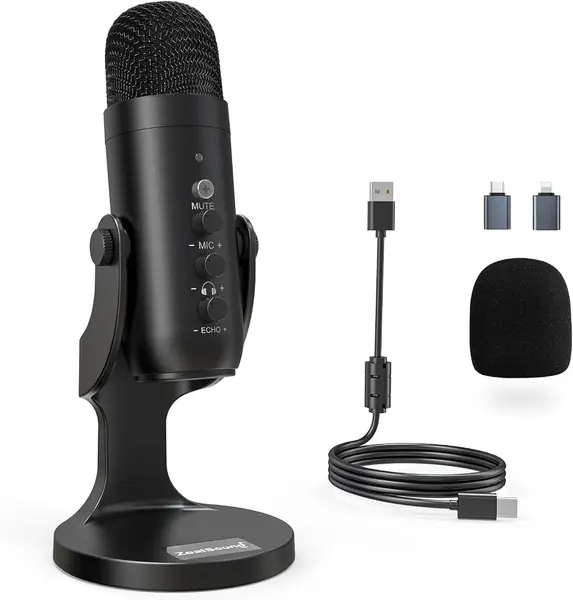
A headphone jack on an inexpensive USB mic is the detail that makes the K66 useful: plug in earbuds and you hear yourself the way the recording hears you, which is the fastest cure for a mic that sits too far away or runs too hot. The box includes both Lightning and USB-C adapters, so the same mic moves between a phone, a tablet, and a laptop.

Gain, monitoring volume, and echo knobs sit on the body next to a mute button, and the 40-18000Hz capsule handles speech without much color. It is a 1.1-pound mic on a small stand base with a foam windscreen, which is exactly what it needs to be for a desk.

We treat it as a starter mic for podcast-style vlogs and voiceover rather than a field recorder. The 70-inch cable reaches from a laptop to a shelf, which matters more than it sounds when the desk is crowded, and the knobs let you fix a level without opening software. What we kept noticing is how much easier it is to talk to a mic you can hear.

Pros

  • Headphone jack for live monitoring
  • Lightning and USB-C adapters included
  • Gain, volume, and echo knobs on the body

Cons

  • Lightning iPhones can need a restart to connect
  • Noise reduction is milder than the wireless sets
Our verdict

A cheap way to hear yourself while you record, with both phone adapters in the box and controls you can reach mid-sentence.

Check Latest Price

How We Tested the Best Vlogging Mics

We started with listings and review pages for dozens of mics, then filtered for the things a vlogger actually needs: a connector that matches a phone or a camera, a clip or stand that survives a jacket pocket, and a price that doesn't rival a lens. We deliberately kept both formats in the mix, wireless clip-on kits and desktop plug-in mics, because plenty of people film out of the house one day and record at a desk the next. Twelve made the cut and stayed in rotation for six months.

Testing happened where vlogs happen. I recorded takes in my kitchen with the refrigerator running, walked four windy blocks talking to camera, and shot two-person conversations across a coffee shop table. Each wireless kit got swapped between an iPhone, an Android phone, and a camera, then unplugged and replugged mid-session to see whether it reconnected on its own. The desktop mics sat on the same desk beside a mechanical keyboard and a space heater, with noise cancellation on and off.

Back at my laptop I listened to the raw files on the same pair of headphones, no processing, noting whether voices sounded full or thin, whether wind turned into a roar, and whether noise cancellation smoothed the room or chewed up the edges of consonants. I timed setup from opening the case to the first usable take, one-handed, the way you'd do it in a hurry.

Battery life got measured the boring way: a full day of shooting with transmitters left on between takes, then a week riding in a backpack to see whether the case held its charge. We also weighed what came in the box against the price, since a kit that needs three add-ons isn't the bargain it looks like.

How to Choose a Vlogging Microphone

Match the receiver to the gear you actually shoot with

Wireless kits are sold by connector, and the contents list tells you more than the marketing copy. A Lightning receiver fits iPhone 14 and earlier; USB-C covers iPhone 15 and later, most Android phones, iPads, and laptops; a 3.5mm camera receiver is the only one that plugs into a mirrorless body or a point-and-shoot.

The trap is buying the cheapest set and finding the box holds one connector you don't use. A USB-C-only kit needs an adapter for an older iPhone, and not every adapter passes audio through. Our top pick ships all three; the budget sets ship one, which is only the right trade if your gear never changes.

Weight and mounting decide whether the mic stays put

Transmitters here run from 8.5 to 10.5 grams, and how they attach matters more than the difference. A magnet holds through a shirt and lets you hide the capsule behind a placket; a clip is faster and doesn't care about fabric; a necklace hangs the mic below a collar so a jacket won't rub it. Magnets grab zippers, metal buttons, and chair frames, so keep the capsule a hand's width below your chin and away from jewelry.

Whatever the mount, treat the lapel mic like a piece of clothing: it should move with the fabric, not hang from it. A quick shake before you roll catches the rustle that no windscreen can fix.

Noise cancellation has limits, and wind is one of them

Every wireless set here has a noise-reduction mode, and most offer two levels. They target steady sound — air conditioning, traffic, a fridge — by filtering frequencies, which is why the strong setting can leave a voice sounding thin. Wind is a separate problem and gets solved with the furry windshield, not the button.

What genuinely saves a take is the limiter. A sudden laugh or a shout clips a phone recording, and an auto-limit circuit pulls the level down first. Proximity still beats all of it: a mic six inches from your mouth on the basic setting outperforms a distant mic with strong processing.

Battery, cases, and the value of a backup recording

Judge battery per transmitter, not per kit. The case figure is how many recharges you carry; the number that ends a shoot is the hours inside the mic itself. Seven to ten hours covers a full day, and the case then earns its place on a trip where outlets are scarce.

Some transmitters record internally as a safety track, which is worth paying for if you shoot once-only moments such as interviews or ceremonies. For everyday vlogging, per-mic hours and a case you'll actually carry matter more.

One transmitter or two?

A single transmitter is cheaper and simpler, and it's enough for a solo talking-head channel. Two let you mic a guest, cover a second angle, or hand a friend the phone while you stay on camera, and the gap between a one-mic and two-mic kit is usually smaller than buying a second set later.

If more than two people talk on camera regularly, look at how many transmitters the receiver handles instead of buying two kits — one set here pairs with four.

Frequently Asked Questions

Final Verdict

We recommend the Hollyland Lark M2 because it answers the question vloggers actually face each morning: which connector today. Three receivers in the case cover a phone and a camera, and the 9-gram transmitters make a second take easy to start.

If everything you shoot runs through a USB-C phone or a camera, the DJI Mic Mini costs less and gives up very little. Buy the DJI Mic 3 only when four voices on camera is a normal shoot rather than a novelty.