Best Kitchen Tablets of 2026

My phone spends more time propped against a can of crushed tomatoes than it does in my pocket, and every time I reach for it with dough on my hands, the screen goes dark. A kitchen tablet solves that specific small humiliation: it stays put, stays awake, and keeps the recipe, the grocery list, and the school calendar where the whole household can see them at once.

What caught me off guard is how much the details decide whether one of these earns its counter space. A screen built for a kitchen has to tolerate being plugged in all day, stay readable from the stove, and wake with a tap instead of a password, and plenty of ordinary tablets handle all three badly. We've spent the past eight months living with 12 of them, from a big wall-mounted hub to palm-size displays, and the gaps between them showed up within a week.

Some are excellent organizers and only passable entertainment devices; others are simply a bright, cheap screen that docks and charges where you need it. Both kinds belong in the list below, and each pick earned its spot the same way: somebody in my house kept walking over to use it after the novelty wore off.

The Best Kitchen Tablets

1

Amazon Echo Show 15 Best Overall
89 /100
TKZ Score Excellent

Key details

Display
15.6-inch Full HD (1080p)
Smart Home
Built-in hub with dashboard
Streaming
Built-in Fire TV
Organization
Customizable family widgets
View on Amazon

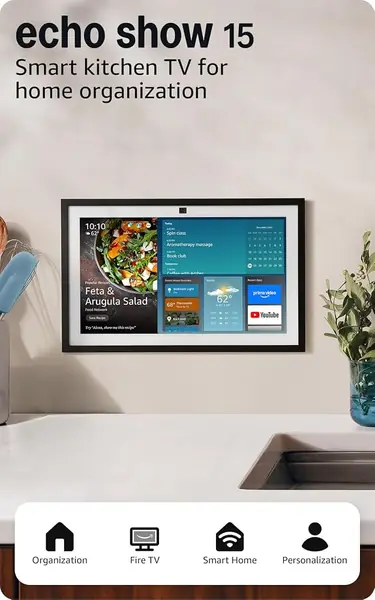
A 15.6-inch screen is the whole argument for this one. Across the kitchen, a recipe stays legible from the stove rather than from six inches away, so you aren't pinching to zoom with wet hands. The home screen runs customizable widgets — the family calendar, to-do lists, local weather, a smart-home dashboard — which means the morning glance covers the day without opening a single app.

We think it's the best kitchen display here because it handles the three jobs that actually come up, cooking, watching, and coordinating, without asking you to pick one. Built-in Fire TV brings Prime Video, Netflix, YouTube, and Apple TV, making it the only screen here with a TV interface built in. And the photo slideshow quietly solves the thing we minded most about a big dark rectangle on a wall: it looks like something you chose rather than a monitor you left there.

It also asks the most of your kitchen. This is a fixture, not something you carry to the couch, and it wants wall space or a genuinely deep counter. Alexa runs the show, so the experience is smoothest if you already live in Amazon's world; an iPhone-and-Google household will feel the seams. We kept coming back to the widgets as the real reason to buy — if you only want recipes, a smaller display does the same job for far less.

Pros

  • Recipe text readable from across the kitchen
  • Built-in Fire TV streaming
  • Calendar and smart-home widgets at a glance

Cons

  • Largest footprint here; needs wall space or a deep counter
  • Alexa-centric, so it suits Amazon households best
Our verdict

If you want one screen that reads recipes from across the kitchen, streams TV, and runs the family calendar, this is the one we recommend.

Check Latest Price
2

Amazon Echo Show 5 Best for Small Counters

87 /100
TKZ Score Excellent

Key details

Display
5.5-inch touchscreen
Smart Home
Alexa voice control
Camera
Built-in for calls and drop-ins
Photos
Rotating photo slideshow
View on Amazon

Five and a half inches is barely wider than a phone, and that's exactly why this one survives in kitchens where nothing bigger does. It tucks beside a coffee maker or onto a narrow shelf and still shows weather and news at a glance, makes video calls, streams music through a speaker with more low end than the screen would suggest, and controls smart-home devices by voice.

It's the pick when counter space is the constraint, but be honest about what a 5.5-inch screen does with a recipe. Steps scroll, headings are small, and reading from a step back isn't happening, so this is better as a timer-and-lists device than as a cookbook. We noticed the touchscreen can be slow to register a quick tap, which you feel most when your hands are covered in dough.

The small stuff is where it earns its place. A timer set by voice works with your hands in a bowl, the built-in camera lets you check a compatible front-door camera or drop in on family mid-stir, and the rotating photo slideshow handles idle time better than a blank screen. For following a full recipe or watching anything longer than a clip, size up.

Pros

  • Fits where a 10-inch tablet won't
  • Hands-free timers and smart-home control
  • Camera for calls and front-door checks

Cons

  • Long recipes become a scrolling chore
  • Touchscreen can lag behind a fast tap
Our verdict

Buy it for a cramped counter where timers, weather, calls, and a doorbell view matter more than reading a recipe from across the room.

Check Latest Price
3

CYPID Smart Digital Calendar Best for Family Scheduling

86 /100
TKZ Score Excellent

Key details

Display
10.1-inch touchscreen
Placement
Wall-mounted or countertop
Family Tools
Chore chart, meal planner, to-do lists
Calendar Sync
Google, iCloud, Outlook, Cozi, Yahoo
View on Amazon

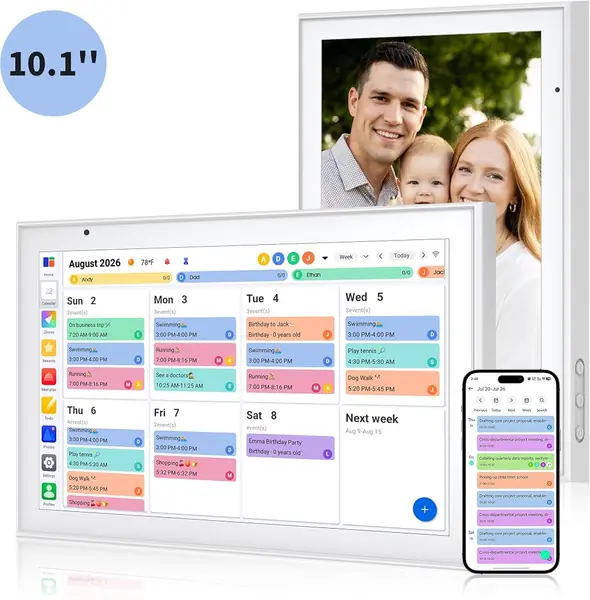
Of everything here, this is the closest to the paper wall calendar it replaces: a 10.1-inch touchscreen that syncs with Google, iCloud, Outlook, Cozi, and Yahoo, so everyone's events land on one bright, readable board instead of four phone calendars nobody checks. It's the least expensive pick in this group, and the only one that's plainly better at organizing than at entertaining.

The family tools are where it earns the wall space. There's a shared chore chart kids tick off themselves for points, a meal planner that feeds the grocery list, and to-do lists — the kind of thing that turns what's for dinner into a question already answered by four in the afternoon. When it's idle it becomes a photo frame, which is a far better use of a screen in a hallway than a blank grid.

Placement is flexible: it hangs on a wall or sits on a counter, and the screen is bright enough to read from across a room, which is more than we can say for the small smart display here. The photo frame mode gets used more than we expected, especially in a hallway where a schedule board can otherwise look like office equipment.

Pros

  • Syncs with Google, iCloud, Outlook, Cozi, and Yahoo
  • Chore chart kids tick off for points
  • Doubles as a photo frame when idle

Cons

  • Planner only
Our verdict

Pick it if the family's problem is schedules, not entertainment — it puts everyone's week on one readable screen for less than the rest.

Check Latest Price
4

Apple iPad 8th Gen (Renewed) Best for Apps and Portability

85 /100
TKZ Score Excellent

Key details

Display
10.2-inch Retina
Battery
Up to 10 hours
Storage
32GB
Connectivity
Wi-Fi + Cellular
View on Amazon

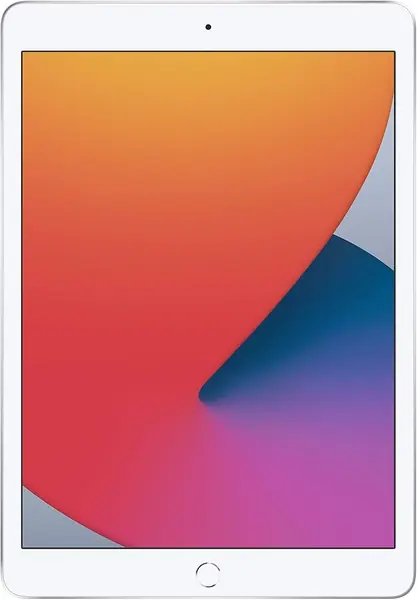
Renewed is the first thing to understand here: this is a 2020 iPad that someone else owned, backed by a 90-day warranty, and priced in the middle of this group. The hardware itself still holds up — a 10.2-inch Retina display, the A12 Bionic chip, stereo speakers, and Wi-Fi plus cellular in the configuration we looked at.

What it brings to a kitchen that the fixed displays can't is real apps and legs. A recipe app with a cook mode keeps the screen awake, the browser handles any food blog, streaming works through the services you already pay for, and Notes holds the grocery list — then it comes off the counter with you for the couch or the store. Cellular means it keeps working when the Wi-Fi doesn't reach the patio.

Battery is the variable we weigh hardest on a renewed unit. The spec says up to ten hours, and a 2020 device arrives with years of charge cycles behind it, so check the real drain in the first week while the return window is open. Thirty-two gigabytes also fills faster than you think once apps and downloaded shows land on it. Neither is a dealbreaker, but both are why we treat it as a second screen rather than the household's only one.

Pros

  • Runs full iPad apps and streaming services
  • Retina screen that leaves the counter with you
  • Cellular keeps it useful away from Wi-Fi

Cons

  • 32GB fills quickly with apps and downloads
  • 90-day warranty on a renewed 2020 device
Our verdict

It's the pick when you want real apps and a screen that travels, and the only one here that's a tablet first.

Check Latest Price
5

Jeazans Android 16 Tablet with Dock Best for A Budget Second Screen That Stays Docked and Charged

81 /100
TKZ Score Excellent

Key details

Display
10.1-inch 1280x800
Battery
6000mAh
Storage
64GB, expandable to 1TB
Included
Charging speaker dock
View on Amazon

The dock is the reason this one belongs in a kitchen guide. A 10.1-inch Android tablet drops onto a magnetic-contact speaker dock that keeps it charged and upright, so it works like a small counter display — clock, photo frame, music — and it's topped up whenever you pick it up. For a second screen on a budget, that combination is hard to beat on paper.

The rest of the spec sheet reads well for the money: Android 16, an eight-core processor, 64GB of storage expandable to a terabyte, Wi-Fi 6, Bluetooth 5.4, and a 6000mAh battery. The screen is the weak point — 1280x800 stretched across 10.1 inches is soft, fine for a recipe at arm's length and fuzzy for anything with small text.

What keeps this out of our top tier is consistency. Speed splits sharply from unit to unit, and the battery lands anywhere from a few hours to a full day of light use. The bigger concern is longevity: some of these stop powering on within a couple of months. Buy it somewhere with an easy return window and put it through its paces early; if it holds up, the dock makes it a lot of kitchen screen for the money.

Pros

  • Dock keeps it charged and upright
  • 64GB expandable to 1TB
  • Doubles as a speaker and photo frame

Cons

  • Soft 1280x800 resolution at 10.1 inches
  • Five-hour rated battery life
Our verdict

Worth it as a budget counter screen for recipes and video: the dock keeps it charged, and the price leaves room for a better tablet later.

Check Latest Price

How We Tested Kitchen Tablets

We started with more than 40 displays and tablets marketed as kitchen or family hubs, then narrowed the field by size, price, and whether the thing could realistically live on a counter, meaning a screen you can read from three feet away and a footprint that fits under a cabinet. That left 12 units, which we set up in working kitchens and lived with for eight months.

Every unit went beside a stove or a coffee maker and stayed there. We loaded the same shared grocery list, weekly meal plan, chore chart, and recipe onto each one, then handed them around to everyone in the house, including a 9-year-old and a grandparent, to see whether the organization tools held up once more than one person was editing them. We timed how long it took to get a new device onto Wi-Fi and syncing, and noted how often it dropped the connection afterward.

Screen quality got judged in bad light, both a 7 a.m. sunbeam across the counter and a dim kitchen at 9 p.m., where we looked for glare and checked whether text stayed readable at an angle. We counted how many taps it took to reach a list, how quickly the voice assistant answered over a running exhaust fan, and how long each screen took to wake. Battery life meant tracking how often the portable models needed a charge and whether the always-plugged-in ones ran warm. For durability, we wiped greasy fingerprints off twice a day with a damp cloth and, in two unlucky cases, watched one slide off the edge of the counter. Appearance and value got the last word: if a hub looked like a spare monitor or its extras never got used, it lost points.

How to Choose a Kitchen Tablet

Match Screen Size to Counter Space

A 15.6-inch display is legible from the stove, a 10-inch screen works at arm's length, and a 5.5-inch screen is really a timer-and-weather device that happens to show recipes. Think about how far you actually stand from the screen while stirring something, and let that pick the size rather than the other way around.

Measure before you order the big one. Screen size is quoted on the diagonal, but what decides the fit is the height under your upper cabinets, the depth of the counter, and whether a stand or mount adds an inch you didn't count. A display that has to sit sideways to clear a cabinet is one you stop using by the second week.

Decide How It Stays Powered

A kitchen screen that lives in a drawer isn't a kitchen screen. Docked and built-in displays stay powered where they sit, which is why they get used for five-second questions — how long to roast a chicken, whether it's going to rain, whose turn it is to drive. A battery tablet needs a routine: a stand near an outlet and the habit of putting it back.

The trap is sleep. Most tablets dim after a minute or two, which is useless halfway through a recipe, so set a longer screen timeout or use a cooking mode that keeps the display awake before you rely on it mid-chop.

Match the Software to the Job You Have

Work backward from what you want on the screen. Video in the kitchen means a streaming platform — Fire TV on the Echo Show models, iPadOS or Android on the tablets — and that rules out a calendar-only display. Food blogs need a browser. Smart lights and a video doorbell mean Alexa or a tablet running the camera maker's app.

Check where your calendar lives before buying a family planner. The CYPID syncs with Google, iCloud, Outlook, Cozi, and Yahoo; a display that won't talk to your calendar is just an expensive clock.

Weigh Hands-Free Control and Sound

Voice is the feature you use most and notice least: a timer set from across the kitchen with both hands in a bowl of dough is the whole reason a screen beats a cookbook. It only works if the device can hear you, and a range hood on high plus a running blender is a lot of noise between you and a microphone.

Put the display on the quieter side of the room, away from the hood and the sink. If music and podcasts matter, listen to the speaker before you commit or read closely — a small unit with real low end beats a big screen with a thin speaker for everything except video.

Weigh New, Renewed, and Budget

Budget Android tablets buy screen size with older components and shorter support, so check the resolution — 1280x800 spread over 10 inches is soft — and the warranty before you commit. A renewed iPad is the cheapest route into full tablet apps, but it arrives with a short warranty and a battery of unknown history, so test the drain while returns are still easy.

The premium end pays for the screen and the ecosystem. That's worth it if the display will be the household's calendar, TV, and shopping list at once, and overkill if you mainly want a timer and a forecast.

Frequently Asked Questions

Final Verdict

The Echo Show 15 is the screen we recommend for most kitchens: big enough to read a recipe from the stove, useful enough to run the family calendar, and the only one here with a TV interface built in. If counter space is the constraint, the Echo Show 5 handles timers, weather, and a doorbell view in a fraction of the width.

And if the household's real problem is scheduling rather than screen size, the CYPID calendar fixes it for less than anything else here.