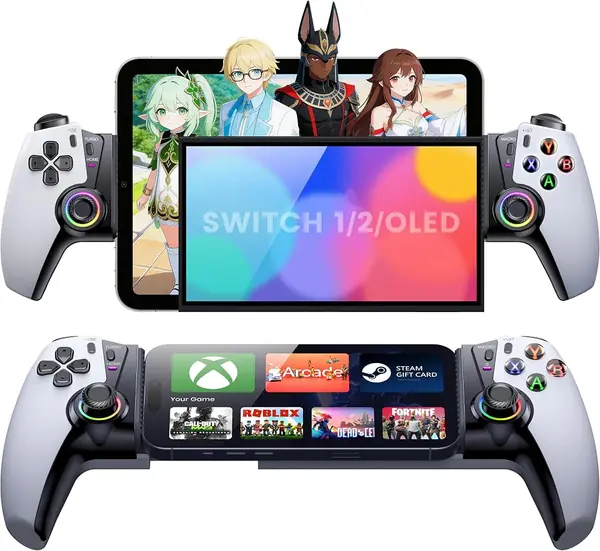
Best iPhone Controllers of 2026

A phone can run console-grade games now, but glass is still a lousy controller: your thumbs slide, the virtual stick drifts off center mid-jump, and the screen gets greasy twenty minutes in. A clip-on gamepad fixes that in one move — real sticks under your thumbs, real triggers under your fingers, and a grip that keeps the phone from edge-diving off the couch.

We spent six months with 12 of them, and the field has shifted since the first mobile controllers. Hall effect sticks and triggers, which track movement magnetically instead of with a wearing contact pad, now turn up on inexpensive models as often as expensive ones, and they are the main reason stick drift stays away. We clamped each one onto a phone with a case still on and compared direct plug-in connections against Bluetooth pairing.

Here's the part nobody tells a first-time buyer: the connector is half the decision. Older iPhones take Lightning, newer ones take USB-C, so a controller bought today may not follow you to your next phone. The rest comes down to button feel, grip, and whether it survives a bag. The picks below span both connector types and a range of hand sizes.

The Best iPhone Controllers

1

GameSir G8 Galileo Best Overall
87 /100
TKZ Score Excellent

Key details

Connection
USB-C, plug and play
iPhone Fit
iPhone 15 series
Sticks
Hall effect sticks and triggers
Extras
3.5mm jack, pass-through charging
View on Amazon

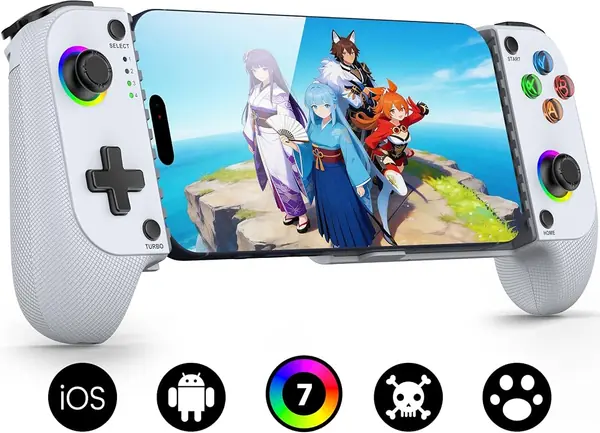
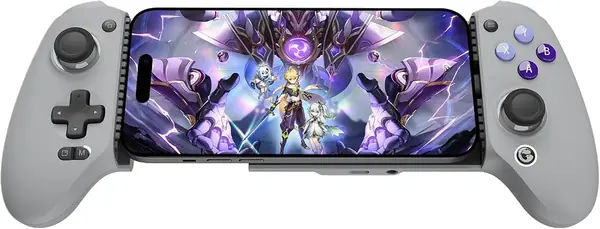
Clamp an iPhone into the G8 Galileo and the first thing that registers is how much controller there is: 540 grams, most of it in two grips that fill your palms the way an Xbox pad does. The sticks are full-size Hall-effect units rather than the stubby nubs most phone controllers give you, and the triggers are analog with Hall sensing as well, which is the difference between a racing game you can modulate and one you can only mash. A couple of hours into a streaming session, our thumbs had stopped noticing there was a phone in the middle.

That weight is what the money buys, and we think it is the right trade if you play at home. Pass-through charging keeps the phone alive while you play, the 3.5mm jack takes wired headphones without a dongle, and the magnetic faceplates pop off when you want a different look. It is not a controller that lives in a bag, though. It is the one that lives next to the couch.

Fit is the catch. GameSir asks for a case no thicker than 1mm, which rules out most of what people actually carry, and the supported iPhone list is the 15 series. If you are on a newer USB-C iPhone, confirm your model is covered before you order; the abxylute S8 Lite below names 15 through 18 Pro Max outright.

Buy it somewhere with a straightforward return window and put the buttons through their paces in the first month. A face button that goes soft is the fault that ends this controller's life early. The sticks, with no carbon film to wear through, are the part we do not worry about.

Pros

  • Full-size Hall sticks and analog triggers
  • Pass-through charging and a 3.5mm jack
  • Console-like grips for long sessions

Cons

  • Needs a case under 1 mm thick
Our verdict

We point anyone with a USB-C iPhone at the G8 Galileo: full-size Hall sticks, a headphone jack, and pass-through charging make it feel like a console rather than a phone accessory.
Check Latest Price
2

abxylute S8 Lite Best Value

86 /100
TKZ Score Excellent

Key details

Connection
USB-C, plug and play
iPhone Fit
iPhone 15/16/17/18 Pro Max
Weight
8 oz
Charging
Pass-through charging
View on Amazon

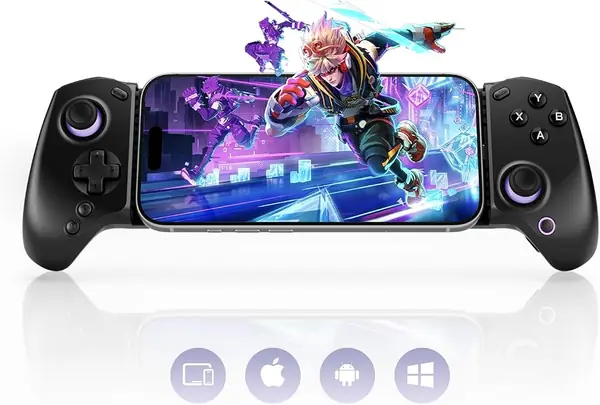
The S8 Lite's listing names iPhone 15, 16, 17 and 18 Pro Max plus the iPad mini 6 and 7, and that alone makes it the safer buy for anyone on a current phone. It is a USB-C plug-in, so there is no pairing and no battery to top up: the phone powers the controller, and the controller passes charging back through to the phone. For anyone who wants a proper controller without console-pad money, this is the one we recommend first.

Eight ounces is the number that decides where it lives. It is less than half the weight of the GameSir, and we have carried it in a bag without thinking about it once. The extended, textured grips give your palms somewhere to sit, the rear buttons can be mapped, and the swappable D-pad lets you choose between a disc and a cross, which matters if half your library is retro.

The limitation is structural. With no Bluetooth, this is only ever a controller with a phone in it. You cannot prop the phone on a table and play from across the room, and you cannot hand it to someone as a standalone pad. That is fine for handheld play and useless for anything else, so know which of those you are buying.

What it does not have is history. The GameSir has years of players behind it and this one does not. What it has instead is less to break: no cells, no radio, no companion app to fight with, and a price that keeps the gamble small.

Pros

  • Names iPhone 15 through 18 Pro Max
  • 8 oz with textured extended grips
  • Phone-powered, with pass-through charging

Cons

  • Phone case has to come off to plug in
Our verdict

For a USB-C iPhone, the S8 Lite is the value pick: it names the 15 through 18 Pro Max, weighs 8 ounces, and costs about half what the GameSir does.

Check Latest Price
3

Razer Kishi V2 (Lightning) Best for Lightning iPhones

85 /100
TKZ Score Excellent

Key details

Connection
Lightning
iPhone Fit
Lightning iPhones
Weight
4.48 oz
Charging
Pass-through charging
View on Amazon

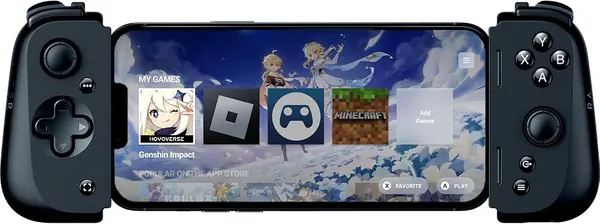
If your iPhone still has a Lightning port, your options are close to none, and the Kishi V2 is the one worth taking. It is a Lightning controller: the phone seats on the bridge, the controller is simply there, and there is no pairing step, no battery of its own, and a passthrough port so the phone keeps charging while you play.

Razer's microswitch buttons are the sharpest-feeling on this list, closer to a mouse click than to a rubber-dome gamepad. We liked them for fighting games and found them loud in a quiet room. The bridge extends to grip the phone and collapses to something you can drop in a jacket pocket.

We still think it is the right buy for a Lightning phone, with one reservation: the grips are shallow, and after an hour our hands wanted more to hold onto. That is the price of a controller that folds down this small, and it is a fair one for commutes rather than marathons.

Two details worth knowing before you commit. The programmable macros do not work on iOS, so do not pay for them, and there is no audio passthrough, so wired headphones go straight into the phone. If you have already moved to a USB-C iPhone, this one has nothing to offer you.

Pros

  • Plugs into Lightning with no pairing
  • Crisp microswitch buttons
  • Pass-through charging in a pocketable frame

Cons

  • Substantial phone cases have to come off
Our verdict

If your iPhone still has a Lightning port, the Kishi V2 is the best-built controller here that plugs into it, with no pairing, no battery, and no lag.

Check Latest Price
4

Mocagen MC1 Best Bluetooth Pick

84 /100
TKZ Score Excellent

Key details

Connection
Bluetooth
iPhone Fit
All iPhone models
Sticks
Hall effect, 5M-cycle rating
Battery
600 mAh
View on Amazon

Bluetooth solves the thing that kills plug-in controllers: nothing has to line up with your phone's port. The MC1 holds a cased iPhone in a cradle between its two grips, so a thick case and a camera bump stop being a problem, and it pairs with whichever iPhone you happen to be carrying.

The Hall-effect sticks are the reason to choose it over a cheaper wireless pad. They sense magnetically rather than through a carbon film, rated to five million cycles, so there is nothing rubbing itself into drift. The laser-etched texture on the grips does real work once your hands warm up, and we appreciate that the RGB ring can be switched off entirely when there is someone asleep next to you.

Bluetooth is the part of any wireless controller that varies most, and this one is no different: a dropout mid-match is the thing to test hard while the return window is open rather than something to live with for a year. The rest of the package is thorough, with turbo, a 600 mAh battery, and a cradle that holds the phone at a usable angle.

Where the MC1 earns its place over the plug-in picks is reach. It does not care whether your iPhone has a Lightning port or a USB-C one, so it is the sensible buy if you are between phones, if you hand the controller around a family, or if your phone is old enough that nobody makes a clip-on for it.

Pros

  • Holds a cased iPhone in a cradle
  • Hall-effect sticks rated to 5 million cycles
  • Works with any iPhone, Lightning or USB-C

Cons

  • Phone cannot charge while it is mounted
  • Power button wakes on a single press
Our verdict

The MC1 is our pick if your iPhone is older or your case is thick: it pairs over Bluetooth, holds a cased phone, and still gives you Hall-effect sticks.

Check Latest Price
5

8BitDo Ultimate Mobile Best for Cloud Gaming

83 /100
TKZ Score Excellent

Key details

Connection
Bluetooth
Sticks
Hall effect sticks and triggers
Phone Fit
100–170 mm phones
Back Buttons
Two pro paddles
View on Amazon

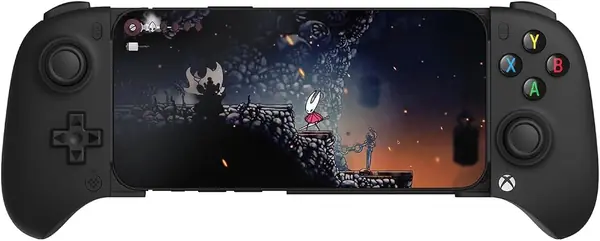
Officially licensed by Xbox and supported by Apple is an unusual combination, and it is why we reach for the Ultimate Mobile with Game Pass: the button layout matches the prompts on screen, so your thumbs stop translating. Of everything here short of the GameSir, it is the closest to sitting down with a console pad.

8BitDo has done the physical part properly. At 280 grams it has real grips, tactile bumpers, a D-pad with some snap to it, and metal rings around the stick bases, which is the sort of detail that separates it from a cheap pad. The two back paddles are what we used most: mapping one to jump and the other to reload changes a phone shooter more than any stick upgrade.

It fits phones from 100 to 170 mm, which takes a 17 Pro Max in a thin MagSafe case, and it does not pass charge through to the phone, so a long session wants a battery pack or an outlet nearby. The 8BitDo software is the fussier half of the product. Set your mapping up once, on a phone that recognizes the controller, then leave it alone.

Where it sits is straightforward: more money than the MC1 and worth it if you want paddles and triggers, less than the GameSir and a little less console in the hand. For a library that is mostly cloud and remote play, that is the right set of trade-offs.

Pros

  • Officially licensed for Xbox Cloud Gaming
  • Two back paddles and Hall-effect triggers
  • Fits 100–170 mm phones with real grips

Cons

  • Does not charge the phone while you play
  • Companion app is finicky
Our verdict

For Xbox Cloud Gaming and remote play, the Ultimate Mobile is the pick: officially licensed, with back paddles and Hall triggers, and it feels like a real Xbox pad.

Check Latest Price
6

abxylute M4 Best Pocketable

82 /100
TKZ Score Excellent

Key details

Connection
Bluetooth
Weight
3 oz
Modes
HID, PS and NS modes
Mount
Magnetic snap-on, MagSafe
View on Amazon

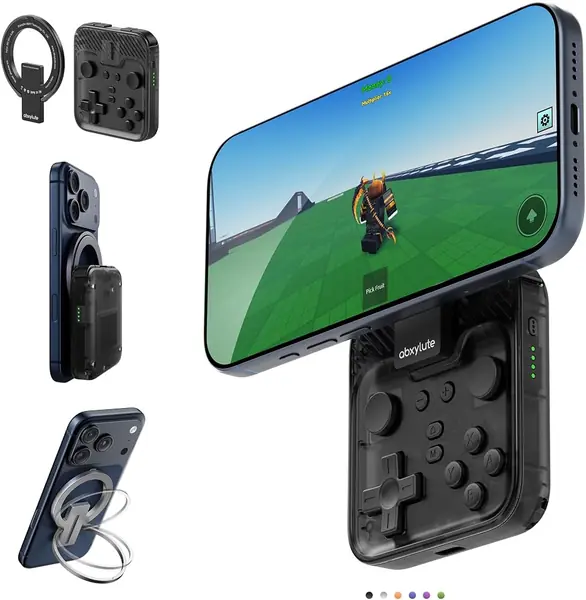
The M4 weighs 85 grams and snaps onto the back of a MagSafe iPhone, or onto a magnetic sticker on your case, which turns the phone into a very small handheld. The magnet is the whole trick, and it does double duty: set the phone down and the controller becomes a kickstand.

It is built for retro rather than for shooters. HID, PS and NS modes cover local games, Call of Duty Mobile and PS Remote Play, and Delta, RetroArch and PPSSPP all work with it. What we like most is that it commits to an idea: phone upright, thumbs at the sides, buttons clicky but quiet enough for a train.

We treat it as a second controller rather than a main one, and part of that is size. The D-pad is small and the grip is cramped for anyone with large hands; we felt it inside a single session. It is the thing that goes in a pocket for a lunch break, not the thing you play three hours of Genshin Impact on.

What it has going for it is that it never has to stay at home. A controller that lives in a drawer does not get used, and one that is already in your jacket does. If your library is two-dimensional and your patience for clamps is gone, nothing else here fills that slot.

Pros

  • 85 g, snaps on magnetically, doubles as a kickstand
  • HID, PS and NS modes with emulator support
  • Clicky but quiet buttons

Cons

  • Small D-pad and cramped grip for large hands
Our verdict

The M4 is the controller that actually travels: 85 grams, a magnet that grabs a MagSafe iPhone, and a kickstand for playing at a table.

Check Latest Price
7

8BitDo FlipPad Retro Portrait Play

81 /100
TKZ Score Excellent

Key details

Connection
USB-C, plug and play
Weight
1.11 oz
Hinge
Rated 6,000 cycles
Orientation
Vertical (portrait)
View on Amazon

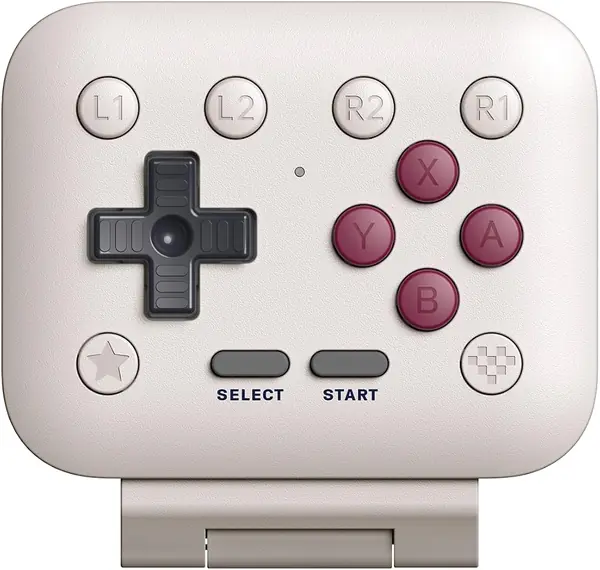
It folds into a slab that slides into a jacket pocket and weighs 31.5 grams, which makes it the only controller here you can genuinely forget you are carrying. Flip it open, plug the USB-C end into the phone, and you are holding a vertical Game Boy.

Portrait is the whole point. Retro titles and anything designed around a vertical screen feel natural with the phone upright and your thumbs at either side, and the D-pad and ABXY buttons are clicky without being loud. That matters more than it sounds if most of your gaming happens on transit, where a controller that clicks like a stapler is a social problem.

The hinge is the piece that decides how long it lasts, and it is rated for 6,000 open-and-close cycles. That is not an enormous number if you fidget with it. The layout is tight as well: it is happiest with smaller hands or short sessions, and an hour is about the limit of a comfortable one.

Buy it if the games you play are mostly two-dimensional and you want a controller that travels better than it performs. It will not replace anything else on this list. It fills a gap the others do not, and it fills it for pocket money.

Pros

  • 31.5 g and folds flat into a pocket
  • Clicky D-pad and buttons, quiet on transit
  • USB-C plug and play, no battery or pairing

Cons

  • Needs a slim case or a bare phone
  • Folding it shut cuts the connection
Our verdict

The FlipPad is for portrait play and little else: 31.5 grams, a clicky D-pad, and a hinge that folds it flat when you are done.

Check Latest Price
8

Kickdot MC500 Best for Long Sessions

80 /100
TKZ Score Excellent

Key details

Connection
Bluetooth
iPhone Fit
iPhone 17/18 series
Sticks
TMR joysticks, Hall triggers
Battery
1,000 mAh
View on Amazon

Kickdot ships a right-angle charging cable with the MC500, which sounds like a freebie until you have tried to play with a straight plug jabbing your palm. It is the mark of a controller designed around a session rather than around a parts list, and it goes with the 1,000 mAh battery the maker rates at 15 hours.

The sticks are the interesting part: TMR sensors rather than the Hall-effect units the other plug-in picks use. Both are contactless and magnetic, so neither wears a carbon film into drift. TMR is claimed to resolve more finely, and whether you would feel that in a mobile game is an open question, but the triggers underneath are Hall effect and the two back paddles and macro recording are all present.

What we cannot tell you is how those sticks feel after a year, because this is the least-proven controller on the list and the battery figure is the maker's own. Neither is a reason to avoid it. Both are reasons to buy from somewhere with a return window and to test the paddles early.

Where it earns a place with us is the long session away from an outlet: more battery than the MC1, paddles like the 8BitDo, and grips shaped for an evening rather than a commute. It also pairs with a Switch 2, so one purchase can cover the phone and the console.

Pros

  • TMR sticks and Hall-effect triggers
  • 1,000 mAh battery and a right-angle cable
  • Back paddles, macros, and Switch 2 support

Cons

  • Stick technology with no long track record
Our verdict

The MC500 is worth a look for long sessions away from an outlet: TMR sticks, a 1,000 mAh battery, and a charging cable angled to stay out of your way.

Check Latest Price

How We Tested iPhone Controllers

We started by pulling every current iPhone gamepad we could find, dozens of listings in all, and filtering for the things that actually decide whether one works for you: connector type, the range of phone sizes it clamps onto, whether the buttons can be remapped, and price. Models that fit a single phone size, or that duplicated a design we already had on hand, got cut. That left 12 controllers, which we used for six months.

Testing happened where people actually play. Each controller lived on a phone for at least a week of couch sessions, and several came along on flights, commutes, and a long car trip. We clamped each one on, held the phone up by the controller and shook it, then repeated the whole process with a case left on the phone to see if the bridge still reached.

Then we played the same 30 minutes of a platformer and a racing game on every unit and wrote down what our hands did. We noted whether the sticks had slop in the center before the character moved, whether the triggers bottomed out with a clean click or a spongy squish, whether the shoulder buttons sat where index fingers expected them, and whether our palms cramped before the session ended. Sticks got a slow-nudge test for dead zone, and we counted how far a face button travels before it registers.

Finally, durability and battery. Each controller rode in a tote bag with keys and a water bottle for a week, then got knocked off a coffee table onto hardwood, and we checked for rattles, wobble in the bridge, and buttons that had gone soft. For the wireless models we tracked the phone's battery drop over an hour of play and timed pairing from a cold start. Every unit was judged against what it cost.

How to Choose an Iphone Controller

Start With the Port

Lightning iPhones — the 14 and everything before it — can use only the Razer Kishi V2 here; nothing else on this page plugs into that connector. USB-C iPhones, from the 15 on, can take the GameSir G8 Galileo, the abxylute S8 Lite, or the 8BitDo FlipPad. Bluetooth sits outside all of it and works with either.

The trap is a listing that advertises universal fit. That usually describes how far the bridge stretches, not which iPhone models were tested with the controller. Check that your exact model is named before you order, especially if you bought your phone in the last year.

Wired or Wireless, and What You Trade

A plug-in controller has no battery, no pairing step, and nothing to charge, and on a phone it is the closest thing to a wired console pad: the signal never leaves the cable. The cost is that it draws power from the phone, which is why pass-through charging matters on a long flight or a long session.

Bluetooth gives you a mobile gaming controller that outlives the phone it was bought for, works with a tablet or a Switch, and does not care how thick your case is. In exchange you maintain a battery and live with a radio link. For competitive shooters we take the wire; for everything else, wireless is fine.

Fit: Cases, Camera Bumps, and Phone Length

Fit is where this purchase goes wrong. A plug-in controller grips the phone at both ends, and every fraction of an inch of case pushes the connector further from the port. GameSir asks for a case of 1mm or less; the Kishi V2 and the FlipPad want a bare phone or something very slim.

Two designs sidestep the problem entirely: the Mocagen MC1 holds the phone in a cradle, and the abxylute M4 uses magnets, with a sticker for your case. If you are not willing to take your case off every time you play, buy one of those.

Sticks, Triggers, and the Buttons That Matter

Hall-effect sticks sense magnetically instead of rubbing a carbon film against a contact, which is why they are the ones that do not drift. Most of the plug-in picks here have them. Analog triggers are worth paying for if you play racing games and do nothing for a retro or puzzle library.

Back paddles and macros are the shooter features, but check that they work on iOS before you pay for them, because the Kishi V2's macros do not. And a full-size stick is not automatically better: the smallest controllers here trade stick travel for a pocket, which is the right trade if that is where the controller lives.

Weight Decides Where It Lives

A 540-gram controller with full grips is a couch device. A 31.5-gram one is a pocket device. At 85 grams you are in jacket territory. There is no wrong answer, but be honest about the setting before you compare specifications.

If gaming happens on the sofa, buy the weight, because the grips and the full-size sticks come with it. If it happens on a train, the light controller you actually carry beats the good one sitting in a drawer.

Frequently Asked Questions

Final Verdict

Start with the port, then buy the best controller that port allows. On a USB-C iPhone, we point you to the GameSir G8 Galileo: full-size Hall sticks, a headphone jack, and pass-through charging make it feel like a console rather than an accessory, and the 540 grams are the price of that.

If you are on an iPhone 17 or 18 and want your model named in the listing, or you would rather not spend that much, the abxylute S8 Lite weighs 8 ounces and puts the money into the grips instead of the box. And if your iPhone still has a Lightning port, the Razer Kishi V2 is the only one here that plugs in at all.