Best iPad Controllers of 2026

Virtual joysticks are fine until you actually need to aim. An iPad is a genuinely good gaming screen — big, bright, sharp — but thumbs on glass turn a shooter into a wrestling match, and that's usually the moment someone starts shopping for a controller. The catch is that the category splits cleanly in two: clamp-on models turn a tablet into a handheld, while standalone pads expect the iPad propped up on a stand in front of you. Buy without noticing that distinction and you'll find out the hard way, on the couch, with a clamp that won't clear your case.

My team and I have spent the last four months playing on 12 of them, and what decides whether a controller stays in your bag has almost nothing to do with how many buttons are printed on the box. Hall-effect sticks and triggers, which use magnets instead of physical contacts, are the best defense against the slow creep of drift, and at mid-range prices there's little reason to settle for anything else. The rest comes down to fit — your iPad, your case, your hand size — and whether the connection holds when the match gets close.

Some of the picks below are built for a backpack and a train ride; others belong at home with the tablet on a stand. Either way, that's how the list is sorted.

The Best iPad Controllers

1

8BitDo Ultimate 2 Best Overall
91 /100
TKZ Score Outstanding

Key details

Joysticks
TMR
Connection
Bluetooth, 2.4G, USB-C
Compatibility
Apple, Android, Windows
Charging
Dock included
View on Amazon

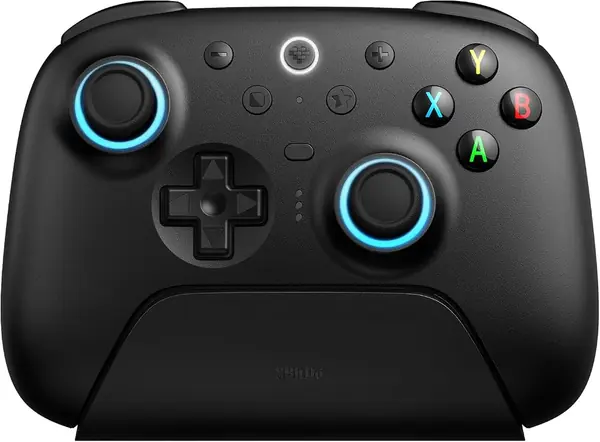
The best iPad controller may not clamp to the tablet at all. For most games, we prefer a full-size controller on a stand, and the 8BitDo Ultimate 2 is the one that feels most console-like in the hand. Its TMR joysticks are smooth and built to resist drift, the back buttons are easy to reach, and the trigger-mode switch lets you choose between a linear Hall-effect pull and a shorter tactile click. That flexibility matters more than RGB for racing, shooters, and platformers.

The detail we keep coming back to is the charging dock. It gives the controller a permanent home on a desk or shelf, so the battery is topped up instead of being one more thing to remember. The Ultimate 2 is built for Apple, Android, and PC, with Bluetooth for iPad and 8BitDo's 2.4G link for a computer. The 1,000 Hz polling rate is a wired and 2.4G feature, not a Bluetooth one, so don't buy it expecting that responsiveness on iPad.

The trade-off is shape: there's no clamp, so you need a stand, a keyboard case, or a table to prop up the iPad. That's the setup we prefer for longer sessions because the grips don't fight the tablet's weight, but it's not the handheld experience a clamp gives you. If you want the screen between the grips, the GameSir G8 Plus or abxylute S8 is the better fit. For everyone else, the Ultimate 2 is the safest buy here.

Pros

  • TMR joysticks resist drift and wear
  • Trigger-mode switch adds versatility
  • Charging dock keeps it ready

Cons

  • Bluetooth can be less stable than the 2.4G link
Our verdict

For most iPad players, we recommend the 8BitDo Ultimate 2: a full-size, comfortable controller with TMR sticks and a charging dock that makes tabletop play feel like a console.
Check Latest Price
2

GameSir G8 Plus Best Tablet Clamp

86 /100
TKZ Score Excellent

Key details

Joysticks
Hall Effect
Connection
Bluetooth
Compatibility
Switch, iOS, Android, tablets
Weight
1.39 lb
View on Amazon

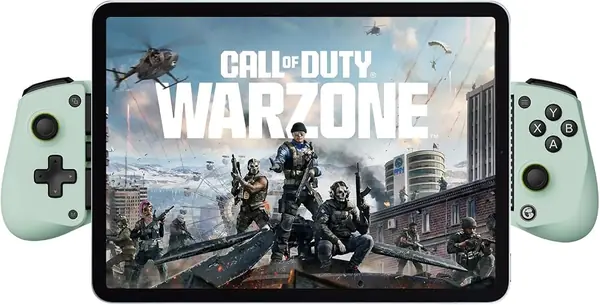
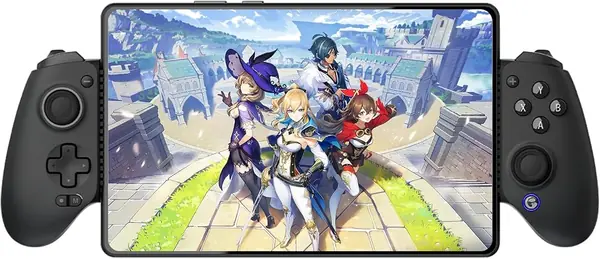
At 630 grams, the G8 Plus is a beefy controller, and that's before you clamp a tablet into it. The weight buys full-size grips and a cradle that feels substantial, which is exactly what we want when the screen is doing the work. The Hall-effect sticks and triggers are smooth, the 6-axis gyro is there for Switch-style motion games, and the magnetic face components are a nice touch if you like changing the look.

Where it earns a place is handheld tablet play. The extendable bridge holds a tablet between the grips, turning an iPad into a big-screen handheld in a way a standalone pad can't. We like that it also works with a Switch or phone, so it's not a one-device purchase. The catch is that it's a Bluetooth mobile controller, not a wired one, so there's a pairing step before you play. Once connected, the controls feel responsive.

The 630-gram weight is the other thing to know. It's fine on a couch or bed, where the tablet can rest, but it's not the controller we pack for a commute. If you want a lighter clamp, the abxylute S8 is easier to carry; if you want maximum grip and don't mind the bulk, the G8 Plus is the more substantial feel. It's a specialized tool, but for handheld iPad play it's a good one.

Pros

  • Tablet clamp turns iPad into a handheld
  • Hall-effect sticks and triggers
  • Magnetic face components customize the look

Cons

  • Bluetooth pairing can be inconsistent
Our verdict

If you want your iPad held between the grips, the G8 Plus is the most flexible clamp here—just expect some heft and Bluetooth pairing that can take a few tries.

Check Latest Price
3

abxylute S8 Best for Large Tablets

85 /100
TKZ Score Excellent

Key details

Joysticks
Hall Effect
Connection
Bluetooth
Tablet Fit
Up to 216 mm
Back Buttons
Customizable
View on Amazon

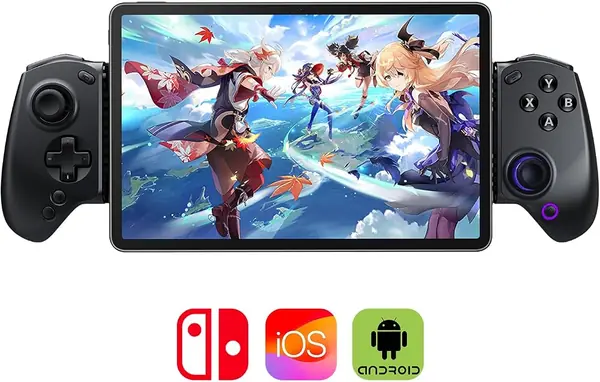
The number that matters is 216 mm. That's the widest tablet the S8's bridge is rated to hold, and it's why this clamp is our pick for larger iPads. It grips the tablet between two full-size grips, pairs over Bluetooth, and still works as a standalone controller when you don't want the screen attached. The Hall-effect sticks and triggers are the right choice for long sessions, and the customizable back buttons are easy to program.

The S8 is also easier to live with than some clamps because it folds down for travel and has a one-tap screenshot button. We like that it can switch between clamped and standalone use; it means one controller covers handheld play and tabletop play. Bluetooth pairing is one of its stronger points, and the back buttons are useful without being crowded. The 216 mm limit is the spec to check: a full-size iPad is close to that width, so measure before you assume it will fit comfortably.

Where it lands is as the big-screen handheld choice. It doesn't have the instant USB-C connection of the X5 Lite, but it does something a standalone pad cannot: it holds a tablet up to 216 mm wide and still gives you full-size controls. If that's your setup, the S8 is the one we point to. If you mostly play on a stand, a standalone pad is still more comfortable.

Pros

  • Fits tablets up to 216 mm
  • Customizable back buttons
  • Clamp or standalone use

Cons

  • Bluetooth only; no wired fallback
Our verdict

The S8 is our pick for a big-screen handheld setup: it clamps tablets up to 216 mm, pairs over Bluetooth, and adds back buttons without the G8 Plus's bulk.

Check Latest Price
4

GameSir X5 Lite Best Wired for iPad Mini

84 /100
TKZ Score Excellent

Key details

Joysticks
Hall Effect
Connection
USB-C
Compatibility
iPhone 15/16, iPad mini 7, Android
Weight
4.59 oz
View on Amazon

The X5 Lite is the simplest controller on this list to live with. It's a USB-C clamp, so there's no pairing menu, no battery to charge, and no Bluetooth handshake to troubleshoot: you slide the iPad mini into the cradle, plug in the connector, and play. The 130-gram body is light enough to hold for a while, and the Hall-effect sticks are a genuine upgrade over the drift-prone sticks on cheaper mobile pads. The turbo button is there for repeat-fire games, and pass-through charging lets you top up the tablet while you play.

The fit is the main thing to check. The rails cover phones from 105 to 213 mm and are aimed at the iPad mini 7, so this is not a full-size iPad controller. It also means a thick case will probably need to come off before the connector seats. Within that lane, we like the X5 Lite's focus: it does one job, does it without fuss, and doesn't ask you to manage another battery. The textured sticks and light body make it feel more expensive than its budget price.

For iPad mini owners who play cloud games, emulators, or controller-supported native titles, the X5 Lite is an easy recommendation. The wired connection is the point: it's as close to plug-and-play as mobile gaming gets, and pass-through charging solves the usual battery anxiety. If you want wireless freedom, the abxylute S8 is the step up; if you want a full-size pad for a stand, the 8BitDo is the better fit.

Pros

  • Plug-and-play USB-C connection needs no pairing
  • Hall-effect sticks resist drift
  • Pass-through charging keeps the iPad powered

Cons

  • No audio jack
Our verdict

For an iPad mini, the X5 Lite is the simplest buy here: plug it into USB-C and play, with Hall sticks, pass-through charging, and no battery to manage.

Check Latest Price
5

AceGamer Aurora II Best Budget

83 /100
TKZ Score Excellent

Key details

Joysticks
Hall Effect
Connection
2.4G, Bluetooth
Compatibility
PC, iOS, Android, Switch
Battery
1,000 mAh
View on Amazon

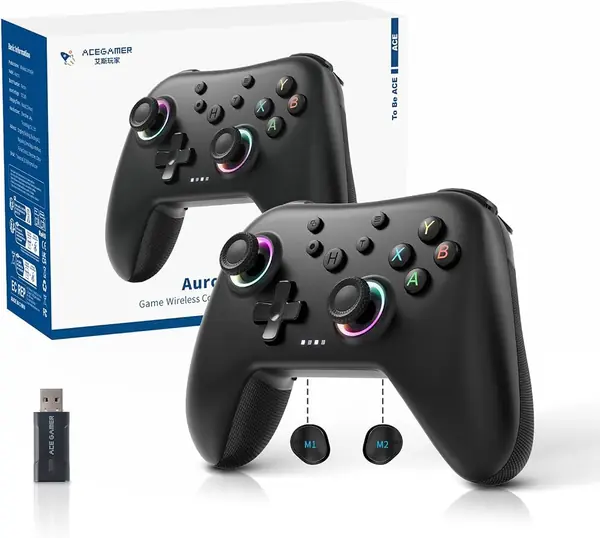
The Aurora II is the budget controller that doesn't feel like a punishment. It has Hall-effect sticks, two programmable back buttons, and a 1,000 mAh battery that's larger than what most budget pads carry. The RGB ring is there if you like that look, and the controller works over 2.4G or Bluetooth with PC, Switch, iOS, and Android. For iPad play, you'll use Bluetooth and prop the tablet up; this is a standalone pad, not a clamp.

What makes it worth considering is the price-to-features ratio. Back buttons and Hall sticks usually show up on more expensive controllers, and the Aurora II gives you both without asking you to give up a full-size grip. We think it's a good second controller for a kid or a travel bag, or a first controller for someone who isn't ready to spend on a premium pad. The weak spot is consistency: Bluetooth can drop, so pair it before you sit down.

That's the trade-off with a budget pick. You get the useful hardware, but you may spend more time re-pairing than you would with a premium controller. The 1,000 mAh battery helps, and the back buttons are genuinely useful in games that support remapping. If you want the lowest-risk budget buy, this is still the one we point to; just treat it as a value pick, not a long-term flagship.

Pros

  • Budget price with back buttons
  • Large 1,000 mAh battery
  • Hall-effect sticks resist drift

Cons

  • Button response can be inconsistent
  • Durability can fall short after months
Our verdict

The Aurora II is the budget full-size controller we point to for iPad players who want back buttons and Hall sticks without paying premium money.

Check Latest Price
6

CRKD ATOM+ Best Travel

82 /100
TKZ Score Excellent

Key details

Joysticks
TMR
Connection
Bluetooth
Compatibility
Switch 2, iOS, Android, PC
Size
90 x 48 mm
View on Amazon

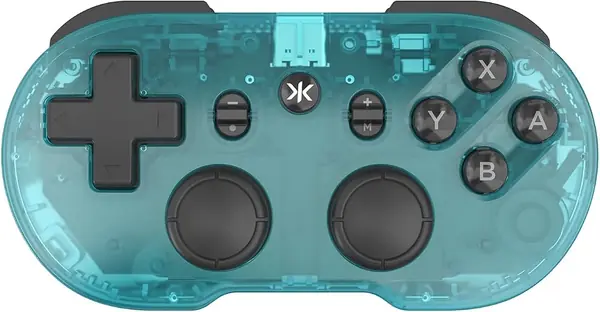
At 90 by 48 mm, the ATOM+ is smaller than most phones, which is the entire pitch. It's a pocketable Bluetooth controller with TMR thumbsticks, four shoulder buttons, and a layout that feels surprisingly complete for the size. The sticks use the same zero-contact magnetic technology as CRKD's larger controllers, so you're not giving up drift resistance just because it fits in a bag.

We like it most as a travel controller. It pairs over Bluetooth with an iPad, Switch 2, Android, or PC, and it's light enough to disappear into a backpack pocket. The buttons are clicky and tactile, and the controller has motion sensing and rumble. For retro games, puzzle games, and short sessions, the small size is an advantage; for shooters or long sessions, the compact grips can cramp larger hands.

The ATOM+ earns its place as the controller you keep in a bag, not the one you use for every long session. Its TMR sticks and four shoulder buttons make it more capable than its size suggests, and Bluetooth pairing is quick. If you want a travel pad that doesn't compromise on sticks, this is our pick; if you want full-size comfort, go with the 8BitDo.

Pros

  • Pocket-size 90 x 48 mm body
  • TMR thumbsticks resist drift
  • Easy Bluetooth pairing with iPad and Switch

Cons

  • Shoulder buttons are on/off, not pressure-sensitive
Our verdict

The ATOM+ is the controller we recommend for a bag or a small tablet setup: it's tiny, pairs easily, and still has TMR sticks and four shoulder buttons.

Check Latest Price
7

Razer Kishi V3 Pro Premium iPad Mini

81 /100
TKZ Score Excellent

Key details

Joysticks
TMR
Connection
USB-C
Tablet Fit
Up to 8 in
Extra Controls
Back buttons and haptics
View on Amazon

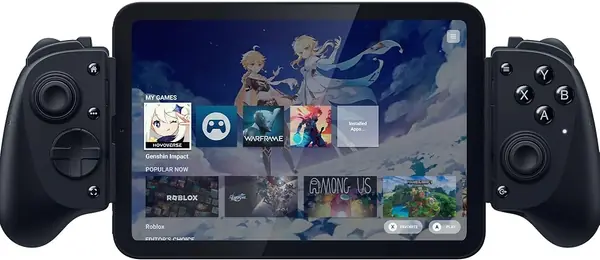
The Kishi V3 Pro is the most console-like clamp we've tried for the iPad mini. Its full-size TMR thumbsticks have swappable caps, the back buttons use mouse-click switches, and the grips are shaped like a real controller rather than a plastic shell. It also adds haptics, a headphone jack, and pass-through charging, which are the kind of details that make a mobile controller feel less like a compromise.

The fit is the first thing to understand: this is an iPad mini controller, not a full-size iPad controller. Razer rates it for the iPad mini 6 and 7 and phones up to 8 inches, and the telescopic bridge locks the tablet in securely once it's seated. If you have a larger iPad, the abxylute S8 or a standalone pad is the better route. For the mini, the Kishi feels like the premium option it is.

The controls are where the premium shows. The TMR sticks are smooth and precise, the back buttons are easy to reach, and the haptics add a layer of feedback beyond basic rumble. We also like the pass-through charging and headphone jack, which make long sessions easier. The buttons are loud enough to notice in a quiet room, but that's a small trade-off for the feel.

At the premium end, the Kishi V3 Pro is for the iPad mini owner who wants the best-feeling clamp. If you want full-size sticks, back buttons, and haptics in a clamp, it's the one we recommend.

Pros

  • Full-size TMR sticks with swappable caps
  • Back buttons and haptic feedback
  • Fits iPad mini 6 and 7

Cons

  • Premium price relative to other picks
Our verdict

We recommend the Kishi V3 Pro for iPad mini owners who want a console-style clamp with full-size TMR sticks, back buttons, and haptics.

Check Latest Price

How We Tested a Dozen iPad Controllers

We started by pulling every controller we could find that explicitly lists iPadOS or iOS support, then cut anything that needed a workaround to connect — a dongle, a firmware dance, a companion app you can't play without. We noted which models mount a tablet directly, which top out at phone size, and how thick a case each clamp would accept. We also kept a running note of what each one offered over a plain console-style pad for the money. That left 12 controllers, tested over four months.

Testing happened where people actually play: on a living room couch with an iPad propped on a stand for Genshin Impact and Minecraft, on a commuter train with an iPad mini pulled out of a tote, on two cross-country flights, and in a hotel room at night with a shooter and headphones.

For each unit we timed the first pairing and counted how many attempts it took, and we plugged the USB-C models straight into an iPhone and an iPad mini to see whether they worked before we opened a settings menu. We clamped every controller onto a bare tablet and then onto the same tablet in a silicone case, and recorded which ones demanded the case come off. With a tablet mounted, we played a 45-minute session and wrote down where our hands started to cramp.

Button feel got a practical test: the same shooting game on every controller, paying attention to whether aim lagged over Bluetooth versus wired, whether triggers bottomed out with a clean stop or a mushy one, and whether the back buttons landed under our fingers instead of a reach away. Where a controller came with a remapping app, we rebuilt the layout for one game and checked it stuck. Durability came last — months of bag drops, carry-ons, and being set down on a coffee table — and we finished by reopening that same game on each one to see whether the character crept forward with the sticks at rest.

How to Choose an Ipad Controller

Clamp or Standalone?

A clamp controller holds the tablet between two grips and turns it into a handheld console. It's the right choice if you play in bed, on a couch, or on a train and want the screen attached. A standalone controller leaves the iPad on a stand or table, which is more comfortable for long sessions and lets you use a full-size pad. We reach for the 8BitDo Ultimate 2 for tabletop play and the GameSir G8 Plus or abxylute S8 when the tablet needs to come with us.

Fit Comes Before Features

For a clamp, the tablet's width and case matter more than the number of buttons. Check the clamp's stated range and whether your iPad's camera bump or port position interferes. The abxylute S8 is rated to 216 mm, while the GameSir X5 Lite is built around the iPad mini and phones. A full-size iPad may fit a wide clamp on paper but feel top-heavy in use. Measure the tablet's short edge, not the screen size, and test without a case before assuming it will fit.

Bluetooth or USB-C?

Bluetooth is convenient because it works with a stand, a tablet, and a TV, but pairing can be fussy and you're relying on a battery. USB-C clamps like the X5 Lite and Razer Kishi V3 Pro draw power from the tablet, offer pass-through charging on some models, and skip the pairing step, but they tether you to the device and usually fit a narrower set of sizes. If you play fast games, the wired connection is the safer bet; for couch play and tabletop setups, Bluetooth is easier to live with.

Sticks, Triggers, and Back Buttons

Hall-effect and TMR sticks use magnetic sensing instead of physical contact, which is why they're less prone to drift over time. That's the feature we prioritize after fit. A trigger-mode switch, like the one on the 8BitDo Ultimate 2, lets you choose a linear pull for racing or a short click for shooters. Back buttons are useful if a game lets you remap them, but they're not worth paying for if you only play platformers. Skip RGB if it means giving up good sticks.

Comfort, Weight, and Travel

A full-size controller is easier on your hands for long sessions, but it needs a surface. A clamp adds the tablet's weight to the controller, so a 630-gram model like the GameSir G8 Plus feels very different from a 130-gram X5 Lite. If the controller lives in a bag, a compact pad like the CRKD ATOM+ makes more sense than a full-size clamp. The right answer is the one you'll actually hold for the length of your typical session, not the one with the longest feature list.

Frequently Asked Questions

Final Verdict

For most iPad players, the 8BitDo Ultimate 2 is the controller we recommend. It has the comfort of a full-size pad, TMR sticks that should resist drift, a useful trigger-mode switch, and a charging dock that keeps it ready. It's the best default for tabletop play, where the iPad sits on a stand and your hands are free to use a real controller.

If you want the iPad in your hands, choose the GameSir G8 Plus for a substantial tablet clamp or the abxylute S8 for a lighter big-screen clamp. For an iPad mini, the GameSir X5 Lite is the simple wired pick, and the Razer Kishi V3 Pro is the premium step up. The right choice starts with how you hold the screen.