Best iPad Cases with a Stand of 2026

There's a half-second of panic every iPad owner recognizes: the tablet is balanced on the arm of the couch, the cover's fold gives out, and it lands screen-first on the floor. A good case handles two jobs that rarely live in one design — it grips the tablet tightly enough that a bump won't free it, and it holds the thing up at an angle you can actually watch without leaning it on a mug.

Over the past four months, my team and I have lived with 14 cases, from slim single-fold folios to full-body shells with a rotating ring. The thing I didn't expect: the magnet that wakes the screen and the magnet that holds the stand open are separate problems. Plenty of covers woke the iPad every time and still sagged halfway through an episode.

Stiffness is the tell. A hinge that folds with two fingers won't survive a month of bedtime use; one that resists you usually is. The picks below run from kid-proof to barely-there, but each holds the tablet and the angle.

The Best iPad Cases with a Stand

1

DTTO Rotating iPad Case Best Overall

96 /100
TKZ Score Outstanding

Key details

Fits
iPad 11th gen 11-inch (2025), iPad 10th gen 10.9-inch (2022)
Stand
360-degree rotating folio
Viewing
Portrait and landscape
Extras
Hand strap and pencil holder
View on Amazon

A swivel sits between the iPad and this folio, and that hinge is why it's our top pick. Give the tablet a quarter turn and it locks into portrait without unclipping anything, the orientation you want for a recipe on the counter, a video call, or sheet music on a stand. Almost every other case here can only prop the iPad the wide way.

The rest of the build holds up. The faux leather cover has stitched edges and a microfiber lining, the shell leaves the buttons and ports clear, and a leather hand strap inside the cover gives you a one-handed grip while you read in bed. There's a Pencil slot that keeps the stylus with the tablet, and this is the best-looking case in the group: the brown reads more like a notebook than an accessory.

One part to watch. The elastic band that keeps the cover shut is the piece that loosens after a year of opening and closing. That's a small thing against a case that stands in both orientations, adds less bulk than the rugged shells here, and costs about what the VIKESI does.

Pros

  • Rotates to portrait without removing the iPad
  • Hand strap makes one-handed reading comfortable
  • Best-looking finish in this set

Cons

  • Elastic closure band loosens over time
Our verdict

For an 11-inch or 10.9-inch iPad, this is the case we hand over: it stands in portrait and landscape, grips one-handed, and looks better than its price.
Check Latest Price
2

VIKESI Magnetic Stand Case Best for Adjustable Angles

95 /100
TKZ Score Outstanding

Key details

Fits
iPad 11th gen 11-inch (2025), iPad 10th gen 10.9-inch (2022)
Stand
Magnetic three-bracket cover
Weight
10.9 oz
Angles
Multiple magnetic angles
View on Amazon

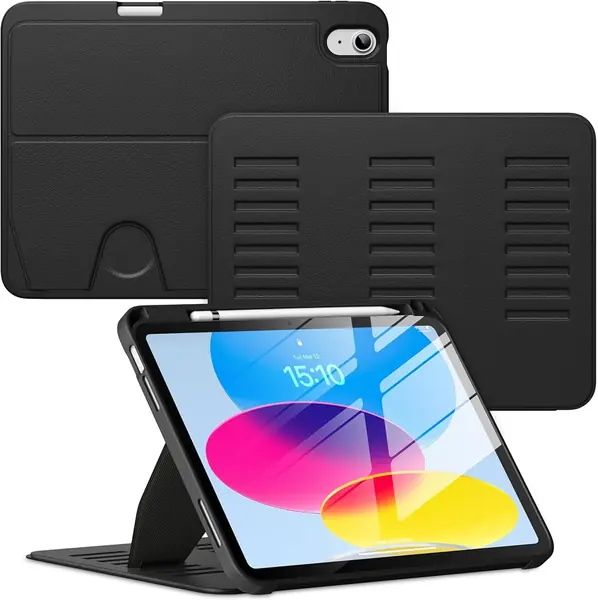
VIKESI builds the stand from three magnetic brackets instead of the single strip most fold-back covers use, and the difference shows the moment you set an angle. The cover grabs the back of the case at several heights, so a shallow angle for typing and a steep one for watching both hold without the cover creeping down the back.

We kept reaching for it on the couch and in bed, where a folio triangle tends to skate across a duvet. The magnet that pins the stand also holds the cover closed, there's a stylus holder on the edge, and the fabric has a smooth, almost suede feel that is nicer in the hand than the faux leather on the DTTO.

At 0.31 kg it stays comfortable to hold one-handed, and it is slim enough to leave on the iPad permanently. It doesn't swivel to portrait the way the DTTO does, which is the trade for the extra angles. The volume cutout on ours sat slightly off the buttons, so presses needed a beat more pressure.

Pros

  • Three-bracket stand holds several angles
  • Strong magnet keeps the cover shut
  • Light for a full cover at 0.31 kg

Cons

  • Volume cutout can sit slightly off the buttons
Our verdict

If you prop the iPad on your lap, a bed, or a tray table, this is the case we point to: the three-bracket stand grips where single-magnet covers slide.

Check Latest Price
3

SEYMAC Rugged iPad Case Best Rugged

94 /100
TKZ Score Outstanding

Key details

Fits
iPad 11th gen 11-inch (2025), iPad 10th gen 10.9-inch (2022)
Stand
360-degree rotating hand strap and stand
Weight
12.7 oz
Included
Built-in screen protector and shoulder strap
View on Amazon

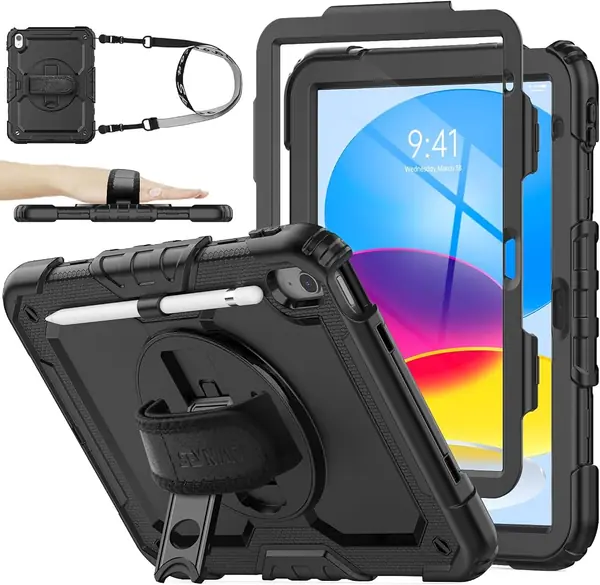
This is the case we hand to someone who needs an iPad to survive a school year. Silicone wraps the tablet, a built-in screen protector covers the glass, port covers keep grit out of the charging slot, and a shoulder strap lets you carry it hands-free. It is the strongest protection in this set, and the only case here with a strap that goes over your shoulder.

The wide hand strap on the back rotates a full 360 degrees and doubles as the stand, which makes it useful in the back seat, in a clinic, and in a workshop. There's a Pencil holder, the silicone has enough grip that it doesn't slide off a lap, and the frame snaps together around the tablet with a firm press.

The kickstand is short, and on a cushion or a duvet the iPad leans back; set it on a table, a tray, or a desk and it holds steady. For a child, a clinic, or a job site, that is a fair trade for the armor. It is not the case for someone who wants a slim folio.

Pros

  • Built-in screen protector and port covers
  • Rotating hand strap doubles as a stand
  • Shoulder strap carries it hands-free

Cons

  • Heaviest case here at 360 g
  • Frame halves can pop apart in a hard fall
Our verdict

Buy it for a kid, a clinic, or a job site: this is the most protection you can wrap around an 11-inch iPad without giving up the stand.

Check Latest Price
4

Fintie Rotating Case (10.2-inch) Best for iPad 9Th, 8Th, and 7Th Gen

93 /100
TKZ Score Outstanding

Key details

Fits
iPad 9th, 8th, 7th gen (10.2-inch)
Stand
360-degree swivel
Weight
12.6 oz
Viewing
Portrait and landscape
View on Amazon

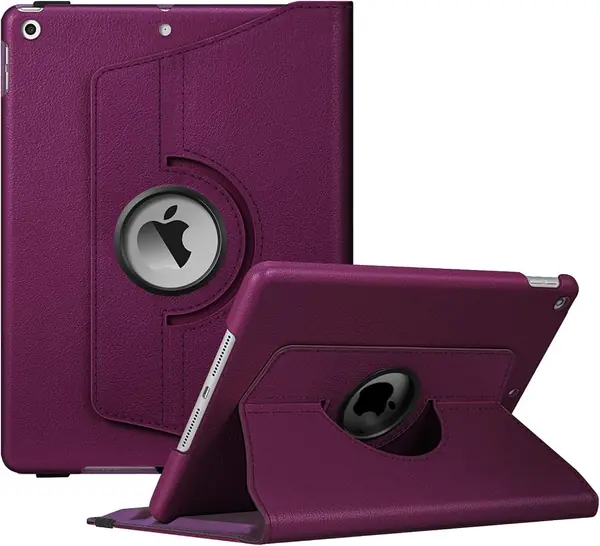
If you're still carrying a 10.2-inch iPad, the 7th, 8th, or 9th generation, this is the pick, because none of the 11-inch cases here will fit that body. Fintie mounts the tablet in a swivel inside a synthetic leather cover, so it turns from landscape to portrait without coming out of the shell.

That swivel is the reason we recommend it. The hinge moves smoothly, and portrait is what makes the case useful for reading, recipes, and video calls in a way a fold-back cover cannot match. There are also three slots, one for the Pencil, one for the cap, and one for the charging adapter, which is the sort of detail you appreciate the day you don't lose either small piece.

Deep purple here is a real color rather than a purple-gray compromise, the cover looks like a notebook on a shelf, and the sleep/wake magnet engages when the front closes. At 12.6 ounces it is a substantial case, and the dual-layer interior is what you are carrying.

Pros

  • Swivel stand works in portrait and landscape
  • Separate slots for Pencil, cap, and adapter
  • Sleep/wake magnet and a notebook-style cover

Cons

  • iPad can slide in the stand grooves
  • Heavy side at 12.6 ounces
Our verdict

For a 10.2-inch iPad, this is the stand case we recommend: the swivel gives you portrait, and three slots keep a Pencil and its small parts together.

Check Latest Price
5

MoKo Slim Folio Case Best Budget

92 /100
TKZ Score Outstanding

Key details

Fits
iPad 11th gen 11-inch (2025), iPad 10th gen 10.9-inch (2022)
Stand
Magnetic fold-back cover
Weight
7.85 oz
Angles
Two viewing angles
View on Amazon

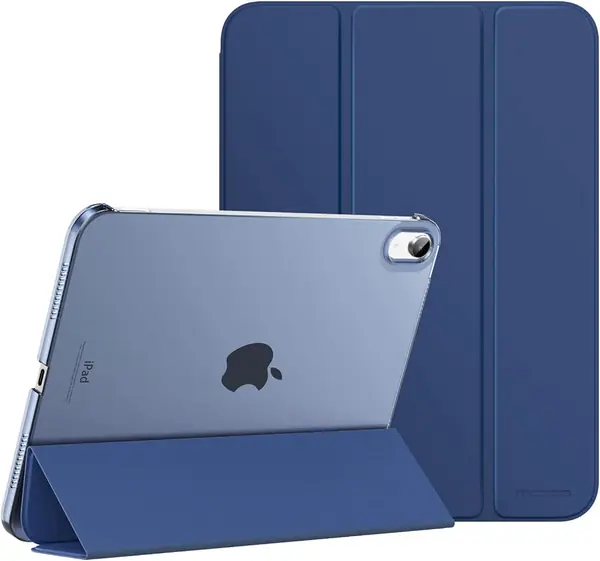
The MoKo is the cheapest case here and the lightest at 7.85 ounces, roughly two-thirds the weight of the Fintie rotator. For a case that mostly props the iPad up on a desk or a kitchen counter, that is most of what matters.

What the money buys: a slim folio with a translucent hard back so the iPad's color shows through, a magnetic cover that folds into two angles, a cutout that leaves Touch ID clear, auto wake/sleep, and a spot for a Pencil. It snaps on in seconds and comes off just as easily when you want the tablet bare.

We reach for it when the iPad lives on a table and the priority is a stand that disappears into a bag. It is a thin shell rather than armor. For the money, buying it as the house case and keeping a rugged one for travel makes sense.

Pros

  • Lightest case here at 7.85 ounces
  • Translucent back shows the iPad's finish
  • Two stand angles for typing and watching

Cons

  • Stand can collapse under a firm tap
  • Plastic corners can crack with wear
Our verdict

The budget pick we actually recommend: the lightest case here, with a two-angle stand and a see-through back, for an iPad that mostly stays home.

Check Latest Price
6

Fintie Kid-Friendly Case (10.2-inch) Best for Young Kids

91 /100
TKZ Score Outstanding

Key details

Fits
iPad 9th, 8th, 7th gen (10.2-inch)
Stand
Two-position kickstand
Weight
1.04 lb
Viewing
Portrait and landscape
View on Amazon

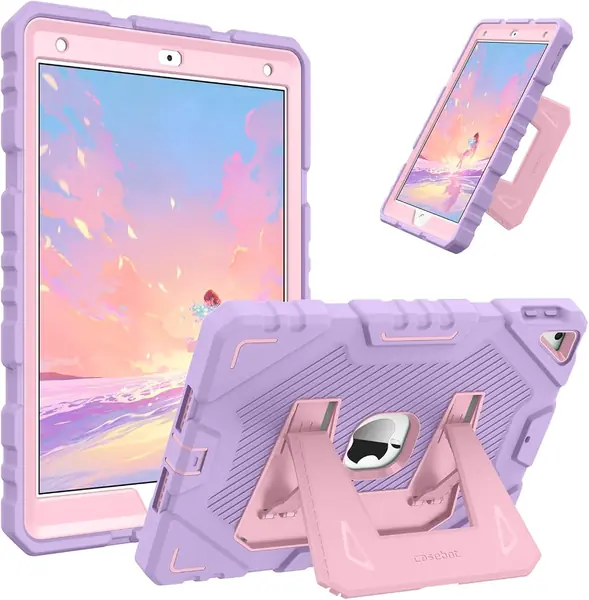
It arrives in three pieces, a front frame, a back shell, and a silicone skin, and closing it around a 10.2-inch iPad takes a firm press along all four edges. A small pry tool comes in the box for opening it again, which matters more than it sounds like it should.

The payoff is a genuinely tough case. The layers are polycarbonate and silicone, and the skin has a bumpy texture that small hands can hold more easily than smooth plastic. The purple and pink options are bright enough to find under a couch.

The kickstand pops out of the back with two positions, one for watching in landscape and one that stands the iPad more upright for drawing and reading. On a table it holds steady, and the hinge takes a little learning before a young child stops fighting it.

Where this earns its place is the drop, the moment a tablet goes over the arm of a couch. It is also less expensive than the SEYMAC, which makes it the sensible choice for a hand-me-down iPad that lives with a child.

Pros

  • Three-layer shell takes drops
  • Two-position kickstand for portrait and landscape
  • Grippy silicone texture for small hands

Cons

  • Volume buttons can turn oversensitive
  • Adds noticeable bulk at 0.47 kg
Our verdict

For a child's 10.2-inch iPad, this is the case we reach for: three layers, a two-position stand, and a shell that shrugs off the couch-to-floor commute.

Check Latest Price
7

ZoneFoker Rugged Case (10.2-inch) Budget Protection

90 /100
TKZ Score Outstanding

Key details

Fits
iPad 9th, 8th, 7th gen (10.2-inch)
Stand
Folding kickstand
Weight
10.9 oz
Shell
Silicone over hard polycarbonate
View on Amazon

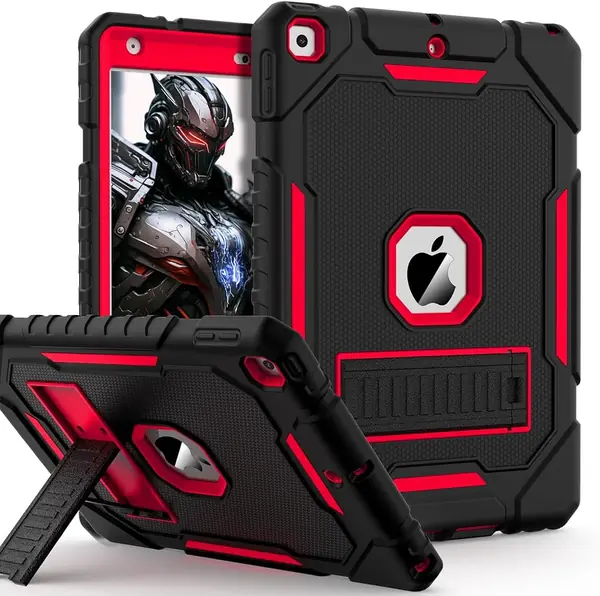
The kickstand here is a single arm that folds out of the back, and it isn't centered, so propped on a bed or a couch cushion the iPad tips forward when you tap near the top of the screen. On a table or a desk, where the arm has something flat to push against, it holds. We kept it on a hard surface and stopped noticing the offset.

Around that stand is a three-layer shell, soft silicone over a hard polycarbonate frame, that snaps together around a 10.2-inch iPad in a couple of minutes. The silicone has enough texture that it doesn't slide off a lap, and the black-and-red version is easy to find in a bag full of dark electronics.

It is the rugged option for a 10.2-inch iPad when the budget is tight: more protection than the folios here, less money than the SEYMAC. If the tablet spends its life on a table and gets handed to a child, this is the value pick of the group.

Pros

  • Three-layer shell with a hard frame
  • Grippy silicone stays put on a lap
  • Rugged build on a budget

Cons

  • Stand arm is the weak point under rough handling
Our verdict

A cheap way to armor a 10.2-inch iPad, as long as you use the stand on a table rather than a bed, where the offset arm tips it forward.

Check Latest Price

How We Tested These iPad Cases

We started by collecting every case we could find that was built for a specific iPad generation rather than a loose size range, then set aside anything whose stand was a single fold-and-flop with no second position. That left 14 cases, which we fitted to the iPads we had on hand and used for four months — on the couch, on the kitchen counter next to a recipe, in a tote bag, and in the back seat on the way to school.

Fit came first. I snapped each tablet in, turned it upside down, and shook it gently over a cushion to see whether the corners held, then found every button and camera cutout by feel. For the sleep/wake magnet, I opened and closed the cover 30 times in a row and counted the misses. For the stand magnet, I held the case upside down by the flap to see whether the tablet stayed put.

Stability got the most use. I propped each case on a couch arm, a kitchen counter, and a mattress — soft surfaces expose a weak hinge fast — then typed on the screen hard enough to rock it. Durability meant drops from counter height onto hardwood, corner first, with the tablet inside, plus a week in a bag with keys. Pencil holders were judged by whether the stylus charged while docked and whether the loop crowded the buttons on that side.

At the end, I lined all 14 up side by side to judge appearance after weeks of handling — fingerprints on translucent backs, scuffs on faux leather, edges gone shiny — and weighed the finish against what each one cost.

How to Choose an Ipad Case with a Stand

Start With the Model Number, Not the Screen Size

Two different iPads get sold as roughly 11 inches, and one of them is 10.9. The 11th-generation iPad (A16, 2025) and the 10th-generation 10.9-inch iPad (2022) share a body, which is why the DTTO, VIKESI, SEYMAC, and MoKo cases here list both. The 10.2-inch 7th, 8th, and 9th generations are a different shape, and a case cut for them will not stretch over the newer tablet.

Open Settings, then General, then About, and match the A-number to the listing before you order. It takes thirty seconds, and it is the one mistake in this category that costs you a return.

Match the Stand to How You Actually Watch

Four designs turn up here and they behave differently. A magnetic fold-back cover gives you one or two angles, adds the least weight, and wants a hard, flat surface. A swivel case turns the tablet to portrait as well as landscape, which is what recipes, reading, and video calls need. A magnetic multi-angle cover holds a stack of positions and copes best with a lap. A pop-out kickstand is what you get on rugged shells: two positions, happiest on a table.

Decide the orientation first. If the iPad only ever sits the wide way, a two-angle folio is enough; if you read or cook with it, pay for the swivel.

Decide How Much Armor You're Carrying

The trade is straightforward: the more the case absorbs, the less you want to hold it for an hour. A built-in screen protector and a full silicone wrap, as on the SEYMAC, are what a tablet that travels to school or a workshop needs. A slim folio with bare glass, like the MoKo, keeps the iPad light and easy to hold but leaves the screen to fend for itself.

Straps are the other dividing line. A hand strap earns its place if you read standing up, and a shoulder strap changes how you carry the tablet entirely. Neither matters much for an iPad that never leaves the kitchen counter.

Frequently Asked Questions

Final Verdict

For most iPads bought in the last two years, the 11-inch A16 or the 10.9-inch 10th generation, the DTTO is the case we recommend. It stands in portrait and landscape, the hand strap makes one-handed reading easy, and the finish looks better than anything else in this group at a mid-range price.

Two situations change the answer. If the iPad spends more time on a lap or a bed than on a desk, the VIKESI's three-bracket stand holds the angle better. If it belongs to a child, take the SEYMAC for an 11-inch iPad or the Fintie kid case for a 10.2-inch one.