Best iPad A16 Cases of 2026

A case has one job: take the hit so your iPad doesn't. The trouble is that the ones built to survive a drop are often the ones that turn a 1-pound tablet into something that feels like a hardcover book in your bag, and the slim ones can feel like a gamble every time you set the thing down on a counter. I've carried both kinds for months at a stretch, and the difference in daily handling is bigger than any spec sheet lets on.

The underrated part is the magnets. They hold the cover shut, trigger sleep/wake, and keep the whole thing propped at an angle you can actually type at without it collapsing mid-sentence, and strong ones separate a case that works from one that wobbles. Fit matters just as much, since a loose shell means the ports don't line up and the Pencil holder stops gripping. Over the past four months, our team has put 14 cases through ordinary life, and the ones that held up earned it.

What we ended up caring about most wasn't the thickest shell or the fanciest cover, but whether the case felt secure in the hand and stayed where you put it. The picks below run that range, from slim folios to full-body shells.

The Best iPad A16 Cases

1

ZUGU Case for iPad A16 Best Overall
96 /100
TKZ Score Outstanding

Key details

Compatibility
iPad (A16) 11th/10th gen
Stand
8-angle magnetic
Drop Protection
5 ft
Warranty
2-year
View on Amazon

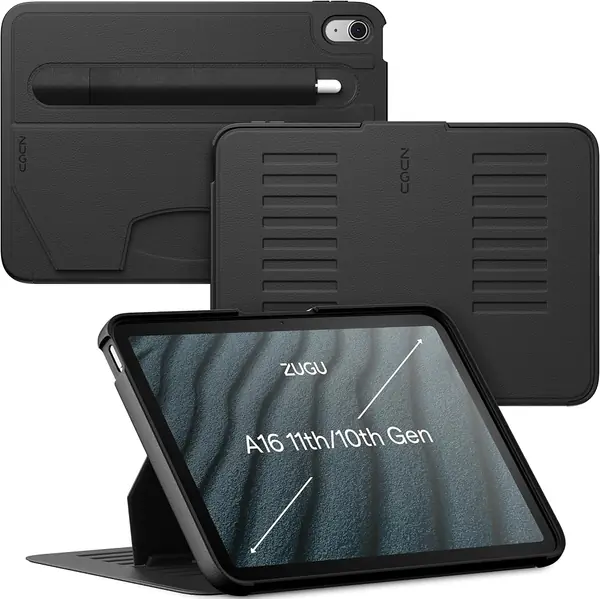
Eight angles, and the stand still holds: that is the ZUGU's argument for the top spot. Its magnetic panel lets you set the iPad steep for drawing, shallow for typing, or nearly upright for video, and the fold stays where you put it instead of collapsing under the tablet's weight. The 5-foot drop rating and two-year warranty add backup that most folios here don't match.

In daily use, the difference is small but constant. The cover folds into a stable triangle without a lot of fiddling, and the magnets let you park the iPad on a fridge or metal surface while you do something else. We also like the built-in Apple Pencil holder because it keeps the pencil with the tablet instead of loose in a bag. The trade-off is weight: this is one of the denser cases here and feels more substantial than the MoKo or DTTO.

The fit is precise around the buttons, camera, and charging port, and the auto sleep/wake works as expected. We did not find the same corner-splitting or stand-collapse problems that show up on cheaper folios, though the smooth exterior picks up fingerprints. If you often carry the iPad by hand for long stretches, a strap case like the SEYMAC is more convenient.

The only time we reach for another pick is when we want a hand strap or a kid-proof shell; otherwise, the ZUGU's stand and warranty are what keep it on the tablet.

Pros

  • Magnetic stand holds eight viewing angles
  • 5-foot drop protection and two-year warranty
  • Built-in Apple Pencil holder

Cons

  • Premium price compared with budget folios
Our verdict

We recommend the ZUGU for most iPad A16 owners because its eight-angle magnetic stand stays put and its 5-foot drop protection and two-year warranty justify the premium.
Check Latest Price
2

DTTO Rotating Folio Best Rotating Folio

94 /100
TKZ Score Outstanding

Key details

Compatibility
iPad A16 11th/10th gen
Pencil Holder
Built-in
Material
Faux leather, microfiber
Rotation
360 degrees
View on Amazon

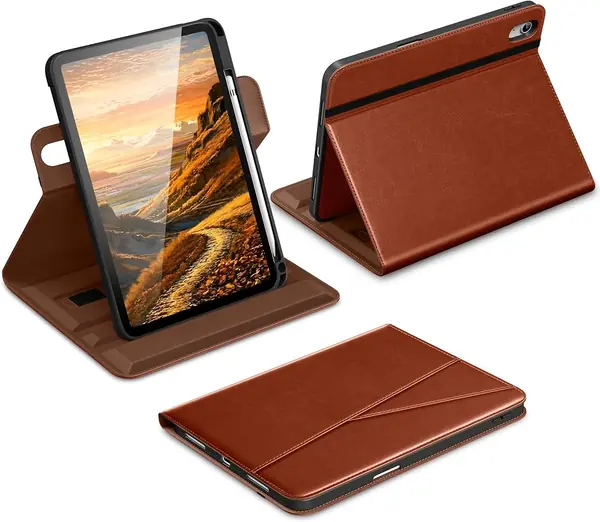
A 360-degree swivel is the reason to look at the DTTO. The iPad clips into an inner frame that rotates inside the folio, so you can turn a recipe, a comic, or a video call upright without pulling the tablet out. The faux-leather exterior looks more expensive than the case's midrange price, and the stitching and pockets give it a finished feel.

We like this one for reading and video calls, where portrait orientation matters more than a kickstand's angle range. The cover folds into a stand, and the hand strap makes one-handed holding easier than a plain trifold. The pencil holder and auto sleep/wake are the other daily conveniences we use most.

The elastic band that holds the cover closed is the detail to watch; it keeps the folio shut in a bag, but it can stretch over time. The fit around the camera and buttons is clean, and the rotation mechanism feels snug. If you switch orientation often, that band is the one part to check as the case ages.

Pros

  • 360-degree swivel for portrait or landscape
  • Premium-looking faux leather and stitching
  • Hand strap and pencil holder add convenience

Cons

  • Softer shell than rugged cases
Our verdict

We recommend the DTTO for anyone who wants to switch between portrait and landscape without removing the iPad from its case.

Check Latest Price
3

VIKESI Magnetic Stand Case Best Adjustable Stand

93 /100
TKZ Score Outstanding

Key details

Compatibility
iPad A16 11th/10th gen
Stand
3-bracket magnetic
Pencil Holder
Built-in
Warranty
2-year
View on Amazon

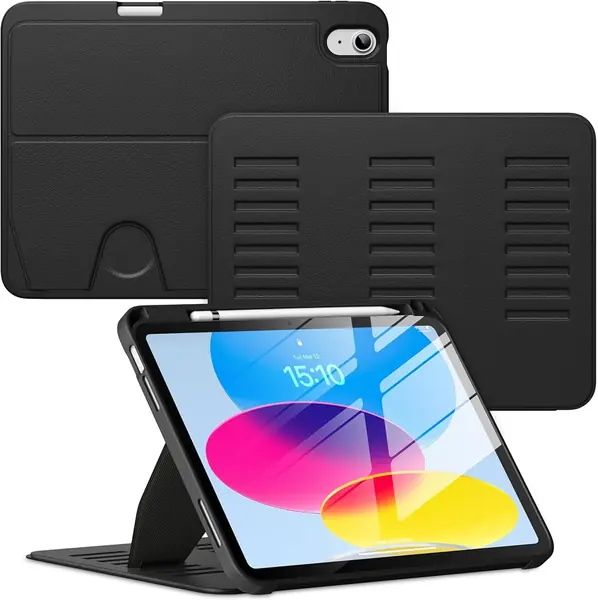
Most folio stands give you two positions and hope. The VIKESI uses a three-bracket magnetic stand that slots into several angles, and the difference shows when you tilt the screen forward for typing or back for video. The magnets are strong enough that the cover doesn't flop shut when you move the case.

The case itself is a hybrid folio with a shockproof back, a pencil holder, and auto sleep/wake. It feels more substantial than the MoKo but less armored than the Defender, which puts it in the middle of this group for protection. The fabric has a smooth, slightly warm feel that we liked, and the cutouts line up cleanly.

We recommend it for a desk, kitchen counter, or lap because the stand is the main event and it delivers. It is a bit heavy for long one-handed reading, and the DTTO is better if you want a case that swivels. For everything else, the stable angle range is what earns it a place.

Pros

  • Three-bracket stand holds many angles
  • Strong magnets keep the cover in place
  • Pencil holder and auto wake/sleep

Cons

  • No portrait rotation
Our verdict

We recommend the VIKESI for desk and lap use because its three-bracket magnetic stand holds many angles more firmly than a typical folio.

Check Latest Price
4

OtterBox Defender Best Heavy-Duty Protection

92 /100
TKZ Score Outstanding

Key details

Compatibility
iPad A16 & 10th gen
Stand
Four-position
Drop Protection
2x military-grade
Pencil Storage
Built-in
View on Amazon

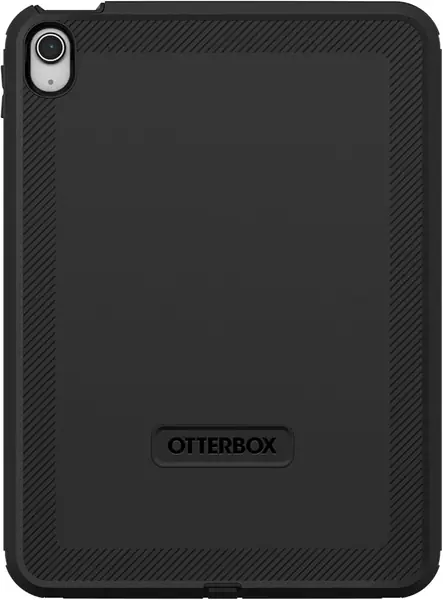
Drop protection is the reason this case exists, and the Defender treats it like a mission. OtterBox rates it for two times military-grade drop protection, and the multi-layer shell, port covers, and raised edges make that claim believable. It is the most armored case in this group, and it feels like it.

We recommend it for job sites, travel, or a household where the iPad gets knocked around, but the kickstand is the weak link. The four-position stand is harder to move than it should be and can feel floppy once it is out, which is frustrating on a case this expensive. The rest of the package—pencil storage, lanyard anchors, and a fit that stays tight—is solid.

The built-in screen protector is a plus for dust and scratches, though it is not as clear as bare glass. If you want similar protection with a friendlier stand, the ZUGU is the better everyday compromise.

Pros

  • Military-grade drop protection
  • Port covers and raised edges
  • Pencil storage and lanyard anchors

Cons

  • Heavy and bulky
Our verdict

We recommend the OtterBox Defender for anyone who prioritizes drop protection above all else and can live with a fussy kickstand.

Check Latest Price
5

SEYMAC Full-Body Case Best for Hands-Free Carry

91 /100
TKZ Score Outstanding

Key details

Compatibility
iPad A16 11th/10th gen
Stand
360° rotating kickstand
Protection
Full-body with screen protector
Straps
Hand and shoulder
View on Amazon

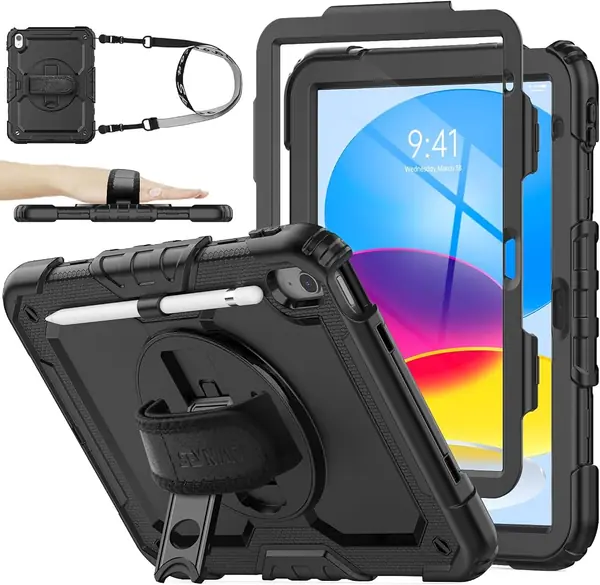
A rotating hand strap on the back and a shoulder strap in the box make the SEYMAC the most carry-focused case here. The hand strap gives you a secure one-handed grip, and the shoulder strap turns the tablet into something you can carry like a small bag. The full-body shell includes a built-in screen protector and port plugs, so it covers the parts a slim folio leaves exposed.

We like it for travel, school runs, and anyone who moves around while using the iPad. The 360-degree kickstand rotates for landscape or portrait, and the pencil holder keeps a stylus from disappearing into a backpack. The frame is the part we watch: the pieces can pop apart if the case takes a hard fall, which is worth knowing if the iPad gets dropped often.

The rest of the case is built for rough handling, and the screen protector is a real convenience if you don't want to install glass. The pen holder and cutouts are precise, and the shoulder strap is easy to clip on when you need it.

Pros

  • Full-body coverage with screen protector
  • Hand and shoulder straps for carrying
  • 360° rotating kickstand

Cons

  • Bulky full-body shell
Our verdict

We recommend the SEYMAC for travel and busy days because its hand and shoulder straps make the iPad easier to carry than a plain folio.

Check Latest Price
6

MoKo Slim Folio Best Budget

90 /100
TKZ Score Outstanding

Key details

Compatibility
iPad A16 11th/10th gen
Stand
Magnetic trifold
Pencil Holder
Built-in
Material
PU leather, PC back
View on Amazon

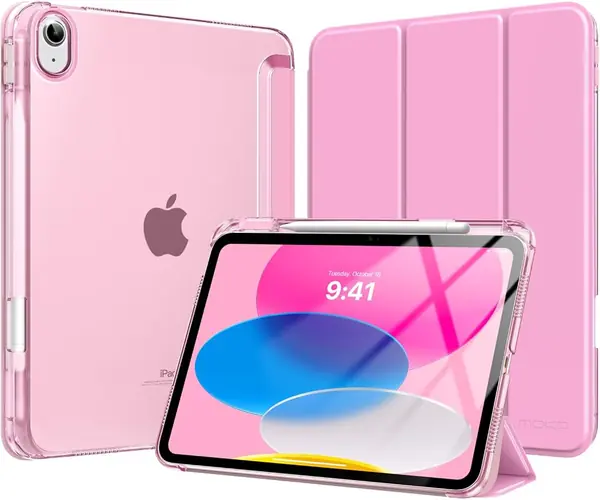
For a slim folio that covers the basics, the MoKo is the one we hand to someone who doesn't want to spend much. It covers the front and back, supports auto sleep/wake, and has a built-in pencil holder, which is more than we expect at this price. The translucent back lets the iPad's color show through, and the trifold cover folds into a viewing or typing stand.

The fit is easy to live with: the iPad snaps in, the buttons stay clicky, and the cutouts line up. The cover is stiff enough to protect the screen in a bag, and the magnetic closure keeps it from flapping open. We like the pencil holder for a USB-C Pencil, though it adds a little bulk to an otherwise slim case.

The stand is where the budget shows. The magnetic fold works on a table, but it can slide out of position on a soft surface or when you push the screen back. The magnets that hold the cover closed are not the strongest here either. If you mostly use the iPad flat or on a desk, those are easy compromises; if you need a stand for drawing or video calls, spend more on the ZUGU or VIKESI.

Pros

  • Slim folio with built-in pencil holder
  • Auto sleep/wake and precise cutouts
  • Low-cost everyday protection

Cons

  • Less drop protection than rugged cases
Our verdict

We recommend the MoKo as a budget everyday folio for anyone who wants slim protection, a pencil holder, and auto wake/sleep without spending much.

Check Latest Price
7

OtterBox EasyGrab Best for Kids

89 /100
TKZ Score Excellent

Key details

Compatibility
iPad A16 & 10th gen
Protection
Kid-proof durable shell
Handle
Swivel handle/stand
Cleaning
Wipeable
View on Amazon

A thick rubber shell, a big swivel handle, and grip ridges along the sides: the EasyGrab looks like a kids' case because it is one. The handle locks in several positions and doubles as a stand, so a child can carry the iPad by the handle or prop it up for a show. The shell is screenless, which means you add your own glass protector if you want one.

We like the wipeable surface for sticky fingers and snack crumbs, and the raised edges give the screen some clearance when the tablet is face down. The case is bulky, which is the point for a kid's tablet, but it makes the iPad feel more like a toy than a personal device. The handle is the feature that earns its keep: it gives small hands a confident grip and makes the case easier to pick up off the floor.

The fit is snug enough that the iPad does not shift inside the shell, and the buttons and ports stay accessible. The screenless design is a deliberate trade-off: you don't get a built-in shield, but you also don't deal with a plastic film over the display. For a child who uses the iPad for school, videos, and FaceTime, that is the right balance.

The handle and wipeable shell are the parts that make the upgrade worthwhile; if the iPad stays on a desk, a slim folio is the better buy.

Pros

  • Wipeable shell handles sticky hands
  • Swivel handle doubles as a stand
  • Kid-proof durable construction

Cons

  • Expensive for a kids' case
Our verdict

We recommend the OtterBox EasyGrab for families with young kids because its wipeable shell and swivel handle stand up to rough handling.

Check Latest Price
8

Grifobes Heavy-Duty Case Rugged Budget Pick

88 /100
TKZ Score Excellent

Key details

Stand
Dual-mode kickstand
Pencil Holder
Built-in
Material
Silicone and PC
Drop Protection
Military-grade
View on Amazon

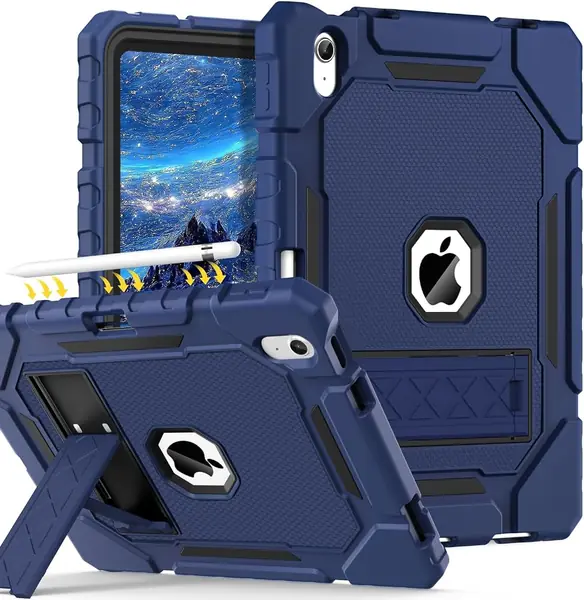
Rugged protection at a budget price is the Grifobes' pitch, and it mostly delivers. It combines a soft silicone outer layer with a hard polycarbonate frame, and the result is a case that feels tougher than the MoKo or DTTO. The dual-mode kickstand props the iPad in landscape or portrait, and the pencil holder keeps a stylus close.

We recommend it for a kid's backpack, a workshop, or any iPad that gets handled without much ceremony. The silicone is grippy and the buttons are easy to press, though the outer layer collects dust and lint faster than the smoother folios here. The dual-mode stand is stable on a table, and the pencil holder is easy to reach.

The fit is precise, and the case does not interfere with the charging port or camera. It is bulkier than a folio, but not as heavy as the OtterBox Defender. For a rugged case at this price, the protection is the point.

The Grifobes earns its place as the rugged budget option: it protects the iPad, stands in two orientations, and stores a pencil without asking for premium money. That combination is why it stays in the roundup.

Pros

  • Military-grade drop protection
  • Dual-mode kickstand for landscape or portrait
  • Built-in Apple Pencil holder

Cons

  • No built-in screen protector
Our verdict

We recommend the Grifobes as a rugged budget pick for anyone who wants drop protection and a kickstand without paying premium money.

Check Latest Price

How We Tested the Best iPad (A16) Cases

We started by pulling every case we could find that explicitly named both the A16 11-inch and the 10th/11th-generation 10.9-inch in its compatibility line, because the generation overlap trips up a lot of listings and anything vague about fit got cut. From there we filtered by cover style, price, and weight, and bought 14 to test over four months.

Fit and protection came first. We installed each case, checked that every port, button, and camera opening lined up without forcing, and noted whether the shell flexed away from the tablet at the corners. For magnet strength, we held each case upside down by its cover and gave it a shake to see whether the iPad shifted, then opened and closed the cover 20 times to confirm sleep/wake fired every time. We propped each one at every angle it offered and typed on it for a few minutes to see which positions actually held, and we checked that the Pencil holder still gripped after a few weeks and left the Pencil's charging edge clear.

Durability got a less gentle treatment. We dropped each case from waist height onto hardwood and from knee height onto a concrete step, then inspected the corners and screen edges for damage to both case and tablet. Grip we judged by carrying each one around one-handed, on the stairs and in and out of a backpack, and appearance by how the materials looked after a month of that, including a wipe-down with a damp cloth after a coffee spill. Usability came down to small things: whether the stand held when we tapped the screen, and whether the case slid off a lap without warning.

How to Choose an Ipad A16 Case

Fit the exact model first

Every case here lists the iPad (A16) 11th generation and the 10.9-inch 10th generation, but the model numbers still matter: A3354, A3355, and A3356 for the 2025 A16, and A2696, A2757, or A2777 for the 2022 10th generation. A case cut for the wrong generation can cover a microphone, misalign the USB-C port, or leave a corner unclipped. Before ordering, match the model number on the back of the iPad to the listing. If you use a glass screen protector, choose a case with a screenless front or a removable frame, because a built-in shield can trap air against the glass.

Decide how much armor you need

A slim folio like the MoKo or DTTO protects against scratches, bumps, and the occasional table-to-floor drop, and it keeps the iPad light enough to read in one hand. A rugged case like the OtterBox Defender or SEYMAC adds a multi-layer shell, port covers, and sometimes a built-in screen protector, but it also adds bulk and weight. We think most adults are better served by a well-made folio; the extra armor is worth it for kids, travel, or job sites where the iPad gets knocked around. Built-in screen protectors are convenient, but they can reduce touch sensitivity or clarity, so a screenless rugged case plus your own glass is often the cleaner setup.

Test the stand before you trust it

The stand is where cheap folios give themselves away. A two-position magnetic fold is fine for watching video on a table, but it can collapse when you tilt the screen forward to type or use it on a soft surface. Look for a stand with multiple grooves or a magnetic panel that holds the fold at the angle you set. The ZUGU and VIKESI are the strongest examples here, while the rotating DTTO is the one to choose if you want portrait orientation. If you mostly use the iPad flat, spend less on the stand and more on the shell.

Plan for pencil, ports, and cleaning

If you use an Apple Pencil, a built-in holder keeps it from rolling loose in a bag, but make sure the case still allows magnetic charging on the side. Port cutouts matter too: a tight fit around the USB-C port can make a chunky charging cable hard to seat. For cleaning, silicone and TPU cases wipe down with mild soap and water, while faux leather needs a damp cloth and no harsh solvents. A kid's case should survive both sticky snacks and frequent sanitizing wipes; the OtterBox EasyGrab is built for that routine.

Choose straps and handles for the way it travels

A hand strap makes one-handed reading easier, a shoulder strap turns the tablet into a carry-along, and a kid's handle doubles as a stand. These features add bulk, so choose them only if the iPad regularly leaves the house. For a shared family tablet, a handle is more useful than a slim cover. For an adult who walks between meetings or classrooms, a hand strap is the detail that keeps the tablet from becoming a two-handed burden.

Frequently Asked Questions

Final Verdict

The ZUGU is the case we recommend to most people: its eight-angle magnetic stand is the most stable in this group, and the 5-foot drop protection and two-year warranty make the premium easier to justify. If the iPad belongs to a child, the OtterBox EasyGrab's handle and wipeable shell are the better match; if you need portrait viewing, the DTTO's 360-degree swivel is the one to choose. Buy the ZUGU for yourself, the EasyGrab for a kid, and the DTTO if the iPad is shared for reading and video calls.