Best Gimbals for iPhone of 2026

A gimbal doesn't improve your iPhone's camera — it removes the reason your footage looks amateur, which is your hand. Walking, talking to the lens, pivoting to follow a subject across a room: a stabilizer smooths all of it. I spent years bracing my elbows, until a shaky clip from a friend's birthday dinner settled the argument.

The motors are only half the story now. What decides whether a gimbal stays in your bag is everything around them: AI tracking that holds when you film in the app you already edit in, a rod long enough for a solo shot, a fill light for a dim room, a tripod that pops out of the handle. We spent six months with 12 of these, and the gap between the best and the rest was rarely about stabilization.

Worth knowing: the most portable models give up a little motor headroom, so how you plan to move matters more than the phone you mount. The picks below are built for people who shoot alone, most of the time, without a second pair of hands.

The Best Gimbals for iPhone

1

DJI Osmo Mobile 6 Best Overall
92 /100
TKZ Score Outstanding

Key details

Folded Size
189 x 84.5 x 44 mm
Extension Rod
Built-in
Stabilization
3-axis
View on Amazon

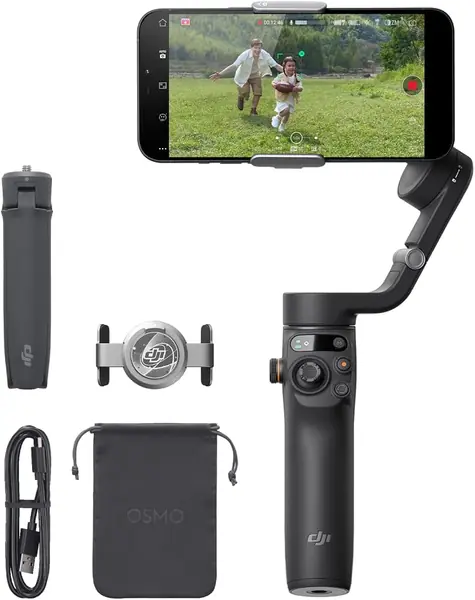
The Osmo Mobile 6 is the gimbal we hand to friends who ask what to buy first, and the extension rod is most of the reason. It slides out of the handle so the phone sits away from your body, which turns a walking shot from chin-and-nostril into something that looks framed by another person. The cheaper Osmo Mobile 7 does without that rod, and for the way most people actually use a phone gimbal — travel, family, the occasional clip for work — the reach is worth the step up.

On the move, the 3-axis head holds a level horizon at an ordinary walking pace, which is the whole job. The mode list goes further than most people need: SpinShot for a whip pan, Motion-Lapse for traffic or clouds, and a panorama stitch that saves you doing it in Photos afterward. Folded, it measures 189 x 84.5 x 44 mm, so it travels in a jacket pocket or a backpack's bottle sleeve instead of a case of its own.

iPhone owners get the better half of this gimbal. The compatibility grumbling attached to it centers on Android phones; paired with an iPhone, the connection is the least dramatic part of using it. It also feels like a solid piece of equipment rather than a plastic toy, which matters when one joint is holding your phone in the air.

We wish the motors held their grip down to the last bar. As the battery drains, a heavy phone in a thick case starts to droop under its own weight, so pack a small power bank for a long day out and top up between takes. The droop shows up late in the afternoon, not in the first hour.

Pros

  • Built-in extension rod for selfies and overheads
  • Holds a level horizon at walking pace
  • Folds to 189 x 84.5 x 44 mm

Cons

  • Some units fail within the first weeks
Our verdict

We recommend the Osmo Mobile 6 to most iPhone owners: the motors hold a walking shot, the rod adds reach, and it's the safest iPhone pairing in this group.
Check Latest Price
2

DJI Osmo Mobile 8 Best for Solo Creators

91 /100
TKZ Score Outstanding

Key details

Weight
13.4 oz
Pan Rotation
360 degrees
Warranty
2 years
Fill Light
Included
View on Amazon

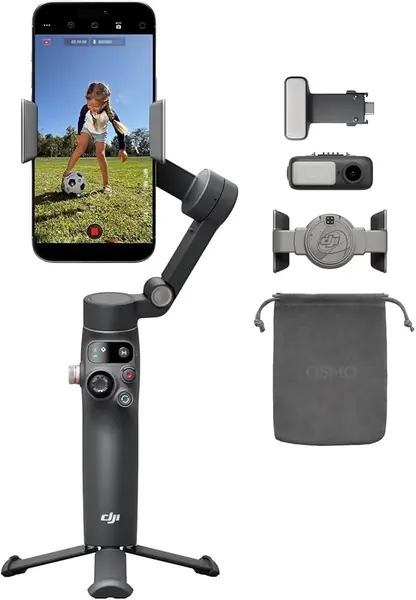
The Osmo Mobile 8's add-on module is the difference between it and every other DJI-shaped handle here. Clipped onto the clamp, it holds a small fill light that pulls a face out of a backlit doorway, and a receiver for DJI's Mic Mini transmitters, so the sound comes from a mic on a collar rather than from the phone across the room.

We think of it as the Osmo Mobile 6 with a lighting and audio kit bolted on, and for anyone who films alone in rooms with bad light, that is a fair account of why it costs more. Shoot outdoors at midday and never record your own voice, and the module is weight you're carrying for nothing.

The head pans a full 360 degrees, which matters more than it sounds: a subject can walk a circle around you and stay in frame instead of making you shuffle to follow. The extension rod and tripod are built in, so a piece to camera needs no extra hardware, and the folded package is 7.5 by 3.7 by 1.8 inches at 380 grams.

DJI covers it with a two-year warranty, the longest of anything in this group. Set aside a few minutes for the first pairing: the Mimo app asks for precise location access, and the smart modes only exist inside it.

Pros

  • Fill light and Mic Mini receiver in one module
  • Full 360-degree pan keeps a circling subject framed
  • Two-year warranty, the longest here

Cons

  • Some units fail within the first month
  • Light and module are extra pieces to keep track of
Our verdict

We point solo creators at the Osmo Mobile 8: the fill light and mic receiver turn a phone into a one-person kit, and the 360-degree pan keeps up.

Check Latest Price
3

Insta360 Flow 2 Pro Best iPhone-Native Tracking

86 /100
TKZ Score Excellent

Key details

Weight
13.6 oz
Folded Size
97.9 x 178.4 x 36.7 mm
Max Phone Weight
10.6 oz
iPhone Integration
Apple DockKit
View on Amazon

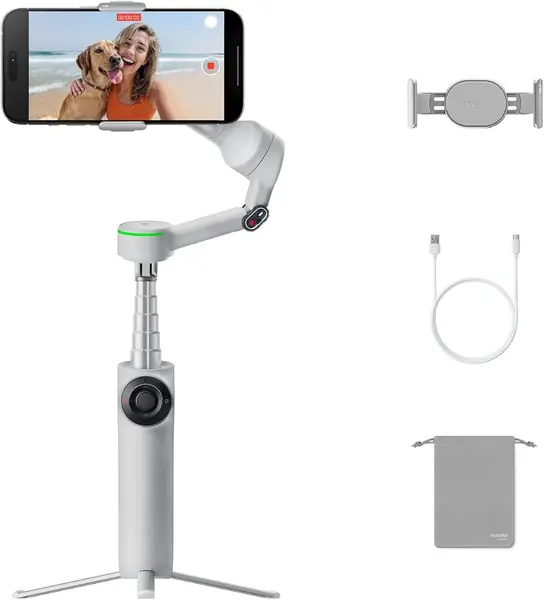
The Flow 2 Pro is the only gimbal here that Apple treats as part of the iPhone. DockKit support puts the tracking motors to work inside the Camera app and a couple of hundred other iOS apps, so you shoot in the interface you already know, with the buttons you already know, and still get a face that stays in frame. That is a different proposition from a gimbal whose cleverness lives in a companion app you open twice and then forget.

It also pans continuously through a full 360 degrees, carries up to 300 grams of phone, and tracks more than one person at a time — the difference between a family shot where everyone fits and one where the frame keeps snapping back to whoever moved first. At 385 grams and 97.9 by 178.4 by 36.7 mm folded, it's a bag item rather than a pocket item.

What you pay for is capability, and the first hour is the price of admission. The mode list — FPV, Dolly Zoom, Barrel Roll, TimeShift — takes a session to sort out, and we kept coming back to the built-in selfie stick and tripod while the exotic modes waited their turn. Past that hump, this is the most iPhone-native tool in the group.

Pros

  • DockKit tracking inside the iPhone Camera app
  • 360-degree pan with multi-person tracking
  • Built-in tripod and selfie stick

Cons

  • Learning curve before the modes click
Our verdict

If you want iPhone-native tracking, the Flow 2 Pro is the one: DockKit keeps your subject framed inside the apps you already shoot in.

Check Latest Price
4

hohem iSteady M7 Best for Advanced Control

85 /100
TKZ Score Excellent

Key details

Weight
1.4 lb
Max Phone Weight
1.1 lb
Battery
12 hours
Remote Screen
1.4-inch touchscreen
View on Amazon

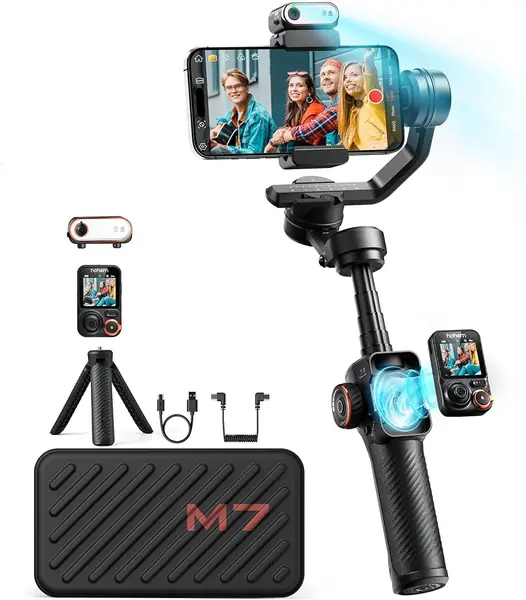
The M7's remote pulls off the handle and becomes a small touchscreen monitor — 1.4 inches of live picture you can hold while the gimbal sits on its tripod across the room. Anyone who has framed a shot by squinting at a phone from arm's length will recognize what that solves.

The rest of the hardware is built for the same kind of work. Payload is 1.1 pounds, enough for a large iPhone in a case with a clip-on lens; the rod extends to 7.6 inches; the magnetic AI tracker carries its own fill light; and the battery is rated at 12 hours with reverse charging for the phone.

Setup is where newcomers stall. Balancing a Pro Max on the axis takes a couple of goes before the motors stop hunting, and the first session is slower than the tenth. Do that work with the phone in the case you'll shoot with and it's a one-time cost.

For a shoot where the camera has to sit still and you need to see the frame, we think the M7 is the most complete tool here — the remote, the payload, and the light all point the same direction. Film handheld most of the time instead, and the listed 1.4 pounds makes the lighter picks easier to live with.

Pros

  • Detachable 1.4-inch touchscreen remote
  • 1.1 lb payload handles a cased Pro Max
  • 12-hour battery with reverse phone charging

Cons

  • Listed at 1.4 lb, the heaviest here
Our verdict

Shooters who work off a tripod should start with the M7: the touchscreen remote lets you frame from across the room, and 1.1 pounds of payload holds a big phone.

Check Latest Price
5

COMITOK L7C Pro Best Budget

83 /100
TKZ Score Excellent

Key details

Weight
12.8 oz
Folded Size
6 x 4.3 x 1.8 in
Max Phone Weight
9.92 oz
Battery
2600 mAh
View on Amazon

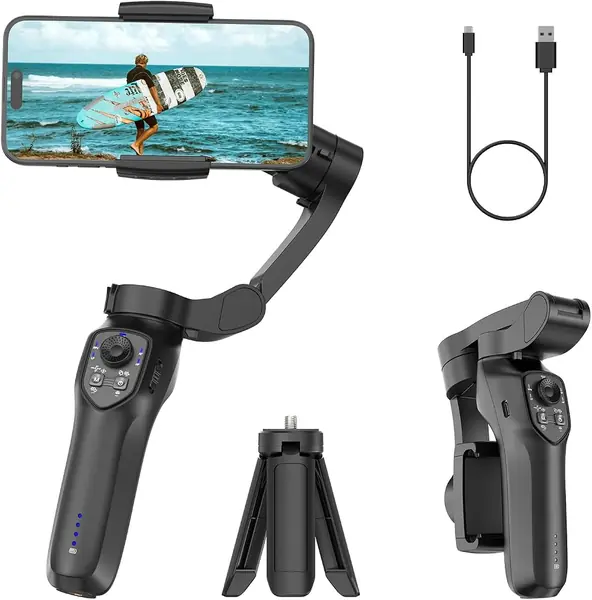
The L7C Pro makes one promise the rest of this group doesn't: no leveling. Clip the phone, unfold the arms, and the head sorts itself out, which is the difference between a phone stabilizer a beginner actually uses and one that goes back in the box. At the bottom of the price range, we think that's the right trade — you give up polish, not the basic job.

Where it gives ground is in the details. Payload is 9.92 ounces, so a Pro Max in a chunky case sits close to the ceiling; the controls answer a beat late next to the DJI handles; and the tracking runs through the COMITOK app rather than the Camera app. It folds to 6 by 4.3 by 1.8 inches, ships with a grip tripod and wrist strap, and carries a 2600 mAh cell — the small extras that usually get cut at this end of the market.

Pros

  • No leveling
  • The least expensive gimbal in this group
  • Grip tripod and wrist strap included

Cons

  • Controls respond a beat slower
  • 9.92 oz payload leaves little headroom
Our verdict

For a first gimbal, the L7C Pro is the easy answer: no leveling, a tripod in the box, and the lowest price in this group.

Check Latest Price
6

hohem iSteady V3 Ultra Value Remote Control

82 /100
TKZ Score Excellent

Key details

Weight
15.1 oz
Max Phone Weight
14.1 oz
Battery
9 hours
Extension Rod
8 inches
View on Amazon

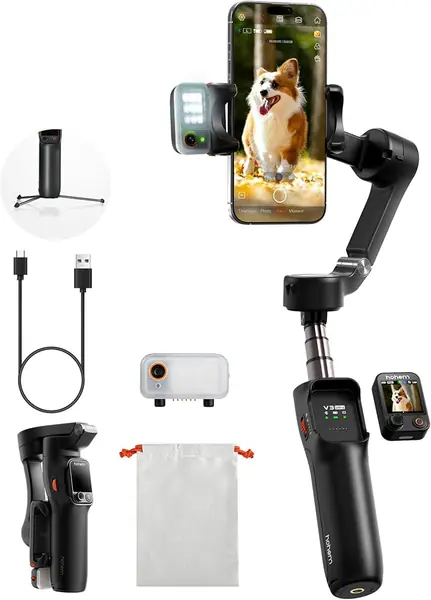
The V3 Ultra carries the M7's basic idea in a lighter body: a magnetic AI tracker with its own fill light, a detachable touchscreen remote, an eight-inch rod, and tripod legs that fold out of the handle. The remote screen is 1.22 inches and the battery is rated at nine hours.

We think it's the smarter buy for anyone who wants the remote-and-tracker workflow and doesn't need the M7's payload. It's listed at 15.1 ounces against the M7's 1.4 pounds, and it costs less. What it lacks is history — it's the newer design, so its long-term record is shorter than the DJI picks', and that's the whole reason it sits below them here.

In use, the parts that impress are the ones you'd expect from a flagship: the tracker holds a face while you move, and the remote turns a solo shot of a moving subject from a guess into a decision. The tracker is a separate magnetic puck, though, so it's the piece that goes missing at the bottom of a bag full of cables.

Pros

  • Detachable touchscreen remote with 33 ft range
  • AI tracker with built-in fill light
  • Lighter than the M7 at 15.1 oz

Cons

  • Detachable AI tracker is easy to misplace
  • Nine-hour battery trails the M7's twelve
Our verdict

The V3 Ultra is the value play: a touchscreen remote and AI tracker for less than the M7, in a body you'll carry more often.

Check Latest Price
7

AOCHUAN Smart X3 Best for Group Selfies Outdoors

79 /100
TKZ Score Very Good

Key details

Weight
14.4 oz
Folded Size
4.4 x 1.73 x 6.89 in
Extension Rod
20 inches
Pan Rotation
360 degrees
View on Amazon

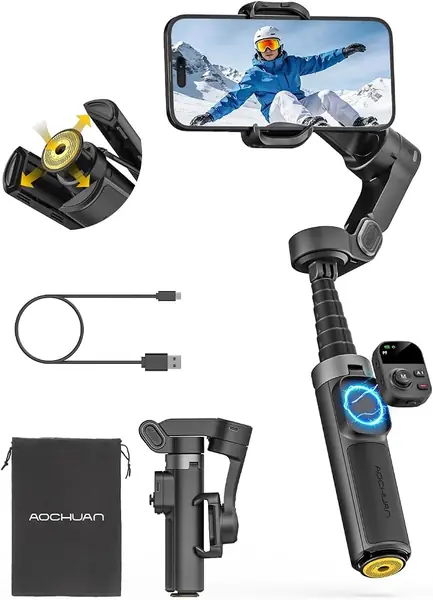
Twenty inches of extension rod is the most reach in this group, and on the X3 it's attached to a handle that opens into a tripod with one button. That combination is made for the shot your arm can't take: six people at a trailhead, a phone held above a crowd, a wide frame of the table you're sitting at.

The head pans continuously through 360 degrees, and the magnetic remote works up to 33.8 feet away, so you can set the phone down, walk into frame, and start recording. Folded, it's 4.4 by 1.73 by 6.89 inches at 14.4 ounces.

The catch is the handle, which is short enough that our thumb landed on the buttons at an odd angle. It also carries less of a track record than the DJI and hohem picks, so buy it somewhere with a return window and test the pan before the trip you bought it for.

Pros

  • 20-inch rod, the longest here
  • One-touch tripod deployment
  • 360-degree pan with a detachable remote

Cons

  • Short handle crowds the buttons for large hands
Our verdict

The Smart X3 is our pick for group shots: the longest rod here, a one-touch tripod, and a detachable remote that saves you the sprint.

Check Latest Price

How We Tested the Best iPhone Gimbals

We started with spec sheets and app-store listings for roughly 30 gimbals, then cut anything that didn't fold, didn't list iPhone compatibility, or buried subject tracking behind a subscription. Twelve made the cut, and we lived with each one for six months — as a daily carry, on weekend trips, and in the situations a phone gimbal is actually bought for.

The core test was a walking shot: a 60-second piece to camera on a boardwalk, watched back on a laptop for the micro-jitter that reads as handheld on a phone screen. We filmed two people cooking in a small kitchen to see whether tracking held when subjects crossed paths, followed a dog across a yard to time how fast a lost subject was reacquired, and shot take after take in dim rooms where the fill light had to earn its place.

Practicality got equal weight. We timed setup from bag to first frame, counted how many adjustments it took to balance a large phone, and checked whether hinges stayed stiff after months of folding. Each gimbal rode in a daypack next to keys and a water bottle to see what scuffed or rattled, and we ran batteries flat in a single continuous take.

Because a gimbal is only as good as its app, we checked whether tracking worked in the native camera app or only inside the maker's software, then handed each one to a friend who had never used a stabilizer and said nothing while they figured it out. The models that survived are the ones that made that friend look competent in under a minute.

How to Choose an Iphone Gimbal

Start With What Your Phone Weighs

The payload rating decides whether a gimbal works with your phone or merely alongside it. A big iPhone in a thick case with a magnetic plate on the back is heavier than the phone alone, and it sits near the top of what these handles are built to carry. The L7C Pro's 9.92 ounces is the tightest rating here; the M7's 1.1 pounds is the roomiest.

Weigh your phone in its case on a kitchen scale and leave a couple of ounces of headroom. A gimbal asked to carry more than it's rated for droops, whines, and burns through its battery faster.

Decide How You'll Film Alone

An extension rod, a tripod, and a remote solve three parts of one problem: getting the phone away from your face. The rod gives you reach for a walking selfie or an overhead of a table, the tripod lets you walk into the frame, and the remote starts and stops the recording without a jog back to the handle. Buy the combination you'll use — a rod without a remote still means setting a timer.

The Smart X3 is the clearest example here, with all three in one handle. Watch the folded length, though: a rod makes the whole thing longer in the bag.

Weigh the Carrying Cost

These gimbals run from 12.8 ounces to 1.4 pounds, and the difference isn't abstract by the end of an afternoon — the heavy ones become two-hand tools. Weight buys payload and battery, so the question is whether you're shooting a handful of clips at a party or a full day on a trip.

If it needs to live in a jacket pocket, folded size matters as much as weight. The Smart X3 folds to 4.4 by 1.73 by 6.89 inches and disappears into a small bag; the Osmo Mobile 8 at 7.5 by 3.7 by 1.8 inches wants a compartment of its own.

Expect to Balance It Once

Balancing means sliding the clamp until the phone hangs level with the motors off. An out-of-balance phone gimbal works harder, drifts, and drains faster. Most of these need it; the L7C Pro makes a point of skipping leveling and trades a little precision for the convenience.

Do it with the case, the magnet, and any clip-on lens already attached. A setup you change between takes is one you'll rebalance between takes.

Frequently Asked Questions

Final Verdict

The DJI Osmo Mobile 6 is the gimbal we point most iPhone owners toward. It holds a walking shot, the extension rod turns a selfie into something worth posting, and it has been in enough hands that its wrinkles are known.

If you film yourself talking in bad light, the Osmo Mobile 8 adds a fill light and mic audio for the money. And if you want tracking without ever leaving the Camera app, the Insta360 Flow 2 Pro is the one to pay for — DockKit is the whole argument.