Best 8-Inch Tablets of 2026

An 8-inch tablet is the screen that actually leaves the house. It fits in a coat pocket, stands up against a mug on the counter, and won't make your arm ache when you hold it overhead in bed. What you're buying is a second screen that goes where the laptop won't. The catch is that almost everything at this size is built to a price, and the corner that gets cut varies: a chip that stutters, a panel that washes out, an import model with no US warranty.

Size is what shoppers agonize over: I've found the gap between an 8-inch screen and an 8.7-inch one is the difference between a comfortable one-handed hold and a two-handed one. Over the past eight months our team has used 12 of these tablets on flights, at the kitchen counter, and in bed. The ones worth carrying share a few traits — a setup that doesn't fight you, a charge that lasts a full travel day, a screen you don't have to squint at — and they're the ones below.

The Best 8-Inch Tablets

1

Lenovo Tab One Best Overall
88 /100
TKZ Score Excellent

Key details

Display
8.7 inches, 1340 x 800
Storage And RAM
64GB, 4GB
Weight
11.2 oz
In The Box
Folio case included
View on Amazon

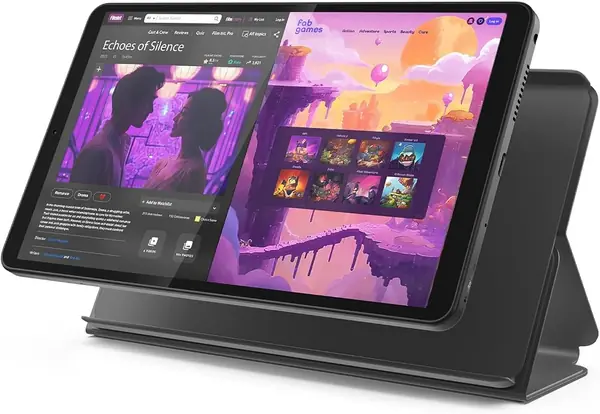
The folio case in the box is the detail that makes the Lenovo Tab One easy to recommend as the default compact tablet here. At 11.2 ounces, it is lighter than either Samsung pick, and the case means you can toss it in a tote without shopping for a separate cover. The 8.7-inch, 1340 x 800 display is shaped 16:9 for widescreen video, and the 480-nit brightness is enough for a train seat or a kitchen counter. We found the resolution comfortable for a movie and for a page of a book.

The 64GB storage and 4GB of RAM are the right baseline for streaming, browsing, email, and a few games. The Helio G85 is a modest chip, so we kept our expectations in casual-use territory; this is not the tablet for heavy games or a dozen browser tabs. The microSD slot is there for downloaded shows, and Lenovo rates the battery for up to 12.5 hours of YouTube streaming. In our mixed use, the battery was the part we worried about least.

The 8.7-inch size is the sweet spot for us: big enough for a movie, small enough to hold one-handed on a crowded bus. The case adds a bit of bulk, but it also turns the tablet into something you can carry without a sleeve. That combination is why it is the easiest of these to live with.

Pros

  • Light 11.2-ounce body
  • Folio case included in the box
  • 64GB storage plus microSD slot

Cons

  • No wall charger in the box
Our verdict

The Lenovo Tab One is the compact tablet we reach for first: light enough for one hand, with a case in the box and enough storage for everyday streaming and browsing.
Check Latest Price
2

Fire HD 8 (Like-New) Best Budget

87 /100
TKZ Score Excellent

Key details

Display
8-inch HD
Storage And RAM
32GB, 3GB
Battery
Up to 13 hours reading
Condition
Like-new refurbished
View on Amazon

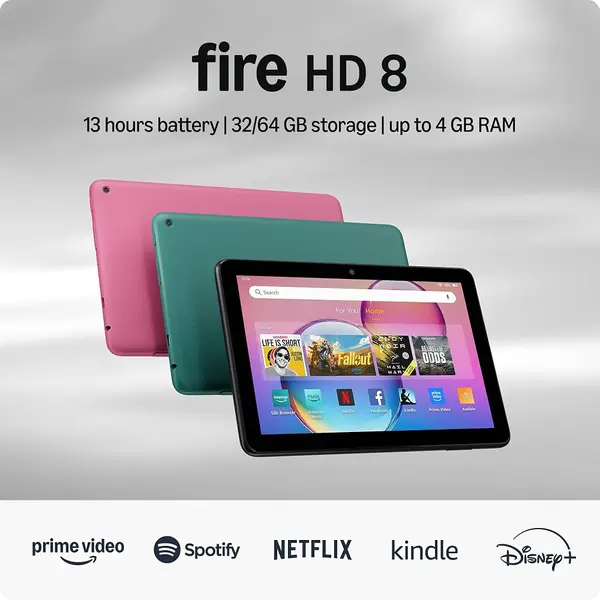
The Fire HD 8 is the tablet we reach for when the job is watching Prime Video, reading Kindle books, and handing a child a screen without spending much. The 8-inch display is the smallest here, and that is exactly why it works: it slips into a small bag and feels less like a laptop replacement than the 8.7-inch models. The 3GB of RAM and 32GB of storage are modest, but the microSD slot takes up to 1TB, so downloaded seasons do not have to live on the internal drive. Amazon rates the battery for up to 13 hours of reading, which is the right kind of endurance for a bedside or travel tablet.

We were struck by how much the Fire HD 8 is built for Prime Video and Kindle, and the 5MP rear camera is there for the occasional snapshot. It is at its best as a secondary screen, not as the only computer in the house. For a reader who already pays for Prime and wants a cheap, compact tablet for video and books, it earns its place.

Pros

  • Low-cost budget tablet
  • Up to 13 hours of reading
  • microSD expansion to 1TB

Cons

  • Amazon Appstore only, no Google Play
  • Like-new refurbished, not new
Our verdict

We recommend the Fire HD 8 for Amazon households that want a low-cost 8-inch tablet for Prime Video, Kindle, and light apps.

Check Latest Price
3

Samsung Galaxy Tab A11 Best for Smooth Scrolling

86 /100
TKZ Score Excellent

Key details

Display
8.7 inches, 90Hz
Storage And RAM
64GB, 4GB
Weight
15.2 oz
Software
Android 15
View on Amazon

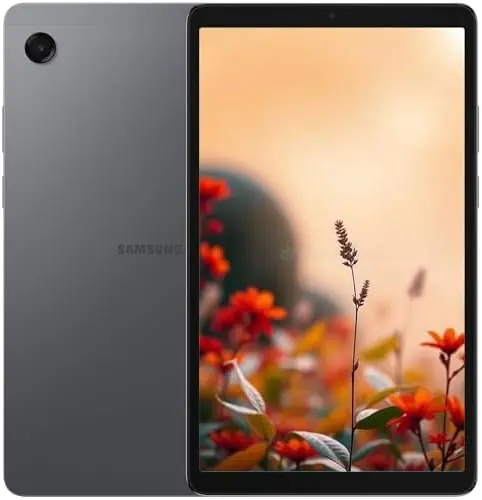
The first thing we noticed about the Galaxy Tab A11 is the 90Hz screen. On an 8.7-inch tablet, the faster refresh makes swiping through a feed and scrolling a long article feel smoother than the 60Hz Lenovo. The 1340 x 800 panel is not sharper, but motion is the upgrade. The Helio G99 and 4GB of RAM give it more headroom than the Lenovo's Helio G85, and Android 15 is the newest Android software here. That combination makes it the pick for someone who wants the most responsive compact Android tablet.

The 5100mAh battery is rated for 12 hours, and the 8.7-inch size still fits in a small bag. The 64GB storage and microSD slot give you room for downloads, and the 8MP rear camera is there for occasional photos and document scans. We liked the 90Hz panel most for reading and scrolling; it is the kind of upgrade you notice every time you touch the screen.

The catch is the international model. It is a Latin American version with no domestic warranty, and country selection may not include the U.S. during setup. That is a real trade-off for a tablet you plan to keep for years. If you mostly use a tablet at home and value the smoother screen, those terms are easier to accept; if you want the safest U.S. purchase, the Lenovo or Tab A7 Lite is the better route.

Pros

  • 90Hz 8.7-inch display
  • Helio G99 and 4GB RAM
  • 64GB storage plus microSD

Cons

  • Heavy at 15.2 ounces
Our verdict

For the smoothest scrolling in this set, we pick the Galaxy Tab A11; its 90Hz panel and Helio G99 chip make everyday swiping feel quicker.

Check Latest Price
4

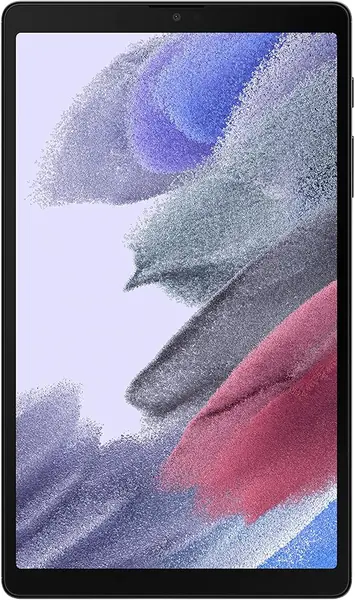
Samsung Galaxy Tab A7 Lite Best for Samsung Users

85 /100
TKZ Score Excellent

Key details

Display
8.7 inches, 1340 x 800
Storage And RAM
32GB, 3GB
Weight
13 oz
Software
Android 11
View on Amazon

The Galaxy Tab A7 Lite is the Samsung we point U.S. buyers to when they want a familiar One UI tablet with a U.S. warranty and a metal frame that feels sturdier than the rest of this budget group. The 8.7-inch screen and 12.96-ounce body sit between the Lenovo and the Tab A11: easy enough to hold, not as light as the Lenovo. The 5100mAh battery is the same size as the Tab A11's, and the metal frame is the part we appreciate most in a tablet that gets tossed in a bag.

The 32GB of storage is the number to watch, but a microSD card is the fix for downloaded movies and shows. We also like that this is a U.S. version with a one-year manufacturer warranty, which is the main reason it earns a place over the cheaper international Tab A11. The charger in the box is a small convenience, but it is the kind of detail that makes a budget tablet feel complete.

Pros

  • U.S. version with one-year warranty
  • Sturdy metal frame
  • microSD expansion

Cons

  • Android 11 is several versions old
  • 3GB RAM limits heavy multitasking
Our verdict

We point U.S. buyers who want a familiar Samsung interface, a metal frame, and a microSD slot to the Galaxy Tab A7 Lite.

Check Latest Price

How We Chose and Tested the Best 8-Inch Tablets

We started with a running list of about 40 tablets sold as 8-inch or 8.7-inch models and cut anything without a current US warranty, anything whose listing didn't specify its memory, and anything too big for a jacket pocket. That left 12, which we bought at retail and used as our own for eight months — no loaners, no lab bench.

Setup was timed from box to usable home screen, and we noted every preinstalled app along the way. We also checked each model number against the manufacturer's US listing, because several of these are sold as international versions — we confirmed the app store loaded, US streaming apps worked, and the charger had a US plug, and we noted how many years of security updates the maker promised.

Then we lived with them. Each tablet streamed video on a loop at half brightness until the battery died, so we could compare real stamina against the claimed hours. We read for an hour in bed with the lights off, then again on a sunny patio to see how the panel handled glare. We opened six apps, jumped between them, and timed a browser page load — this is where the gap between 3 GB and 4 GB of memory actually shows up.

Finally, we weighed each one, held it one-handed through a full hour of reading, carried it in a coat pocket and a small bag, and handed it to a nine-year-old for a two-hour car ride. Every few weeks we went back to the units still in rotation to see whether the case had frayed, whether the battery still cleared a long flight, and whether the tablet still felt worth what we paid.

How to Choose an 8-Inch Tablet

Start With the Screen, Not the Number

An 8-inch tablet is a size class, not a single measurement; the picks here run from 8.0 to 8.7 inches. The difference matters less than the panel. A 1340 x 800 resolution is the norm at this size, so text is readable but not razor-sharp. What separates them is brightness and refresh rate: the Lenovo's 480 nits helps outdoors, while the Galaxy Tab A11's 90Hz refresh makes scrolling smoother. We put more weight on brightness and refresh rate than on the inch count alone. If you read long documents, prioritize sharp text; if you scroll social feeds, the faster panel is the upgrade you notice.

Match Memory to Your Apps

Most compact tablets start at 3GB or 4GB of RAM, and that difference shows up when you keep several apps open. We treat 4GB and 64GB as the comfortable baseline for streaming, browsing, email, and a few games; 3GB and 32GB are workable for Kindle, video, and light browsing, especially with a microSD card. The Lenovo Tab One and Galaxy Tab A11 both pair 4GB with 64GB, while the Fire HD 8 and Galaxy Tab A7 Lite start at 3GB and 32GB. If you download a lot of video, check the microSD limit before you buy.

Weigh Portability Against Battery

At this size, weight is the spec you feel every day. The Lenovo Tab One is 11.2 ounces, the Galaxy Tab A7 Lite is 12.96 ounces, and the Galaxy Tab A11 is 15.2 ounces. We treat 13 ounces as the line where one-handed reading starts to get tiring; the heavier Tab A11 is better on a stand or in two hands. Battery claims follow the same pattern: Lenovo rates up to 12.5 hours of YouTube streaming, Samsung rates the Tab A11 for 12 hours, and Amazon rates the Fire HD 8 for up to 13 hours of reading. Real use will vary with brightness, Wi-Fi, and app load.

Check the App Store, Warranty, and Region

Software can decide the purchase more than the hardware. The Fire HD 8 uses Amazon's Appstore, so Google Play apps are not part of the package; the Android picks can install from Google Play if the model is set up for your region. The Galaxy Tab A11 is an international Latin American model with no domestic warranty, and country selection may not include the U.S. during setup. We put a U.S. warranty and a known region ahead of a faster screen for a tablet you plan to keep for years. If you want the safest U.S. purchase, choose a U.S.-version model like the Tab A7 Lite or the Lenovo Tab One.

Frequently Asked Questions

Final Verdict

The Lenovo Tab One is the 8-inch tablet we recommend first. It is light enough to hold for a long read, comes with a folio case, and pairs 64GB of storage with a screen that is comfortable for video and browsing. The Fire HD 8 is the budget alternative for Amazon households, while the Galaxy Tab A11 is the choice for smoother scrolling if you accept the international-model caveats. For most U.S. buyers who want one compact Android tablet, the Lenovo is the most sensible balance of portability, storage, and everyday performance.