Best 12-Inch Tablets of 2026

Twelve inches is the point where a tablet stops being a big phone and starts being a second screen you can genuinely work on — wide enough for split-screen email and a video call, comfortable for a whole movie in bed. It's also the point where the tradeoffs get real. These things are heavier than they look, and the spec sheet tells you almost nothing about how one feels after an hour in your hands. I've had a rotating pile of them on my coffee table since spring, and over the past eight months my team and I have put 11 through everyday use.

A few things I wish someone had told me before my first one: some listings pad their memory numbers with virtual expansion, so read carefully, because real RAM is what keeps your apps alive. An HD streaming certification matters more than people expect — without one, Netflix looks soft and you'll blame your Wi-Fi. And battery life is the quiet dealbreaker. A tablet that dies at 7 p.m. is one you stop picking up, no matter how good the screen is. The 11 that made the cut all handle the basics; the ones near the top are the ones I kept reaching for after testing was officially over.

The Best 12-Inch Tablets

1

Lenovo Idea Tab Plus Best Overall
88 /100
TKZ Score Excellent

Key details

Screen
12.1-inch 2.5K, 90Hz
Memory
8GB RAM, 128GB storage
In The Box
Tab Pen and folio case
Weight
1.2 lb
View on Amazon

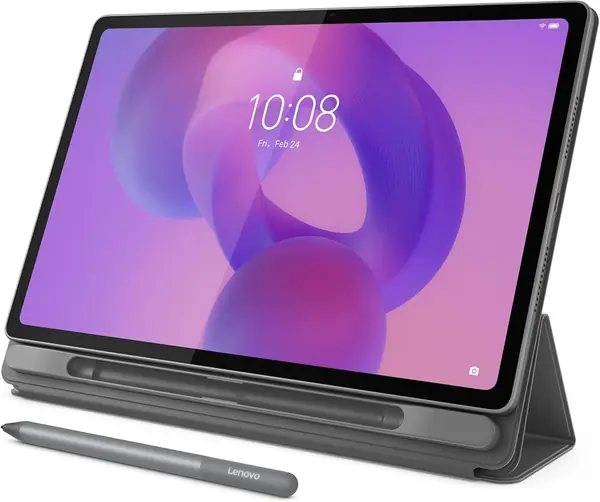
A 12.1-inch tablet that weighs 1.2 pounds is rarer than it should be, and it is the first thing we noticed about the Idea Tab Plus. You feel it holding the tablet one-handed on the couch, and you feel it when it slides into a tote beside a notebook instead of taking over the bag.

What the box adds is just as persuasive. Lenovo includes the Tab Pen and a folio case, so the two accessories most tablets make you buy separately are already in there. Pair that with a 2.5K panel running at 90Hz, which keeps a long PDF or a feed scrolling smoothly, and you have the most complete 12-inch package in this group for students and general use.

In daily use, the Dimensity 6400 and 8GB of RAM are comfortable with split-screen notes, a browser, and video running at once; demanding games are where you find the ceiling. Battery life is one of the better stories here, and the four bundled learning apps, Squid and Nebo among them, give the pen something useful to do on day one.

The one thing missing is a keyboard. The folio case props the screen but does not type, so plan on the folio keyboard model if essays and long email are the point of buying a tablet this size.

Pros

  • Sharp 2.5K screen with smooth 90Hz scrolling
  • Tab Pen and folio case included
  • 1.2 pounds is light for a 12-inch tablet
  • Battery holds up through a day of classes

Cons

No notable drawbacks to flag.

Our verdict

We recommend the Idea Tab Plus as the default 12-inch tablet: a sharp 90Hz screen, a pen, and a folio case for midrange money, in a body light enough to carry all day.
Check Latest Price
2

Amazon Alexa Tablet 12 Pro Best for Glare-Free Reading

87 /100
TKZ Score Excellent

Key details

Screen
12-inch 2.8K Nanomatte, 120Hz
Memory
8GB RAM, 128GB storage
App Access
Google Play with Amazon apps
Aspect Ratio
3:2
View on Amazon

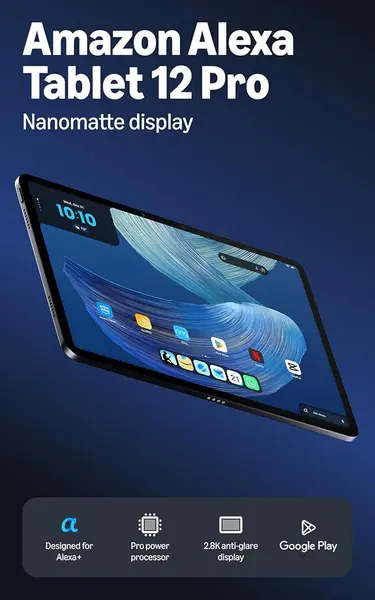
Glare is the enemy of any tablet used near a window, and the Alexa Tablet 12 Pro is the only pick here that solves it in hardware: a 2.8K Nanomatte panel that diffuses overhead light instead of mirroring it. Text stays readable at an angle and in a bright room, which is why it is our choice for reading and browsing by daylight.

The rest of the hardware keeps up. The 120Hz refresh and the 8-core chip with 8GB of RAM make app switching feel immediate, and because it runs full Android with Google Play, everything you already use installs normally, with Prime Video, Kindle, and Audible simply preloaded on top. The software is the softer spot, since the interface can stutter in places even though the chip has headroom, but apps open and video plays without complaint.

One ordering detail matters more than it should. The matte finish is a specific option, so the word Nanomatte needs to appear in the name on the page you buy, because the same tablet without it gives you a different, glossier experience. The 3:2 aspect ratio is the other part we appreciate: it is squarer than the 16:10 panels elsewhere in this guide, so a comic page or a document fills more of the screen with less letterboxing.

Pros

  • Matte 2.8K screen stays readable in bright rooms
  • 120Hz refresh and a quick 8-core chip
  • Full Google Play with Amazon apps built in
  • 3:2 screen suits documents and comics

Cons

  • Stylus and keyboard are extra purchases
Our verdict

Buy it if glare is your enemy: the Nanomatte screen is the most readable surface in this group, and full Google Play keeps every app within reach.

Check Latest Price
3

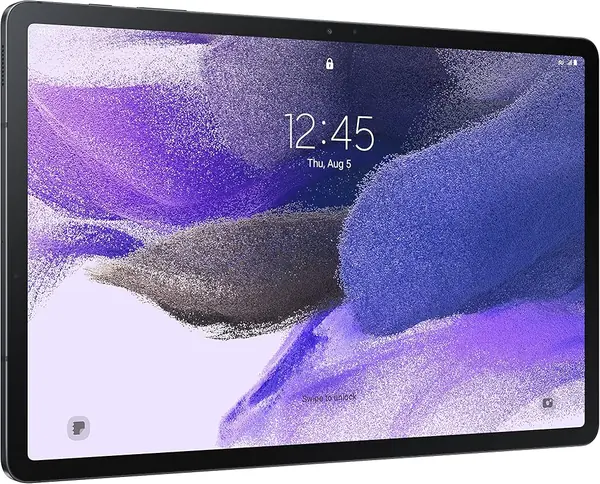
Samsung Galaxy Tab S7 FE (Renewed) Best for Note-Taking

86 /100
TKZ Score Excellent

Key details

Screen
12.4-inch, 2560 x 1600
Battery
10,090 mAh
In The Box
S Pen and 15W adapter
Storage
64GB
View on Amazon

The Galaxy Tab S7 FE arrives renewed, and that single fact should shape more of your decision than the screen size does. It means last-generation hardware and a 90-day warranty, and it also means an S Pen in the box and the largest screen in this guide at 12.4 inches.

Where it earns its spot is pen work. The S Pen comes with the tablet, the 2560 x 1600 panel matches the Idea Tab Plus across a slightly larger canvas, and everyday apps run smoothly enough for notes, reading, and split-screen browsing. For a student, or anyone who fills notebooks for a living, we think it is still the most satisfying stylus setup in this group.

The rest is honestly a 2021 tablet. Storage is 64GB, the smallest here, so stream your video rather than downloading a season at a time; in exchange you get the biggest battery in the group, 10,090mAh with 13 hours listed. Open the box, check the glass, and confirm it charges before the short warranty window starts running.

Pros

  • S Pen included and ready to write
  • 12.4-inch screen is the largest here
  • 10,090mAh battery is the biggest in this group
  • Holds up well for notes and streaming

Cons

  • 60Hz screen next to faster rivals
Our verdict

For pen-first note-taking on a big screen, this renewed Samsung still delivers: S Pen included, 12.4 inches of canvas, and the biggest battery here.

Check Latest Price
4

Raemond 12-Inch 2-in-1 Tablet Best Budget Bundle

79 /100
TKZ Score Very Good

Key details

Screen
12-inch, 2000 x 1200, 90Hz
Memory
36GB (12+24) RAM, 256GB storage
Battery
9,000 mAh
In The Box
Keyboard, mouse, stylus, case
View on Amazon

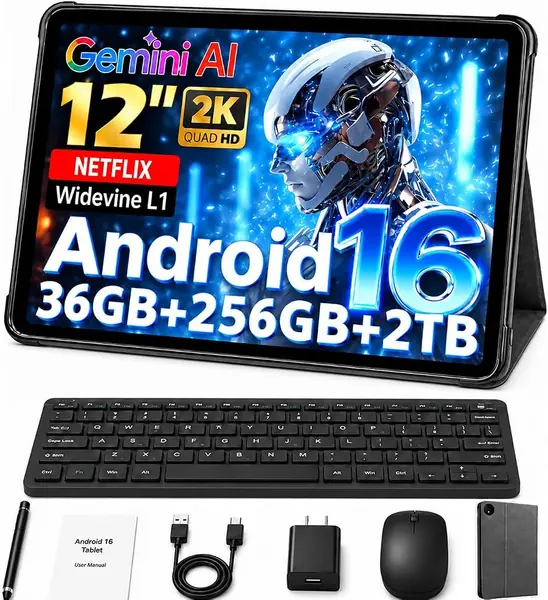
The listing leads with 36GB of RAM, and the useful version of that number is 12GB of physical memory plus 24GB of virtual memory borrowed from storage. Virtual RAM helps keep more apps loaded in the background; it does not make an entry-level chip behave like an expensive one, and knowing that sets fair expectations for everything else here.

What your money actually buys is generous: 256GB of storage, double what the Idea Tab Plus offers, a 12-inch 2000 x 1200 screen at 90Hz, a 9,000mAh battery, and a keyboard, mouse, stylus, and case in the box. At 586 grams it is lighter than the Samsung and only a little heavier than the Lenovo, so it is no burden to carry.

We think it is the strongest budget 2-in-1 tablet in this group, and the accessories are the reason: you are paying for capacity and kit rather than pixels, since the screen is the same 2000 x 1200 class as the cheapest pick here. Raemond also lists a two-year warranty, which is worth confirming with the seller because it is longer than anything else in this guide.

Pros

  • 256GB of storage at a budget price
  • Keyboard, mouse, stylus, and case included
  • 586 grams is light for a 12-inch tablet

Cons

  • Entry-level chip struggles with heavy gaming
Our verdict

It is the bundle to pick when the budget is tight and you need a keyboard, mouse, stylus, and case in one box, with storage to spare.

Check Latest Price
5

SVITOO 12-Inch Android Tablet Best for Budget Streaming

78 /100
TKZ Score Very Good

Key details

Screen
12-inch, 2000 x 1200
Memory
4GB plus 26GB virtual RAM, 128GB storage
Battery
8,800 mAh
Expandable Storage
microSD
View on Amazon

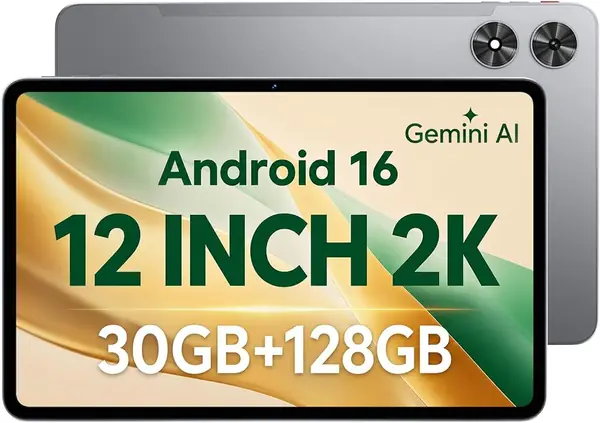
There is a healthy gap between the SVITOO and everything else in this guide, and the gap is the point: this is the least expensive route to a 12-inch screen here.

The hardware is honest for the money. You get a 12-inch 2000 x 1200 IPS panel, 128GB of storage with a microSD slot, an 8,800mAh battery, GPS, and Widevine L1 support, which is about streaming quality rather than another line on the spec sheet. The memory figure deserves a translator: 4GB is physical, and the rest of the 30GB headline is virtual memory borrowed from storage.

We think it is a fair buy as a kitchen-counter streamer, a first big tablet for a kid, or a travel spare, the kind of device that lives on a stand more than in a bag. The included screen protector saves you a purchase, and the 5MP front camera is the one that matters for video calls; the 13MP rear camera is not worth planning around.

Pros

  • Lowest price of any 12-inch tablet here
  • 12-inch 2K screen with Widevine L1 streaming
  • microSD expansion beyond 128GB

Cons

  • Charging port can work loose over time
  • Performance varies app to app
Our verdict

The cheapest way to a 12-inch screen here, and a sensible buy for streaming, video calls, and light browsing.

Check Latest Price

How We Tested 12-Inch Tablets

We started by pulling every 12-inch-class tablet we could find from brands with a real support footprint, then filtered on display resolution, actual RAM and storage, whether a pen or keyboard came in the box, and whether software updates were promised past year one. Anything that couldn't stream in HD got cut early. That left 11 units, which we ran for eight months.

Battery testing came in two parts: a looped video run at fixed brightness until each tablet died, then an ordinary day of email, a video call, split-screen notes, and a game, with the charger deliberately left in another room. For speed, I timed cold app launches with a stopwatch and watched whether switching among four open apps forced any of them to reload.

For screens, I lined them up side by side playing the same clip and the same photograph, then scrolled a long, image-heavy page on each to see what the higher refresh rates did and didn't do. Sound got tested the way it gets used: a podcast from across the kitchen, an album at full volume to listen for rattle, and a video call to confirm I didn't sound like I was speaking from inside a can.

Then each tablet went into real life — tossed in a tote next to keys, held one-handed through a two-hour movie, propped on a counter while I cooked, handed to a kid for homework. I set every one up from scratch to count preinstalled apps and note how many taps it took to reach a usable home screen, and I checked build quality by flexing the chassis gently and listening for creaks.

How to Choose a 12-Inch Tablet

Resolution, Refresh Rate, and Glare

Two 12-inch tablets can look very different. A 2000 x 1200 panel is pleasant for video, but at this size the text in a PDF or a spreadsheet looks soft next to a 2.5K or 2.8K screen, and if you read for hours that is the difference you live with. Refresh rate is the second half: 90Hz and 120Hz make scrolling feel fluid, while 60Hz is fine for watching and reading.

Finish matters just as much. Matte panels like the Nanomatte on the Amazon tablet trade a little punch for far less glare, while glossy panels look richer indoors. If the tablet will sit near a window or a lamp, pay for the matte finish.

Physical RAM, Virtual RAM, and the Chip Behind Them

Watch the memory headline. A tablet advertised with 30GB or 36GB of RAM is usually quoting 4GB to 12GB of physical memory plus virtual memory borrowed from storage; virtual RAM keeps more apps alive in the background but does nothing for raw speed. What actually decides how a 12-inch tablet feels is the chip and the physical RAM beside it, which is why the Idea Tab Plus with 8GB and a Dimensity 6400 handles split-screen work that a 4GB budget model struggles with.

Whether the Pen and Keyboard Come With It

Accessories decide the real price. Lenovo puts the Tab Pen and a folio case in the box, Samsung includes its S Pen, and the budget 2-in-1 bundles throw in a keyboard, mouse, and stylus, while a bare tablet can leave you spending the difference on the extras you assumed were included.

The trap is the keyboard. On some inexpensive bundles it will not attach to the case or fit inside it, so check how it connects before you plan to type on your lap. A pen in the box is the more reliable win, since typing is easy to solve with a Bluetooth keyboard you already own.

Weight, Battery, and Living With a Big Screen

A 12-inch tablet is a two-hand device for most people, but weight still matters: 1.2 pounds is comfortable for an hour of reading in bed, and 1.5 pounds wants a stand or a propped knee. Battery capacity is the other half, and the models here that list a figure run from 8,800mAh to 10,090mAh.

A bigger number does not guarantee longer runtime, because a bright 2.5K screen at 120Hz drains a large cell faster than a 2000 x 1200 panel at 60Hz. Match the battery to the screen and to your habits rather than the other way around.

New, Budget, or Renewed

The condition you buy in decides how much tablet you get for the money. Budget models deliver the 12-inch screen and the accessories but come with entry-level chips; renewed stock, like the Galaxy Tab S7 FE here, gets you older premium hardware and a real stylus for less, with a shorter warranty of 90 days. Whatever you choose, test the expensive things first: charge it, check the glass, and confirm the battery holds before the return window closes.

Frequently Asked Questions

Final Verdict

For most people the Lenovo Idea Tab Plus is the 12-inch tablet to buy. The 2.5K 90Hz screen is sharp enough for split-screen work, the pen and folio case are already in the box, and at 1.2 pounds it is the one here you can carry all day without thinking about it.

Reach for the renewed Galaxy Tab S7 FE if writing by hand is the reason you want a big screen, or the Alexa Tablet 12 Pro if you read near windows and want the matte finish. On the tightest budget, the Raemond bundle covers typing, notes, and 256GB for less than the midrange picks, provided you treat it as a writing and streaming machine.