Best 100W USB-C Chargers of 2026

A 100W rating comes with fine print: that number is the charger's total power budget, not what each port gets. Add a second device and the power divides, which is how people end up with a laptop crawling while a phone tops off. What a good charger fixes is simpler — it replaces the brick that came with your laptop and covers everything else in your bag. I've carried one instead of three for years, and the gap between a great one and an adequate one shows up in small ways: how warm it runs after an hour of laptop charging, whether it still grips a loose outlet, whether the prongs fold flat enough to vanish in a pocket.

We spent six months with 12 of them, long enough to learn that port count is the spec people overrate. A five-port brick splitting 100W five ways isn't more useful than a three-port model that hands 65W to a laptop and still tops off a phone. What separates them is how the power divides under load, how fast heat sheds, and whether they still feel solid after months in a bag. The picks below are the ones we kept reaching for.

The Best 100W USB-C Chargers

1

Anker 317 100W Charger Best Overall
93 /100
TKZ Score Outstanding

Key details

Ports
1 USB-C
Max Output
100W
Plug
Foldable
Cable Included
USB-C to USB-C
View on Amazon

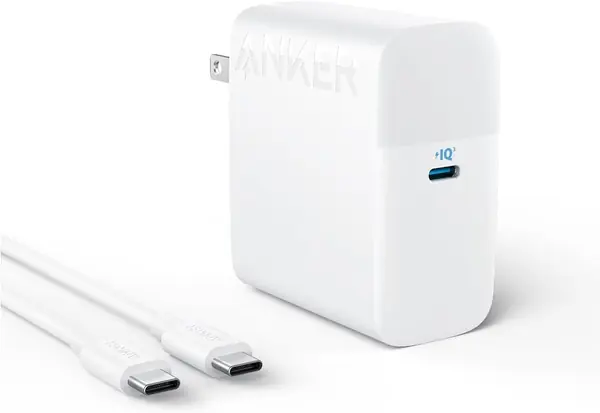
The 317 is what we hand to someone who wants the laptop problem solved and nothing else: one USB-C port, the full 100 watts through it, prongs that fold flat, and a USB-C cable in the box. That last part is rarer at this price than it should be, and it is most of why this is our top pick — you open the box, plug in, and stop thinking about charging.

Its size is the other reason. It disappears into a laptop-bag pocket, and the folding prongs don't snag a sleeve on the way in. The body is dense for its size, though, and in a worn hotel outlet that weight can pull the plug partway out of the socket; a firm receptacle or a short extension cord solves it. At a sustained 100 watts it runs warm, as every charger here does, and the temperature monitoring inside is there to manage that rather than to make the case cool to the touch.

One port is the whole design, so plan around it: a tablet or a phone waits its turn behind the laptop, and there's no display or app to check. Anker backs it for 18 months, and the unit carries UL and Energy Star certification — worth knowing for a brick that lives in an outlet overnight. If a laptop and two smaller devices need to charge at the same time, the Anker Prime below handles all three from one outlet.

Pros

  • Full 100W through a single USB-C port
  • Cable in the box, which many rivals skip
  • Folding prongs and a genuinely small body

Cons

  • One USB-C port, so nothing charges alongside
  • A meaningful share of units quit within months
Our verdict

Our default pick: the 317 puts the full 100 watts into a laptop, folds flat in a bag, and includes a cable — the simplest way to replace a first-party laptop brick.
Check Latest Price
2

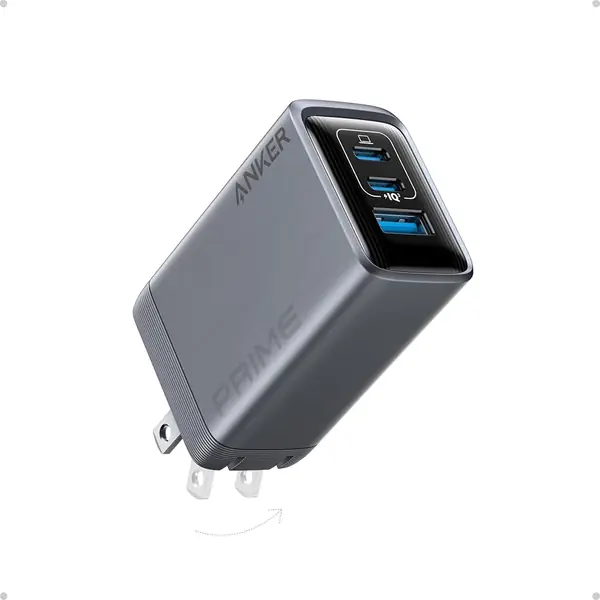
Anker Prime 100W Charger Best for Several Devices

92 /100
TKZ Score Outstanding

Key details

Ports
2 USB-C, 1 USB-A
Max Output
100W
Plug
Foldable
Weight
6 oz
View on Amazon

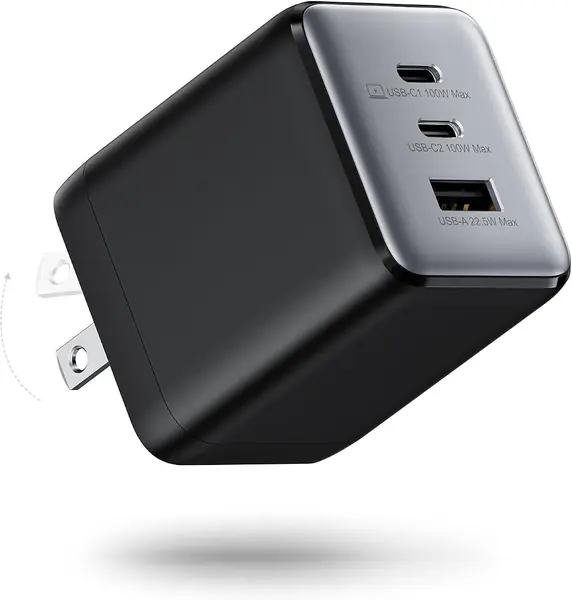
Plug a laptop into one USB-C port and a phone into the other and the arithmetic changes: the 100 watts is a budget for the whole charger, not a promise per port. That is the one thing to understand before you buy. What you get for accepting it is two USB-C ports and a USB-A on a single small block — the difference between one charger in your bag and three.

We like the shape as much as the port count. It's flatter than the cube-shaped chargers here, so it doesn't block the second socket on a power strip, and the prongs fold away. At 170 grams it's noticeable in a jacket pocket and invisible in a laptop bag. The catch is heat: under a sustained full load it can get properly hot, and it can slow its own charging rather than push through.

The 24-month warranty is the longest in this group, which counts for something on a charger that runs this hot. If you only ever charge a laptop, the 317 is simpler and lighter. If your bag already carries a phone, a watch, and earbuds, this one replaces three bricks and earns the space it takes.

Pros

  • Two USB-C ports plus USB-A on one block
  • Flat body doesn't cover the next outlet
  • 24-month warranty, the longest in this set

Cons

  • 100W is shared across all three ports
  • Gets very hot under a sustained full load
Our verdict

We reach for the Prime when one outlet has to serve a laptop, a phone, and a watch — three ports, folding prongs, and the longest warranty here, with a shared 100-watt budget to accept.

Check Latest Price
3

UGREEN Nexode Air 100W Best Compact Option

91 /100
TKZ Score Outstanding

Key details

Ports
1 USB-C
Max Output
100W
Size
1.40 x 1.36 x 1.97 in
Certification
UL, TÜV, CSA
View on Amazon

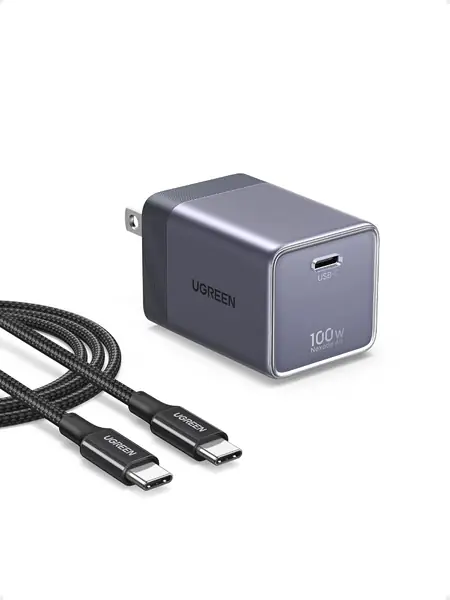
Set the Nexode Air beside a laptop brick and it looks like the wrong charger for the job. At 1.40 by 1.36 by 1.97 inches it's the smallest 100-watt unit in this group, and it still pushes the full 100 watts through a single USB-C port. It's the one we pack when the bag is already full — the difference between carrying a charger and deciding not to bother.

What sets it apart is the paperwork: UL, TÜV Rheinland, and CSA certification, a flame-retardant casing, and thermal monitoring. That's more third-party certification than anything else here, and it's a real part of what you're paying for on a brick that sits in an outlet overnight. It's GaN, so it runs warm at full output like everything else — small does not mean cool.

The cost is straightforward: one port and no flexibility, so an iPad or a phone waits while the laptop charges. If the smallest possible brick is the point, this is the one. If a second port matters more than a smaller body, the Anker Prime is the better trade.

Pros

  • Smallest 100W charger in this set
  • UL, TÜV Rheinland, and CSA certification
  • USB-C cable included

Cons

  • Single USB-C port
  • The priciest pick in this set
Our verdict

The smallest 100W charger here, with the most safety certification and a cable in the box — worth the premium if your bag is already full and one device charges at a time.

Check Latest Price
4

Skyvast 100W Laptop Charger Best for a Desk

90 /100
TKZ Score Outstanding

Key details

Ports
1 USB-C
Max Output
100W
Weight
14.2 oz
Cable
9 ft USB-C
View on Amazon

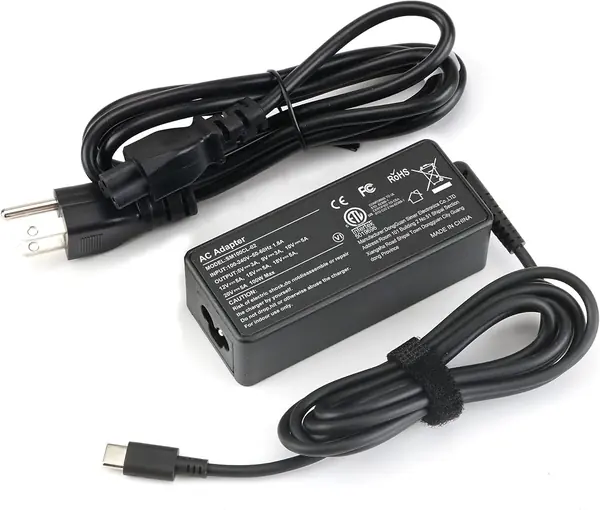
The Skyvast isn't a plug, it's a brick with a cord: a detachable AC cord on one side and a nine-foot USB-C cable on the other. That's a different object from the foldable blocks here, and it solves a problem they can't — the outlet is behind the desk, or across the room from the couch, and you want to keep working where you are.

The rest is ordinary in the best way: 100 watts over USB-C, PD 3.0, and a 100–240V input range that covers a European trip with a plug adapter. There's one port and no display, and at 14.24 ounces the brick is the heaviest thing in this group — the price of the cord-and-cable design is that it isn't going in a pocket.

What it is, is the budget pick here, and the one we leave on a desk. If the charger lives in one place and the cable has to reach, this is the sensible buy. If it travels in a bag every day, one of the foldable Ankers is the better shape.

Pros

  • Nine-foot cable reaches where wall blocks can't
  • Detachable AC cord keeps the brick off the outlet
  • 100–240V input for overseas travel

Cons

  • Single USB-C port
Our verdict

A corded 100W brick with a nine-foot cable and a detachable AC cord — the right charger for a desk, a couch, or a hotel room where the outlet isn't where you need it.

Check Latest Price
5

iGENJUN 5-Port 100W Block Best for Phones and Tablets

89 /100
TKZ Score Excellent

Key details

Ports
5
Pack
2-pack
Total Output
100W
View on Amazon

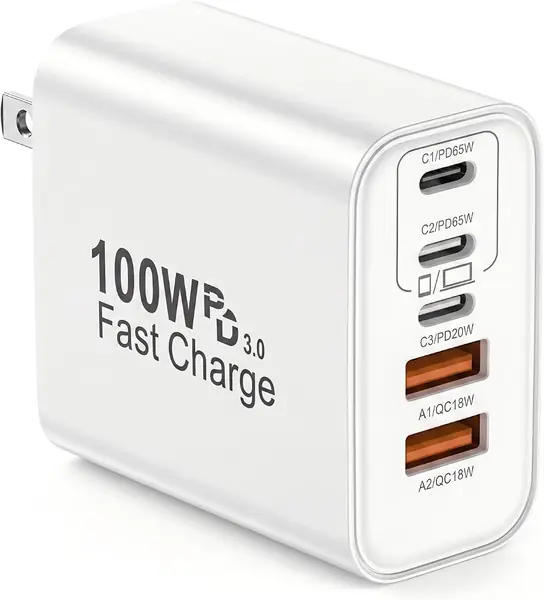
Five ports, one outlet, two blocks in the box. The iGENJUN isn't a laptop charger in the sense the rest of this list means — its 100 watts is the total for everything plugged in — so read it as the countertop station it is: phones, a tablet, earbuds, a watch, and a laptop at the end of the day. Load it up and everything slows down, which is how a shared 100-watt budget works.

For the money, that's genuinely useful. It clears a countertop of small phone bricks, and the spare block can live in a suitcase without being unpacked. Just don't buy it expecting one laptop to charge at full speed — that's the Anker 317's job.

Pros

  • Five ports, mixing USB-C and USB-A
  • Two blocks in the box
  • Cheap enough to keep one in each room

Cons

  • 100W is the total for all five ports
Our verdict

A five-port block that's happiest charging a pile of phones and tablets — not the pick for fast-charging one laptop, but the easiest way to clear a counter of small chargers.

Check Latest Price
6

wegear 100W 3-Port Charger Budget Multi-Port

86 /100
TKZ Score Excellent

Key details

Ports
2 USB-C, 1 USB-A
Max Output
100W
Plug
Foldable
Weight
6.35 oz
View on Amazon

Three ports for the money of a one-port charger is the pitch, and the wegear mostly delivers: two USB-C, one USB-A, a full 100 watts to a single connected device, GaN internals, and prongs that fold. Against the Anker Prime it's the value alternative; against the single-port picks it's simply more useful.

The compromise is heat and fit. It runs warm at full output like the rest of this group, so take the cooler-running claims on the box as marketing, and it stands proud of the outlet — fine on a power strip, awkward behind a couch.

For a second charger that lives in a travel bag or on a home-office desk, that's enough. It folds flat, takes up one outlet, and doesn't ask you to think about it.

Pros

  • Two USB-C ports and a USB-A
  • Folding prongs and GaN internals
  • 100W to a single connected device

Cons

  • Reliability is uneven, with units failing early
  • Heavier than the Anker Prime at 180 g
Our verdict

Three ports for the money of a one-port charger, with a folding plug and 100W to a single device — a fair second charger as long as you don't need it to be the one that lasts.

Check Latest Price

How We Tested 12 Chargers Over Six Months

We started by pulling every 100W USB-C charger we could find from brands we already trust with our own laptops, then cut the field to 12. The filters were the things that change how you live with one: whether the prongs fold, how many ports there are and how the wattage splits between them, whether a cable comes in the box, and how much it weighs against a price that makes sense. GaN models dominated the shortlist, but we kept a couple of conventional bricks in to see whether the size advantage was real.

Most of the six months happened where chargers actually live. On a desk, we drained a 14-inch laptop to 5 percent and timed it back to full, then ran it again with a phone in the second port to measure how far the laptop's speed fell. On the kitchen counter we charged a tablet, earbuds, and a phone at once and noted which port got starved.

Heat drew the most attention. We took surface readings with an infrared thermometer every 15 minutes through an hour-long laptop charge and watched for the point where speed tailed off, the tell that a charger is protecting itself. Each one also hung from a loose outlet to see if it drooped, got weighed on a kitchen scale, and had its folding prongs worked open and shut every time we packed it.

That schedule, plus flights and hotel rooms with exactly one reachable outlet, sorted them. The chargers that held speed past the 45-minute mark, stayed warm rather than hot, and still gripped a wall socket after months of daily use earned their place. A few of the smallest ran hot enough that we couldn't recommend them, and by month four more than one had developed a port loose enough to drop a cable.

How to Choose a 100W Usb-C Charger

One Port or Several

With a single USB-C port, the full 100 watts has exactly one place to go, so a laptop charges at its fastest rate. Add ports and the total doesn't grow — the charger splits the same 100 watts, which is why a laptop on a three-port charging block can charge more slowly than the same laptop on a one-port brick. Buy for the devices you actually charge at the same time. A single-port unit like the Anker 317 keeps it simple; a three-port like the Anker Prime is what you carry when a phone and a watch are always in the mix.

The Cable Is Half the Purchase

A 100-watt charge needs a USB-C cable rated for 5A and electronically marked. The 60W cable that came with an older laptop will cap the whole setup at 60W no matter what the charger promises, and that mismatch is the usual reason a new 100W brick feels slow. Check the cable before you blame the charger. Buying a unit that ships with a rated cable, as the Anker 317 and the Nexode Air do, removes both a purchase and a guess.

Size, Prongs, and Your Outlets

GaN circuitry has made 100-watt chargers small, and small usually means dense. A compact block with folding prongs is the right thing for a bag, but its weight can pull it partway out of a worn outlet, which is annoying at best. If the socket is loose, run a short extension cord up to the desk instead. If the charger never leaves a desk, a corded brick like the Skyvast reaches further and stays put.

Heat and Certification

Every 100-watt charger here runs warm at full output, and warmth alone is not a fault. What differs is behavior at the top of the range: some slow the charge deliberately, and a few cycle off and on. A charger that stays too hot to touch, smells hot, or restarts on its own should come out of the wall. Look for UL, ETL, or TÜV certification on the unit — for a brick that sits in an outlet overnight, that paperwork is worth more than a millimeter of size.

Frequently Asked Questions

Final Verdict

The Anker 317 is the charger we recommend to most people. It puts the full 100 watts into a laptop, folds flat in a bag, and includes the cable — there's nothing to configure and nothing to think about.

Buy the Anker Prime instead if a phone and a watch charge at the same time; three ports and a 24-month warranty are worth sharing the power budget. And if the charger never leaves a desk, the Skyvast's nine-foot cable is the more useful shape.