Best Tablets with a Stylus of 2026

A tablet with a stylus is supposed to replace a notebook, a sketchpad, and a stack of signed forms. The catch is that the pen is often the weakest part of the package — sold separately, with nowhere to clip, lagging a half-second behind your handwriting. Get the pairing right and the screen you watch shows on becomes the place you take minutes, sketch, and mark up PDFs.

I have shelves of half-filled paper notebooks, but the tablet is what goes to meetings now. Over the past eight months, my team and I have used 12 of them for everything from class notes to bedtime reading, in sizes from about 10 to 14 inches. The details that separated them rarely show up in a listing: whether the pen charges or takes a battery, whether it stows on the tablet, whether the screen is glossy or matte. Matte, paper-like panels are lovely to write on and a little flat for movies.

Battery life is the other quiet dividing line, since a big screen and a fast refresh rate both cost you hours. The picks below are the ones we'd buy with our own money, sorted by who each one suits.

The Best Tablets with a Stylus

1

Lenovo Idea Tab 11 Best Overall
93 /100
TKZ Score Outstanding

Key details

Stylus
Lenovo Tab Pen included
Display
11-inch, 2560 x 1600, 90 Hz
Memory And Storage
8GB RAM, 256GB
Weight
1.1 lb
View on Amazon

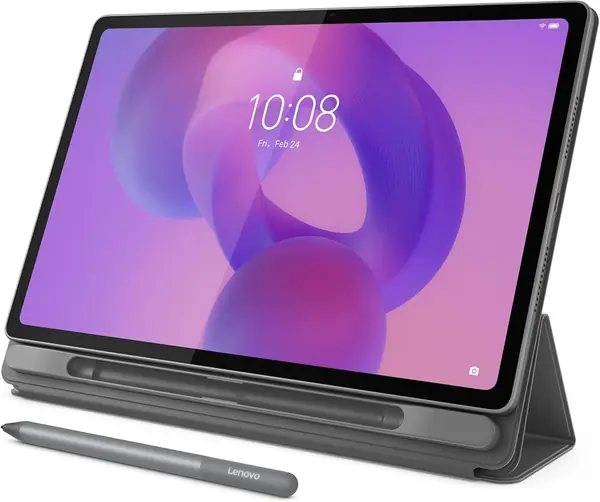
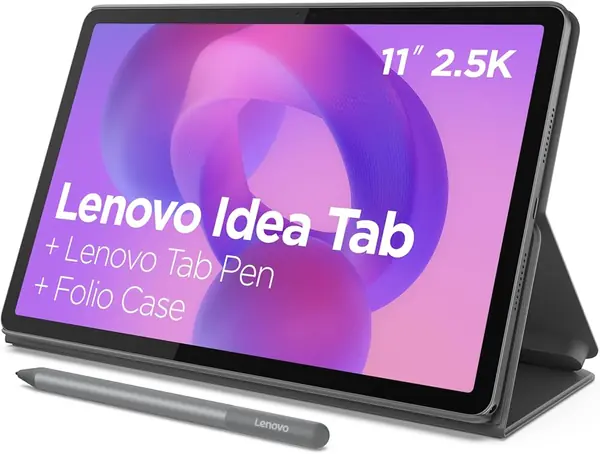
The Idea Tab 11 is the one we hand to anyone who wants to write on a tablet without paying flagship money. The Lenovo Tab Pen and a folio case come in the box, so there is nothing to buy before the first note, and behind them sits an 11-inch 2.5K IPS panel at 90 Hz. That pairing is why it leads this list: the pen is not an accessory you add later, and the screen it writes on is genuinely sharp.

For handwriting, touch response matters more than resolution, and the 90 Hz refresh is what keeps ink close behind the nib when we sketch a diagram or mark up a page. Lenovo also bundles four learning apps — AI Note, Squid, Nebo and MyScript Calculator — and that is more useful than it sounds, because handwriting recognition and a calculator you can write into are the first two things students ask for. The Dimensity 6300 and 8GB of RAM are midrange and behave that way: notes, split-screen reading and video run fine, a dozen heavy tabs do not.

Storage is the quiet advantage. 256GB is more than most people in this category will fill, which means years of lecture PDFs and downloaded video before the microSD tray matters at all. A USB-C cable is in the box but no charging adapter, so plan on a spare brick. Everything else holds up: at midrange money you get an active pen and a screen worth writing on, and nothing else here does both.

Pros

  • Pen and folio case included
  • Sharp 2.5K screen at 90 Hz
  • 256GB storage plus microSD tray

Cons

  • Battery life is adequate rather than generous
Our verdict

Our pick for most people: an active pen and case in the box, a sharp 90 Hz screen, and battery life you will top up nightly.
Check Latest Price
2

Samsung Galaxy Tab S10 Lite Best S Pen Tablet

92 /100
TKZ Score Outstanding

Key details

Stylus
S Pen included
Display
10.9-inch, 2122 x 1320, 90 Hz
Memory And Storage
6GB RAM, 128GB
Warranty
International model, no domestic warranty
View on Amazon

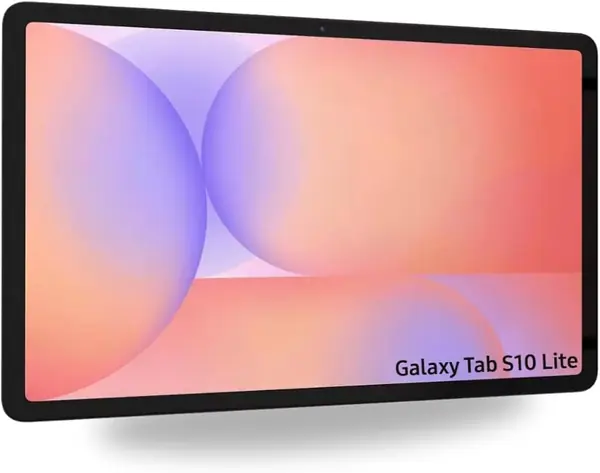
The S Pen is the whole argument for this tablet. It ships in the box, it is Samsung's own, and it makes the Tab S10 Lite the most natural handwriting device in this group — closer to a notebook than anything else we picked. Behind it sits a 10.9-inch 2122 x 1320 LCD at 90 Hz, which looks and feels a class above what the specification sheet suggests.

We choose it when the pen is going to be used for hours at a stretch and the tablet will be carried around all day. The Exynos 1380 handles notes, PDFs and video without complaint, the 8,000 mAh battery and microSD slot make it a long-haul purchase rather than a semester one, and 524 grams is noticeable after an hour one-handed but vanishes once the tablet is propped on a stand.

The warranty line matters more here than the specifications. This is an international model sold without a domestic warranty, covered by the seller's return policy rather than Samsung's, so a failure in month eight is a conversation with a seller and not with the manufacturer. We still recommend it, because the hardware is the most polished in the group — just go in knowing that is the trade.

Pros

  • S Pen included and ready to write
  • Sharp 10.9-inch 90 Hz display
  • 8,000 mAh battery with microSD slot

Cons

  • 6GB of RAM is modest at this price
Our verdict

Buy it for the S Pen and the polished 90 Hz screen, and for handwriting that feels better than anything else on this list.

Check Latest Price
3

TCL NXTPAPER 11 Gen 2 Best for Note-Taking

89 /100
TKZ Score Excellent

Key details

Stylus
T-Pen, 4,096 levels, included
Display
11-inch, 1920 x 1200, matte
Memory And Storage
8GB + 8GB RAM, 128GB
Battery
8,000 mAh
View on Amazon

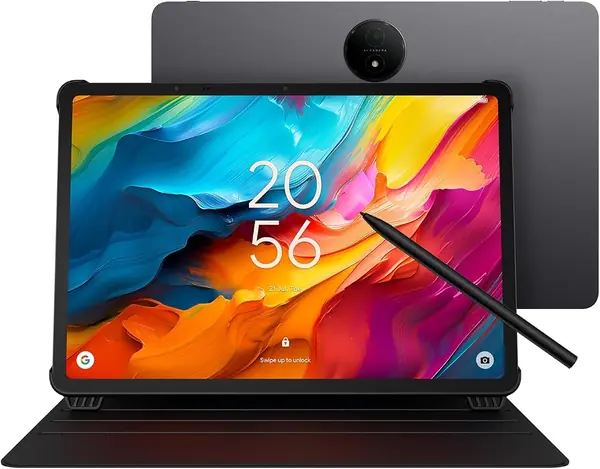
The screen is why this one exists. TCL's NXTPAPER 4.0 panel is matte, so a desk lamp or a lecture-hall ceiling lands as a soft glow instead of a mirror, and an hour of notes stops feeling like staring into a flashlight. Switch to a color-paper mode and the white goes warm and papery; switch back to regular mode and photos and video look like a normal LCD. We left it in paper mode most of the time.

The T-Pen is included, it is a 4,096-level active pen, and the flip case comes with it. Handwriting in a note app is the job this tablet is built around, and the pen tracks well enough to keep cursive legible. The catch is refresh: this panel runs at 60 Hz while the Lenovo picks run at 90, and the gap shows up in fast strokes and scrolling rather than in careful writing.

Underneath, the Helio G80 and 8GB of physical RAM — TCL lists it as 8+8 — are the slowest combination among our main picks. Note-taking, reading and streaming are fine; heavy split-screen work and games are not, and performance is the one place where the feedback genuinely splits. The 8,000 mAh battery and 128GB of storage redeem a lot of it for a student who charges overnight and keeps a library on the device.

Pros

  • Matte NXTPAPER screen cuts glare
  • 4,096-level pen and flip case included
  • Large 8,000 mAh battery

Cons

  • Helio G80 is the slowest chip among our picks
  • 60 Hz panel trails the Lenovo screens
Our verdict

Our choice for handwriting and long reading sessions: the matte screen and included 4,096-level pen are the most comfortable pairing here.

Check Latest Price
4

Lenovo Idea Tab Plus Best Big Screen for Study

88 /100
TKZ Score Excellent

Key details

Stylus
Lenovo Tab Pen included
Display
12.1-inch, 2560 x 1600, 90 Hz
Memory And Storage
8GB RAM, 128GB
Weight
1.2 lb
View on Amazon

The Idea Tab Plus answers the one thing we wanted to change about the 11-inch Idea Tab: a 2.5K screen is sharp, but at 11 inches it gets cramped when a PDF and a notes app share it. The Plus stretches 2560 x 1600 across 12.1 inches, and at 1.2 pounds it is still light enough to hold in one hand while writing with the other.

It is the same kit as its smaller sibling — Tab Pen and folio case in the box, 8GB of RAM, Android 15, quad speakers — with a Dimensity 6400 instead of the 6300 and 128GB of storage instead of 256. That last swap stings: the smaller tablet gives you twice the room for roughly the same money, and the microSD slot only partly makes up for it.

Between the two Lenovos, we hand the Plus to anyone whose day is reading and annotating rather than hauling: split-screen coursework, marked-up slides, a lecture running in one window while notes fill the rest. Speed is the split in the feedback — plenty for that workload, thin once a dozen tabs and a game are open — and the interface is the other, with gestures that do not land immediately for everyone. Neither complaint touches the reason to buy it, which is a genuinely large, genuinely sharp canvas.

Pros

  • 12.1-inch 2.5K 90 Hz screen
  • Tab Pen and folio case included
  • Light 1.2-pound body

Cons

  • 128GB, half the smaller Idea Tab's storage
  • Not built for gaming
Our verdict

We pick the Idea Tab Plus when the screen has to hold two things at once — the best large canvas here that still carries like a tablet.

Check Latest Price
5

TCL NXTPAPER 14 Best for Sheet Music

87 /100
TKZ Score Excellent

Key details

Stylus
4,096-level stylus included
Display
14.3-inch, 2400 x 1600, matte
Memory And Storage
8GB + 8GB RAM, 256GB
Battery
10,000 mAh
View on Amazon

A 14.3-inch tablet sounds absurd until you set it on a music stand. Two pages of a score fit at a readable size, the matte NXTPAPER 3.0 surface kills the glare from a stand lamp, and the whole thing takes less room in a gig bag than a binder of printed charts. Sheet music is the most enthusiastic thread in the feedback on this tablet, and a week of use explains it.

We reach for it whenever a document was designed for paper and the alternative is squinting. The 2400 x 1600 panel is sharp, the 4,096-level stylus and case come in the box, and the 10,000 mAh battery runs long enough that charging is a nightly habit rather than a mid-rehearsal worry. 256GB holds a serious PDF library, and the Helio G99 does not need to be more than it is for reading, marking up and streaming.

The size is the cost. At 12.7 by 8.7 inches it does not go in a small bag, and the 60 Hz panel feels slower under the finger than the Lenovo screens. Endurance is the other split, with long days on one side and early evenings on the other. If the tablet lives on a stand or a desk, none of that matters much; if it has to travel everywhere, the 12.1-inch Lenovo is the easier carry.

Pros

  • Full-page 14.3-inch matte display
  • 4,096-level stylus and case included
  • 10,000 mAh battery and 256GB storage

Cons

  • Too large to carry every day
  • Battery life can fall short of a full day
Our verdict

For musicians and anyone reading full-size pages, this is the one — a 14.3-inch matte screen that stands in for a printed score.

Check Latest Price
6

Evermyth 10-Inch Tablet Best Budget Bundle

86 /100
TKZ Score Excellent

Key details

Stylus
Stylus included
Display
10.1-inch, 1280 x 800
Memory And Storage
6GB + 30GB virtual RAM, 128GB
In The Box
Keyboard, mouse, pen, case, headphones
View on Amazon

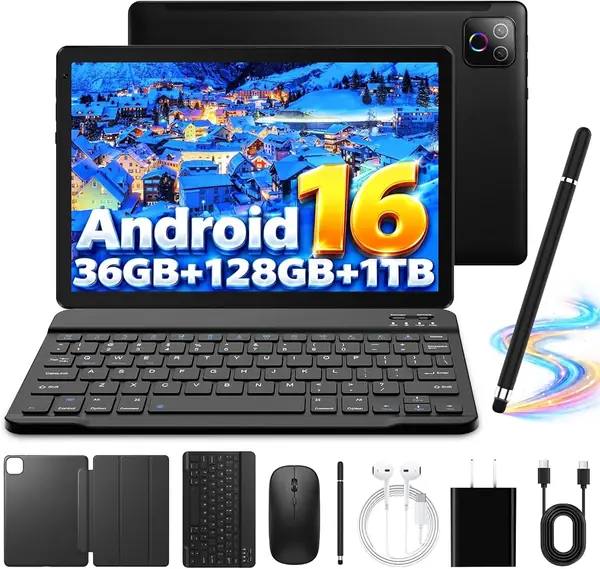
Open the box and you get a tablet, a keyboard, a mouse, a stylus, a case, headphones and a charger. That is the entire pitch, and at the budget end of this list it is a strong one: nothing about this tablet asks you to buy something else before it becomes useful.

The storage number is honest — 128GB with a microSD slot behind it — and so is the screen, an ordinary 1280 x 800 IPS panel that does the job for reading and video and shows its limits next to the 2.5K Lenovo displays. The RAM number needs translating. The 36GB in the title is 6GB of physical memory plus 30GB of virtual memory borrowed from storage, so judge it as a 6GB tablet when you decide what to run on it.

We treat it as a household's second or third device, or a first writing tablet for someone who wants a keyboard included. Notes, browsing, video and messaging are all comfortable; speed is where the feedback splits, and the honest read is that it is fine until a heavy game or a dozen background apps find the ceiling. Wi-Fi 6, Bluetooth 5.4 and Android 16 are current rather than compromised, which the other budget tablets here cannot all match.

Pros

  • Keyboard, mouse, pen and case included
  • Real 128GB storage plus microSD
  • Wi-Fi 6 and Android 16

Cons

  • 36GB RAM headline is mostly virtual
  • 1280 x 800 screen looks soft next to the rest
Our verdict

The budget bundle we recommend when a keyboard, mouse and pen all need to be in the box, with speed that suits light work.

Check Latest Price
7

EDUAITABLET 10-Inch Tablet Light Schoolwork

85 /100
TKZ Score Excellent

Key details

Stylus
Stylus included
Display
10.1-inch, 1280 x 800
Memory And Storage
4GB + 12GB virtual RAM, 32GB
In The Box
Keyboard, mouse, pen, case, stand
View on Amazon

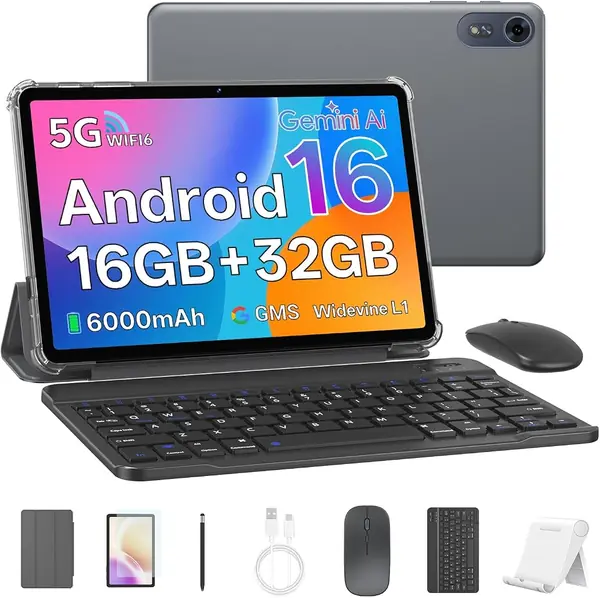
Thirty-two gigabytes. That is the number to get past before anything else about this tablet matters, because Android 16 and a handful of apps take a serious bite out of it, and every note, photo and download afterward competes for what is left. There is a microSD slot good for up to 1TB, and a card is not optional here — budget for one from the start.

What budget money buys is the most complete kit in this group: tablet, keyboard, mouse, stylus, protective case and a stand, with the pen and case included rather than sold after the fact. The 10.1-inch 1280 x 800 panel is basic but bright enough indoors, there is a headphone jack, and at 1.2 pounds it slips into a backpack without complaint.

Speed is the honest weakness. The penta-core ARM chip running at 1.8GHz is modest, and speed is the one topic that turns negative here even while the overall picture stays warm — fine for a child's school apps and video, less so for anything heavier. The keyboard pairs over Bluetooth and charges separately, which is one more cable to keep track of.

We point to it as a first tablet or a study machine for a younger kid, where the stand, the keyboard and the low outlay matter more than a sharp panel. If the tablet is for you and note-taking is the point, spend more: the pen here is a basic one and the screen is the weakest on this list.

Pros

  • Keyboard, mouse, pen, case and stand included
  • microSD slot up to 1TB
  • Light 1.2-pound body

Cons

  • 32GB of storage needs a card immediately
  • Basic 1280 x 800 display
Our verdict

A complete budget study kit for a kid — just plan on a memory card and keep expectations for the screen modest.

Check Latest Price

How We Tested Tablets With Styluses

We started with spec sheets, filtering for active pen support, screens between roughly 10 and 14 inches, and whether the stylus and a case came in the box rather than as a separate purchase. From there we cut anything whose price only made sense on paper, and we looked at each brand's track record for software updates, since a tablet that stops receiving them in a year is not much of a value.

Twelve tablets came home with us for eight months. They went into meetings for note-taking, onto the couch for annotating PDFs and sketching, to the kitchen table for homework, and into a tote bag on weekend trips next to a folding keyboard. We also spent plenty of evenings reading and streaming on them, because that is what most people actually do with a tablet.

For the pen work, we wrote the same two pages of notes and drew the same set of shapes on every screen, deliberately resting a palm on the glass to see if stray marks appeared, and watching the gap between the nib and the line it left. We noted whether the pen woke instantly or needed a tap, whether it charged or took a battery, and where it stowed. For speed, we kept a video running in one split-screen pane while typing notes in the other and watched for stutter when switching apps.

Battery testing was simple and repetitive: screen at a set brightness, video looping, and a note of the percentage at the two-hour mark and again at the end of the day. Brightness got judged on a sunny patio, and the matte panels were easier to write on but softened colors next to glossy glass. We joined both Wi-Fi bands, paired earbuds and keyboards over Bluetooth, and kept a running log of crashes and slow moments to judge reliability.

How to Choose a Tablet with a Stylus

Start With the Pen, Not the Processor

An active pen reports pressure, so a line thickens when you press and thins when you lift. A capacitive stylus is a rubber-tipped finger substitute and writes at one width no matter what. Both arrive in boxes that say stylus included.

Look for a stated pressure-level count — both TCL models here claim 4,096 — or a named pen such as the S Pen or the Lenovo Tab Pen. If you plan to sketch, that detail matters more than the chip inside.

Pick the Screen Finish You Will Live With

Matte, paper-like panels cut glare and feel better under a pen across hours of reading, at the cost of color that looks slightly veiled and video that looks flat. Glossy 2.5K panels are better for film and photos and reflect more of the room back at you. Writing and reading all day points to matte; mixed entertainment points to glossy.

Resolution matters too. Above 1920 x 1200 is worth paying for at 11 inches and up, because small type and fine handwriting both need the pixels.

Let the Document Decide the Size

Eleven inches is the sweet spot for split-screen notes. Twelve inches is better when a PDF and a notes app share the display. Fourteen inches is a music stand or a document reader and a poor daily carry.

Measure the bag you actually use before ordering. A tablet that is 12.7 inches wide does not slide into a tote that swallows an 11-inch one, and no specification sheet will tell you that.

Read the Memory Numbers Carefully

Budget listings advertise 16GB, 20GB and 36GB of RAM. Most of that is virtual memory borrowed from storage, and the physical figure is the one that decides how many apps stay open — the Idea Tab 11's 8GB is 8GB.

Storage is the simpler call. 32GB needs a memory card on day one, 128GB is comfortable for a student, and 256GB means you stop thinking about it.

Check the Warranty Line Before the Price

A tablet sold as an international model can arrive without a domestic warranty; the Galaxy Tab S10 Lite is covered by the seller's return policy rather than Samsung's. Read that line first, because a cheaper listing with no service path is not actually cheaper.

Confirm what is in the box, too. The Idea Tab 11 includes the pen and case but ships with a USB-C cable and no wall adapter.

Frequently Asked Questions

Final Verdict

The Lenovo Idea Tab 11 is the tablet we recommend to most people buying a pen tablet: an active pen and folio case in the box, a sharp 2.5K 90 Hz screen to write on, and 256GB of room for everything you accumulate.

Choose the Galaxy Tab S10 Lite instead if the S Pen's feel is worth an international model with no domestic warranty, or the TCL NXTPAPER 11 Gen 2 if your day is handwriting and reading and glare is the enemy.