Best Multiport USB-C Chargers of 2026

A multiport charger promises the end of the power-brick drawer: one block on the desk, everything plugged in, nothing to remember. The fine print is where people get burned. The wattage on the box is a total, shared across every port, so the moment a laptop starts pulling power, the phone beside it quietly drops to a trickle. We ran 12 of these chargers through six months of daily use — desk, nightstand, hotel room, kitchen counter — to see which ones keep every device moving.

The differences come down to how honestly a charger splits its power, not how big the headline number is. Gallium nitride guts run cooler and smaller than the old bricks, which is why the compact ones can genuinely travel, though weight still swings a lot once the cables are in the bag. Port mix matters too: a long row of USB-A looks generous until you notice nothing you own plugs into it anymore.

What follows is sorted by who each one suits: the road warrior, the household charging station, the minimalist with one free outlet.

The Best Multiport USB-C Chargers

1

Anker Prime 200W Best Overall
94 /100
TKZ Score Outstanding

Key details

Total Output
200W
Ports
6
Max Per USB-C Port
100W
Weight
1.2 lb
View on Amazon

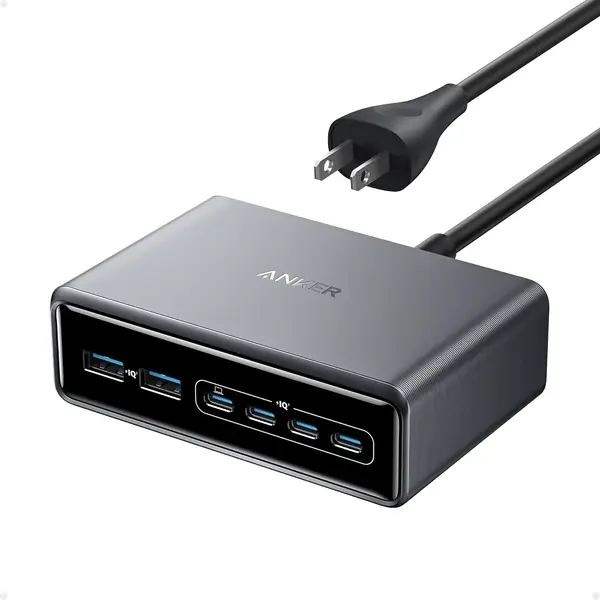
Two hundred watts is the number on the box; the number that changes how you use it is 100. That's what each of two USB-C ports delivers at the same time, so a 14-inch laptop on one port and a second laptop on another both charge at full speed — something only one other charger here can match. The remaining ports pick up phones, a watch, and earbuds, the stuff that used to occupy four separate bricks.

On a desk it measures 4.4 by 3.0 by 1.4 inches and weighs 1.2 pounds: heavy enough to stay where you put it when a cable gets yanked, compact enough to disappear behind a monitor. The shell feels dense, the ports grip a plug instead of letting it wobble, and the thermal monitoring runs continuously — after a night with six devices attached it was warm and never hot. One small miss is that there's no indicator light, so you can't tell at a glance whether the outlet it's on is live.

We recommend it first to anyone whose charging pile includes a laptop, and second to anyone who wants to stop thinking about chargers for a few years. The Ediliow below matches the two 100W ports for about half the money and throws in cables, so if ports are all you're buying, take that one. What the extra buys here is the finish, the port feel, and 24 months of warranty — details you notice every time you plug something in, which for a charger that lives on a desk is most of the experience.

Pros

  • Two 100W USB-C ports run two laptops at full speed
  • Dense, stable body that stays put on a desk
  • Continuous thermal monitoring and 24-month warranty

Cons

  • Too heavy to be a travel charger
Our verdict

We recommend it first for desks where a laptop charges next to phones: two 100W USB-C ports carry more load than anything else in this group.
Check Latest Price
2

MEKIOJEO 380W 12-Port Best for a Desk Full of Devices

93 /100
TKZ Score Outstanding

Key details

Total Output
380W
Ports
12 (8 USB-C + 4 USB-A)
Max Per USB-C Port
65W
Weight
10.6 oz
View on Amazon

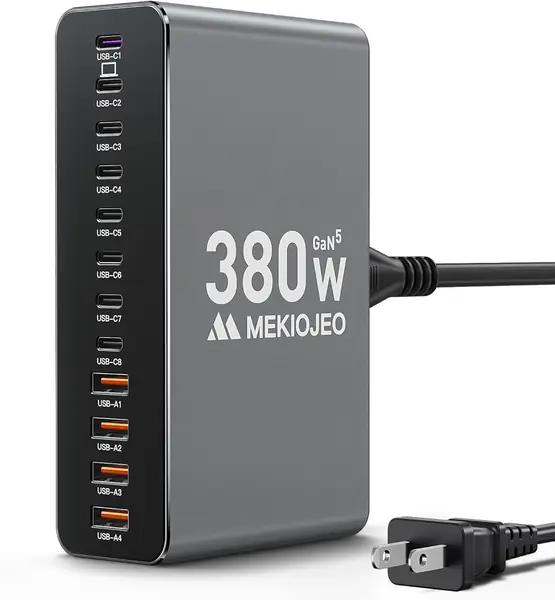
Twelve ports for less than the Anker charges for six is the whole argument here. Eight of them are USB-C, four are USB-A, and the total is 380W, so a household's phones, two tablets, a watch, earbuds, a camera, and a laptop can live on one aluminum block instead of five adapters. We reach for this one when the problem is quantity rather than speed.

One port runs at 65W, which moves a thin laptop at a decent clip and won't match the 96W or 140W brick a bigger machine came with. The other USB-C ports split 30W and 20W. The aluminum shell does real work: it spreads heat instead of trapping it the way plastic does, and after an evening of charging it's warm rather than concerning. A 5-foot cord and a 300-gram body mean it sits on a shelf instead of hanging off a wall, and the two-year coverage matches the best in this group.

The catch is that 380W is a pool, not a promise. It's the sum of what all twelve ports can do, and with a laptop plus six or seven other devices drawing, each one gets a share. Reserve the 65W port for the laptop, put phones on the 20W ports, and nothing feels slow. If your laptop is a 16-inch workstation, spend more; for everyone else with a drawer full of devices, this is the most charger for the money in the group.

Pros

  • Twelve ports, eight of them USB-C
  • Aluminum body spreads heat under a full load
  • 65W laptop port at a midrange price

Cons

  • 65W is the ceiling for any single laptop
Our verdict

We point anyone with a pile of phones, tablets, and accessories here: twelve ports, an aluminum body, and a 65W laptop port for less than the top pick.

Check Latest Price
3

Anker 112W Desktop Best for a Nightstand

92 /100
TKZ Score Outstanding

Key details

Total Output
112W
Ports
6 (3 USB-C + 3 USB-A)
Max Per USB-C Port
30W
Size
3.0 × 3.2 × 1.3 in
View on Amazon

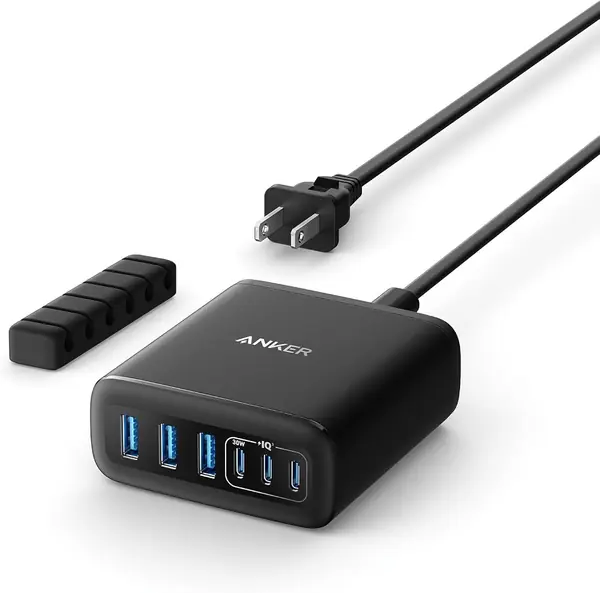
Thirty watts is the ceiling on each of this charger's USB-C ports, and that one number tells you whether it's for you. A phone, a tablet, a watch, and a pair of earbuds: perfect. A 16-inch laptop: it charges, slowly, and you'll feel every watt. We keep ours on a side table where the overnight devices live, and it has quietly replaced four separate bricks.

What makes it good at that job is size and steadiness. At 3.0 by 3.2 by 1.3 inches and just over 10 ounces it takes less room than a coaster stack, and the flat base means it doesn't tip when someone pulls a cable at midnight. Anker also includes a silicone cable organizer that clips cords down, which sounds like a gimmick until you've lived with four cables sliding off a nightstand.

Three USB-C and three USB-A ports is the right split for a bedside table, since the USB-A side keeps older cables, a watch charger, and a cheap lamp cord in service without an adapter. Against the top pick on a phone-heavy desk it finishes the night just as full, in a third of the volume, for noticeably less money. The second a laptop joins the party, though, you want to be on a 65W or 100W port, and this one tops out at 30.

Pros

  • Compact, stable body that suits a nightstand
  • Even split of three USB-C and three USB-A
  • Silicone cable organizer keeps cords in place

Cons

  • 30W per USB-C port is too slow for laptops
  • No USB charging cable in the box
Our verdict

We like it for nightstands and small desks: six compact ports, three of each kind, at the speeds phones and tablets actually use.

Check Latest Price
4

Ediliow 380W 8-Port Best for Two Laptops

91 /100
TKZ Score Outstanding

Key details

Total Output
380W
Ports
8 (5 USB-C + 3 USB-A)
Max Per USB-C Port
100W
Included Cables
4 USB-C cables
View on Amazon

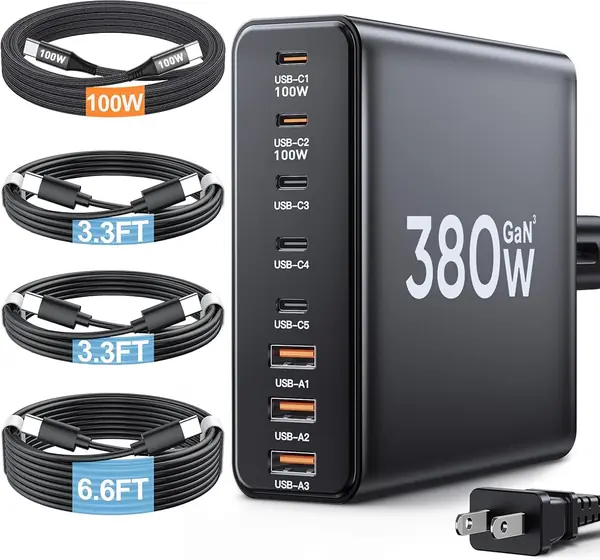
Four USB-C cables come in the box — one 3.3-foot 100W braided cable, two 3.3-foot C-to-C cables, and a 6.6-foot C-to-C — along with a 5-foot power cord. That's the detail that makes this the easiest of the group to set up: plug it in and start charging a laptop and two phones without ordering anything else, which isn't true of most of the chargers here.

Two of the eight ports run at 100W, so two laptops can fast-charge at once. The only other charger here that does it is the Anker Prime, and this one costs about half as much while including the cables. The remaining three USB-C and three USB-A ports run at 30W, enough for tablets, phones, and a watch.

The 380W figure is a ceiling, and it's the number people trip over. With eight ports loaded, the two 100W ports don't stay at 100W — the total gets divided, and a laptop that was flying on its own slows once three phones join. That's true of every multiport charger here, but this one advertises bigger per-port numbers, so the drop is easier to notice. Plan around it: laptops on the two top ports, everything else below.

Where it slips behind the Anker is feel. The plastic case is fine, the ports are fine, and nothing about it suggests it will fall apart, but the Anker feels like equipment and this feels like an accessory. With four cables in the box and two years of warranty, we can live with accessory. If two work laptops charge on your desk every night, this is the one we hand you.

Pros

  • Two 100W USB-C ports for two laptops
  • Four USB-C cables and a power cord included
  • Three more USB-C and three USB-A ports

Cons

  • Output drops when all eight ports are loaded
  • Three of the four cables stop at 3.3 feet
Our verdict

We hand this to two-laptop households: a pair of 100W USB-C ports, six more ports, and four cables in the box for roughly half the price of the top pick.

Check Latest Price
5

Karhood 60W 5-Port Best Budget

90 /100
TKZ Score Outstanding

Key details

Total Output
60W
Ports
5 (3 USB-C + 2 USB-A)
Max Per USB-C Port
30W
Safety Listing
ETL
View on Amazon

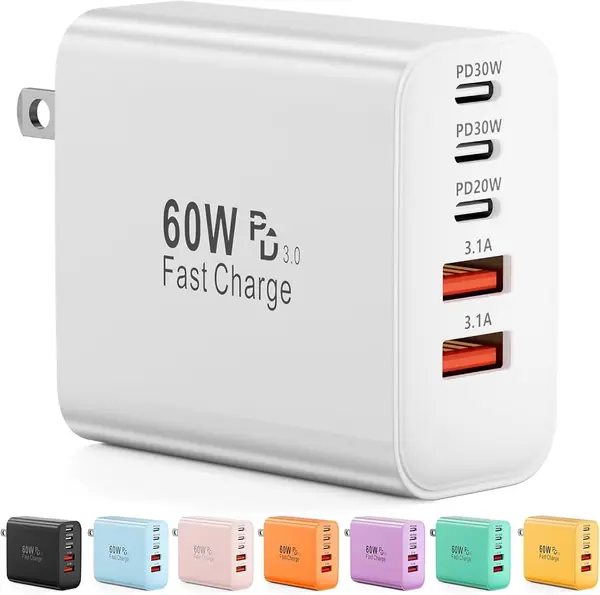
Three USB-C ports, two USB-A, 30W of Power Delivery on a USB-C port, and an ETL listing — at the bottom of this group's price range, that combination is hard to argue with. It's the charger we hand to people who want a multiport block and don't want to think hard about it.

Sixty watts total across five ports is the honest limit. One device gets 30W, a real fast charge for a phone; fill all five and everyone shares, so this is an overnight charger rather than a ten-minute top-up before you leave. Where it earns its place is in a bag: it's a small block, and the price makes a second one an easy call, so you're not unplugging the one behind your desk every time you pack.

The prongs don't fold, and that's our one real complaint — in a packed pouch they snag on everything. Beyond that the case is plain and it has done everything we've asked of it on phones, tablets, and a set of earbuds. It's also the pick we suggest to people who charge phones and tablets only; the moment a laptop is in the bag, a 30W ceiling is the wrong tool and the money is better spent on the 112W Anker.

Pros

  • Genuine 30W USB-C fast charging
  • Five ports with an ETL safety listing
  • Small and inexpensive enough to buy twice

Cons

  • Prongs don't fold for travel
  • 60W total is quickly shared among five devices
Our verdict

We recommend it without hesitation as the budget pick: five ports, a true 30W USB-C fast charge, and an ETL listing that not every pricier charger here has.

Check Latest Price
6

BREEKET 100W 6-Port Bedside Family Hub

89 /100
TKZ Score Excellent

Key details

Total Output
100W
Ports
6 (3 USB-C + 3 USB-A)
Max Per USB-C Port
20W
Power Cord
5 ft, detachable
View on Amazon

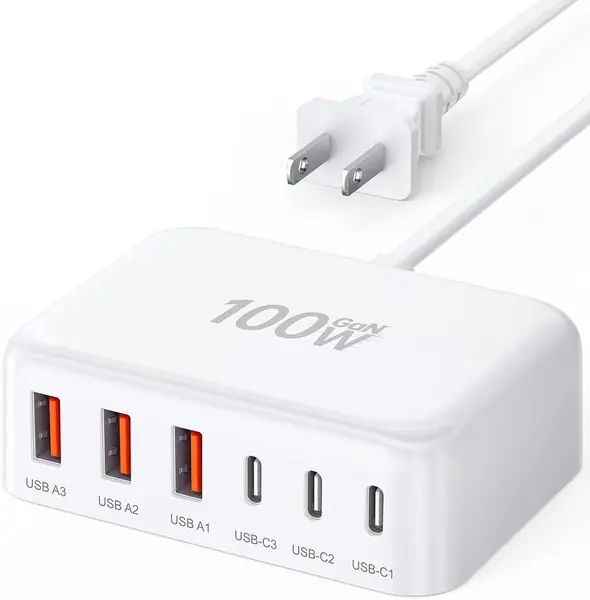
The 5-foot AC cord detaches, and that single feature decides where this charger lives. Plug the cord in behind a nightstand and run it to the tabletop: no brick hanging from the wall, and no extension cord needed for the outlet that's always behind the bed. The body is 3.27 by 2.36 by 1.1 inches, roughly the footprint of a paperback.

Six ports: three USB-C at 20W and three USB-A at 18W, with 100W total. That's phone-and-tablet territory — 20W is right for a modern phone and useless for fast-charging a laptop. As a bedside hub for a family, with three phones and a couple of tablets sharing a nightstand, it does exactly what it's for, and the five-foot cord is why it works in a room where the outlet is nowhere useful.

The caveat that carries weight is longevity. Some of these stop working within a few months — a port dies, or the whole unit goes dead — which is a risk to price in rather than ignore. Ours has been fine, and we've kept it in the guide because nothing else here is this compact or comes with a cord this long for the money. Buy it from a seller with an easy return window and give it air rather than burying it under a pile of things.

We like it as a second charger for a guest room or a kid's nightstand, where three phones get filled overnight and nobody needs a laptop topped up. It isn't the charger to build a desk around, and it isn't trying to be.

Pros

  • Detachable 5-foot cord reaches awkward outlets
  • Three USB-C and three USB-A ports
  • Small enough for a nightstand, priced for a second unit

Cons

  • Some units stop working within months
Our verdict

We recommend it as a compact bedside hub for phones and tablets, and not as a laptop charger — 20W USB-C ports are the hard limit.

Check Latest Price
7

hibiker 65W 6-Port Best for Mixed-Port Households

88 /100
TKZ Score Excellent

Key details

Total Output
65W
Ports
6 (3 USB-C + 3 USB-A)
Input
100–240V
Fast-charge Standards
PD and QC 3.0
View on Amazon

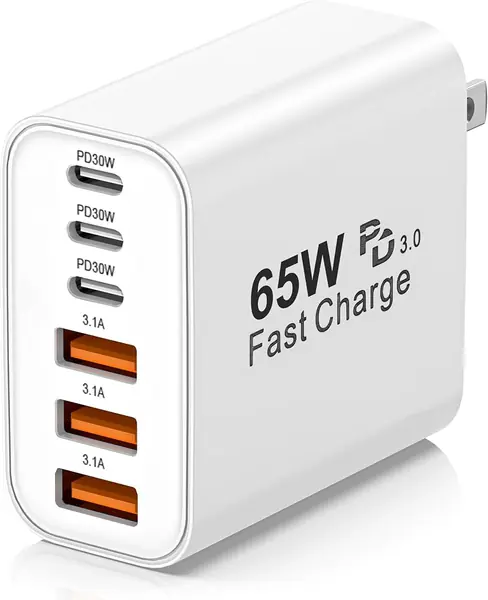
A charger that hangs off the wall has one job beyond charging: staying in the socket. This one is bulky, and with three cables hanging off it there's enough leverage to work it loose in a worn outlet, so give it a tight socket or a power strip on the desk rather than the loose outlet behind the sofa. Ours hasn't fallen out of a good outlet, but there's a lot of block to hang.

The reason to pick it over the Karhood is the third USB-A port. Three USB-C and three USB-A at 65W covers a house in transition: a laptop on USB-C, an older iPad and a watch charger on USB-A, a lamp cable in the last slot. GaN internals run cooler than the older blocks they replace, and the 100–240V input means it travels outside the U.S. without a converter — worth checking on any charger block you buy with a trip in mind.

Sixty-five watts shared six ways is the trade. Two devices is fine; five or six and everything slows to an overnight pace. We also read the low price as a hedge rather than a promise: some of these stop working in the first year, and the one-year warranty is as short as it gets in this group. Buy it for the port mix and the travel voltage, not for longevity.

Pros

  • Three USB-C and three USB-A ports
  • 100–240V input for international travel
  • GaN design runs cooler than older blocks

Cons

  • Bulky enough to work loose in a worn outlet
  • 65W is shared and thins out fast
Our verdict

We recommend it when your drawer still holds USB-A cables: six ports, 65W, and 100–240V input for travel at the bottom of the price range.

Check Latest Price
8

DERANOR 75W 2-Pack Best for Two-Location Charging

87 /100
TKZ Score Excellent

Key details

Total Output
75W
Max Per USB-C Port
45W
Pack
2 chargers
Ports Per Charger
5 (3 USB-C + 2 USB-A)
View on Amazon

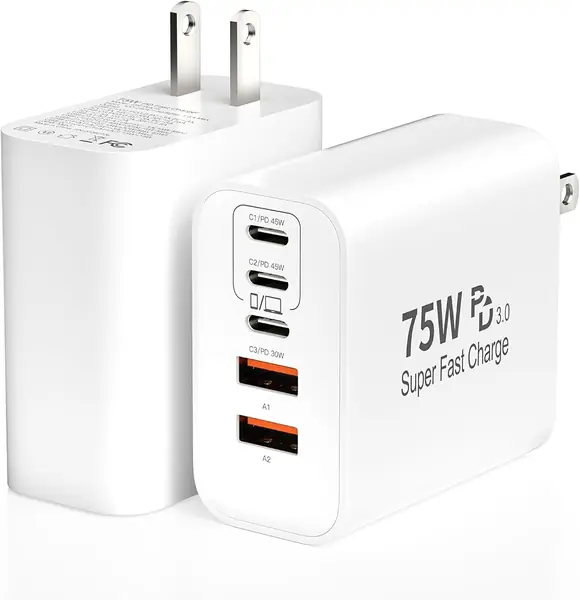
Two chargers, not one. Each is a five-port block — three USB-C, two USB-A — with 75W total and up to 45W on either of the first two USB-C ports. The point isn't the spec sheet; it's that you can leave one plugged in at home and keep the other in a bag, which is what most people actually want from a multiport charger and rarely buy.

Forty-five watts is the number that makes the second one worth carrying: enough to top up a thin laptop or fast-charge a phone, and enough for a tablet plus a phone at once. Both units are UL listed, which not every charger here can claim, and the two USB-A ports are friendlier to older gear than an all-USB-C block would be. What's missing is cables — the box holds the two blocks and nothing to plug into them — so add a couple of C-to-C cables to the total if you don't already own good ones.

Pros

  • Two five-port chargers for home and bag
  • 45W USB-C port handles a thin laptop
  • UL listed with three USB-C and two USB-A each

Cons

  • No charging cables included
Our verdict

We recommend the two-pack for anyone who keeps meaning to buy a second charger: 45W USB-C in each block, UL listed, one for the house and one for the bag.

Check Latest Price

How We Tested Multiport USB-C Chargers

We started by gathering every multiport charger we could find from brands people actually buy, then narrowed by total wattage, port count, whether the USB-C ports could deliver laptop-level power, footprint, and price measured against the number of ports that could fast-charge something. Chargers that advertised a big total but spread it across ports that couldn't run a laptop got cut early. That left 12, from pocketable five-port wall blocks to a full desktop station.

Each one lived on my desk for at least a week and went into a backpack for at least one trip. I weighed every charger on a kitchen scale, then weighed the bag again with the charger and its cables inside, because a light block with a heavy cord isn't actually light. I also noted how much room each one ate on a nightstand and whether its plugs crowded a power strip.

The real testing happened around 6 p.m., when a laptop, a phone, earbuds, and a tablet all needed juice before dinner. I plugged everything in at once and watched what each device reported: whether the laptop held its fast-charge rate, whether the phone fell back to slow charging, which ports gave up first. Then came the stopwatch — one phone alone, then the same phone with three other devices drawing — to see how far charging speed dropped under load.

After an hour I felt each case for heat and checked whether any port had loosened after repeated plugging and unplugging. Reliability showed up in smaller ways: labels readable upside down, ports spaced far enough apart for chunky cable heads, and units that never needed to be unplugged and reset to get a device charging again.

How to Choose a Multiport Usb-C Charger

Read Watts Per Port Before Total Watts

The total is a pool every connected device draws from; the per-port figure is what any one device can get. A 100W charger with three 20W USB-C ports will fast-charge three phones and crawl on a laptop, while a 200W charger with two 100W ports runs two laptops at full speed. That difference is why the Anker Prime and the Ediliow cost more than their totals suggest and why a 30W-per-port desktop like the Anker 112W is a bargain for the right buyer.

Before you buy, look at the adapter your laptop came with and treat its wattage as the floor for the port you'll use. Below 30W is phone-and-tablet territory, 45W starts to move a thin laptop, and 65W to 100W is what a serious machine wants.

Count the Port Mix, Not Just the Ports

Six ports of the wrong type are worse than four of the right ones. USB-C is where phones, tablets, and laptops have landed, but USB-A still earns its place: older cables, watch chargers, cheap bedside lamps, and the accessory that never made the switch. An even three-and-three split, like the Anker 112W and the BREEKET, covers a household mid-transition.

If everything you own is USB-C, spend the space on more C ports. The MEKIOJEO's eight USB-C ports are the reason one block clears a whole desk instead of four people negotiating over two.

Decide Between a Wall Block and a Corded Station

A wall block is smaller and travels better; a station with its own cord sits on a desk, reaches an outlet behind the furniture, and doesn't hang its weight off the socket. If the outlet is behind a bed or under a desk, the corded kind is the right answer, and the BREEKET's detachable five-footer is the clearest example here.

The trap is the word compact. On a charger block it usually describes the body, not the plug, and prongs that don't fold will catch on the inside of a bag. Check that before you pack it, and check the cord length before you decide where it lives.

Budget for Cables, Cords, and the Return Trip

Extras vary wildly in this group. The Ediliow includes four USB-C cables and a power cord; the Anker 112W includes a cable organizer but no charging cable; the DERANOR two-pack includes the blocks and nothing to plug into them. Price out two decent C-to-C cables before you compare a bare-bones box against a loaded one.

Then buy from a seller whose return window you can actually use. Multi-port chargers run warm and work hard, and when a unit fails it tends to fail in the first months rather than on day one, so keep the packaging longer than feels reasonable.

Frequently Asked Questions

Final Verdict

We recommend the Anker Prime 200W to almost anyone building a charging desk. Two 100W USB-C ports mean a laptop charges at full speed while phones fill in around it, and the build is the best in this group — dense, steady, and never more than warm after a night with six devices attached.

If your devices are phones, tablets, and watches, the smaller Anker 112W does the same night's work in a third of the space, and the Karhood covers a bag for the price of a takeout lunch. For a household with more devices than money, the MEKIOJEO's twelve ports and 65W laptop port are the value call.