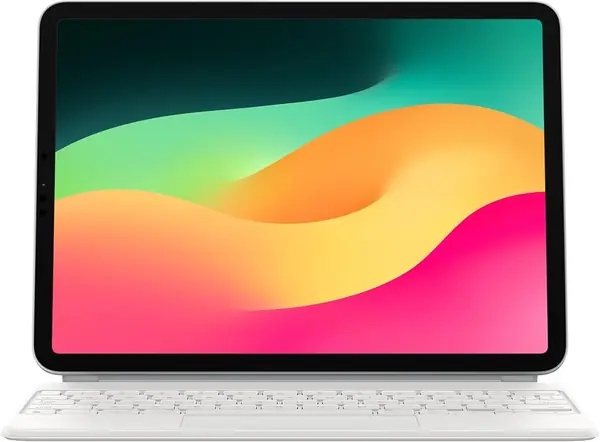
Apple Magic Keyboard (M4/M5) Best Overall
Key details
- Compatible iPads
- iPad Pro 11-inch (M4, M5)
- Keys
- Backlit scissor, function row
- Charging
- USB-C pass-through
- Trackpad
- Glass with haptic feedback
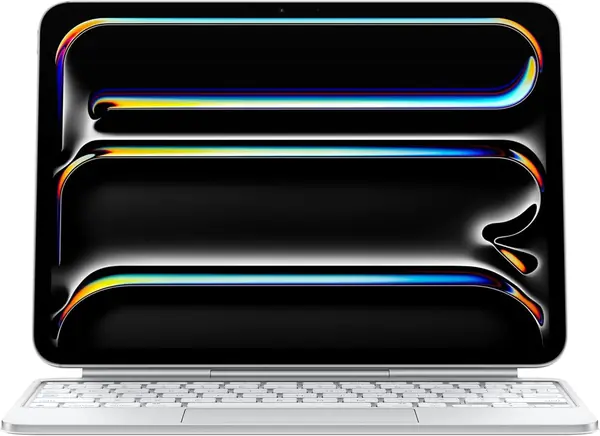
Two things separate this Magic Keyboard from the older one most people have seen: a 10-key function row across the top and a glass trackpad that clicks with haptic feedback anywhere your finger lands. Both sound like small upgrades until you live with them. We stopped reaching for the screen to change volume within a day, and the full-surface click is the difference between dragging a window and fighting it.
What you are paying for is feel. The scissor keys are quiet with real travel, the two-cantilever hinge holds whatever angle you set rather than snapping into grooves, and the backlight comes on without a fuss. It is thin enough to leave on, it folds shut into a front-and-back cover so the screen is protected in a bag, and the USB-C port on the hinge passes power through to the iPad, which means the cable you already carry does both jobs.
The fit list is short and specific: iPad Pro 11-inch in M4 and M5 only. That is the trade for a case built this precisely — nothing rattles, the magnets land where they should, and it opens like a laptop lid — but it also makes this a one-tablet purchase. If your Pro is a 2022 or earlier, the older Magic Keyboard below is the same idea for your machine.
Pros
- Function row plus haptic glass trackpad
- Pass-through USB-C charging on the hinge
- Quiet scissor keys on an adjustable hinge
Cons
- Front and back protection only, no edge wrap
- Premium price for a single iPad generation
If your iPad Pro is an M4 or M5, this is the keyboard we tell you to buy — the best typing feel here, plus a function row and pass-through charging.