Best iPad Cases of 2026

An iPad case has two jobs that fight each other: be thin enough to forget you're holding anything, and survive the fall that ruins a Saturday. I've carried both extremes — a slim folio that let a corner of my tablet hit tile, and a rugged shell so bulky I stopped taking the iPad anywhere. The sweet spot is a case that disappears in your hand, holds its angle while you watch something, and keeps the corners intact when you fumble it.

We spent eight months testing 12 cases on iPads from an older 10.2-inch up to the current 11-inch, and the gaps showed up within a week. Most buyers shop by screen size alone, but fit is per generation — a case that's perfect for one model year can leave the camera cutout misaligned on the next. And the sleep/wake magnet is underrated right up until it starts waking your tablet inside a bag.

Everything below earned its place on the same terms: secure corners, a stand that doesn't collapse mid-episode, and enough grip that carrying it around the house isn't a two-handed job. Some picks lean slim, some lean armored — where your iPad goes decides which you need.

The Best iPad Cases

1

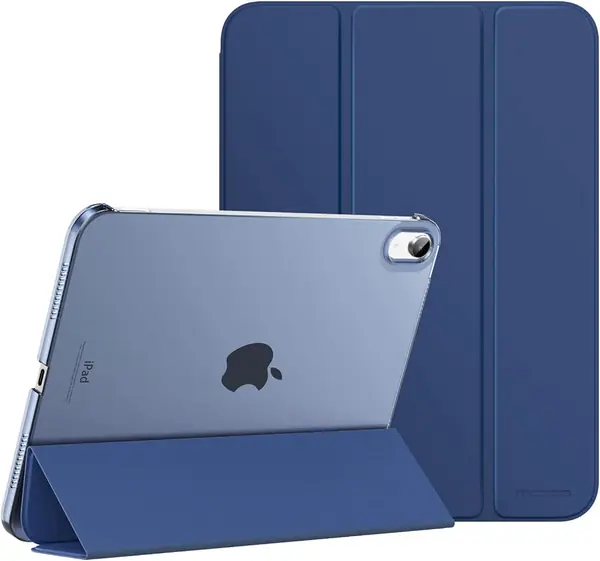
ZUGU Case for iPad 10th/11th Gen Best Overall
97 /100
TKZ Score Outstanding

Key details

Compatibility
iPad 10th/11th gen
Weight
1.01 lb
Stand
8-angle magnetic
Drop Protection
5 ft
View on Amazon

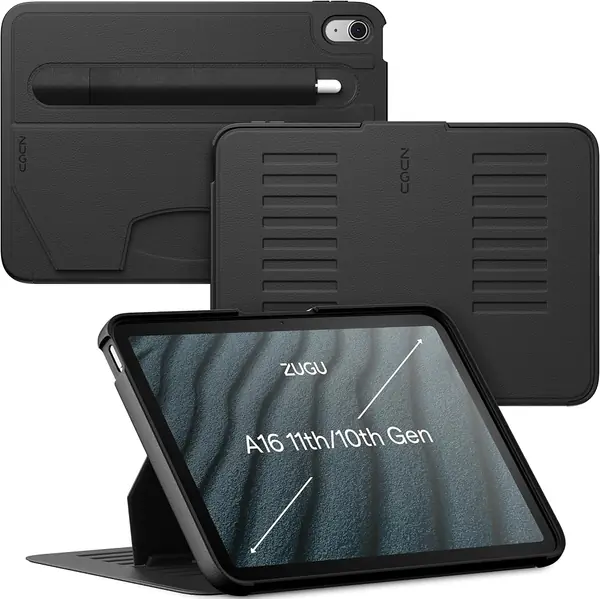
The ZUGU's eight-angle magnetic stand is the reason it earns the top spot. Instead of folding the cover into one or two grooves, the stand uses magnets across the back to hold the iPad at a range of angles, from a low typing position to something close to upright for video. We paid close attention to how often a stand collapses under a tap, and this one feels planted. The rest of the case is equally deliberate: a stiff shell, a soft-touch finish, and a cutout that keeps the Apple Pencil secure.

The five-foot drop protection is the other number that matters. This is not a thin folio pretending to be armor; it has real structure around the corners and back, and the front cover adds screen coverage when the case is closed. That protection comes with weight, at 458 grams, so the iPad feels more substantial in hand than it does in a budget cover. We think that is the right trade for a tablet that leaves the house, but it is worth knowing before you buy.

The built-in Pencil holder keeps the stylus with the tablet without adding a loop on the outside, and the auto sleep/wake cover has aligned every time we closed it. ZUGU also backs the case with a two-year warranty and a one-time repair contribution if the iPad is damaged while in the case, which is more coverage than most cases here offer. Those extras are unusual in this group.

Pros

  • Eight-angle stand stays steady
  • Five-foot drop protection
  • Built-in Apple Pencil holder
  • Two-year warranty and repair coverage

Cons

  • Premium price
  • Fits only 10th/11th-gen iPads
Our verdict

We recommend the ZUGU for anyone with a 10th- or 11th-gen iPad who wants protective coverage and a stand that stays put, and does not mind paying for it.
Check Latest Price
2

MoKo Case for iPad 10th/11th Gen Best Budget

96 /100
TKZ Score Outstanding

Key details

Compatibility
iPad 10th/11th gen
Weight
7.85 oz
Pencil Support
Apple Pencil 1st/USB-C
Viewing Angles
2
View on Amazon

The MoKo is the case we point to when someone wants a slim folio for a current iPad and does not want to spend much. It covers the 10th- and 11th-generation tablets, adds very little bulk, and has the basics: a magnetic cover, auto sleep/wake, and a two-position stand. The translucent back is a nice touch because it shows the iPad's color without turning the case into a plain black slab.

We think it is a smart buy for a student, a kitchen tablet, or a second iPad that mostly stays home. The two-position stand works for watching video, but it is not the stand for furious tapping; it can shift under a firm touch. The cover magnets also let the flap drift in a crowded bag, so this is a light-duty folio, not a rugged travel case. Those are fair trade-offs at the budget end, not deal-breakers for light use.

The case is easy to put on and take off, which matters if you share the iPad or dock it in a stand. It supports Apple Pencil charging through the side cutout, and the cover folds into a typing wedge. The sleep/wake magnet has been reliable in our use, and the cover folds behind the tablet without bunching at the hinge.

Pros

  • Slim, lightweight folio
  • Two-position magnetic stand
  • Apple Pencil charging support

Cons

  • Stand can shift under firm taps
  • Cover magnets are weak in a bag
Our verdict

The MoKo is our budget pick for 10th- and 11th-gen iPads: a slim, likable folio that covers the basics as long as you do not need a rock-solid stand.

Check Latest Price
3

ProCase for iPad 9th/8th/7th Gen Best for Older 10.2-Inch iPads

95 /100
TKZ Score Outstanding

Key details

Compatibility
iPad 7th/8th/9th gen
Weight
5 oz
Back
Translucent hard shell
Auto Wake/sleep
Yes
View on Amazon

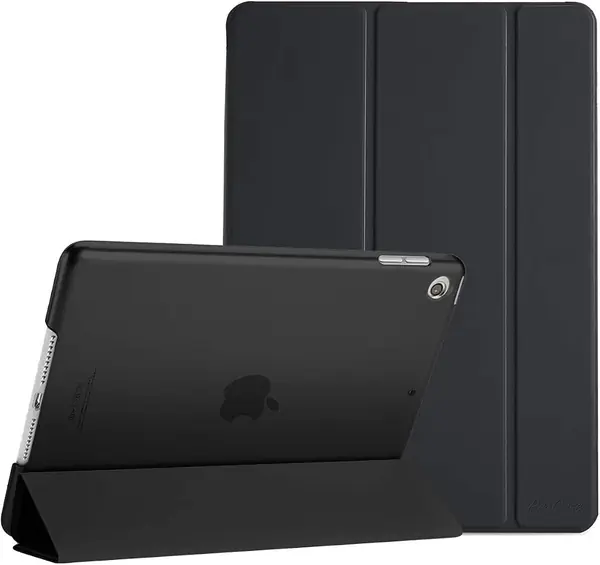
The ProCase is the budget cover for the 10.2-inch iPad with a home button: the 7th, 8th, and 9th generations. It is the kind of case you buy when the tablet is mostly a couch companion: slim, light, and inexpensive enough that you do not agonize over it. The frosted back shows the Apple logo, and the cover folds into a stand for video or typing.

We like how little it adds to the iPad; at 5 ounces, it disappears in a bag and is easy to hold for long reading sessions. The hard back is there for scratches and everyday knocks, not for drops onto concrete. The fit is generally snug, but the shell is not the tightest here, so make sure the tablet is fully seated before you carry it by the cover.

Auto sleep/wake works, the cutouts line up, and the cover wipes clean. The case has held up for light daily use, but the plastic shell is not the one to choose for a child who drops the tablet. If your iPad lives on the sofa and you want a simple cover, this is an easy budget pick. The cover also folds behind the tablet for one-handed reading, though it does not lock into place.

Pros

  • Fits 10.2-inch iPad 7th/8th/9th gen
  • Slim 5-ounce design
  • Auto sleep/wake and fold-out stand

Cons

  • Not compatible with Smart Keyboard
  • Plastic shell can crack with hard use
Our verdict

For a 7th-, 8th-, or 9th-gen iPad, the ProCase is a cheap, slim cover that handles everyday knocks; skip it if you need drop armor or a keyboard.

Check Latest Price
4

SEYMAC stock Case for iPad 9th/8th/7th Gen Best Rugged for Kids

94 /100
TKZ Score Outstanding

Key details

Compatibility
iPad 7th/8th/9th gen
Weight
12.3 oz
Carry
Hand strap + shoulder strap
Screen Protection
Built-in protector
View on Amazon

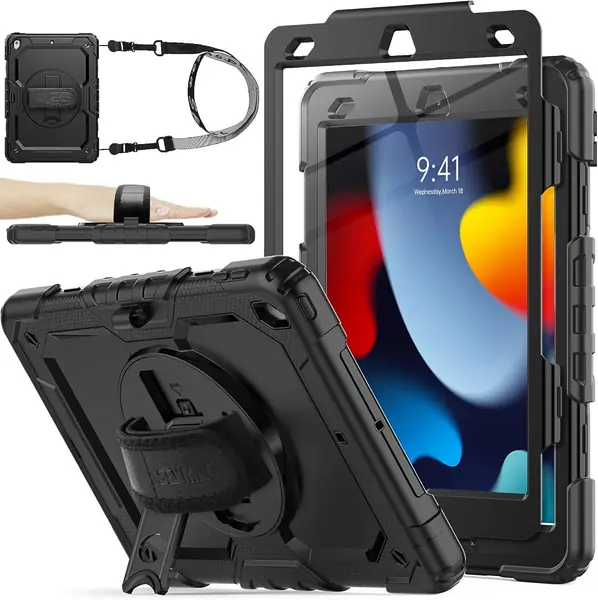
The SEYMAC stock case is what we put on a 10.2-inch iPad that gets carried by a handle, strapped to a car seat, or handed to a kid. It wraps the tablet in TPU and silicone, adds a built-in screen protector, and includes both a rotating hand strap and a shoulder strap. The result is closer to a protective shell than a folio, and that is the point.

The built-in screen protector is the feature that makes it useful for families: there is no separate sheet to align, and the display stays covered when the case is closed. The hand strap rotates 360 degrees, so you can hold the iPad in portrait or landscape while standing, and the kickstand works for tabletop video. The shoulder strap is a nice extra for travel, though most people will leave it at home.

The trade-off is bulk. At 350 grams and 0.79 inches thick, this case makes the iPad feel like a different device, and the stand is best on a flat table rather than a lap. For a kid's iPad or a shared family tablet, we think the protection is worth it. The port covers keep dust out, and the pencil holder keeps the stylus from getting lost.

Pros

  • Built-in screen protector
  • Rotating hand strap and shoulder strap
  • Full-body TPU and silicone protection

Cons

  • Adds bulk and weight
Our verdict

If your 10.2-inch iPad lives with kids or travels between car seats, the SEYMAC is the protective pick we trust; it is more armor than folio.

Check Latest Price
5

AZZSY Case for iPad 10th/11th Gen Best Heavy-Duty Value

93 /100
TKZ Score Outstanding

Key details

Compatibility
iPad 10th/11th gen
Stand
Pop-out kickstand
Pencil Holder
Built-in
Protection
Heavy-duty shockproof
View on Amazon

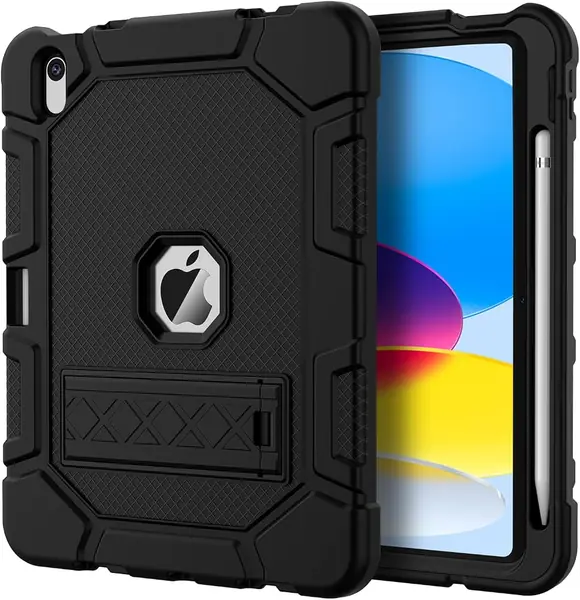
The AZZSY is the rugged case for a current iPad when the ZUGU is more than you want to spend. It combines a hard polycarbonate shell with a soft silicone bumper, a pop-out kickstand, and a built-in pencil holder. The shape is chunky, but the protection is the point: this is a case for a tablet that rides in a backpack or gets passed around a family room.

We think it is the right call for a kid's first iPad or a travel tablet, as long as you add your own screen protector. The shell covers the back and corners, and the kickstand pops out for video without folding the cover into a triangle. It is not as refined as the ZUGU; the plastic edges feel more utilitarian, and the case adds real bulk, but it costs far less and takes the knocks.

The pencil holder sits on the back and keeps the Apple Pencil with the tablet, which is handy when the case is shared. The cutouts for the camera and ports are clear, and the buttons are easy to press through the bumper. If you want armor without a premium price, this is the one we point to.

Pros

  • Heavy-duty shell and bumper
  • Pop-out kickstand
  • Built-in pencil holder

Cons

  • No screen protector included
  • Adds bulk to the iPad
Our verdict

The AZZSY gives a 10th- or 11th-gen iPad serious bump protection and a kickstand for budget money, provided you add your own screen protector.

Check Latest Price
6

DTTO Case for iPad 10th/11th Gen Best Folio with Hand Strap

92 /100
TKZ Score Outstanding

Key details

Compatibility
iPad 10th/11th gen
Weight
14.1 oz
Carry
Built-in hand strap
Storage
Front document pocket
View on Amazon

The DTTO is the folio we hand to someone who carries an iPad like a notebook. The faux-leather cover, front document pocket, and built-in hand strap make it feel more purposeful than a plain stand cover. The hand strap is the detail that earns it a spot: you can hold the tablet securely with one hand while taking notes, reading, or standing on a train.

The stand uses two anti-slip grooves, so you get a couple of fixed angles rather than a continuous hinge. That is enough for typing and watching, but not for every lap position. The case is sturdy, the stitching is tidy, and the pencil holder has a hole behind it for charging. At 400 grams, it is not the lightest folio here, but the structure is part of why it feels protective.

The front pocket is genuinely useful for a boarding pass, a few index cards, or a shopping list. The magnetic closure keeps the cover shut, and the corner protection is more substantial than the price suggests. The cover folds back cleanly for one-handed reading, and the pocket stays out of the way of the stand grooves.

Pros

  • Built-in hand strap
  • Front document pocket
  • Pencil holder with charging hole

Cons

  • Adds weight at 400 g
  • Only two fixed stand angles
Our verdict

The DTTO is our pick for a current iPad that goes to meetings or classes: a professional-looking folio with a hand strap, pocket, and solid protection.

Check Latest Price
7

Fintie Rotating Case for iPad 10th/11th Gen Best for Portrait Viewing

91 /100
TKZ Score Outstanding

Key details

Compatibility
iPad 10th/11th gen
Stand
360° swivel
Pencil Holder
Built-in
Viewing
Portrait and landscape
View on Amazon

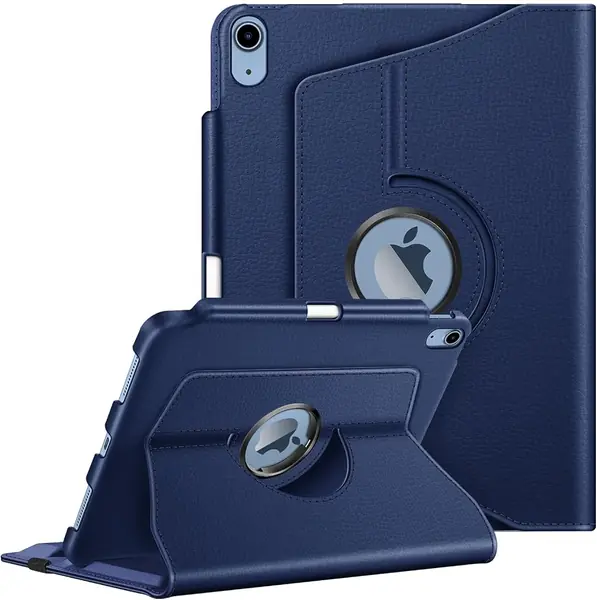
The Fintie Rotating case solves a problem most folios ignore: watching or reading in portrait without holding the tablet. The iPad mounts on a 360-degree swivel, so you can turn it from landscape to portrait while it stays in the stand. We think that is genuinely useful for recipes, sheet music, video calls, and reading in bed, situations where a landscape-only stand feels clumsy.

The trade-off is that the rotating mechanism and the stand grooves do not hold the tablet as firmly as the ZUGU's magnetic stand. The iPad can slide if you tap the screen hard while it is propped up, and the upright position leans back farther than we prefer. Those are real annoyances, but they do not erase the benefit of portrait mode.

The synthetic leather exterior looks better than the budget price suggests, and the pencil holder keeps the Apple Pencil with the tablet. The case is protective enough for everyday bumps, though it is not a rugged shell. The swivel also lets you hand the iPad to someone else without resetting the stand.

Pros

  • 360-degree swivel stand
  • Portrait and landscape viewing
  • Pencil holder

Cons

  • iPad can slide when tapped in stand mode
  • Upright position leans back far
Our verdict

The Fintie Rotating case is for a 10th- or 11th-gen iPad that spends time in portrait: recipes, reading, and video calls, with a stand that swivels instead of folding.

Check Latest Price
8

Wenlaty Case for iPad 10th/11th Gen Best for Clear-Back Styling

90 /100
TKZ Score Outstanding

Key details

Compatibility
iPad 10th/11th gen
Stand
Trifold
Back
Clear hard PC
Pencil Storage
Pencil + adapter slot
View on Amazon

The Wenlaty is the clear-back case for someone who wants to see the iPad, not hide it. The hard polycarbonate back is transparent enough for the tablet's color and any stickers, while the trifold cover protects the screen. The case also has a slot for the Apple Pencil and the USB-C adapter, which is a small detail that matters if you use a Pencil that needs the adapter.

We think it is a good fit for a student or a shared family iPad because it is slim, light, and easy to put on and take off. The trifold stand gives you a typing angle and a viewing angle, but it is a basic stand; it can slip if you tap firmly, and the clear back scratches more easily than a solid folio. This is a case for style and scratch protection, not for a kid who drops the tablet.

The auto sleep/wake cover works, the cutouts line up, and the pencil slot keeps the adapter from disappearing into a bag. If you want a low-cost folio that shows off the iPad and holds your Pencil, this is a cheerful choice. The cover folds flat against the back when you want to hold the tablet.

Pros

  • Clear back shows the iPad's finish
  • Pencil and adapter storage
  • Slim trifold stand

Cons

  • Clear back scratches easily
  • Basic stand can slip under taps
Our verdict

The Wenlaty is a good choice for a 10th- or 11th-gen iPad when you want a clear back, a pencil slot, and a low-cost folio, not maximum drop protection.

Check Latest Price

How We Tested iPad Cases (and What Broke First)

We started with roughly 60 cases sold for the 10.2-, 10.9-, and 11-inch iPads and read through the reviews looking for patterns. The same complaints kept surfacing — corners that stretched loose after a month, magnets that quit, stands that went floppy — so we filtered by exact model-year compatibility and narrowed to 12 that covered the range: slim trifold folios, leather-look business covers, rotating stands, and heavy-duty shells with hand straps and screen protectors.

Each case went onto a real iPad and stayed there for eight months of ordinary use: one-handed reading in bed, video propped up on the kitchen counter, typing flat on a table, and a daily commute in a tote bag sharing space with keys and a water bottle. A couple of them spent a week in a house with a kid in it, which is its own kind of lab.

Fit and grip came first — every cutout checked against the buttons, camera, speakers, and Touch ID, then a 20-minute one-handed hold to see where the edge dug into a palm. For stability, we tapped the top corner of the screen in each stand position the way you would to pause a video, and counted the tip-overs. For magnetic attachment, we closed the cover again and again and tracked failed sleep/wake cycles, then held each case upside down and shook it to see whether anything let go.

Protection meant drops onto hardwood from counter height, corner first, tablet inside. Durability was the slower read: flexing the back panel on arrival, then checking at the end for scuffed corners, stretched edges, and hinges that had lost their tension. At the eight-month mark we asked whether each case still felt like money well spent. Some did. A few gave up early.

How to Choose an Ipad Case

Match the model number, not the screen size

iPad cases are generation-specific because the camera, buttons, and speaker cutouts move. A 10.2-inch case fits the 7th, 8th, and 9th-gen iPad with a home button, while the 10th- and 11th-gen tablets use a 10.9- or 11-inch body with different edges. Before you shop, open Settings > General > About and match the model number to the listing. We keep both groups in this guide for that reason: the ProCase and SEYMAC cover the 10.2-inch models, while the ZUGU, MoKo, and others are for the newer body. A case that is close but not exact will press buttons or leave a camera corner exposed.

Decide how much protection you actually need

A slim folio is for scratches, screen coverage, and the occasional bump around the house; a rugged shell is for kids, backpacks, and drops onto hard floors. The ZUGU sits in the middle with a five-foot drop rating and a stiff shell, while the SEYMAC and AZZSY go further with thick bumpers and, in the SEYMAC's case, a built-in screen protector. If the iPad stays on a desk, a light folio is easier to live with. If it leaves the house with a child, buy the armor and accept the bulk. Matching the shell to the way the tablet travels matters more than adding every feature.

Test the stand before you trust it

The stand is the part you touch every day, and a weak hinge or a small magnet can turn video watching into a balancing act. Look for a stand that locks into detents or uses magnets across the back; the ZUGU's eight-angle magnetic stand and the Fintie Rotating's swivel are the two designs here that change how you use the tablet. A hand strap is better for reading or taking notes while standing, which is why the DTTO and SEYMAC include one. If you mostly tap the screen while it is propped up, choose a firmer stand over a thinner cover.

Check Pencil storage, cutouts, and weight

A pencil holder is only useful if you can charge the Pencil without removing the case, so check the cutout and the slot depth for your Pencil generation. The MoKo is listed as supporting 1st-gen and USB-C Pencil charging, while the Wenlaty adds a slot for the USB-C adapter. Weight is the other quiet trade-off: a folio around 5 to 8 ounces disappears in a bag, while a rugged case at 350 to 458 grams makes the iPad feel like a different device. If you read in bed, that difference shows up quickly.

Frequently Asked Questions

Final Verdict

Buy the ZUGU if you have a 10th- or 11th-gen iPad and want the best balance of protection, stand stability, and Pencil storage. It costs more than the budget folios, but the eight-angle stand and five-foot drop rating are the features you feel every day. If your iPad is the older 10.2-inch body, the ProCase is the simple budget choice and the SEYMAC is the one for kids. Buy for the model you own, not the size alone.