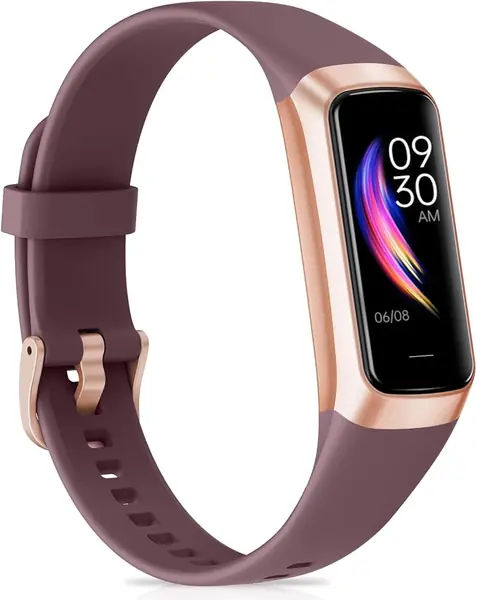
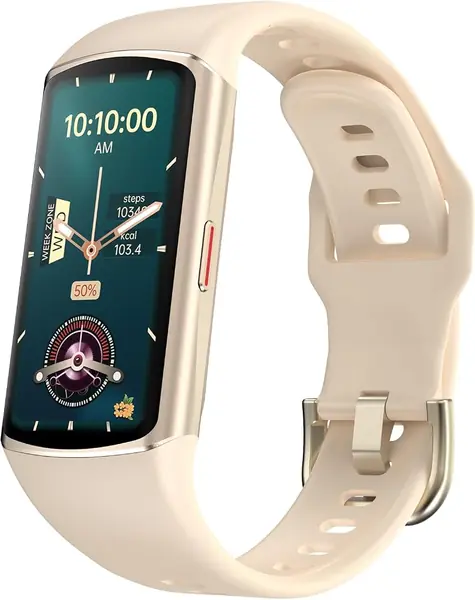
Best Fitness Trackers for iPhone of 2026

A fitness tracker is only worth what you actually wear. Every band and watch in this category counts steps, reads heart rate, and guesses at your sleep, so the real difference comes down to whether the numbers hold up and whether you'll still have it on at week three. I've taken trackers off at midnight because the strap was scratchy, and I've left others on a nightstand because they died by Thursday.

We've spent four months wearing 12 of them, from a screenless band to a full smartwatch with cellular, pairing each one to an iPhone and living with it. The screen turned out to drive almost everything: a bright always-on display is great mid-workout and eats days of battery, while a bare-bones band with nothing but a light can quietly log a full week of sleep on one charge.

Comfort, looks, and value are the things shoppers ask about and reviews rarely rank, so we paid attention. Did the strap survive a night on a sweaty wrist, did it look fine at a desk job as well as in the gym, did the extras earn their keep after the novelty wore off. The picks below are the ones that held up.

The Best Fitness Trackers for iPhone

1

Google Fitbit Air Best Overall
91 /100
TKZ Score Outstanding

Key details

Display
No display
Battery Life
5 days
iPhone Compatibility
iOS 16.4 or later
Weight
0.18 oz
View on Amazon

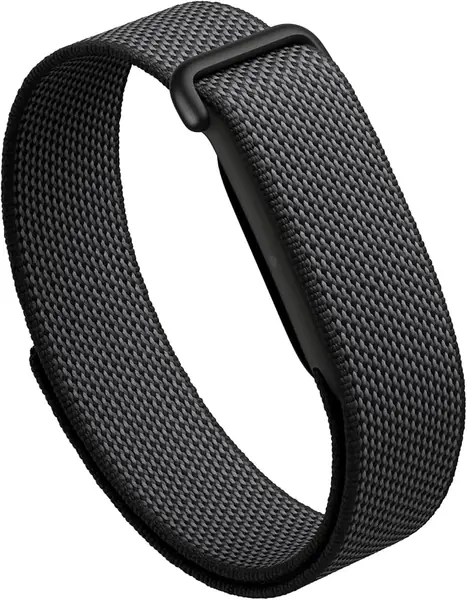
The Fitbit Air makes its case before you open the app: at 5.07 grams and with no screen, it is the rare activity tracker we forget we are wearing. That matters most at night, when a bulky watch becomes a reason to take it off. We like the screenless design for sleep and all-day wear, and we think it is the right default for anyone who wants the data without another glowing display on their wrist.

The tracking set is broad for such a small device: heart rate, sleep stages, blood oxygen, skin-temperature variation, steps, and workouts, all routed through the Google Health app. The sleep breakdown is the most detailed part, and the app's coaching turns the numbers into simple prompts rather than a wall of charts. We treat the sleep stages as a trend rather than a verdict; the value is in the pattern across a week, not one night's score.

Battery life is listed at five days, and a five-minute charge buys a day, which is the kind of flexibility that keeps a tracker on your wrist instead of in a drawer. The lack of a screen is the trade-off: to check a heart rate or a step count, you open the app. We did not mind that during the day, but it is the reason this one is not for someone who wants pace and heart-rate zones at a glance.

The Fitbit Air is also the pick here that feels least like a gadget and most like a band, which is why it earns the top spot over the Apple Watch for most people. Google Health Premium adds deeper coaching after the trial, but the core tracking works without it. The five-minute charge is the detail we keep coming back to: it turns a missed overnight charge into a short delay rather than a lost day of data.

Pros

  • Five-gram build disappears on the wrist
  • Five-day battery with a one-day quick charge
  • Detailed sleep and heart-rate tracking in the app

Cons

  • Full coaching requires Premium after the trial
Our verdict

We recommend the Fitbit Air to anyone who wants a tracker to vanish on the wrist; its five-gram, screenless build and five-day battery make all-day and sleep tracking effortless.
Check Latest Price
2

Apple Watch Series 8 Best iPhone Integration

90 /100
TKZ Score Outstanding

Key details

Display
Always-On Retina
Case Size
45 mm
Connectivity
GPS + Cellular
Health Sensors
ECG and blood oxygen
View on Amazon

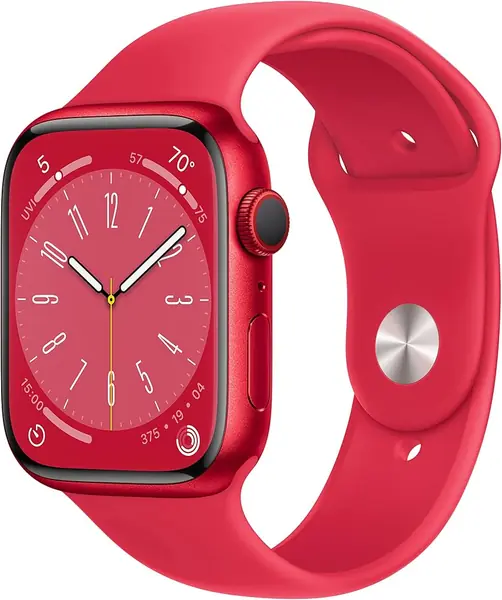
The Apple Watch Series 8 is the one here that is a smartwatch first and a fitness tracker second. The 45 mm case, always-on Retina display, and cellular option put calls, texts, apps, and Apple Health on your wrist. For an iPhone owner, that is less of a compromise than it sounds: the watch uses the phone and apps you already have, and the fitness data lands in the same Health app.

Where it pulls ahead is integration. Your workouts, heart rate, sleep, ECG, and blood oxygen readings sit beside the rest of your Apple Health data, and the watch can place a call or stream music without your phone. We noticed the always-on display most during workouts: a glance is enough, with no wrist raise or button press. The safety features, including fall and crash detection, are the kind of extras that are easy to ignore until they matter.

The trade-off is that you are buying a smartwatch, not a simple band. A 45 mm case is a lot of watch for a small wrist, and the feature set goes well beyond steps and sleep. If you want apps and cellular, that is the point; if you want a multi-day band that disappears, the Fitbit Air is the better fit. Try the 45 mm case on before you commit; size is the first thing that decides whether you keep wearing it.

Pros

  • Native Apple Health integration
  • ECG and blood-oxygen sensors
  • Cellular keeps calls and texts phone-free

Cons

  • Cellular model needs a carrier plan
Our verdict

We pick the Apple Watch Series 8 when you want your iPhone's health data, apps, and cellular connection in one place, and you are ready for a smartwatch rather than a simple band.

Check Latest Price
3

RLQA Band 2 Best Budget

89 /100
TKZ Score Excellent

Key details

Display
1.47-inch touchscreen
Battery Life
Up to 7 days
iPhone Compatibility
iOS and Android
Water Resistance
IP68
View on Amazon

A week of battery is the first thing we look for in a budget tracker, because a cheap device that lives on a charger is no bargain. The RLQA Band 2 lists up to seven days, and its 1.47-inch touchscreen gives you room to read a step count or a heart-rate number. We like that combination: it covers the basics without asking you to charge every night or squint at a postage stamp.

The health suite is broader than the price suggests: heart rate, blood oxygen, sleep, and workouts, with IP68 protection for sweat and showers. The blood-pressure readout is the one we treat as entertainment; wrist blood pressure is not a medical measurement, and you should not use it to make health decisions. Steps, sleep, and heart rate are the numbers that matter here, and they sync to the companion app on an iPhone or Android phone.

The RLQA is for the buyer who wants a first tracker, a spare, or a gift without paying for coaching or a big brand. It covers the everyday basics and leaves the advanced training tools to the pricier picks. We rank it as the budget choice because it spends on the display and battery rather than on features you may never open.

Pros

  • Up to seven days of battery
  • 1.47-inch color touchscreen
  • IP68 water resistance

Cons

  • No built-in GPS
Our verdict

We like the RLQA Band 2 as the budget choice: it covers heart rate, sleep, and workouts with a week of battery, and asks for far less than the leaders.

Check Latest Price
4

Moremore C60 Best Compact

88 /100
TKZ Score Excellent

Key details

Display
1.1-inch AMOLED
Battery Life
Up to 7 days
iPhone Compatibility
iOS and Android
Sports Modes
25
View on Amazon

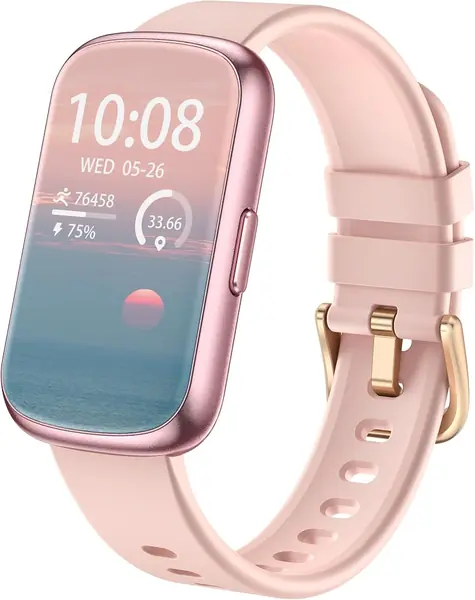
The Moremore C60 is built around a 1.1-inch AMOLED screen, and that small panel is the point. It keeps the case narrow and the whole thing closer to a band than a watch, which suits a small wrist or a second tracker you wear only for sleep. We like that it does not pretend to be a smartwatch; it shows the time, a step count, and a notification, then gets out of the way.

The tracking set is simple but complete enough for everyday use: 25 sports modes, heart rate, blood oxygen, sleep, and a week of battery on a magnetic charger. We think 25 modes is a sensible number; it covers walking, running, cycling, and gym work without turning the app into a menu project. The blood-pressure readout is not a medical measurement, so treat it as a novelty and rely on a cuff if a number matters.

This is not the tracker for someone who wants pace, maps, or a screen full of workout data. The compact size is the reason to choose it over the RLQA Band 2: you give up screen space for a lighter, narrower band that is easier to sleep in. For a simple step-and-sleep routine, that is a fair trade.

Pros

  • Compact 1.1-inch AMOLED screen
  • Up to seven days of battery
  • 25 workout modes cover the basics

Cons

  • Blood-pressure readout is not medical-grade
Our verdict

We recommend the Moremore C60 for small wrists and simple goals, where its tiny AMOLED screen and week of battery matter more than deep coaching.

Check Latest Price
5

Bestinn H32 Pro Best for A Large Screen and a Long Workout Menu

79 /100
TKZ Score Very Good

Key details

Display
1.58 inches
Battery Life
Up to 7 days
iPhone Compatibility
iOS and Android
Exercise Modes
120+
View on Amazon

The Bestinn H32 Pro leads with a 1.58-inch display, the largest screen in this group. That size makes notifications, workout summaries, and watch faces easy to read, and it gives the tracker a more watch-like presence than the slim bands here. A big screen is the reason to consider it; the rest of the package is more ordinary.

Beyond the display, you get 120+ exercise modes, 24/7 heart rate, blood oxygen, sleep tracking, and up to seven days of battery. The exercise list is longer than most people need, and we see it as a menu to browse rather than a feature that changes daily use. The blood-pressure readout is not a medical measurement, so do not treat it like a cuff reading.

The H32 Pro is for the buyer who wants a big, readable screen and a long list of workout modes without moving up to an Apple Watch. It is a lot of case for a small wrist, and at the top of the budget range it competes with better-known trackers. We recommend it when the screen is the priority; the 1.58-inch display is the reason it exists, so check the case size before you fall for it.

Pros

  • Largest 1.58-inch display here
  • 120+ exercise modes
  • Up to seven days of battery

Cons

  • Call alerts only, no on-wrist calling
Our verdict

Our take: choose the Bestinn H32 Pro for its big 1.58-inch screen and long workout menu, provided the case size suits your wrist.

Check Latest Price

How We Tested the Best Fitness Trackers for iPhone

We started with a list of roughly 40 trackers sold to iPhone owners and cut it down by reading spec sheets and customer reviews: which ones actually write to Apple Health, which keep working with the phone left at home, and which promise more than a wrist sensor can deliver. Price played a part, but only as a question of what the extra money buys. The 12 that made the cut ran from a screenless band to a cellular smartwatch.

Each one got at least a week on the wrist, worn overnight every night. We charged to full and logged the battery percentage every morning to see how fast it slid, and noted every time a low-battery warning killed a workout or a night of sleep data. Comfort got judged at 3 a.m.: strap weight, itchy silicone, bands that snagged on sleeves or sheets.

For accuracy, we ran intervals and steady miles alongside a chest strap and watched for heart rate that lagged or spiked. Steps got checked against a hand count on a measured loop, blood oxygen and blood pressure readings against a pulse oximeter and a cuff, and reported sleep stages against the wake-ups we wrote down.

Connectivity got tested the annoying way: phone in another room, out of range on purpose, then checking whether the tracker reconnected without being told twice and whether a single run showed up twice in Apple Health. We wore them to desks and dinners as well as to the gym, and asked whether the features we'd paid more for were ones we still used in week two.

How to Choose a Fitness Tracker for Iphone

Check iPhone Compatibility First

The Fitbit Air lists iOS 16.4 or later; the budget bands here name iOS and Android, but their companion apps do the syncing rather than Apple Health. That matters if you want one dashboard. We check the supported iOS version, whether the app can write to Apple Health, and how often a firmware update changes the pairing routine. If your iPhone is older, confirm the app still supports it before ordering; a low price is no help if setup stalls.

Decide Whether You Want a Screen

A screenless band is the most comfortable choice for sleep and all-day wear; a display is better for glancing at pace or a heart-rate zone mid-workout. The Fitbit Air takes the screenless route, the Apple Watch goes the other way with an always-on display, and the budget bands sit in between with small AMOLED panels. We prefer screenless for bedtime and a display for training, so choose the setting you care about more. If you want one device for both, look for a bright screen that dims at night.

Match Battery Life to Your Charging Habits

Five to seven days is the useful target for a tracker you wear overnight. The Fitbit Air lists five days and a five-minute top-up worth a day; the RLQA and Moremore claim up to seven. A bigger battery often means a bulkier case, so do not chase the longest number without checking the size. We prefer a five-day tracker with a quick charge to a two-week tracker that is too big for sleep. Charge while you shower and keep a cable where you get dressed.

Know Which Sensors and Workouts You Need

Every pick here covers heart rate, sleep, and steps; some add blood oxygen, skin temperature, or ECG. Built-in GPS matters if you run without your phone, while phone-tethered GPS is fine for walks and rides. The Apple Watch has the broadest health suite, the Fitbit Air leans on detailed sleep and recovery, and the budget bands cover the basics. Ignore the sports-mode count after the first dozen: you will use a handful.

Check Fit, Water Resistance, and the Band

A tracker you wear overnight needs a low-profile case and a band that does not dig in. The Fitbit Air weighs 5.07 grams; the Apple Watch is a 45 mm smartwatch, which is a different commitment. IP68 and 50-meter ratings cover sweat and showers, but not every model is built for swimming, and water resistance weakens with age. Match the band to your wrist size, and plan to replace a worn strap rather than the whole device.

Frequently Asked Questions

Final Verdict

Most iPhone owners should start with the Fitbit Air. It is the one here that disappears on the wrist, tracks sleep without a screen glowing in the dark, and asks for a short charge rather than a nightly routine. The Apple Watch Series 8 is the alternative when you want apps, cellular, and ECG in the same device. If you want a screen without the Apple commitment, the RLQA Band 2 covers the basics for a budget.