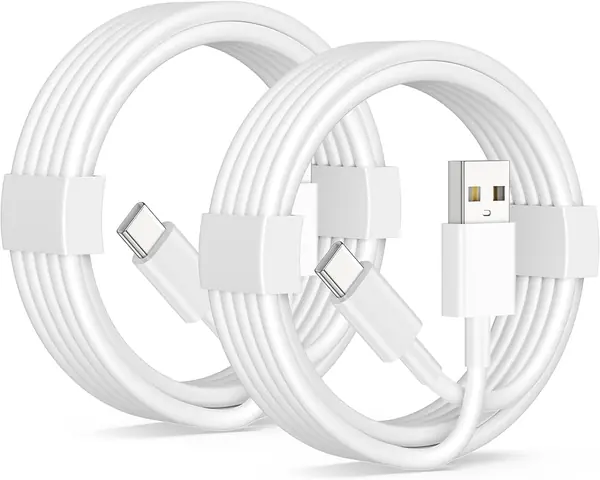
Best USB-C Cables for Android Auto and CarPlay of 2026

The first time CarPlay dropped out on me mid-route, I blamed the head unit. It was the cable — a freebie I'd pulled out of a kitchen drawer, and every expansion joint on the highway seemed to knock the connection loose. A cable is the one piece of the phone-to-dashboard handoff you actually control, and it's the piece most of us treat as an afterthought until a call cuts out on the ramp.

What nobody tells you before you buy: USB-C is a plug shape, not a promise. Plenty of cables will charge a phone all day and never carry the data CarPlay and Android Auto need, and two cords that look identical can move files at wildly different speeds. Length is a bigger deal in a car than anywhere else, too — too short and your phone dangles off the console, too long and you're dredging it out of the footwell. My team and I have spent the past four months living with 16 of these in our own cars, and the difference between a good one and a bad one showed up inside a single commute.

The picks below span both port setups, a range of lengths, and coiled designs for anyone tired of loose cord soup in the center console — all of them cables we'd happily leave plugged in.

The Best USB-C Cables for Android Auto and CarPlay

1

Anker Nano USB-A to USB-C (3 ft) Best Overall
94 /100
TKZ Score Outstanding

Key details

Length
3 ft
Connector
USB-A to USB-C
Max Charging
18W (5V/3A)
Data Rate
480 Mbps
View on Amazon

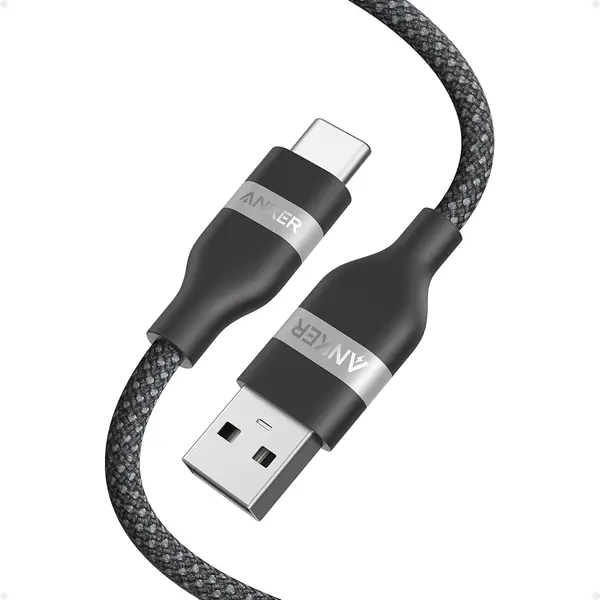
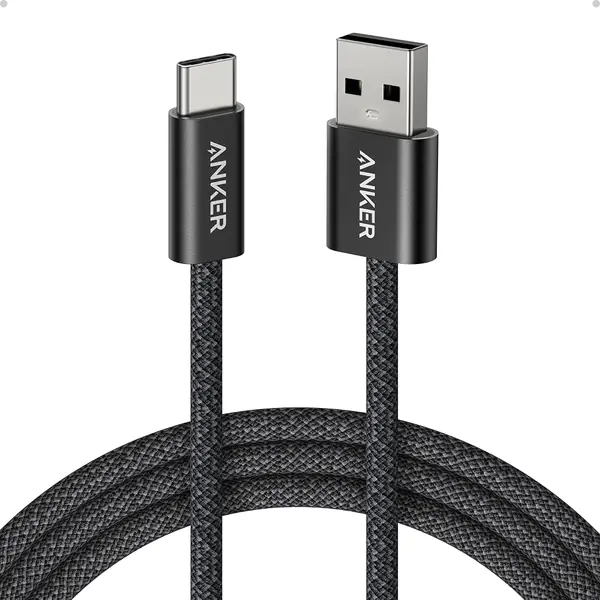
A failing CarPlay cable doesn't announce itself. The head unit wakes up, you pull out of the driveway, and halfway to work the map freezes and the audio drops back to the phone's own speaker. What separates the cable that does that from the cable that doesn't is usually whether the data pair inside stays connected, which is why the Anker Nano is the one we recommend first for most cars. Three feet, USB-A to USB-C, and a 480Mbps transfer rate — exactly the pace a car head unit expects.

Most of what we appreciate here is on the outside. The braided jacket stays soft instead of stiffening into the shape of the last coil, and at 28 grams the cable hangs from the port rather than levering against it. The connector shells are slim enough to sit flush, which matters in a console where a chunky plug holds the lid open. Charging runs to 18W at 5V/3A — enough to keep a phone alive on a commute and nowhere near a wall charger.

Three feet is generous in a compact car and short in a truck, so measure from the port to your mount instead of guessing, and step up to the 6-foot Zolo if the number comes out past about 30 inches. Anker covers this one for 24 months, which is the quieter half of the value: a cable that lives in a door pocket eventually dies, and this is one of the few here with a real warranty behind it.

Pros

  • Carries data reliably for CarPlay and Android Auto
  • Soft braid resists tangling and kinks
  • 18W charging keeps a phone topped up

Cons

  • Priciest single cable in this group
Our verdict

For most cars with the old rectangular USB-A port, the Anker Nano is the cable we recommend first: 3 feet of braided, data-stable cable that keeps CarPlay and Android Auto running.
Check Latest Price
2

LISEN Coiled USB-A to USB-C (2-Pack) Best for a Tidy Console

93 /100
TKZ Score Outstanding

Key details

Length
Coiled, 1 to 4 ft
Connector
USB-A to USB-C
Max Charging
15W (3.1A)
Data Rate
480 Mbps
View on Amazon

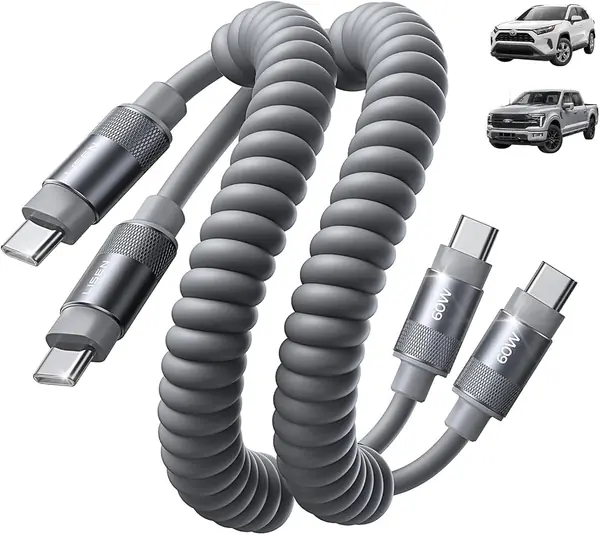
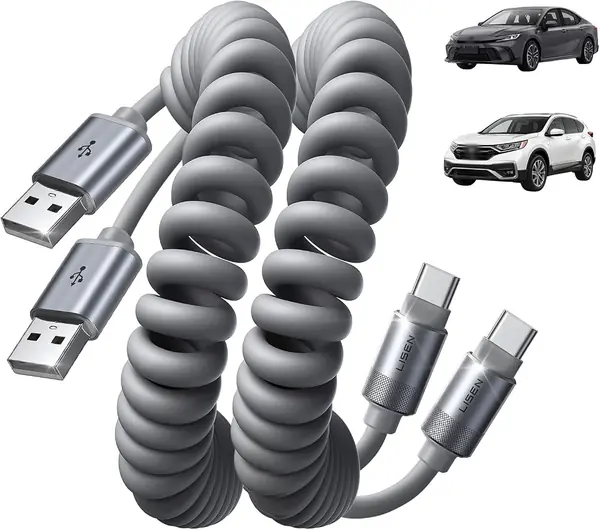
A long cable in a small car spends most of its life in a puddle on the passenger seat, and a coil is the fix almost nobody thinks to buy. These LISEN cables sit at about a foot compressed, stretch to four, and pull themselves back toward the console when you unplug the phone. We like them for exactly that: the cable is out of the way whether or not anything is attached to it.

The numbers are modest and honest — 480Mbps for data, 15W at 3.1A for charging — and the silicone jacket wipes clean when a coffee lid lets go. The molded unibody and UV-sealed joints are the parts that matter in a car, because a coil is under constant light tension and the plug is where that tension lands. Two cables come in the pack, which is the right number: one for the console, one for the glovebox or the second car.

Stretch it to the full four feet and the cable is working against itself, tugging at the plug, so keep the working run between two and three feet where the coil is relaxed. Charging stops at 15W, which means a twenty-minute drive adds little — the USB-C LISEN below manages 60W. Where the coil really earns its place is a center console with a lid: the cable sits inside the bin instead of spilling out of it.

Pros

  • Coil keeps the console clear between drives
  • Stretches from 1 to 4 feet as needed
  • Two cables per pack

Cons

  • Tops out at 15W charging
Our verdict

We reach for these when the console is a mess: the coil pulls back to a foot, stretches to four, and the two-pack costs about what one premium cable does.

Check Latest Price
3

Anker Zolo USB-A to USB-C (6 ft) Best for Long Reach

92 /100
TKZ Score Outstanding

Key details

Length
6 ft
Connector
USB-A to USB-C
Max Charging
18W
Data Rate
480 Mbps
View on Amazon

In a pickup, or in any car whose USB port is buried inside the center armrest bin, three feet doesn't get from the port to a windshield mount. Six feet does. The Zolo is the long version of the cable at the top of this list: the same 480Mbps data rate, the same slim plug, a 48-strand braid in place of the Nano's softer jacket, and 60 grams that still hang from the port instead of dragging on it.

The braid is the part we trust. It comes off the coil without memory, the strain relief at each end is molded rather than glued, and the plug seats with a click you can feel and hear. On the road it behaved the way a CarPlay cable should — the head unit picked the phone up straight away and held it over broken pavement.

Six feet is also six feet of extra cable in a compact coupe, where it loops over the shifter and finds the parking brake; if your port and mount sit a hand's width apart, the Nano is the better buy. Worth confirming at checkout, too: this family is sold in more than one length, and the six feet is the whole reason to pick this one.

Pros

  • Six feet reaches armrest ports and truck dashes
  • 48-strand braid resists wear and memory
  • Slim plug seats with a firm click

Cons

  • Charging tops out at 18W
Our verdict

Our pick for trucks and armrest-mounted ports: the 6-foot Zolo reaches where a 3-footer cannot, and it is the least expensive Anker in this group.

Check Latest Price
4

LISEN USB-C to USB-C Coiled (2-Pack) Best for USB-C Car Ports

91 /100
TKZ Score Outstanding

Key details

Length
Coiled, 1 to 3.5 ft
Connector
USB-C to USB-C
Max Charging
60W
Data Rate
480 Mbps
View on Amazon

The port in the car decides this one. Plenty of newer dashes now carry a USB-C data port, and this is the only pair in this guide built for it: 60W over USB-C Power Delivery, against 15 to 18W for everything else here. On a commute that is the difference between a phone that merely survives the drive and a phone that gains a real charge while it navigates.

What surprised us is the build. The coil sits at a foot and stretches to 3.5, the silicone jacket is thick enough to feel armored, and the metal hub at each connector is a step up from molded plastic. Triple reinforcement — UV adhesive, a molded unibody, and a strain-relief boot — reads like overkill until you have watched a cable die at the plug. Two come in the box.

Stretched to the 3.5-foot maximum the coil is working hard, so treat that as an occasional reach rather than a permanent run; the comfortable zone is two to three feet. And a C-to-C cable does nothing in a USB-A port, so check the port before you order — this is the one pick here that simply won't work in an older car.

Pros

  • 60W Power Delivery charging
  • Coiled silicone keeps the console clear
  • Reinforced connectors feel built to last

Cons

  • Only fits cars with a USB-C data port
Our verdict

If your car has a USB-C data port rather than the old rectangular one, this is the pair we recommend: 60W charging and a coil that keeps the console clear.

Check Latest Price
5

Haoano USB-A to USB-C 6 ft (2-Pack) Best Budget Two-Pack

90 /100
TKZ Score Outstanding

Key details

Length
6 ft
Connector
USB-A to USB-C
Max Charging
15W (5V/3A)
Pack
2 cables
View on Amazon

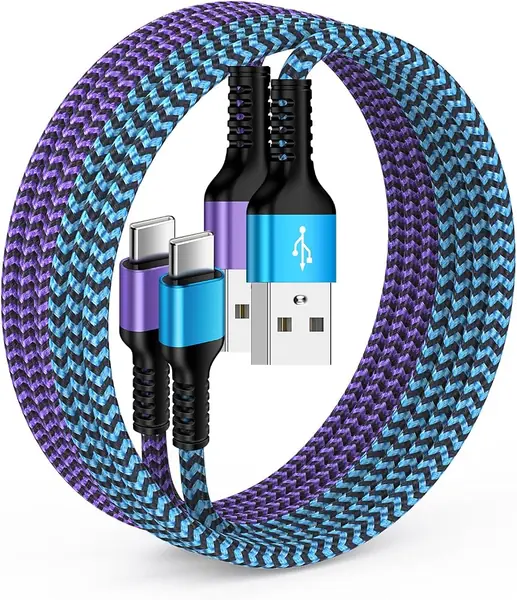
Two 6-foot braided cables, one blue and one purple, for less than most single cables here — that is the whole pitch, and for a household with two cars it is a good one. The colors aren't decoration either: when two people share a vehicle, a blue cable and a purple cable end the which-one-is-mine argument for good.

The important spec is the boring one. At 480Mbps these carry data at exactly the rate a head unit wants, and in our testing they connected first time and stayed connected. The 6-foot run reaches a rear-seat passenger from a front console without a fight, and the braid is dense and slightly stiff, which is what you want in a cable that gets coiled and stuffed into a door pocket.

Where it gives ground is charging. The ceiling is 5V/3A, so phones that can pull more will trickle rather than fill; if the car is your daily top-up, spend the difference on the USB-C LISEN. And six feet in a small coupe is a lot of loop over the shifter — this is a cable for trucks, minivans, and anything with a bench to reach.

Pros

  • Two cables cover two cars
  • Color coding keeps cables straight
  • 6-foot reach for rear-seat passengers

Cons

  • 15W ceiling charges larger phones slowly
Our verdict

Our budget two-pack: two 6-foot braided cables in different colors, so two drivers can stop swapping one cable between cars.

Check Latest Price
6

DteeDck USB-A to USB-C 10Gbps (3 ft) Best for Data and Driving

89 /100
TKZ Score Excellent

Key details

Length
3 ft
Connector
USB-A to USB-C
Max Charging
15W
Data Rate
10 Gbps
View on Amazon

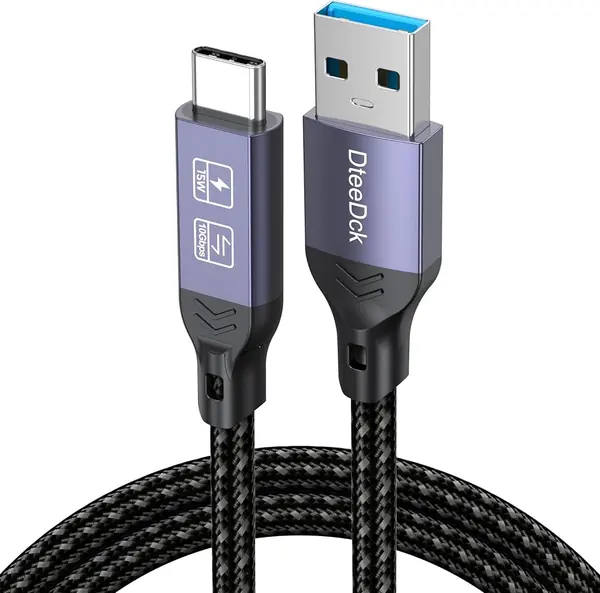
The headline is 10Gbps, which is roughly twenty times what a car head unit can use; a wired CarPlay connection moves kilobytes, not gigabytes. Buy it for the other job — pulling a large folder off a portable SSD, where a 480Mbps cable turns into a coffee break. It does both, at 3 feet, for less than most of the cables in this group.

In the car the length is right: 3 feet reaches a vent or windshield mount from a console port, and the braided jacket and molded ends follow the same formula as everything else here. Charging is 15W, which is a top-up rather than a fast charge.

The catch belongs to this whole class of cable. Cars with USB 2.0 ports can fail to recognize a USB 3.2 cable at all, and the symptom looks like a dead cable rather than a mismatch: the phone charges, or it doesn't, and nothing ever appears on the screen.

That is why this sits below the top picks. In a car a few years old, buy the 480Mbps Anker and keep this one in the laptop bag; if your USB-A port already handles a recent phone without complaint, the DteeDck gives you a car cable and a file-transfer cable for the price of one. We kept coming back to that flexibility.

Pros

  • 10Gbps transfers for drives and laptops
  • 3-foot braided build suits the car
  • Cheapest way to get USB 3.2 speed here

Cons

  • Older USB 2.0 head units may not recognize it
Our verdict

We recommend this one for the car and the laptop bag both — 10Gbps transfers are real — as long as your car's USB-A port isn't the older USB 2.0 type.

Check Latest Price
7

CableTurbo USB-A to USB-C (2 ft) Best for Short, Tight Installs

88 /100
TKZ Score Excellent

Key details

Length
2 ft
Connector
USB-A to USB-C
Max Charging
18W (3A)
Data Rate
10 Gbps
View on Amazon

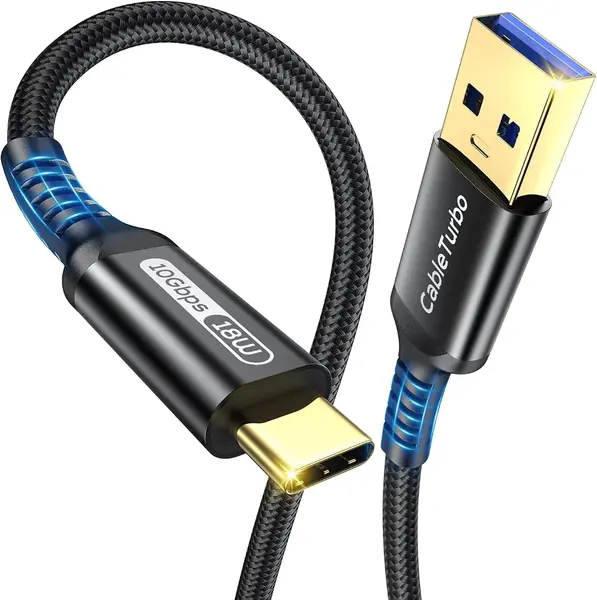
Two feet is shorter than most people picture when they read short cable. It is the distance from a console port to a phone clipped to a vent mount, and not much more — which makes the CableTurbo the tidiest run here if that is your layout, and the wrong cable if it isn't.

The rest of the sheet is unusually complete for the money: 10Gbps over USB 3.1 Gen 2, 3A charging through a 56kΩ resistor, gold-plated contacts, a nylon braid, and a three-year warranty that is the longest in this group. In the car it does what a data cable should — the run is short enough that nothing loops, and the plug stays seated because nothing is pulling at it.

We like it most for that geometry: with the mount beside the port, two feet removes the whole category of problems that comes from slack. The caveat is the same one that follows every 10Gbps cable here — USB 3.2 can go unrecognized on an older USB 2.0 head unit — so a car recent enough to have a modern USB-A data port is the safer pairing.

Pros

  • Two-foot run leaves no slack to snag
  • 10Gbps data transfer alongside charging
  • Three-year warranty, longest in this group

Cons

  • Two feet won't reach a windshield mount
Our verdict

Two feet is the whole point of the CableTurbo: it is the tidiest run in this group when the phone mount sits right beside the port, and we like it for exactly that layout.

Check Latest Price
8

LUOSIKE USB-A to USB-C (2-Pack) Cheapest Two-Car Setup

87 /100
TKZ Score Excellent

Key details

Length
3 ft
Connector
USB-A to USB-C
Max Charging
3A
Pack
2 cables
View on Amazon

Two 3-foot cables for the price of a sandwich is the reason this pack sells, and for plenty of people that is the end of the decision. We think you should know where the money went before you clip one into each car.

What you get is reasonable: 3 feet of cable, 480Mbps data, 3A charging, molded ends, and a two-pack that leaves a spare for the glovebox. In the driveway it charges and it launches CarPlay, and the length is exactly what a console-mounted phone wants.

The uneven part is consistency. This is the cable in the group where CarPlay is most likely to be a coin flip — some units hold the connection for a whole commute, others drop it when the phone shifts in the holder. That is the one job you are buying the cable for, so test yours on day one and use the return window if it won't hold.

Buy it as a pair of charge cables that may well run CarPlay, and don't plan a road trip around the one that doesn't. A few dollars more buys the Anker at the top of this list, and with it the certainty that the screen comes up when you turn the key.

Pros

  • Two cables for the price of one
  • 3-foot run suits console-mounted phones
  • 3A charging from a USB-A port

Cons

  • CarPlay connection unreliable on some units
Our verdict

Our cheapest way to put a cable in two cars, with the honest caveat that CarPlay reliability on these is the shakiest in this group.

Check Latest Price

How We Tested the Best USB-C Cables for CarPlay and Android Auto

We built the shortlist from the specs that decide whether a cable works in a car at all: whether the listing says it carries data or only power, which end is USB-A and which is USB-C, the stated data rate, the jacket material, and the length. We ordered 16 cables — straight and coiled, braided and silicone, A-to-C and C-to-C — and rotated them through real vehicles for four months.

Most of that time wasn't on a desk. I left one cable plugged into my commuter's head unit for a full week at a stretch, counting every time CarPlay or Android Auto dropped on rough pavement or a railroad crossing. Teammates did the same in a 2016 sedan with only USB-A ports, in an SUV whose console sits deep under an armrest, and on a 900-mile road trip where two phones navigated and charged at once. Back home, each cable ran from a wall brick with an inline power meter so we could see what a phone actually pulled in 30 minutes instead of trusting the wattage on the box.

On the bench we copied a folder of photos to a portable SSD to separate the cables that really move data from the ones that crawl. We flexed each connector to 90 degrees, wrapped and unwrapped the cord 50 times, and pulled it out of a port at an angle to see whether the shell loosened. Because most people keep phones in chunky cases, we seated every connector into a cased phone and a bare one, noting which slim shells clicked in fully and which bottomed out. One practical point that only emerged from living with these: a cable that hits 10Gbps on a laptop can still be the one that drops CarPlay, and a two-pack's spare is worth little if the second cord is the wrong length for your console.

How to Choose a Usb-C Cable for Android Auto and Carplay

Start With Data, Not Watts

Every cable here carries data; most of the ones in a checkout aisle don't. Wired Android Auto and CarPlay need the two data pins inside the connector, and a charge-only cable will top up a phone happily while never putting a map on the screen. The listing has to say so, and a stated transfer rate of 480Mbps is the clearest sign — that is USB 2.0 speed, and it is already more than a head unit will ever use.

Which is why the 10Gbps cables in this guide are a specialist choice rather than an upgrade. USB 3.2 cables can go unrecognized on older USB 2.0 car ports, and the failure looks like a dead cable instead of a mismatch. In an older car, buy the plain 480Mbps cable and keep the fast one for the laptop.

Match the Cable to the Port, Not the Phone

The car's port decides the connector. Most vehicles on the road still have the rectangular USB-A port, so a USB-A to USB-C cable is the default order. Newer dashes have moved to USB-C data ports, and those need a C-to-C cable — an A-to-C plug won't fit, and the little adapters people use to bridge the gap are exactly the sort of thing that breaks a data connection.

Check the port before you order, not the picture of the phone. Shopping for two cars means checking both: the LISEN C-to-C pair is the only set here that suits a USB-C port, and the rest are all USB-A.

Length, Coiling, and Console Space

Three feet fits most cars, and it is measured end to end with the connectors included, so a 3-foot cable gives you slightly less than three feet of actual reach. Measure from the port to the mount: a windshield mount usually wants 3 feet, and an armrest bin in a full-size truck usually wants 6.

Coiled cables trade reach for tidiness. They sit at about a foot and stretch to three or four, but at full stretch they are under tension, and a cable that is always pulling at the plug is where drops begin. Keep the working run in the middle of the coil's range and let both ends relax.

Charging Speed and Build: Where the Money Goes

A car is not a charging station. Head-unit ports deliver a fraction of what a wall charger does, so a 15W cable and an 18W cable look identical on a commute — the port is the ceiling. The exception is a USB-C port with Power Delivery, where a 60W cable such as the LISEN pair genuinely changes what you get.

Spend the difference on the ends instead. Molded strain relief, a slim connector that seats flush, and a jacket that doesn't stiffen in the cold are what keep a connection alive past the first winter. That is most of what separates the top pick from the cheapest pack here.

Frequently Asked Questions

Final Verdict

For most cars — the ones with a rectangular USB-A port in the console — the Anker Nano is the cable to buy. Three feet, a braid that survives a door pocket, and a 480Mbps data rate that is exactly right for a head unit: that combination is why it sits at the top of this list.

Change one requirement and the answer changes. A USB-C port in the dash makes the LISEN C-to-C pair the only thing here that fits, and it charges at 60W while it is at it. A truck or an armrest-mounted port makes the 6-foot Anker Zolo the one to order, and a console already full of slack makes the coiled LISEN pair worth the small premium.