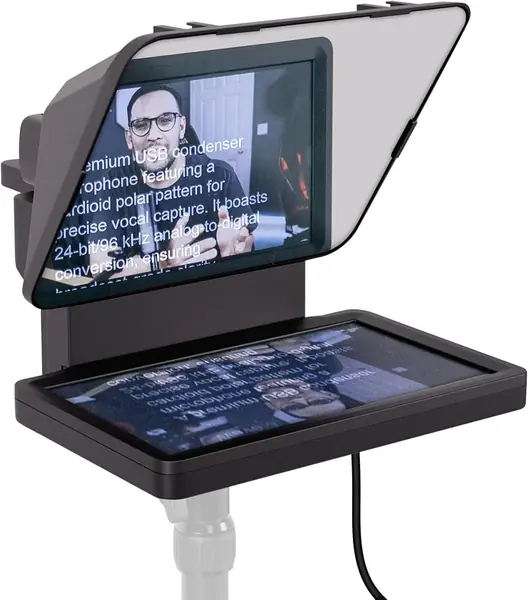
Elgato Prompter Best Overall
Key details
- Weight
- 1.52 lb
- Script Source
- Any Mac or PC window
- Camera Support
- DSLR, webcam, or phone
- Built-in Screen
- 9-inch FHD
The screen is the whole idea. Instead of clamping a tablet or a phone behind the glass, the Elgato Prompter carries its own 9-inch FHD display and takes its picture from your Mac or PC, showing any window you can drag onto it: a document, a browser-based prompter, or a chat feed. We think that is the cleanest arrangement for anyone who records at a desk. Your iPad stays free for notes, nothing has to be re-clamped between takes, and your eyes sit on the lens rather than on a monitor pushed off to the side.
Camera support is unusually broad. A DSLR, a mirrorless body, a webcam, or a phone all mount behind the glass, and the frame clears wide lenses that would vignette inside a narrower hood. At 1.52 pounds it moves between a desk and a studio shelf without a fight, and anyone with a Stream Deck gets hardware control on top. We ended up using it for video calls as often as for scripts, because reading a client's questions off the glass while looking into the lens changes how the call lands.
One physical quirk is worth knowing about. In a bright room the display can bounce its own light into the lens and leave a pale wash across the frame; dark mode on the display, a little less overhead light, and a hood angled away from the window clear it up. It is a lighting problem rather than a hardware fault, and it shows worst in the white-walled, big-windowed rooms where any glass struggles.
Pros
- Built-in screen means no tablet gets sacrificed
- Mounts a DSLR, webcam, or phone
- Any window or app becomes the script
Cons
- Needs a Mac or PC to feed the screen
- Camera Hub app is the weak link
We point desk-based creators to the Prompter: the built-in screen frees your tablet and any camera you already own will mount behind the glass.