Best Tablet Stands of 2026

My tablet spent most of last winter propped against a coffee mug, and every video call began with me catching it as it slid flat. A stand is an unglamorous little purchase, but what it fixes is simple: it holds the screen at an angle your neck doesn't have to argue with, hands free, so you can stir a pot or take notes without holding anything up.

We've lived with 14 of them over the past five months, from folding docks that disappear into a tote to floor stands with bases heavy enough to anchor a music stand. The lesson kept repeating: the base decides everything. An arm can be beautiful and endlessly adjustable, but if the footprint is too small or the weight too light for a 13-inch tablet, it nods forward the moment you tap the screen.

The picks below live on desks, kitchen counters, nightstands, and music stands, and each one earned its place by staying put through the boring parts — a full workday, a long movie, a recipe with a lot of steps.

The Best Tablet Stands

1

Lamicall Adjustable Stand Best Overall
96 /100
TKZ Score Outstanding

Key details

Fits Devices
4 to 13 inches
Weight
8.81 oz
Material
Aluminum alloy and steel
Adjustment
Multi-angle, portrait or landscape
View on Amazon

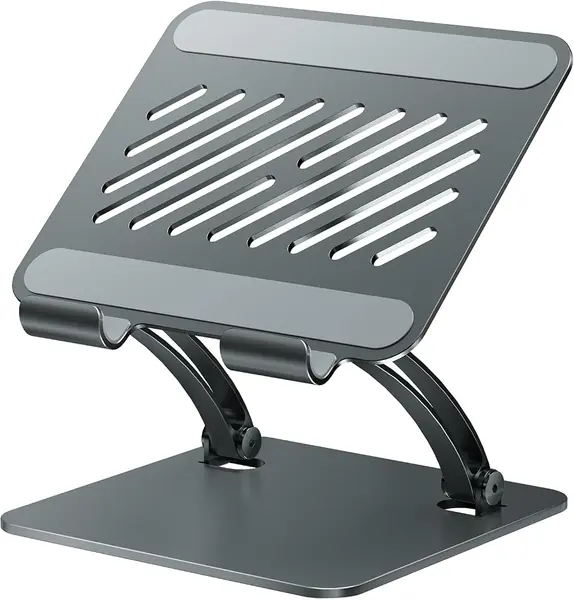
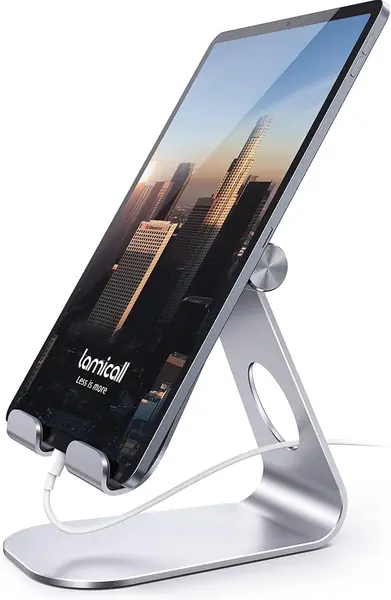
The first thing we noticed about the Lamicall is how little desk it takes up for how firmly it holds a tablet. The aluminum and steel frame has a low, wide stance, and the cradle grips an iPad or phone at an angle that stays put when you tap the screen. We kept it on a desk for everyday reading and video calls because it does the unglamorous part well: the tablet goes where we set it and stays there. It fits devices from 4 to 13 inches, so it covers everything from a phone to a 12.9-inch iPad Pro, and the 8.81-ounce body is easy to move from room to room.

What sold us on it as the default is the balance between grip and adjustment. The stand tilts smoothly through useful desk angles, and the rubber pads keep the device from sliding without making it hard to lift out. In portrait and landscape it felt equally settled, which is more than we can say for lighter folding stands that want to tip when you press near the top edge. The 18 mm hook is generous enough for many everyday cases, but a very thick folio or rugged case can overfill it, so check that before you commit.

The simple hinge is part of why the stand feels so solid. If you need the screen higher, the COOPER TabHolder is the better tool; if it needs to travel, the UGREEN is the smaller choice. For the desk where a tablet lands every day, the Lamicall is still the one we reach for first.

Pros

  • Firm, low-wobble hold at desk angles
  • Fits phones through 13-inch tablets
  • Compact aluminum body moves easily

Cons

  • Tilt-only design lacks height adjustment
Our verdict

We recommend the Lamicall as the default desk stand: it holds a 4- to 13-inch tablet firmly at useful angles, stays put, and takes up little space.
Check Latest Price
2

LISEN Foldable Tablet Stand Best for Bulky Cases

95 /100
TKZ Score Outstanding

Key details

Base
Weighted metal
Storage
Folds flat
Hook Width
0.8 inch
Tilt Range
0 to 135 degrees
View on Amazon

A desk stand is only useful if it can accept the tablet you actually carry, case and all. The LISEN makes that its main argument: the hook is widened to 0.8 inch, which is enough to swallow many folio and rugged cases that crowd narrower cradles. We also appreciate the cutout around the charging port; the cable stays connected in portrait or landscape instead of forcing you to unplug to keep the tablet seated.

The hinge runs from nearly flat to 135 degrees, and the stand folds down to a slim package for a drawer or bag. What we like most is the included bridge screw: when the hinge starts to feel loose after months of daily repositioning, you can snug it back up instead of replacing the stand. That is a small thing that makes a budget stand feel more considered. The weighted base and silicone pads keep it from skating across a desk.

It is a desk stand, not a floor stand, and the compact size that makes it easy to stash is the same reason it is not the right match for a 13-inch tablet at a dramatic angle. For an iPad Air or a 10-inch Galaxy Tab, it hits the sweet spot. We also like that it handles a phone without looking like a phone dock. If your tablet lives in a thick case and you want the cable to stay plugged in, the LISEN is the practical pick.

Pros

  • Wide 0.8-inch hook clears bulky cases
  • Hinge can be re-tightened with included screw
  • Folds flat for drawers and bags

Cons

  • Can rock with a heavy tablet at steep angles
Our verdict

The LISEN is our pick for a tablet that stays in a bulky case: the wide hook accepts it, the cable stays reachable, and the hinge can be re-tightened.

Check Latest Price
3

UGREEN Portable Tablet Stand Best Portable Pick

94 /100
TKZ Score Outstanding

Key details

Fits Devices
4 to 11 inches
Weight
4.23 oz
Adjustment
15 to 100 degrees
Max Thickness
0.55 inch
View on Amazon

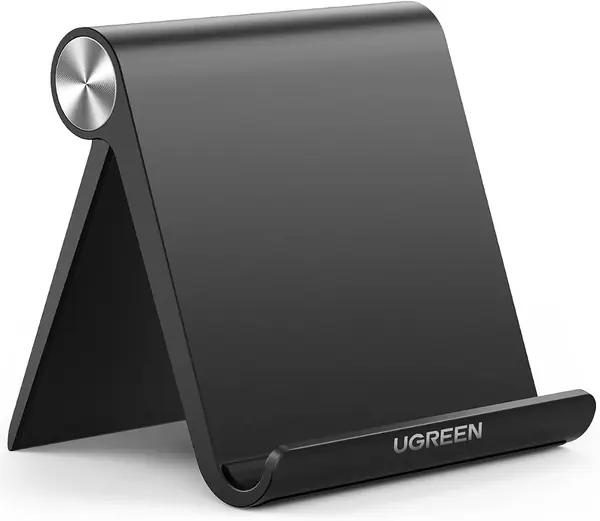
The UGREEN is the stand that lives in a bag rather than on a desk. It folds to roughly the size of a phone, weighs 120 grams, and opens into a small cradle that holds a 4- to 11-inch device at angles from 15 to 100 degrees. We found the folded shape easy to slide into a laptop sleeve, and the plastic body is light enough that we did not think twice about carrying it.

On a table, the silicone pads do their job and the stand holds a small tablet or phone at a stable angle for video calls and recipes. The multiple angle settings are genuinely useful: a low angle for typing, a steeper one for watching. We liked it best with an iPad mini, a Kindle, or a phone, where the compact cradle feels proportional.

This is not the stand for a 12.9-inch iPad Pro or a portable monitor; those need a wider, heavier base. As a travel stand, the trade is sensible: you give up footprint and heft and get something you can forget in a bag. We keep it in the laptop bag for exactly that reason.

Pros

  • Folds to a compact 4.7 by 4.2 inches
  • Angle range of 15 to 100 degrees
  • Weighs 120 grams for travel

Cons

  • Narrow cradle fits 11-inch tablets tightly
  • Plastic body can flex at steep angles
Our verdict

The UGREEN is the travel stand we recommend: it folds flat, weighs little, and gives a small tablet or phone a stable angle at a cafe table or kitchen counter.

Check Latest Price
4

BluuSuuk Floor Stand Best Floor Stand for Bed

93 /100
TKZ Score Outstanding

Key details

Device Weight Limit
1.5 lb
Base Weight
6.6 lb
Item Weight
8.4 lb
Compatibility
4.7 inches and up
View on Amazon

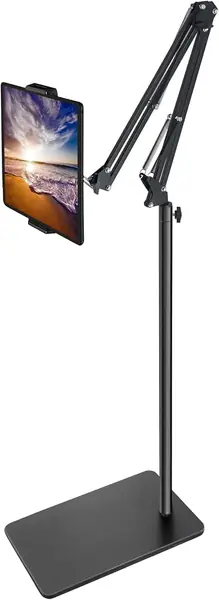
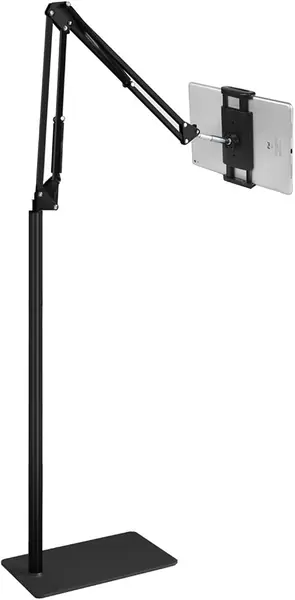
Floor stands live or die by their base, and the BluuSuuk makes its case with a 6.6-pound slab of metal. That weight is the difference between a tablet hovering over a bed and a stand that tips the moment you reach for the screen. We used it where a desk stand cannot go: beside a recliner and over the edge of a bed, with the arm reaching across so the tablet sits in front of us rather than in our hands. It holds devices up to 1.5 pounds, which covers most tablets and phones but not a heavy tablet in a rugged case.

The rest of the stand is built around that stability. The arm adjusts through a wide range and the holder can be angled for lying down or sitting up. Assembly is tool-free, and the base slides under furniture without needing a permanent spot. We liked that it does not demand a dedicated corner the way a tripod does; the flat base is easier to live around in a bedroom.

The trade-off is portability: it is not the stand to pack for a trip, and it is overkill at a desk. But if you read or watch in bed most nights, the BluuSuuk is the one we choose because it stays put when you shift position. The 6.6-pound base is doing exactly the job you bought it for.

Pros

  • Heavy 6.6-pound base resists tipping
  • Long adjustable arm reaches over a bed
  • Tool-free assembly and flat base

Cons

  • Heavy base is awkward to move between rooms
Our verdict

For reading or watching in bed, the BluuSuuk is our pick: its 6.6-pound base keeps the tablet steady where lighter floor stands tip.

Check Latest Price
5

COOPER TabHolder Best Height-Adjustable Desk Stand

92 /100
TKZ Score Outstanding

Key details

Height Range
7 to 10 inches
Tilt
270 degrees
Device Range
15.6 to 17 inch monitors
Weight Capacity
4.4 lb
View on Amazon

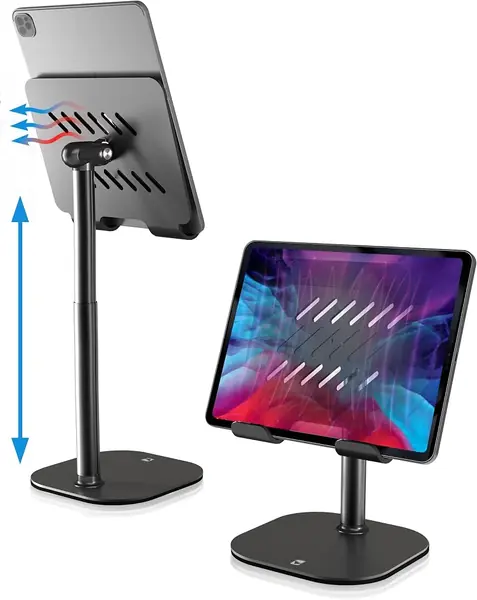
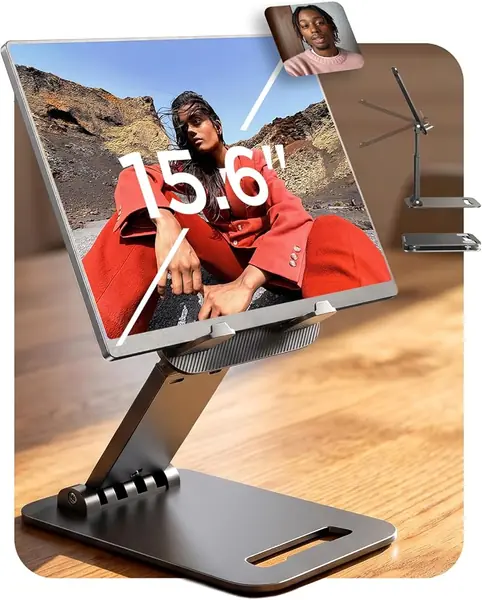
The COOPER TabHolder is for the desk where a tablet sits too low. Its aluminum rod telescopes from 7 to 10 inches, lifting the screen toward eye level, and the holding plate tilts through 270 degrees. That sounds like a small range until you use a tablet for a video call or a long recipe session: the difference between looking down and looking straight ahead is the difference between a stiff neck and a comfortable half hour.

The base is a weighted metal disc with EVA padding, and the stand assembles with a couple of screws. We found the cradle wide enough for a tablet in a case, and the lip deep enough to hold a portable monitor without feeling precarious. The cooling vents in the back plate are a nice detail, though we care more about the fact that the stand stays where we set it. The tilt joint has enough friction to hold a tablet at the angle you set.

What makes the COOPER worth its space is the combination of height and a small footprint. A floor stand can put a tablet at eye level too, but it takes up floor space and is awkward to move. The COOPER sits on a counter or desk and raises the screen without a long arm. We recommend it for a kitchen counter, a standing desk, or a video-call station where the tablet needs to be closer to eye level than a flat stand allows.

Pros

  • Telescopes 7 to 10 inches for eye-level viewing
  • 270-degree tilt and weighted base
  • Supports 15.6- to 17-inch portable monitors

Cons

  • Tilt can creep with a heavy portable monitor
Our verdict

The COOPER is our choice when a flat desk stand sits too low: its 7- to 10-inch telescoping rod brings a tablet or portable monitor up to eye level.

Check Latest Price
6

tounee Dual Rod Stand Best for Large Tablets

91 /100
TKZ Score Outstanding

Key details

Fits Devices
4.7 to 16.9 inches
Base
All-metal weighted base
Storage
Folds flat
Material
Aluminum
View on Amazon

The tounee stand is aimed at the tablet that makes other stands look undersized. Its cradle opens wide enough for devices from 4.7 to 16.9 inches, and the all-metal frame has a locking mechanism for height and angle instead of relying on friction alone. We used it with a large tablet and a portable monitor, and the wide base kept the whole thing from feeling like it was about to nose over.

The silicone pads hold the device without scratching it, and the stand folds flat for storage. The locking mechanism is the reason it holds a heavy tablet without sagging; we prefer that to a friction hinge that drifts under a large screen. We noticed the difference most when tapping near the top of a 13-inch screen; the stand stayed put instead of bouncing.

For a standard iPad, the tounee is more stand than you need. It earns its place when the device is large, when a case adds bulk, or when you want a portable monitor at a desk angle without a separate monitor arm. The folding design means it can still go into a bag, but the metal build gives it a planted feel that the travel-first stands here cannot match. That combination is why we recommend it for big screens.

Pros

  • Wide 4.7- to 16.9-inch compatibility
  • All-metal build with locking height and angle
  • Folds flat for storage

Cons

  • Stiff hinge needs two hands to adjust
Our verdict

The tounee is the stand we choose for a large tablet or portable monitor: its all-metal cradle grips up to 16.9 inches and stays planted at desk angles.

Check Latest Price
7

XXZU Tripod Stand Best for Standing and Music

90 /100
TKZ Score Outstanding

Key details

Height Range
33.07 to 72 inches
Device Weight Limit
11 lb
Folded Length
16.93 inches
Head Rotation
360 degrees
View on Amazon

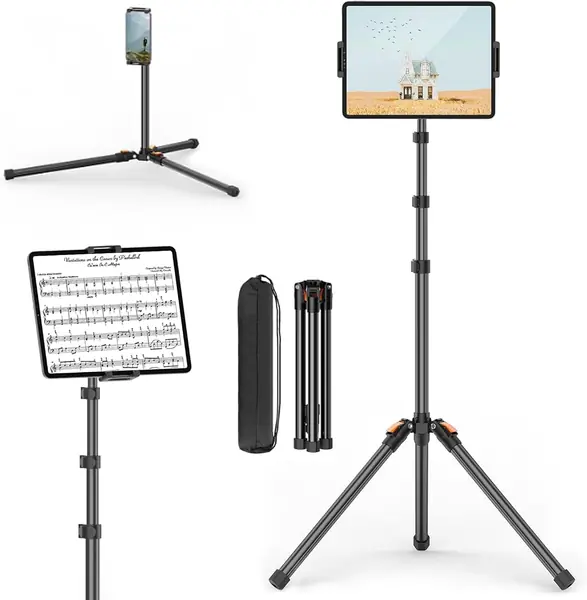
A tripod stand is the right shape when the tablet needs to go higher than a desk and the floor is the only place to put a base. The XXZU reaches from about 33 inches to 72 inches, so it can sit at seated height or stand tall enough for a music stand or a standing presentation. The legs lock at three angles, and the 360-degree ball head lets you turn the screen without moving the tripod.

We used it for a tablet at standing height, and the aluminum legs felt light but not flimsy. The whole stand folds to 16.93 inches and comes with a storage bag, so it is genuinely portable for something that stands on the floor. The ball head is the best part: it makes small angle changes easy, which matters when you are reading music or following a recipe and do not want to move the whole tripod.

The limitation is the tripod footprint. Three legs need more floor space than a flat base, and on thick carpet they can settle unevenly, so the stand is happiest on a hard, level floor. That is a real constraint in a small bedroom, but it is also what lets the stand fold down and travel.

For standing presentations, music practice, or a tablet that needs to be at eye level without a desk, the XXZU is the tripod we reach for. It is not as planted as the BluuSuuk floor stand, and it is not as compact as a folding desk stand. But it solves a different problem: height with portability. That is enough to earn a place here.

Pros

  • Reaches 72 inches for standing use
  • 360-degree ball head for quick angle changes
  • Folds to 16.93 inches with a storage bag

Cons

  • Tripod legs need firm, level floor space
  • Less planted at full height than a flat-base stand
Our verdict

The XXZU is our pick for standing or music use: it reaches 72 inches, packs into a bag, and lets you aim a tablet with a 360-degree ball head.

Check Latest Price
8

Elekpopu Floor Stand Best for Budget Floor Viewing

89 /100
TKZ Score Excellent

Key details

Height Range
27.5 to 55 inches
Device Weight Limit
1.5 lb
Base Weight
5 lb
Rotation
360 degrees
View on Amazon

The Elekpopu is a floor stand at the budget end of this group, and it gets the basics right: a 5-pound metal base, a height range from 27.5 to 55 inches, and a 360-degree holder that accepts phones and tablets from 4.7 to 11 inches. We put it together without tools and found the arm easy to swing into position for seated reading.

The stand is at its best when the tablet is light and the arm is kept close to the base. A Kindle or a phone feels secure, and the height adjustment covers a sofa or a bed without a problem. The cradle grips the device firmly, and the base slides under a chair or bed so it does not take up a permanent patch of floor. For the money, it is a lot of stand.

The trade-off is in the base. Five pounds is enough for a small tablet, but the stand is happiest with the arm close to the base. We added a small weight when using a heavier tablet, and it behaved better. The BluuSuuk is the more stable choice if you need a large tablet over a bed. The Elekpopu is best treated as a light-device stand.

The Elekpopu is the floor stand we suggest when the tablet is a Kindle, a phone, or a 10-inch iPad and the budget is tight. It does not have the planted feel of the BluuSuuk, but it is simple, adjustable, and easy to live with for bedtime reading. That is a fair set of compromises for the money.

Pros

  • 5-pound metal base for a budget stand
  • Adjusts 27.5 to 55 inches and rotates 360 degrees
  • Tool-free assembly

Cons

  • Cradle tops out at 11 inches
  • Max height is 55 inches
Our verdict

The Elekpopu is our budget floor-stand pick for a light tablet or e-reader: it adjusts from 27.5 to 55 inches and assembles without tools.

Check Latest Price

How We Tested 14 Tablet Stands

We started by pulling every stand that listed compatibility with tablets roughly 8 to 13 inches across — and, in a few cases, portable monitors up to 17 inches — then sorted them by how the base was built: weighted aluminum or steel, folding hinge, tripod, floor arm. Anything with a footprint too small for the devices it claimed to hold was cut, which left 14 stands across desk, floor, and travel formats.

Each stand spent at least a week on my desk during the workday, where I took video calls, typed on the on-screen keyboard, and tapped through documents with a tablet docked. To test sturdiness I pressed the top edge of the screen while it sat in the cradle and watched how much the arm flexed; to test stability I nudged the desk and bumped the stand the way a sleeve or a passing elbow would. Floor stands moved between the nightstand and the living room, and the tripod came to two rehearsals loaded with sheet music and a 12.9-inch tablet.

Adjustability got timed, not just rated: I counted the usable positions, then noted which ones I could change with one hand while the tablet stayed in place and which ones needed both. Every stand was weighed on a kitchen scale and measured across the base, since one that eats half a small desk is one you stop using. Quality and appearance came down to the slow stuff — whether hinges still held their angle after a month, whether joints developed a wobble, whether the finish showed fingerprints on a video call. The ones still on my desk at the end never made me think about them.

How to Choose a Tablet Stand

Decide Where the Stand Will Live

Start with the surface. A desk stand needs a stable footprint and enough clearance for a case; a floor stand needs a base that can slide under a chair or bed and enough reach to put the screen where you want it. If the tablet moves between kitchen, sofa, and bed, a folding desk stand or a tripod is easier to carry, while a weighted floor stand stays put in one room. We treat a floor stand as furniture: measure the base and the arm's reach before you give it a permanent spot.

Match the Cradle to Your Tablet and Case

A stand that fits a bare iPad may not fit the same tablet in a folio or rugged case. Check two numbers: the stated screen-size range and the hook or cradle width. A wide hook, like the one on the LISEN, accepts bulkier cases; a compact travel stand may hold an 11-inch tablet only at a modest angle. For a 12.9-inch iPad Pro or a portable monitor, look for a stand rated to that size and weight, such as the tounee or the COOPER, rather than stretching a phone-sized stand.

Put Stability Ahead of Adjustment

More joints and a longer arm can mean more ways to wobble. A heavy base helps, but so does a short arm and a hinge that holds its position. We look for a stand with a broad footprint, rubber or silicone pads, and a way to re-tighten the joint if it loosens. If the tablet will be tapped or swiped, favor a low, rigid stand over a tall, articulated one. The BluuSuuk's 6.6-pound base is the clearest example here of stability bought with weight.

Choose the Adjustment You Will Actually Use

Height, tilt, and rotation solve different problems. Tilt is enough for a desk; height matters for video calls, kitchen counters, and standing work; rotation helps when you switch between portrait and landscape or share a screen. A 360-degree base is a convenience, not a stability guarantee. If the stand stays in one place, buy for the angle range you need. If it travels, favor a flat fold and accept a smaller adjustment range.

Plan for Cables and Controls

Before you buy, picture the tablet seated in the cradle with a charging cable attached. Some stands leave the port open in both orientations; others block it in portrait or crowd the volume buttons. A wide hook can also cover a side button if the tablet sits too deep. If you use the tablet plugged in for long calls or video, make cable access part of the decision, not an afterthought.

Frequently Asked Questions

Final Verdict

For most people, the Lamicall Adjustable Stand is the one to buy first. It holds a 4- to 13-inch tablet firmly at desk angles, stays put when you tap, and takes up almost no space. Move to the BluuSuuk only if the tablet needs to float over a bed, or to the tounee if the screen is larger than a standard iPad. Those are different jobs, not upgrades.