Best Tablet Pillow Holders of 2026

A tablet pillow holder solves a specific indignity: the screen that slides off your knees just as you get comfortable. The good ones are simple—a cushioned wedge with a raised lip that holds your tablet at a readable angle so your hands are free and your neck isn't craned like a turtle. The trouble is that a soft pillow lets a heavy tablet sink and tip forward, while a firm one might as well be a lap desk. The right one lands in between and stays put.

I've spent four months with 12 of these holders—on the couch, in bed, in a recliner, and on two flights—rotating clips, filling snack bowls, folding stands flat, and swapping in tablets of different sizes. The extras vary, but the questions don't: Does the tablet stay where you put it? Does the cushion still feel comfortable after an hour? Does it look decent enough to leave on the coffee table, and does it feel worth the space it takes up? The picks below answer those questions; several others didn't.

The Best Tablet Pillow Holders

1

KDD Tablet Pillow Holder Best Overall
93 /100
TKZ Score Outstanding

Key details

Device Compatibility
4 to 13 inches
Dimensions
11 x 11.02 x 2.7 inches
Weight
15.8 oz
Viewing Angles
3
View on Amazon

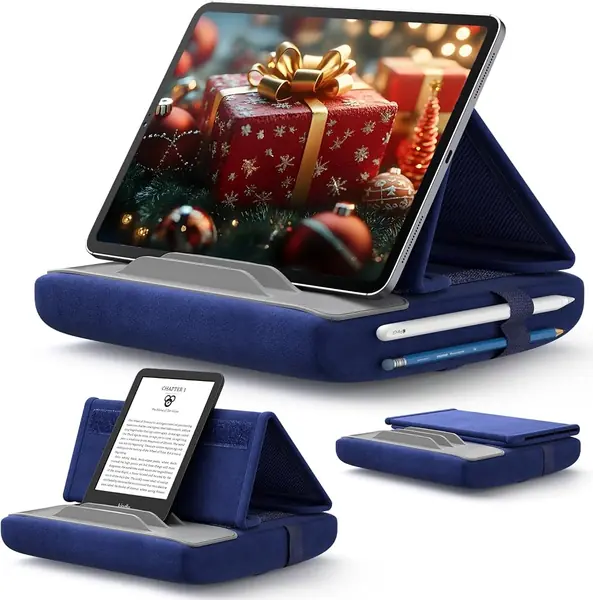
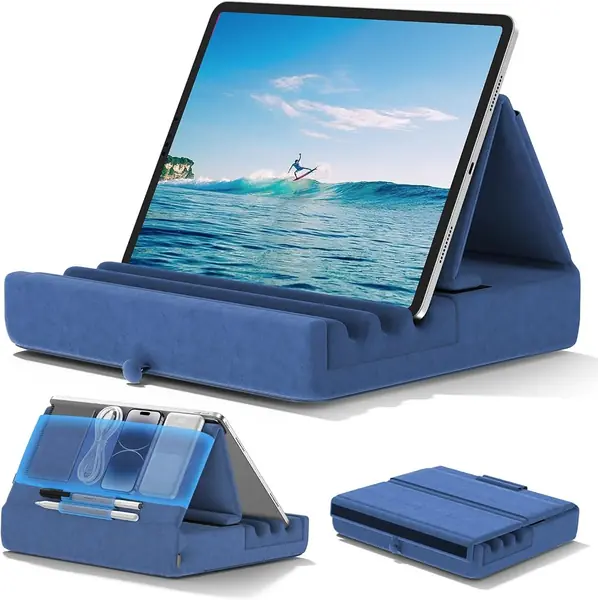
The KDD folds in half like a book and closes to 2.7 inches, which is why it's the one that stays out on the coffee table instead of getting buried in a drawer. Most stands in this group are single molded blocks; the hinge turns a bulky lap accessory into something you can slide under the couch or drop in a carry-on.

Three angles is modest against the Lamicall's six, but the KDD wins where it counts: the fixing slot is wide and deep, so a tablet in a chunky case drops in and stays. We used it with a 12.9-inch iPad Pro on a mattress, on sofa cushions, and on a desk, and the flat base kept it from rocking when we tapped the screen. That is the whole job, and it is why this is the one we point most people toward.

The details are better than the price suggests. A large pouch and two pen slots take a phone, a stylus, and a charging cable, so the stand doubles as the spot where pocket contents land at the end of the day. At 15.84 ounces it moves between rooms in one hand, and the short suede surface has stayed clean through daily use.

Pros

  • Deep wide slot holds a tablet in a case
  • Folds flat to 2.7 inches for storage
  • Pouch and two pen slots corral accessories

Cons

  • Only three viewing angles
Our verdict

We recommend the KDD to almost anyone shopping for one of these: the slot holds a heavy tablet in its case, the base stays put on a mattress, and it folds flat for storage.
Check Latest Price
2

Lamicall Tablet Pillow Stand Best for Viewing Angles

92 /100
TKZ Score Outstanding

Key details

Device Compatibility
4.7 to 13 inches
Dimensions
11.6 x 9.3 x 6.5 inches
Cover
Removable, washable
Viewing Angles
6
View on Amazon

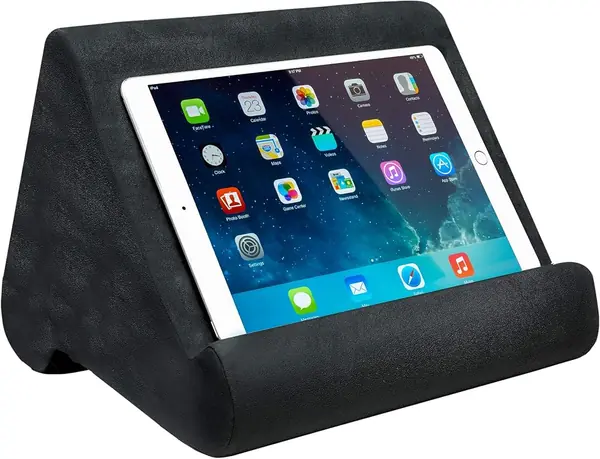
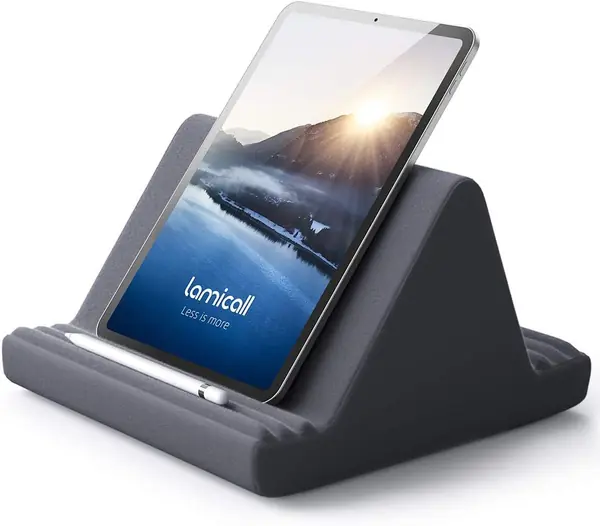
Six slots instead of three is the Lamicall's whole argument. Read on your side, then on your back, then sitting up with the tablet braced on your knees, and the extra positions mean you adjust your body less and the stand more. It's a triangle-profile block rather than a folding pad, so it lives on a nightstand or the arm of a sofa instead of in a tote.

The microsuede cover is the part we ended up appreciating most. It's soft against bare legs on a warm evening, and it detaches for the wash, which matters for something that spends its life on your lap. The wide base will hold two tablets at once if two people want to watch the same thing.

Where it gives ground is the most upright slot. That's the position where a tablet in a thick case can creep forward and eventually tip out, so the flatter angles are the secure ones. If you read reclined most of the time, that costs you nothing and the six positions are worth having; if you sit straight up to read, the KDD's deeper slot is the safer bet.

Pros

  • Six positions suit side, back, and seated reading
  • Washable microsuede cover feels good on a lap
  • Wide base can hold two tablets at once

Cons

  • Takes up shelf space between uses
Our verdict

Six positions and a washable microsuede cover make the Lamicall our pick for readers who shift position constantly — provided the most upright slot isn't the one you want.

Check Latest Price
3

ERGONOV Tablet Pillow Stand Best Splurge

91 /100
TKZ Score Outstanding

Key details

Device Compatibility
4.7 to 13 inches
Dimensions
16.9 x 10.8 x 3.5 inches
Rotation
360 degrees
Arm Joints
Dual 180-degree
View on Amazon

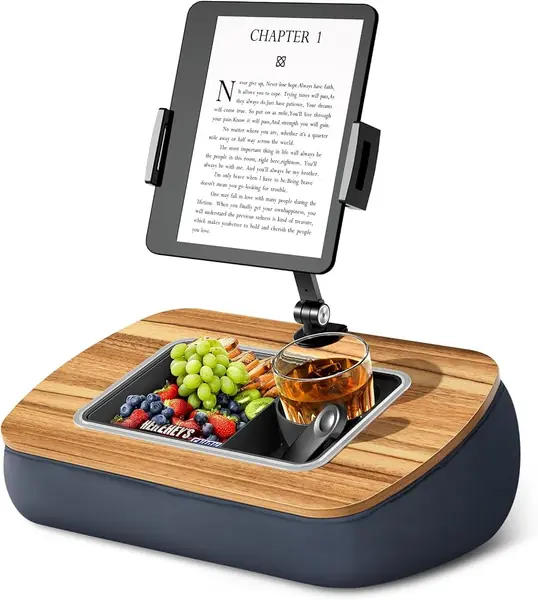
The ERGONOV is the most expensive stand here, and the arm is what you're paying for. It rises off the cushion on two 180-degree joints and ends in a clamp, so the screen floats above your lap at eye level instead of resting on your knees. Lie back on a sofa and read for an hour and the difference is obvious: nothing on your chest, nothing under your chin.

What surprised us is how well the arm holds a position. The joints are screw-tightened rather than friction-fit, so a full-size tablet doesn't slowly droop mid-page — we set the height once and it stayed for the whole session. The clamp rotates a full 360 degrees on a ball joint, which makes flipping to portrait a twist rather than a re-clamp.

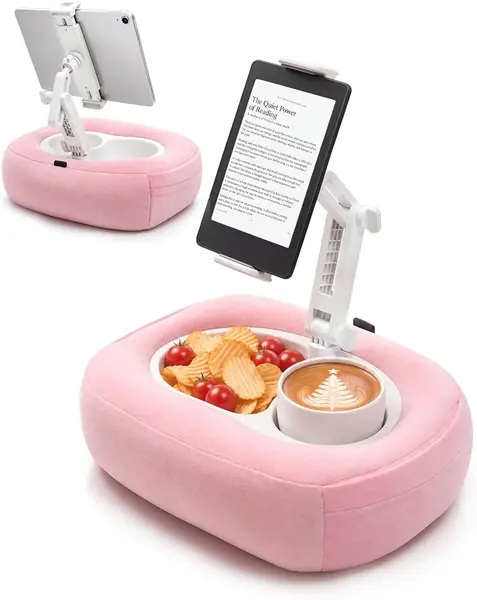
The base is a soft cushion with a three-compartment silicone bowl for snacks, a drink, or the remote, and the arm lifts off entirely so the whole thing becomes a sofa caddy. Add the 18-month warranty — the longest stated on any stand here — and it's the pick for a dedicated reading chair rather than a shared living-room table.

Pros

  • Metal-jointed arm holds its position
  • Lifts the screen to eye level on your back
  • Base doubles as a snack and remote caddy

Cons

  • Changing the arm angle takes the included wrench
Our verdict

If you read lying on your back, we think the ERGONOV's screw-tightened arm is worth the splurge: it puts the screen above your face and holds it there.

Check Latest Price
4

JSAUX Tablet Pillow Stand Best Budget

90 /100
TKZ Score Outstanding

Key details

Device Compatibility
4 to 11 inches
Weight
10.2 oz
Storage
Mesh pocket, pencil holder
Foldable
Yes
View on Amazon

The JSAUX is listed for 4- to 11-inch devices, which rules out a 12.9-inch iPad Pro and makes it the wrong stand for the biggest tablets here. For everything below that — a standard iPad, a mini, a Kindle, a phone — it's the value pick: light, foldable, and steady enough that we stopped noticing it while reading in bed.

Angle adjustment is a hook-and-loop strip working with deeper grooves, so you nudge the tilt instead of snapping between three notches, and the whole thing folds for a bag. At 0.29 kg it adds almost nothing to a carry-on, and the mesh pocket takes a cable while the pencil holder keeps a stylus off the floor. The cover surfaces are a soft crystal velvet over sponge, which is pleasant on bare legs and easy to wipe.

Pros

  • Folds flat and travels light
  • Mesh pocket plus pencil holder
  • Tilt adjusts by hook-and-loop rather than fixed notches

Cons

  • Wobbles under a big tablet in a thick case
Our verdict

For a tablet of 11 inches or less, the JSAUX is the budget buy we hand people: light, foldable, and steady enough for a Kindle or a standard iPad.

Check Latest Price
5

TabHolderix Tablet Pillow Stand Best for Lounging

89 /100
TKZ Score Excellent

Key details

Device Compatibility
4.7 to 13 inches
Rotation
360 degrees
Arm
Dual-axis telescoping
Snack Bowls
2
View on Amazon

Two molded wells sit in the TabHolderix's cushion, one of them sized for a cup, and they are the reason it doesn't get packed away. Three episodes into a series, when you want the next handful of popcorn without sitting up, the wells are the difference between a stand you use and a stand you own.

The arm does more than hold the tablet. It telescopes on a dual-axis cantilever and ends in a spring clamp that rotates 360 degrees, so you can pull the screen closer, push it back, or flip to portrait without lifting the base off your legs. Because the tablet is gripped rather than slotted, there's no ledge for it to slide off.

Storage is generous — pockets on both sides take a remote, a page turner, or a phone — and the cover unclips at two base knobs for washing. It sits between the budget picks and the ERGONOV on price, and it's the one we point to when the evening involves snacks.

Pros

  • Two wells hold snacks and a drink
  • Telescoping arm rotates a full 360 degrees
  • Side pockets keep remotes and a phone close

Cons

  • Loading the spring clamp takes two hands
Our verdict

Our pick for long couch sessions: the clamp holds the screen exactly where you set it, and the wells mean you stop balancing a bowl on the cushion.

Check Latest Price
6

Brookstone Tablet Lap Cushion Best Memory Foam

88 /100
TKZ Score Excellent

Key details

Use
Bed, flights, travel
Cushion
Memory foam
Compatible Devices
iPad, Kindle Paperwhite
View on Amazon

There are no slots, no clamps, and no hardware on the Brookstone — it's a molded memory-foam cushion, full stop. Set it on your legs, settle the tablet against it, and the foam takes the shape of your lap instead of asking your lap to take the shape of the foam.

Memory foam is the difference between this and the firm molded pads here. It gives under a knee or a hip and comes back, and unlike a hard stand it doesn't need a flat surface underneath to stay useful — which is why it's the one we pack for a flight. Brookstone lists it for the Kindle Paperwhite, standard iPads, and iPad Pro.

We think of it as the reading-in-bed pick rather than the typing-at-a-desk one. It's the most comfortable thing here to have on your lap for an hour, and the trade is precision: if you want a repeatable angle you can set and forget, a grooved stand does that better. The cushion's job is comfort, and it does that job without anything to adjust.

Pros

  • Memory foam stays comfortable for long reads
  • No levers or slots to fiddle with
  • Built for flights and travel

Cons

No notable drawbacks to flag.

Our verdict

Buy the Brookstone if you want a cushion instead of a contraption — we think the memory foam is the plushest thing here, and it works on a lap, a bed, or a tray table.

Check Latest Price
7

Ontel Pillow Pad Best for Kindles and Phones

82 /100
TKZ Score Excellent

Key details

Device Compatibility
Tablets, phones, books
Dimensions
11.75 x 9 x 9.5 inches
Weight
15.2 oz
Cover
Removable, machine washable
View on Amazon

The Pillow Pad arrives vacuum-sealed and flat as a cutting board, and the instructions send you to the dryer with a damp towel to bring it back. Ours recovered over a couple of days after that, but the first impression is a creased, half-thickness pad — worth knowing before you decide you've been sent a dud.

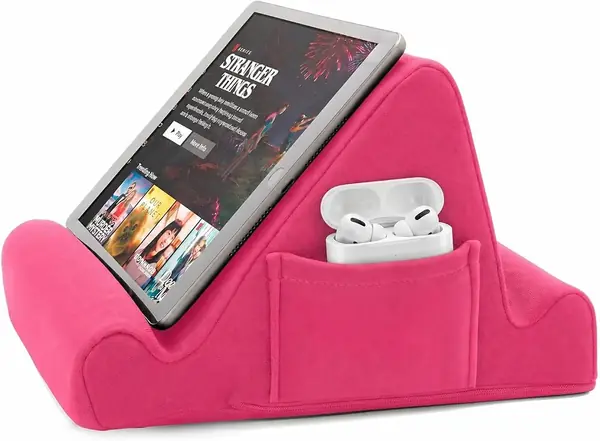
Once it fills out, it's a light, friendly thing to have around. At 15.2 ounces it's easy to move one-handed, and the ultra-suede cover comes off for the wash. A side pocket holds a phone or a remote, and the dual-edge design gives you two ledges rather than a row of notches: one catches a device fairly upright, the other reclines it.

That's less fine-tuning than the six-angle stands offer, and for a paperback or a Kindle it's plenty. It sits on a lap or a mattress without complaint, and it doesn't need setting up, which is the point of a pillow stand in the first place.

We think it's the right first stand for an e-reader and a phone, and we hand it to anyone who isn't sure they'll use a stand at all. The handle is the detail we underrated: it turns a pillow into something you can hook on a finger and carry to the next room.

Pros

  • Two ledge angles for sitting or reclining
  • Carry handle makes it easy to move
  • Removable cover goes in the wash

Cons

  • Shallow ledges let a heavy tablet lean out
Our verdict

We like it as a first stand for a Kindle or a phone, and it's the least expensive pick here — just give the compressed foam a few days to reach full size.

Check Latest Price

How We Chose and Tested Tablet Pillow Holders

We started by scanning reviews and spec sheets for holders that fit everything from a small e-reader to a 13-inch tablet, then narrowed the field by construction—seams, core density, base grip—and by what you get for the money. Features like adjustable angles, rotating mounts, stylus loops, snack bowls, and fold-flat designs got noted, but none of them earned a spot on the list by itself. We gathered 12 holders and tested them for four months.

Each one moved through the same circuit: a Sunday morning in bed propped against the headboard, an evening on the couch with an 11-inch tablet, a recliner session with a smaller e-reader, and a tray table on two flights. We tilted each holder to every angle it offered and watched whether the tablet slid forward, sagged, or held. A palm pressed into the cushion showed how quickly it sprang back—and whether it flattened out after an hour on a lap. On the couch, we noted whether the base gripped the fabric or skated; on bare legs, whether it dug in.

We folded and unfolded the folding models until the hinges and seams showed their hand, and spun rotating clips with a tablet attached to see if the mount kept its angle. Snack bowls got filled with grapes and carried from the kitchen to the couch, because a bowl that tips is worse than no bowl. After a few weeks, we ran a hand over the covers to check for pilling and looked at each holder from across the room to judge whether it belonged on the coffee table or in a drawer.

By the end, three things separated the keepers: the tablet stayed exactly where we placed it, an hour of use left our necks and wrists feeling fine, and the holder felt sturdy enough to trust with a device that costs more than it does. The ones that made the list did all three without asking us to fiddle.

How to Choose a Tablet Pillow Holder

The Ledge Does More Than the Pillow

On a tablet pillow stand, the slot is the whole trick. A deep, wide groove lets a tablet in a thick case sit down inside the foam; a shallow lip lets a heavy screen lean forward until it slides out. Picture your tablet in its everyday case before you buy and check that the slot will swallow that thickness — a stand that only grips a bare device is one you'll stop using by February.

The KDD is the clearest example here of a maker widening and deepening the slot on purpose, and it's the reason we rank it first. Softness is the easy thing to market and the least useful thing to compare.

Count the Angles Against How You Sit

Two or three positions are enough if you read in one spot: propped on a pillow with the tablet on your knees. Six positions earn their keep if you move around — on your side, then flat on your back, then sitting up straight.

More angles usually mean more foam, which is why the six-way stands here are blocks that stay on a nightstand rather than folding into a bag. Decide which reader you are before you pay for positions you won't use.

Match the Stand to the Device, Case Included

Compatibility ranges are written for bare tablets, and a case adds thickness the slot has to swallow. The budget picks here top out around 11 inches, so a 12.9-inch iPad Pro is a hard stop on those — you need a stand rated to 13.

Compare your screen size and your case against the listing rather than assuming your model is covered. A stand that fits your tablet without its case is a stand you'll only use on laundry day.

Decide Between a Cushion and an Arm

A grooved pillow sits on your lap and holds the tablet at whatever angle its slots allow. A clamp-on-arm stand lifts the screen higher, and that is the only thing that helps when you're flat on your back and don't want the tablet on your chest — the ERGONOV and the TabHolderix are the two here built that way.

Arms cost more, take up more lap, and want a firmer base. If you read sitting up, a plain cushion is simpler and cheaper and will do everything you need.

Check the Cover and the Pockets

Two details decide how a stand ages. A removable, washable cover matters because these things live on your legs, on beds, and next to snacks; fixed fabric gets grubby with no remedy.

Then look at storage: a side pocket keeps a phone off the floor, and pen slots or a molded bowl turn the stand into a small tray. Both are cheap to add and irritating to live without once you've had them.

Frequently Asked Questions

Final Verdict

Buy the KDD. It's the stand we recommend without follow-up questions: the slot holds a heavy tablet in its case, the base stays put on a mattress, and it folds flat enough to disappear between uses. Nothing else here balances those three things as well.

Change the pick if your habits point elsewhere. If you shift position constantly, the Lamicall's six angles beat the fold. If you read lying on your back, only an arm stand like the ERGONOV gets the screen off your chest. And if a Kindle is all you'll ever put on it, the Pillow Pad at the lowest price here still does the job.