Best Charging Stations for Multiple Devices of 2026

The outlet behind my kitchen counter spent years as a nest of adapters: a laptop brick, two phone chargers, a watch cable, and one plug that always worked loose. What I wanted was boring — one thing on the counter, everything charged by morning. A charging station splits a single outlet into several ports and hands each device an appropriate share of power, so a laptop and a phone can share one block without either one crawling.

The catch is that the big number on the box is total wattage, not what any one port gives you. A 200-watt station can still hand your laptop a trickle when the ports are crowded, which is why we spent six months living with 12 of these on desks, nightstands, and kitchen counters, watching what happened when three devices were plugged in at once.

Some are pocketable GaN bricks, others are wide docks that hold a family's worth of gear and throw in the cables. The ones that earned a permanent spot on my counter are below.

The Best Charging Stations for Multiple Devices

1

Zobirez 750W 10-Port Charging Station Best Overall
93 /100
TKZ Score Outstanding

Key details

Ports
10 (5 USB-C, 5 USB-A)
Total Output
750W
Cables Included
10
USB-C Output
120W each
View on Amazon

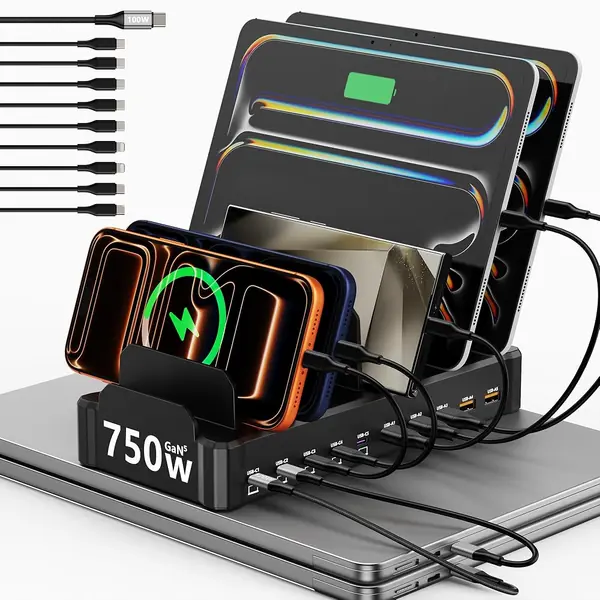
The first thing we check on a charging station is whether its USB-C ports can actually run a laptop, and the Zobirez 750W answers with five ports rated at 120W each. Add five USB-A ports at 30W and a 750W total, and you have enough capacity for a MacBook, an iPad, and a row of phones without deciding who gets the fast port.

What makes it our top pick is the combination of that power and the ten-port organizer. The one-piece slots hold tablets upright, the ten included cables are the right short lengths for a desk, and the body stays put when you pull a device out. For a family with a laptop or two plus tablets and phones, it simplifies the whole nightly routine.

The trade-off is size and permanence. This is a desktop dock, not something you toss in a bag, and it wants a dedicated spot with clearance for the power cord. If your household is phones and earbuds only, the smaller Anker 112W is easier to live with.

Pros

  • Five 120W USB-C ports charge laptops
  • Ten total ports cover a family
  • Ten short cables included

Cons

  • No built-in wireless charging
Our verdict

We recommend the Zobirez 750W when laptops share your charging pile; five 120W USB-C ports and ten total connections make it the strongest default here.
Check Latest Price
2

Zobirez 420W 10-Port Charging Station Best Value

92 /100
TKZ Score Outstanding

Key details

Ports
10 (5 USB-C, 5 USB-A)
Cables Included
10
Port Output
Dual 65W, 3x45W, 5x30W
Laptop Charging
Dual 65W USB-C
View on Amazon

The Zobirez 420W is the value version of our top pick, and the gap between them is smaller than the price suggests. You still get ten ports, five of them USB-C, plus ten short cables and the same one-piece slot design.

The power layout is the real difference: two USB-C ports at 65W, three at 45W, and five USB-A at 30W. That is enough to fast-charge a couple of ultrabooks, a tablet, and a pile of accessories without everyone fighting over the same outlet.

We prefer it for a family that wants the organizer without paying for the top pick's ceiling. For MacBook Airs, iPads, and phones, this one is the smarter buy, and the one-piece slots keep a tablet in a case sitting upright instead of tipping into the next bay.

Pros

  • Ten ports with dual 65W USB-C laptop charging
  • Ten short cables included
  • Sturdy one-piece slot design

Cons

  • Less headroom for several gaming laptops
Our verdict

The Zobirez 420W is our value pick: ten ports, dual 65W laptop charging, and ten cables for families that do not need the top pick's 120W ceiling.

Check Latest Price
3

Anker Prime 200W Charging Station Best for Desks

91 /100
TKZ Score Outstanding

Key details

Ports
6
Total Output
200W
Max USB-C
100W (two ports)
Dimensions
4.4 × 3.0 × 1.4 in
View on Amazon

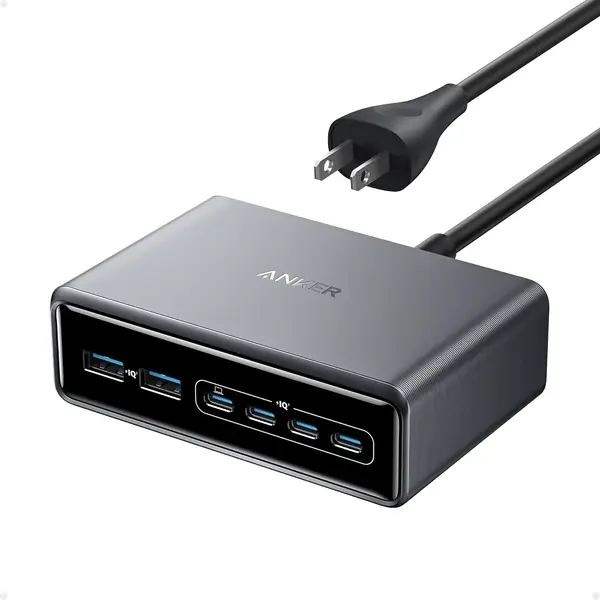
The Anker Prime is about the size of a chunky external battery, but it pushes 200W across six ports. We noticed the weight first—1.24 pounds—and then appreciated why: it stays put on a desk instead of sliding around when you plug in a laptop cable.

Two USB-C ports can deliver 100W each when used together, which is the reason to choose it over the cheaper Anker 112W. It is the charger we prefer for a desk with a MacBook, a phone, and a couple of accessories, especially if you want the power in a small footprint rather than a big slotted dock.

It is a charger, not an organizer: no upright slots and no place to hide the cords. That is fine on a tidy desk, less fine on a kitchen counter shared by four people.

Pros

  • 200W total with two 100W USB-C ports
  • Compact 4.4 × 3.0 × 1.4 in body
  • 1.24 lb build stays put

Cons

  • No charging cables included
Our verdict

We choose the Anker Prime for a compact desk setup where two laptops need fast power and a slotted dock would take up too much room.

Check Latest Price
4

Anker 112W Desktop Charger Best Budget Compact

90 /100
TKZ Score Outstanding

Key details

Ports
6 (3 USB-C, 3 USB-A)
Total Output
112W
Cables Included
None
Max USB-C
30W
View on Amazon

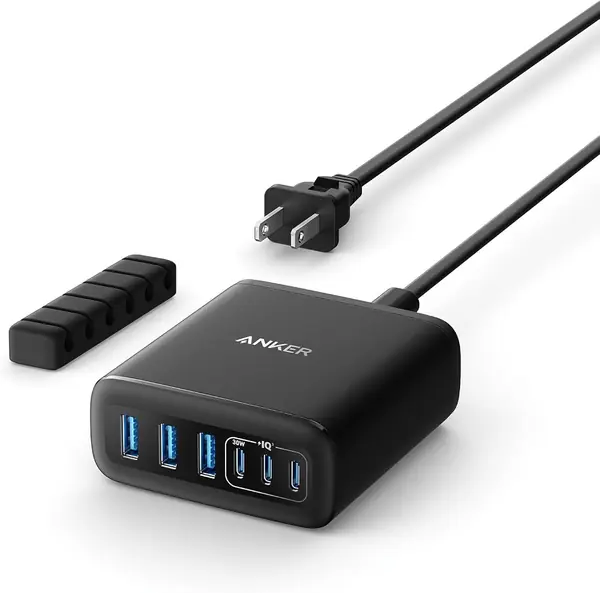
The Anker 112W is the charger we point to when the problem is a crowded side table rather than a whole family's worth of devices. It measures roughly three inches square, has three USB-C and three USB-A ports, and includes a silicone cable organizer to keep the cords from becoming a nest.

The 30W USB-C ceiling is the catch. It will top up a MacBook Air or an iPad, but it is not a fast laptop charger, and the total 112W is shared across everything plugged in. For phones, tablets, watches, and earbuds, though, it is the tidy little brick we prefer on a nightstand or a small home-office desk.

The upside is that it stays out of the way and does not need a dedicated dock footprint. On a small desk, that matters more than another pair of ports.

Pros

  • Six ports in a three-inch footprint
  • Three USB-C and three USB-A ports
  • Silicone cable organizer included

Cons

  • No charging cables included
Our verdict

For phones and tablets on a small desk, we reach for the Anker 112W; its six ports and tiny footprint keep the surface clear.

Check Latest Price
5

GETPALS 3-in-1 Wireless Charger Best for Apple Nightstands

88 /100
TKZ Score Excellent

Key details

Design
Foldable
Compatibility
iPhone, Apple Watch, AirPods
Devices Charged
3
Wireless Outputs
7.5W phone, 3W earbuds, 2.5W watch
View on Amazon

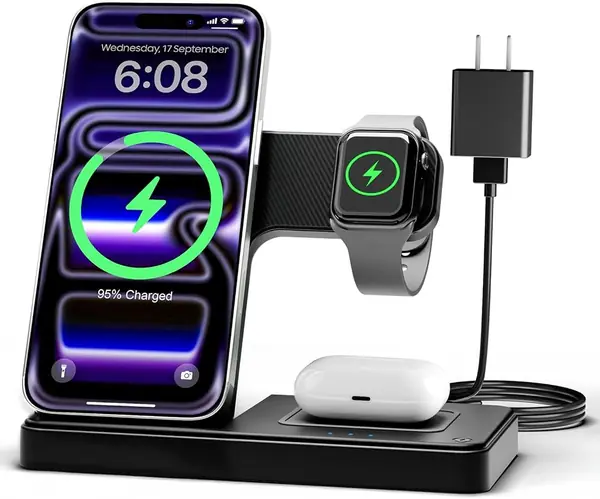
The GETPALS is a three-in-one wireless stand built for the nightly Apple routine: an iPhone on the magnetic stand, an Apple Watch on its pad, and AirPods in the recess. The whole thing folds flat for travel.

Wireless charging is the appeal: no cables to plug in at night, and the stand keeps the phone upright so you can see the screen. The phone pad is rated at 7.5W, the watch at 2.5W, and the earbuds at 3W.

The fold-flat design makes it easy to pack, and the magnetic stand holds the phone in place without a cable dangling off the nightstand. It is the least expensive way here to give three Apple devices their own landing spot.

We think it earns its place as the budget Apple pick. The convenience of one small stand for the phone, watch, and earbuds is the reason to choose it, especially on a nightstand where a tangle of cables is the alternative.

Pros

  • Charges iPhone, Watch, and AirPods together
  • Folds flat for travel
  • Case-friendly up to 4mm

Cons

  • Slow 7.5W phone charging
  • Apple-only wireless charging
Our verdict

We keep the GETPALS for the Apple nightly routine: it folds flat, charges three devices, and is the budget pick here.

Check Latest Price
6

Lcssio 300W 8-Port Charging Station Best Mid-Size Organizer

87 /100
TKZ Score Excellent

Key details

Ports
8 (5 USB-C)
Total Output
300W
Cables Included
6
Max USB-C
Dual 65W
View on Amazon

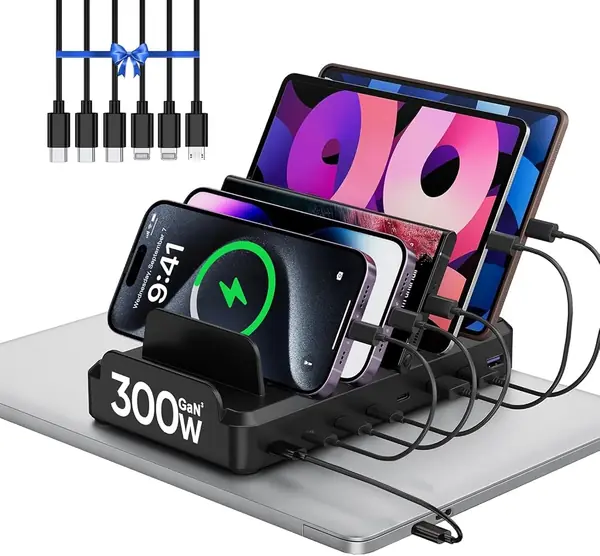
The Lcssio 300W is what we suggest when a ten-port dock feels like overkill but a plain charger block is not enough. It has eight ports, five of them USB-C, and the same upright slot design that keeps tablets and phones visible instead of buried under cables.

Two USB-C ports at 65W give it enough laptop power for a MacBook Air or a smaller Windows machine, and the six included cables cover most phone and tablet combinations. We like the smaller footprint for a shared desk or a kitchen counter where the station does not need to serve an entire classroom.

The caveat is durability. The plastic body and short cables are fine day to day, but this is the one in the group where we keep the receipt and watch for a port dropping out; that is a condition to manage, not a reason to rule it out. For a light-to-medium household, the size and price are the bigger story.

Pros

  • Eight ports in a smaller footprint
  • Dual 65W USB-C ports for ultrabooks
  • Six short cables included

Cons

  • No 100W USB-C port
Our verdict

Our pick for a smaller organizer is the Lcssio 300W: eight ports, a smaller footprint, and laptop-capable USB-C.

Check Latest Price
7

SAIPKYGS 1000W 12-Port Charging Station Best for Maximum Ports

86 /100
TKZ Score Excellent

Key details

Ports
12 (8 USB-C, 4 USB-A)
Max USB-C
100W (dual)
Laptop Slot
1.57 × 1.77 in
Wireless Charging
3-in-1 Apple
View on Amazon

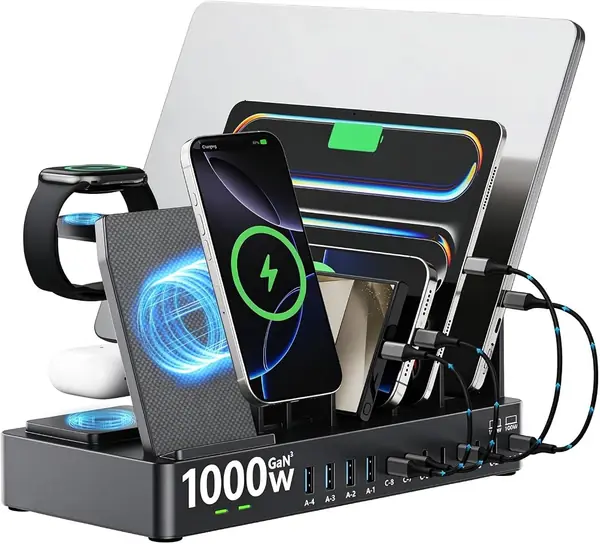
The SAIPKYGS packs the most connections here: eight USB-C ports, four USB-A ports, and a three-in-one wireless pad for an iPhone, Apple Watch, and AirPods. The wide side slot is a thoughtful touch for a laptop in a case.

Two USB-C ports can deliver 100W each, so it can run a couple of laptops while the wireless pad handles the nightly Apple trio. The wired side is the part that makes sense for a mixed household.

The wireless pad is the part to think about before buying. We treat the wired ports as the main event and the pad as a bonus, because the Apple Watch side is the least predictable part of the package.

The GETPALS is the more predictable Apple-first pick if the watch pad is the main reason you are buying; the SAIPKYGS makes more sense when the wired ports come first.

Our take: it is a specialist for a household that wants maximum wired ports plus a wireless landing spot, not the default for everyone.

Pros

  • 12 wired ports plus a 3-in-1 wireless pad
  • Dual 100W USB-C ports
  • Wide 1.57 × 1.77 in laptop slot

Cons

  • No charging cables included
Our verdict

We see the SAIPKYGS as the maximum-port pick, with a wireless pad and a caveat: the Apple Watch side is the weak link.

Check Latest Price
8

Dywcdnice 100W 10-Port Charging Station Best for Adjustable Slots

85 /100
TKZ Score Excellent

Key details

Ports
10 (5 USB-C, 5 USB-A)
Total Output
100W
Cables Included
10
Dividers
11 removable
View on Amazon

The Dywcdnice is the budget ten-port organizer we recommend when adjustable slots are the priority. Its eleven removable baffles let you widen the gaps for a tablet in a thick case or narrow them for a row of phones.

The port layout is familiar: five USB-C and five USB-A, with ten short cables in the box. The total output is 100W, shared across all ten ports, which is the figure to check before you assign it a job.

We like the flexibility for a family with mixed gear, especially kids' tablets that live in bulky cases. The removable baffles are also easier to clean around than a molded slot, which matters on a kitchen counter.

It is a secondary charging spot—a kitchen counter, a kids' study area, or a guest room—rather than the main desk. For that job, the adjustable layout is more useful than another fast-charging brick.

Pros

  • Eleven removable dividers adjust to thick cases
  • Ten ports with five USB-C connections
  • Ten short cables included

Cons

  • 100W total limits laptop charging
Our verdict

We like the Dywcdnice for a budget ten-port organizer, especially if thick cases make fixed slots frustrating.

Check Latest Price
9

BREEKET 100W 6-Port Charging Station Travel Kit

84 /100
TKZ Score Excellent

Key details

Ports
6 (3 USB-C, 3 USB-A)
Total Output
100W
USB-C Output
20W each
Size
3.27 × 2.36 × 1.1 in
View on Amazon

The BREEKET is the size of a deck of cards and weighs almost nothing, which is exactly why it stays in our travel bag. It has three USB-C and three USB-A ports, a detachable five-foot AC cord, and a total output of 100W.

On a hotel desk or a crowded kitchen counter, that is enough for a phone, a tablet, a watch, and a couple of accessories. The USB-C ports top out at 20W, so it is not a laptop charger in any meaningful sense, but it is not pretending to be one.

It is the charger we keep in a bag for hotel rooms and weekend trips, not the one we build a household around. The tiny body disappears into a backpack pocket, and the detachable cord means you can leave the long cable at home.

That makes it a useful spare rather than a primary station. If you want one charger to anchor a desk, spend more for the Anker 112W or a slotted dock.

Pros

  • Pocket-size 3.27 × 2.36 × 1.1 in body
  • Three USB-C and three USB-A ports
  • Detachable five-foot AC cord

Cons

  • Some units stop working after a few months
  • No charging cables included
Our verdict

The BREEKET is our travel spare, not a household hub; its tiny size is the whole point.

Check Latest Price

How We Picked and Tested These Charging Stations

We started by pulling every multiport station we could find with at least six ports and USB-C Power Delivery, then narrowed the list by reading spec sheets for per-port wattage rather than total output. Anything that couldn't clearly state what each port delivers got cut. That left 12 stations, from slim six-port GaN blocks to 12-port docks with a wireless pad on top.

Each one went home with a tester and lived where it would actually live: on a home office desk with a laptop, monitor, and phone; on a nightstand with a watch and earbuds; on a kitchen counter where two phones and a tablet compete for the same outlet. We left them plugged in for six months, charging overnight and through workdays, and noted when a device woke up short on power or a port stopped negotiating full speed.

For charging speed and capacity, we plugged a drained laptop in alongside two phones, timed how long the laptop took to reach 50 percent, then repeated the run with the laptop alone to see what the split cost. For compatibility, we ran iPhones, Galaxy phones, iPads, MacBooks, Dell laptops, watches, and earbuds through every port, USB-A ones included, and recorded anything that refused to fast-charge. Durability and reliability got the least glamorous test: six months of daily plugging, cables yanked out at bad angles, and the compact units tossed into bags for weekend trips. We weighed each station to see which were genuinely portable, and we tallied what came in the box, since a station that includes cables is a different value proposition from one that leaves you buying them separately.

How to Choose a Multi-Device Charging Station

Start with the power budget, not the port count

Ten ports do not mean ten fast charges. A station's total wattage is shared, so a 100W model with ten ports can be a fine phone and tablet dock but a poor laptop charger. Count the laptops first: one laptop needs at least one 65W USB-C port, and two laptops are better served by dual 65W or 100W ports. The Zobirez 750W is the clearest example of a station built around that headroom; the Anker Prime does the same job in a smaller package without slots.

Choose between a slotted dock and a compact block

A slotted charging dock earns its space when tablets, phones, and cases need a permanent home. The upright slots keep screens visible and cables contained, but the dock occupies a patch of counter or desk. A compact block is easier to pack and easier to tuck behind a monitor, though the cables stay loose. We reach for a slotted model for a family kitchen and a compact block for a single desk. If you want both, buy the dock for the house and keep a small charger in your bag.

Treat wireless charging as a convenience

A three-in-one wireless stand is the easiest way to charge an iPhone, Apple Watch, and AirPods overnight, but it is not a substitute for a wired hub. Wireless pads are slower, they usually favor Apple devices, and thick cases can block the coil. Check the watch compatibility before you buy, and keep one wired USB-C port free for a quick top-up. The GETPALS is the simple budget version; the SAIPKYGS adds a wireless pad to a wired dock, but its watch side is the part to verify.

Check the cables, placement, and return window

Included cables are part of the value. Ten short cables save you a separate purchase, but short cables only work if the station sits close to the devices; a laptop usually needs its own longer USB-C cable. Leave clearance around the power cord and vents, and put the station on a hard surface rather than a bed or rug. Finally, keep the receipt: charging stations are the kind of product that can develop a loose port, and an easy return window matters more than a few extra watts.

Frequently Asked Questions

Final Verdict

For most households, the Zobirez 750W is the one to buy. It has the port mix and per-port power to handle laptops, tablets, and phones without reshuffling cables, and the slotted body keeps the whole pile organized. If you want the same idea with less power and a lower price, the Zobirez 420W is the value alternative. For a compact desk charger, the Anker Prime 200W is the better fit; for an Apple-only nightstand, choose the GETPALS.